UI testing tools in 2026, sorted by the job they do
UI testing tools sorted by job: end to end, component, visual, accessibility and agent-driven. Current versions, pricing models, and real output from each.
 Igor LuchenkovBuilding UI Verify
On this page
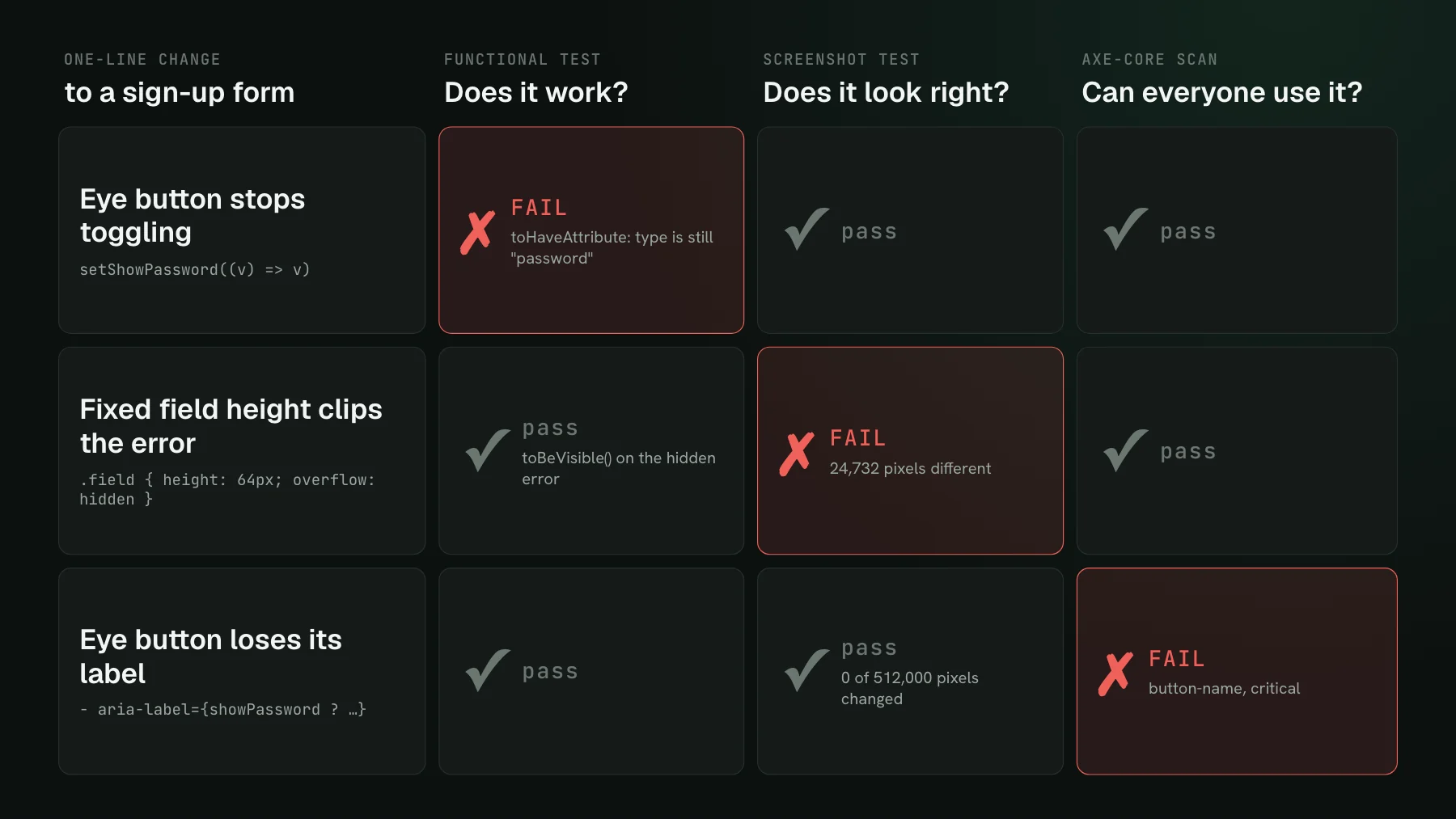
Most lists of UI testing tools rank a dozen products in one column, so a browser automation framework, a no-code recorder, and a screenshot service compete for the same spot. They do different jobs. A UI testing tool answers one of five questions about your interface: does the flow work end to end, does each component behave, does it look the same as the approved version, can everyone use it, and can a coding agent drive it. Pick one tool per job you have, and the comparison that matters is within each job.
This roundup is sorted that way and is not ranked. For each job it names the established tools, what they are best at, and how they are priced, from their own docs checked on 2026-11-02. We also ran the free ones against the same small page, a notification settings card with three switches and a Save button, on pinned versions, so every claim about behavior below comes from a real run.
How we chose the tools
- Established and maintained: a release in the last few months and a large user base, so the tool will still be there next year.
- Does its job without a sales call: free and open source, or a self-serve plan you can try today.
- Fits a code-first frontend team: tests live in the repository and run in CI, which rules out record-and-playback platforms aimed at manual QA teams.
Which UI testing tools run end-to-end tests?
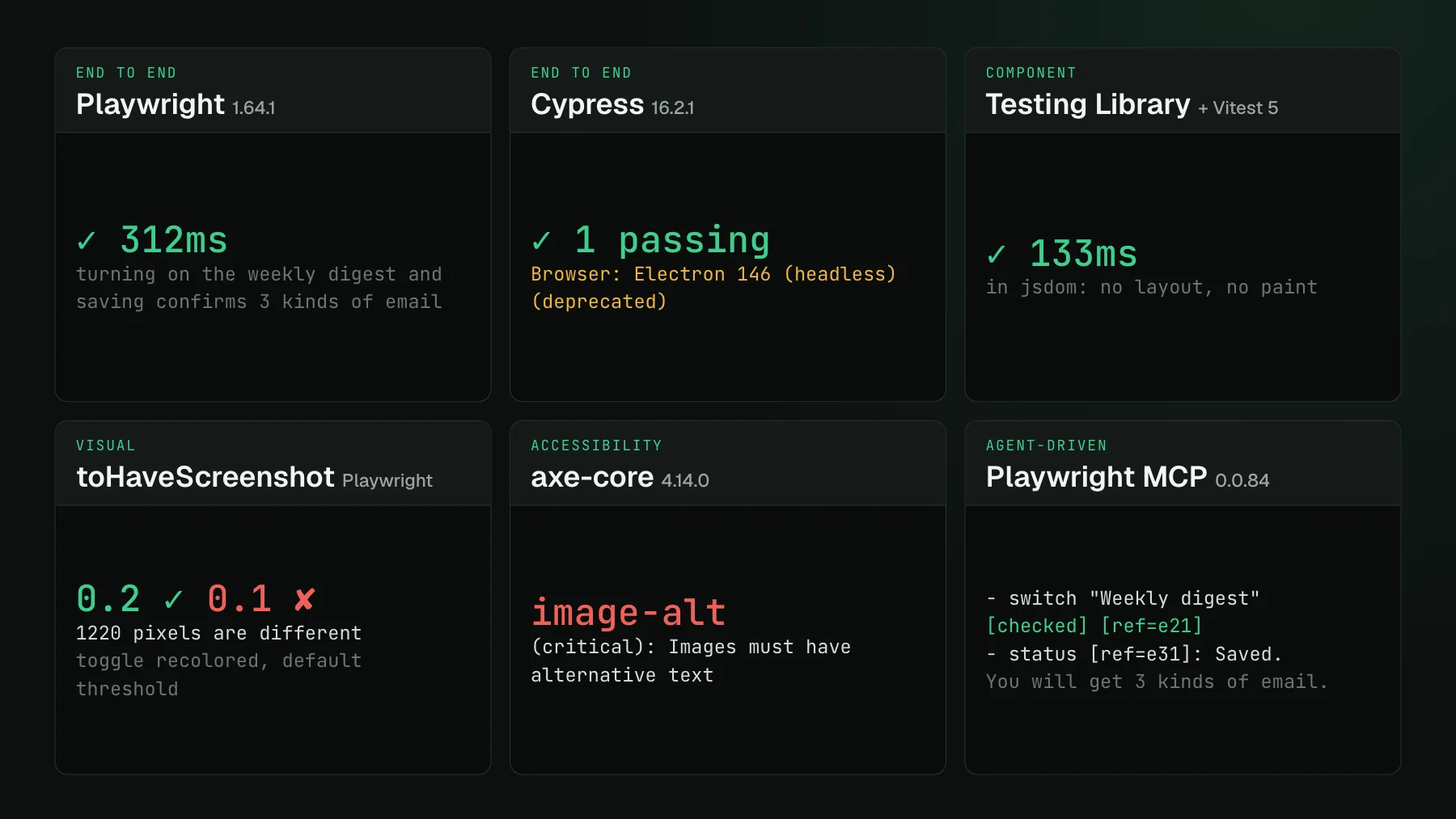
End-to-end tools drive a real browser through a user journey. Playwright (1.64.1, Apache-2.0, free) is the default choice for new projects: Chromium, Firefox, and WebKit from one API, parallel workers and sharding built in, and TypeScript, Python, Java, and .NET bindings. Cypress (16.2.1, MIT, free app) runs tests inside the browser with an interactive runner many teams love; Cypress Cloud is a paid service with a free starter plan, billed by recorded test results. Two current facts about Cypress: version 16 deprecates Electron as a test browser, and our default run printed that warning about its own default browser; and it runs Chrome-family browsers and Firefox, with WebKit still experimental.
Selenium (4.52.0, Apache-2.0) remains the cross-language standard on the WebDriver protocol, with Selenium Manager downloading drivers for you; there is no Selenium 5. WebdriverIO (10.x, MIT) is a Node framework on the same protocol that has leaned into agent workflows in version 10. All four are free; the cost is the CI time and the maintenance.
Which tools test UI components?
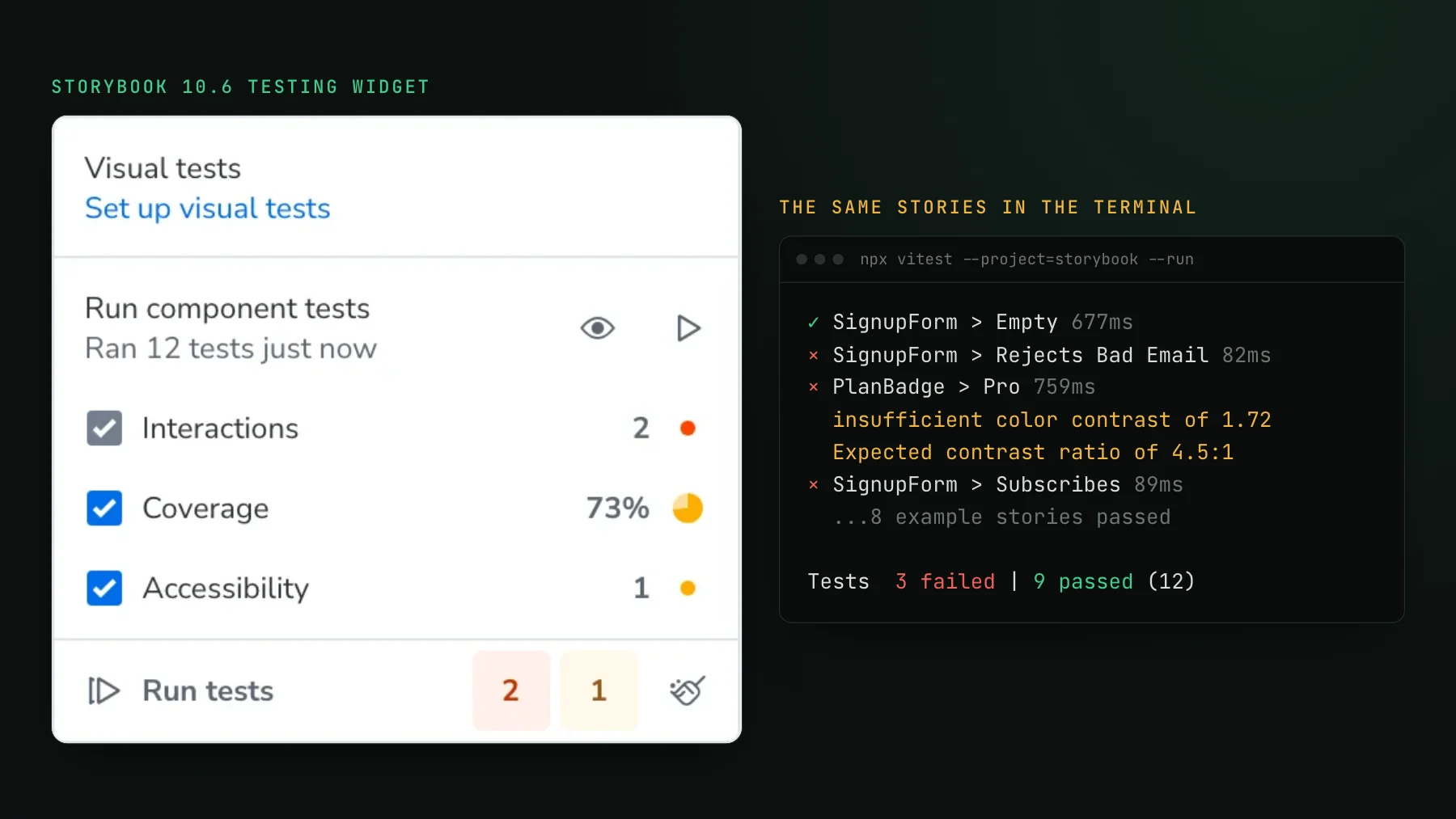
Component tools render one component and drive it, which is faster and more targeted than a full journey. Testing Library (@testing-library/react 16.3.3, MIT) is the query layer: getByRole, getByText, userEvent. It is not a runner, and on its usual jsdom setup there is no layout or paint, so it cannot see anything visual. Vitest browser mode (Vitest 5.0.5, MIT) runs component tests in real Chromium through Playwright and has been stable since Vitest 4.0, though many guides still call it experimental. Storybook (10.6.5, MIT) turns each story into a test, with play functions for interactions, all running through its Vitest addon; our Storybook testing guide walks through each kind.
We wrote the same test four ways: turn on the Weekly digest switch, click Save, expect the confirmation "Saved. You will get 3 kinds of email." All four passed. Inside the test, Testing Library on jsdom took a median of 126 ms over ten runs, Vitest browser mode 187 ms, Playwright 304 ms, and Cypress 522 ms. Startup dominated the whole command: 1.5, 3.7, 3.4, and 5.9 seconds. The machine was shared during the runs, so the ordering is solid and the absolute numbers are rough.
Which UI testing tools check how the UI looks?
Visual tools screenshot the UI and compare it against an approved baseline. The free option is built into the runners: Playwright's `toHaveScreenshot()` and Vitest's toMatchScreenshot() compare locally and store baselines in your repository, one set per operating system. Its default deserves attention. We recolored every enabled switch from teal to blue, a change anyone would notice, and the screenshot assertion passed at its default threshold of 0.2. At 0.1 it flagged 1,220 changed pixels. Playwright's threshold is a perceived color difference, and teal to blue falls inside the default tolerance, so if color changes matter to you, lower it.
The hosted services render in a managed browser, keep baselines out of the repository, and add a review workflow on the pull request. Chromatic is built by the Storybook team, with a free tier and plans metered by snapshots. Percy, part of BrowserStack, has a free tier and plans billed by screenshots, with an AI review agent on paid plans. Applitools sells AI-based visual comparison, with a trial instead of a free plan, a published starter plan, and larger plans through sales. Argos is open source with a free hobby plan and paid plans billed by screenshots. UI Verify, which we build, captures Playwright, Storybook, Vitest, and Bun tests, renders them in one pinned browser, and is built for coding agents: it hands the agent each change, before and after, over MCP. Its free tier covers 10,000 snapshots a month, with 50,000 for open-source projects. Our visual regression testing tools roundup compares this category in depth.
Which tools test accessibility?
axe-core (4.14.0, MPL-2.0) from Deque is the engine almost everything uses: run it in a Playwright test through @axe-core/playwright or in a Vitest browser test, and fail the build on violations. Deque says it finds on average 57% of WCAG issues automatically. Storybook's a11y addon runs axe on every story. Lighthouse (13.6.0, Apache-2.0) scores a page, and its accessibility category runs on axe too. On our page we left one avatar image without an alt attribute. axe reported it as a critical violation. Lighthouse reported the same failed audit and scored the page 94 out of 100.
So use a score to watch the trend and the rule list to gate merges. A 94 looks like a pass on a dashboard, and the person using a screen reader still hears an unlabeled image.
Which tools let a coding agent test the UI?
Playwright MCP (0.0.84, Apache-2.0) gives a coding agent a real browser, described as an accessibility tree it can act on; the same tools ship as the Playwright CLI for agents that prefer a shell. Driving our page, the agent saw the switch flip to [checked] and read the saved message. It did not see the avatar at all: an image with no accessible name has no place in the tree the agent reads, even though anyone looking at the page sees it. Our Playwright MCP guide measures what else the snapshot leaves out.
The established end-to-end tools are moving the same way. Cypress's homepage now leads with "AI writes the code. Cypress proves it works.", and Playwright ships planner, generator, and healer agents that write and repair tests. Agents can drive a UI well. What they still need from the other jobs on this list is a functional check they did not write and a visual check against a baseline they cannot edit.
How do you pick UI testing tools?
- Start with the jobs your bugs come from. If regressions are mostly broken flows, invest in end-to-end; if they are mostly broken layouts, invest in visual.
- Pick one tool per job and avoid stacking two that overlap. Playwright for end to end plus Vitest browser mode or Storybook for components is a common, fast pairing.
- Run the accessibility scan inside tests you already have, so it costs no extra suite.
- Check defaults before trusting a green run: screenshot thresholds, accessibility settings that only warn, and default browsers that are being retired.
- If coding agents write your UI, make sure every job has a check the agent reads but cannot rewrite.
For the questions behind these jobs and how to automate each at component, page, and end-to-end level, see our UI testing guide. For the visual job specifically, the Playwright quickstart and Vitest quickstart set up UI Verify on tests you already have, and Cypress users can bring their screenshots through the custom screenshots path.
Cover the visual job on every pull request
UI Verify captures your Playwright, Storybook, Vitest or Bun tests, diffs them against an approved baseline, and shows each change to your reviewers and your coding agent.
Start for freeNo credit card required.
Set up visual testing
From no visual tests to a green check on every pull request.