Storybook testing: interaction, accessibility, visual
Storybook testing in Storybook 10: interaction tests, accessibility checks, coverage and visual tests, how each runs in CI, and the default that skips axe.
 Igor LuchenkovBuilding UI Verify
On this page
"Do you test your Storybook?" "Yes, the stories run in CI." "What do they check?" "That they render. And the play functions. Accessibility too, I think." Most teams have some version of that exchange, and the "I think" is doing a lot of work. Storybook 10 can run four kinds of test against your stories, each with its own switch and its own CI behavior, and two of them are off or advisory until you change a setting.
Storybook testing means running your stories as tests: each story renders a component in a known state, and Storybook checks that it renders, that its interactions behave, that it meets accessibility rules, and that it looks the same as before. Here is how each kind works in Storybook 10.6, how it runs in CI, and what we measured on a small scratch project and on our own repository on 2026-11-02.
What can Storybook test?
- Render tests. A story with no play function is a smoke test: it passes if the component renders without throwing.
- Interaction tests. A
playfunction clicks, types, and asserts withexpect, the way a user would. - Accessibility tests. The a11y addon runs Deque's axe-core against each story; Storybook's docs say axe catches up to 57% of WCAG issues automatically.
- Coverage. Which lines of your components the stories exercise, built into the Vitest addon.
- Visual tests. A screenshot of each story diffed against an approved baseline, which Storybook leaves to a separate service.
The first four run through @storybook/addon-vitest, which turns every story into a Vitest test in browser mode, headless Chromium by default. Install it with npx storybook add @storybook/addon-vitest on a Vite-based framework (react-vite, vue3-vite, nextjs-vite, sveltekit) with Vitest 3 or newer. You can run tests from the Run tests button at the bottom of the sidebar or from the terminal with npx vitest --project=storybook. One correction to what search results show: Google's AI Overview still tells you to install @storybook/test, whose last release is 8.6.15. Since Storybook 9 the test utilities live in core and import from storybook/test.
Interaction tests with play functions
An interaction test is a story with a play function. The function receives the rendered canvas and a userEvent instance, acts on the component, and asserts with expect from storybook/test. When one fails in the terminal, the error names what it could not find, lists what it did find, and links straight to the story's Interactions panel, where you can step through the play function and see the state at each line.
Storybook 10 also has a .test() method for attaching several tests to one story, but it belongs to CSF Next, which Storybook marks as a preview, and .test() itself is experimental behind a feature flag. For production suites, play functions are the stable form.
Does Storybook's accessibility test fail CI by default?
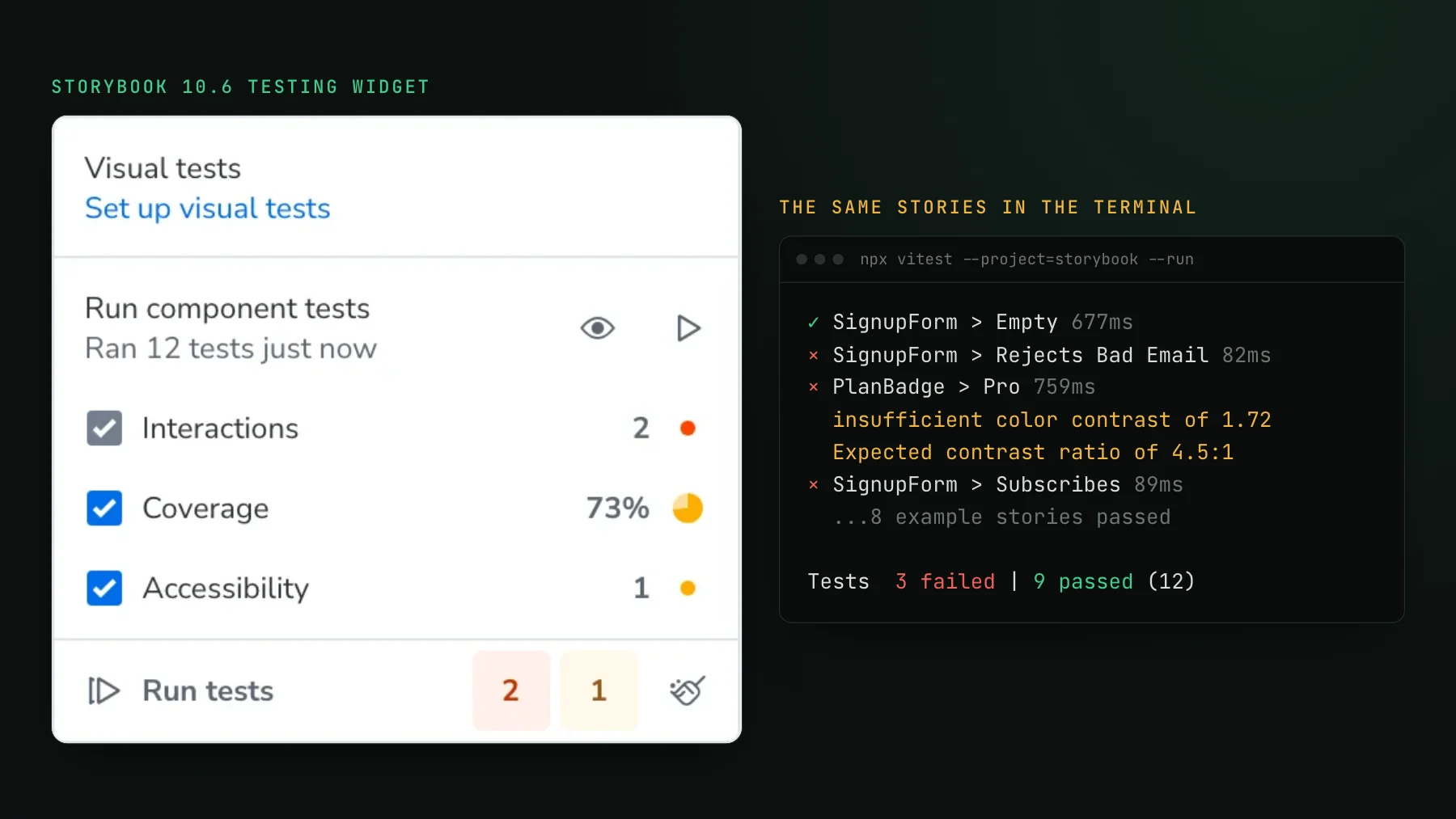
No. The a11y addon's test parameter has three values: 'off', 'todo', and 'error'. Only 'error' turns a violation into a failing test in CI. When we ran storybook init (10.6.5), it wrote a11y: { test: 'todo' } into .storybook/preview.tsx, which shows violations as warnings in the UI and nothing in the terminal. To see what that means, we staged a plan badge with light blue text on a pale blue background, a contrast ratio of 1.72:1 where WCAG AA asks for 4.5:1.
With the default, the run passed: 12 of 12. Changing one word to 'error' made the same run fail on the badge, with the measured ratio in the message. The Accessibility panel in the Storybook UI showed the violation either way, which is useful while you build and invisible in a pipeline. If you want axe to gate merges, set 'error' in your preview and 'todo' only on the stories you are still fixing.
Coverage, and what it counts
Coverage comes with the Vitest addon once you install @vitest/coverage-v8 and tick the checkbox in the testing widget (it starts unticked, as does Accessibility). From the terminal, add --coverage. It counts only the code your stories exercise, and it is not calculated in watch mode. One effect we saw: a run in which two play functions failed early reported 73% in the UI, and a clean run of the same stories reported 93.9% of statements. A failing play function exercises less code, so a coverage drop can be a symptom of a broken test rather than missing stories.
Is the Storybook test runner still recommended?
Not for Vite projects. Storybook's own test-runner page now says the runner "has been superseded by the Vitest addon" and points Vite-based frameworks there. The runner, @storybook/test-runner, still ships (0.26.0 came out in September) and still has jobs only it does: Webpack frameworks, snapshot tests of the rendered markup, and running against an already deployed Storybook. Usage has moved: the Vitest addon passed it in weekly npm downloads in March, and by the last week of October it was at 6.4 million a week against 2.0 million.
On speed, we would rather show work than a stopwatch: our test machine was shared and wall-clock times swung both ways. CPU time held steady. On the same 262 stories with axe enabled, the Vitest addon used 33.8 CPU seconds and the test-runner 53.8, plus a Storybook build the runner needs first. With the addon, a run cost about 7 seconds of fixed startup plus roughly 19 milliseconds per story: 7.6 seconds for 12 stories, 26.3 for 1,012.
What do Storybook tests miss?
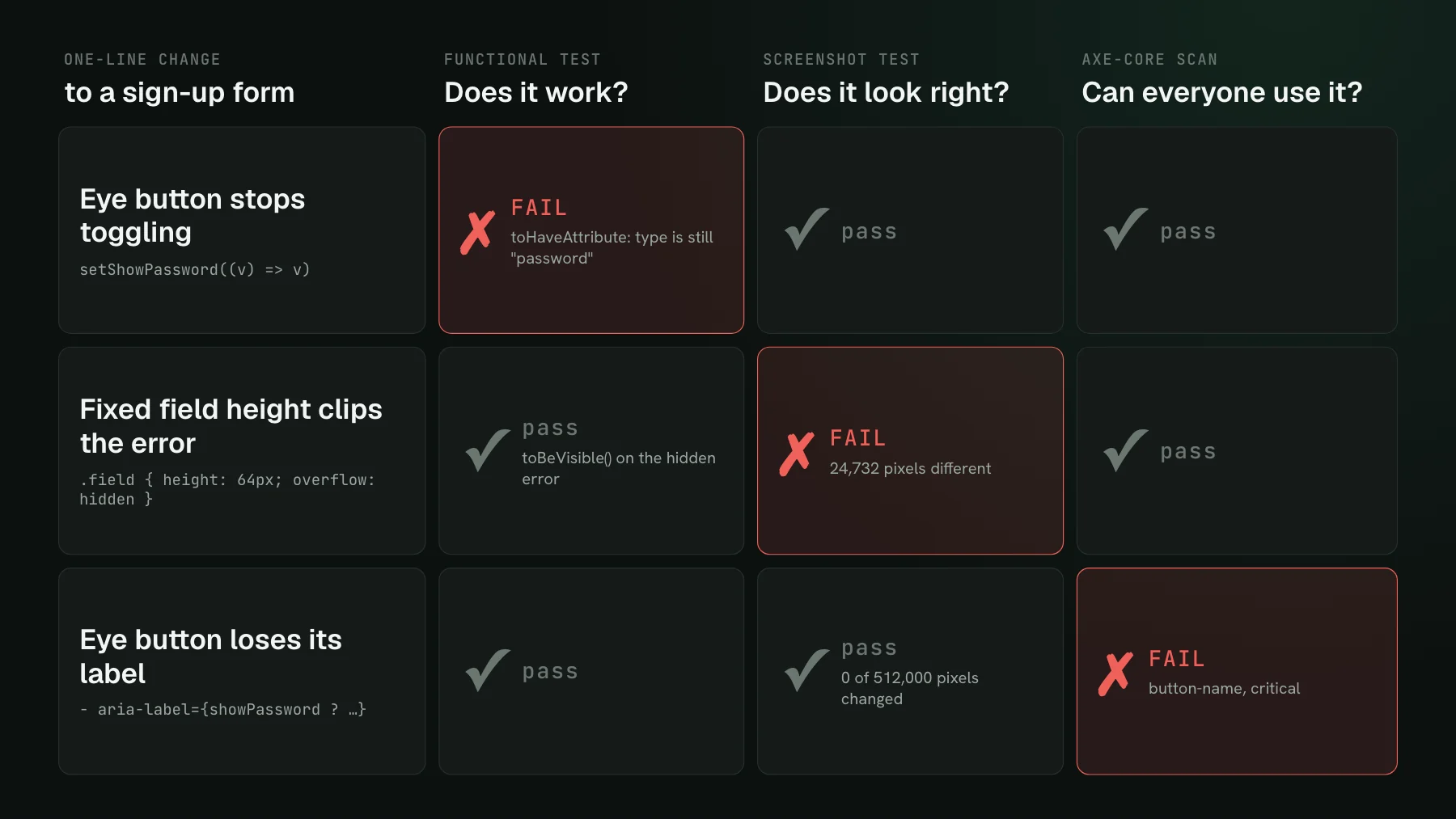
How the component looks. We deleted the submit button's whole CSS rule, a one-line staged change, so the styled button fell back to the plain browser default. With interaction tests on and accessibility set to 'error', all 12 tests stayed green. The play functions still found a button named Subscribe and clicked it. Axe still found the default grey button readable. Nothing in the run looks at pixels, so nothing in the run could object.
That is the job of the fifth kind of test, which Storybook leaves to a separate service: capture every story, diff it against the approved baseline, and show the changes on the pull request for someone to accept or reject. Storybook itself never compares two screenshots.
How we run Storybook tests in CI
Our own repository runs two Storybook jobs on every commit. The play functions run through the Vitest addon in our fast test job: 119 tests in 38.5 seconds on GitHub's standard runner. The visual check runs as a separate job with UI Verify, our visual regression testing tool, which screenshots the stories and diffs them against the baseline. On the commit below, the upload covered all 394 stories and reported 0 changed.
We keep behavior and appearance in separate stories. A resting story, like the open docs search with results, owns the screenshot. A behavior story drives the same component with the keyboard in its play function and is marked disableSnapshot, so its transient post-interaction frame never becomes a baseline. UI Verify runs the play functions of the stories it screenshots too: it waits for each to pass before capturing, and a play function that throws is reported as a failed interaction test and never becomes a baseline (the interaction tests docs cover the details).
A Storybook testing setup that covers all four
- Add
@storybook/addon-vitestand runvitest --project=storybookin CI. Pin Vitest and Playwright, since init writeslatest. - Set
a11y: { test: 'error' }in.storybook/preview, and mark known exceptions'todo'per story. - Turn coverage on in CI with
--coverageand watch for drops, which often mean a play function failed early. - Add a visual check that screenshots every story on the pull request. With UI Verify, you build Storybook with
--stats-jsonand runnpx uiverify upload --static-dir ./storybook-static; nothing gets installed in Storybook, and only stories the change affects are rendered.
Accessibility and coverage stay with Storybook's own addons in that setup, which do the job well in the same Vitest run. The Storybook quickstart has the full visual setup, the Storybook visual regression testing guide explains baselines and review, and the Storybook skill teaches your coding agent the same steps. The free tier covers 10,000 story snapshots a month, and 50,000 for open-source Storybooks.
Add the visual layer to your Storybook tests
UI Verify screenshots every story after its play function passes and diffs it on the pull request, with nothing to install in Storybook. Your agent sees each change over MCP.
Start for freeNo credit card required.
Deterministic Storybook stories
Stop story diffs that come back changed without a real change.