The best visual regression testing tools in 2026
The best visual regression testing tools in 2026, compared: UI Verify, Chromatic, Percy, Applitools, Argos, Playwright, and BackstopJS, and when to use each.
 Igor LuchenkovBuilding UI Verify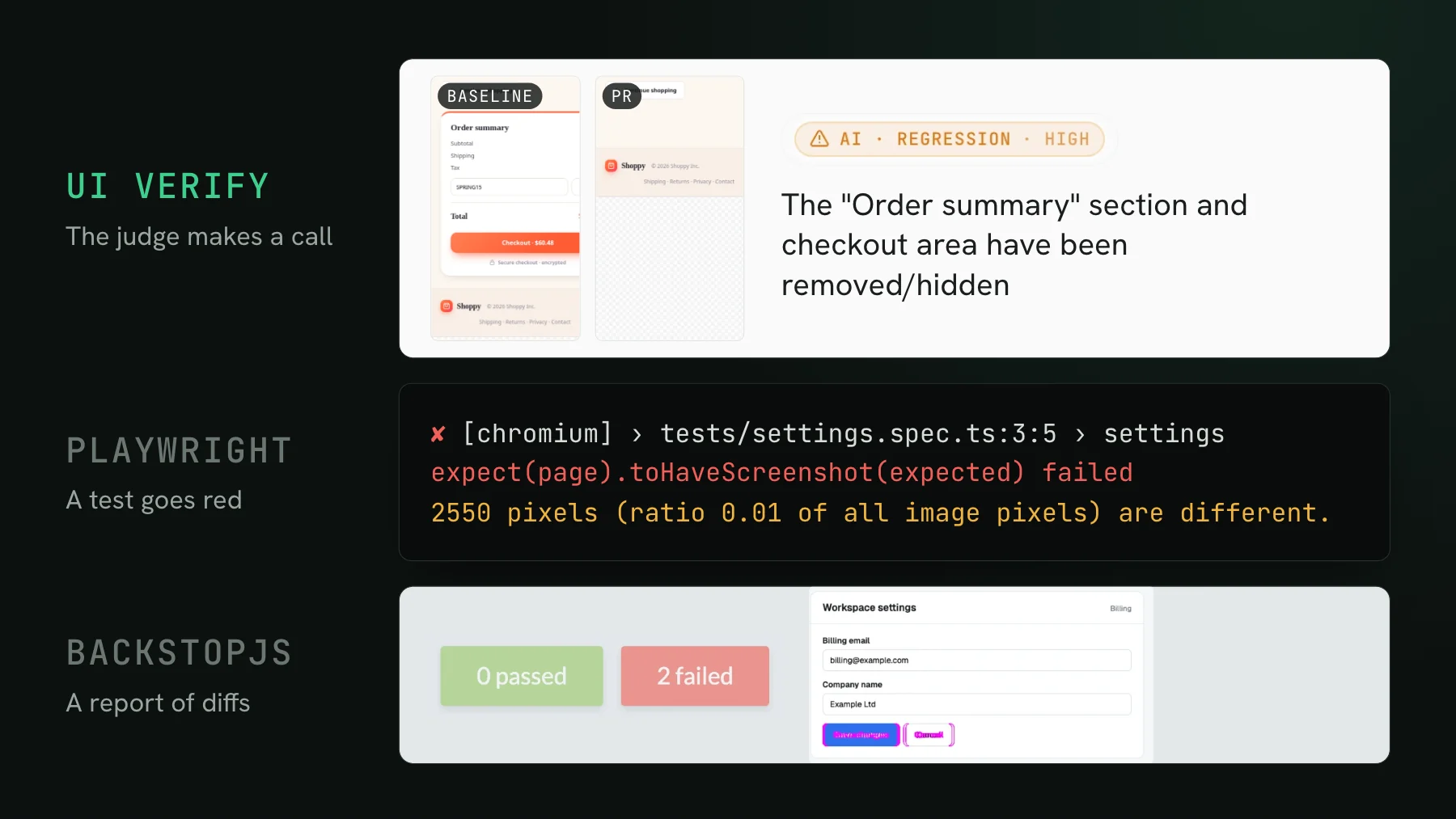
On this page
- What is visual regression testing?
- How to choose a visual regression testing tool
- The best visual regression testing tools in 2026
- 1. UI Verify: best for agent-written pull requests
- 2. Chromatic: best for accessibility and Microsoft Edge
- 3. Percy: best for BrowserStack and device-cloud teams
- 4. Applitools: best for enterprise cross-browser Visual AI
- 5. Argos: best for capturing in your own CI
- 6. Playwright screenshots: best free, local option
- 7. BackstopJS: best open-source, self-hosted option
- Visual regression testing tools compared
- What is the best visual regression testing tool?
- What is the best free visual regression testing tool?
- How is AI changing visual regression testing?
If you are picking a visual regression testing tool from scratch in 2026, the field is wider than it looks and the tools are not really competing on the same thing anymore. Some render your screenshots for you and some diff the ones your CI already takes. Some just show you a pixel difference and some now judge whether the change was intended. This is the guide I wish I had when I started: what visual regression testing actually is, how to choose, and the seven tools worth knowing, each with a straight case for when it is the right pick.
What is visual regression testing?
Visual regression testing renders your UI, screenshots it, and compares each image against a saved baseline, so a change in the rendered pixels fails the build. It catches the class of bug that unit and end-to-end tests miss: a refactor that nudges a button, a token change that breaks contrast, a dependency bump that restyles a card. The component still mounts and the test still passes, but it looks wrong, and only a picture of it catches that. The first run records a baseline for each state; every run after compares against it and flags what moved for a human, or a coding agent, to judge.
How to choose a visual regression testing tool
The tools differ on a handful of axes that actually decide the fit. Weigh these against how your team works, especially how much of your UI is now written and reviewed by coding agents.
- How it captures. Some tools render your screenshots in their cloud, some diff the ones your CI uploads, and some replay your existing Storybook, Playwright, or Vitest tests. This decides how much you author and whether you are locked to one framework.
- Whether it judges, or just diffs. A raw pixel diff hands every change back to you to review. A tool with AI review tells a real regression from an intended change, so a green check means something and your queue holds only what needs a human.
- Agent-native review. If agents open your pull requests, an MCP your coding agent can use to read the diffs and accept baselines from the terminal matters more than another dashboard.
- The cost model. Cloud tools bill per snapshot, so your bill is the number of states you render times how often CI runs them, and both climb with agents. Local and self-hosted tools cost nothing in dollars and more in setup and maintenance.
- Determinism. Flaky diffs are the fastest way to get a team to ignore the check. Some tools neutralize the common false-diff sources for you; others hand you knobs.
- Browser coverage and setup. How many browsers and viewports you get, on which tier, and whether standing it up is a CI change or a rewrite.
The best visual regression testing tools in 2026
Seven tools worth evaluating, from drop-in cloud services to a free local library to self-hosted open source. I have listed UI Verify first because it is the one I build, and then made the case for every other tool where it is the better pick. If you are specifically on Chromatic today and want off, I wrote a companion guide to the best Chromatic alternatives; this post is the from-scratch category pick, so Chromatic is one of the candidates here.
1. UI Verify: best for agent-written pull requests
UI Verify is visual regression testing built for the agent era. It screenshots your UI on every pull request, and an AI judge labels each change a regression or an intended change with a reason, then holds the PR when it flags a regression so a real one cannot merge behind a green check. It captures your existing Storybook stories, Playwright pages, and Vitest components by replaying an archive of the test run, so there is no separate visual SDK to author and no Storybook requirement.
- An AI judge that classifies each change and holds the PR on a regression, so review is decisions, not raw diffs. See the AI judge.
- Agent review over MCP: your coding agent reads the exact per-story diffs and verdicts and accepts the intended baselines from the terminal. See triage with your agent.
- Archive-replay of the Storybook, Playwright, and Vitest tests you already have, with no snapshot calls to sprinkle through your suite.
- Determinism handled at capture time, so the check does not fire on noise: a seeded
Math.random, inlined cross-origin fonts, a fetch-once image cache, a hermetic network, andprefers-reduced-motion, plus a re-render that auto-ignores flakes. See fix flaky visual tests. - Chrome, Firefox, and Safari on the free tier, at desktop and mobile widths.
To be clear, the AI-review-plus-MCP idea is no longer ours alone: Percy's Visual Review Agent, Applitools' Visual AI, and Argos' agent triage each cover the same ground now. What UI Verify adds is the combination: a judge that blocks the merge, an MCP that accepts baselines, archive-replay so there is nothing to author, and a larger free tier than the other hosted tools in this list, larger still for open-source projects.
Pricing: free for 10,000 snapshots a month, no credit card. Paid plans start at $89 a month for 30,000 snapshots, then $0.004 per snapshot beyond your plan. Open-source projects get a larger free tier of 50,000 snapshots a month, self-declared at sign-up with no approval and no card (see free for open source).
Best for: teams whose UI is increasingly written and reviewed by coding agents, and anyone who wants the visual check to make a call, not just show a diff.
2. Chromatic: best for accessibility and Microsoft Edge
Chromatic comes from the Storybook team and reads your stories and parameters.chromatic config directly. UI Verify does the same, re-hosts a browsable, permalinked Storybook on every build, and has its own collaborative review with pixel-anchored comments, so Storybook support and team review are not the line between them - designers comment on the exact pixels and approve or reject in UI Verify too. Chromatic's real advantage is axe accessibility checks and Microsoft Edge coverage on paid plans.
- A mature, designer-facing UI Review, refined over years as the Storybook team's product.
- Accessibility checks with axe and Microsoft Edge on its paid tiers, which UI Verify does not cover.
- Hosted baselines, branch and PR workflows, and cloud rendering billed per snapshot.
Pricing: per-snapshot, with a free tier of around 5,000 snapshots a month on Chrome. Check their site for current numbers.
Best for: teams that need axe accessibility and Microsoft Edge in the same run. UI Verify captures Storybook, publishes a permalinked Storybook, and has design review where designers comment and approve or reject too, so pick Chromatic here for accessibility and Edge, not Storybook or sign-off. See UI Verify vs Chromatic.
3. Percy: best for BrowserStack and device-cloud teams
Percy is BrowserStack's visual testing product. It does the same core job as Chromatic, real-browser screenshots diffed against hosted baselines with a PR check, and its Visual Review Agent labels each change likely-a-bug or likely-intended and compares it against the pull request summary. The BrowserStack MCP can run a Percy build and approve it from your agent.
- Hosted baselines, a review queue, and a pull-request check.
- A Visual Review Agent that summarizes and classifies each change in plain language.
- Runs on BrowserStack's device cloud, and App Percy covers native iOS and Android visual testing.
- Wide SDK support, wired in with
percySnapshot()orpercyScreenshot()calls in your tests.
Pricing: per-snapshot, inside BrowserStack's billing. Check their site for the current free allowance and rate.
Best for: teams already on BrowserStack, or anyone who needs native mobile app and real-device coverage. See UI Verify vs Percy.
4. Applitools: best for enterprise cross-browser Visual AI
Applitools is the enterprise incumbent. Its Visual AI is a perceptual diff engine that decides whether two screenshots differ meaningfully, tuned per checkpoint with match levels, and its Ultrafast Grid renders across many browsers and devices from a single run.
- Perceptual Visual AI with tunable match levels (Dynamic, Strict, Layout, and Exact).
- The Ultrafast Grid: broad cross-browser and device coverage, including Edge and mobile.
- Autonomous test generation and self-healing from plain-English steps.
- Contrast Advisor for WCAG contrast, and a Figma plugin for comparing designs against the running app.
Pricing: enterprise and sales-led, with a small free allowance to trial. Expect a quote rather than a public price.
Best for: large organizations standardizing on one vendor for cross-browser Visual AI, accessibility, and design tooling. See UI Verify vs Applitools.
5. Argos: best for capturing in your own CI
Argos is an open-core visual testing service that diffs the screenshots your CI captures and uploads, rather than rendering them for you. It has hosted baselines, a review UI, and a PR check, and it ships an MCP server so a coding agent can read a build's results and triage them.
- Hosted baselines and a PR check over the screenshots your pipeline produces.
- SDKs for Storybook, Playwright, Puppeteer, and WebdriverIO.
- An MCP server for agent-driven review of build results.
- Open-source roots, with a free tier for small projects.
Pricing: per-screenshot on the hosted service, with a free tier. Check their site for current numbers.
Best for: teams happy to capture screenshots in their own CI who want a lightweight hosted diff and review layer on top. See UI Verify vs Argos.
6. Playwright screenshots: best free, local option
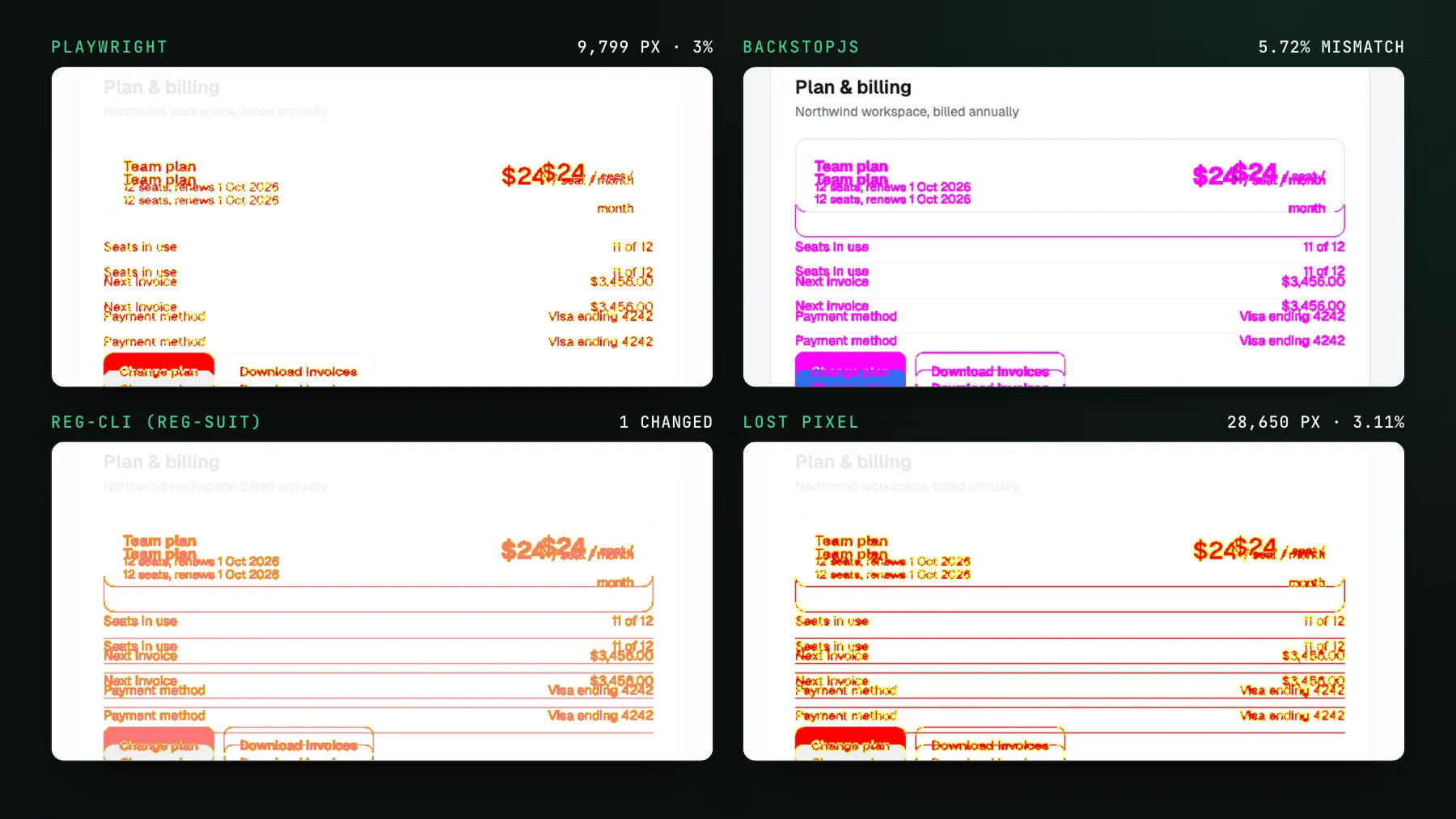
Playwright's built-in toHaveScreenshot is free, local, and already in your test runner, comparing a fresh screenshot against a baseline committed beside the test with mask, threshold, and maxDiffPixelRatio to tame noise and animations disabled by default.
- Free and built into Playwright, with no separate service.
- Real-browser screenshots diffed against baseline images committed to your repo.
mask,stylePath,threshold, andmaxDiffPixelRatioknobs for false diffs.- Runs entirely inside your own CI.
The trade-offs: screenshots do not rasterize identically across operating systems, so teams pin a fixed image and keep a separate baseline per OS, the baseline images live in your repo, and a change shows up as a failed test with no history, review UI, or judgment. In a run for this post, an unchanged settings page recorded on macOS failed in Playwright's Linux Docker image with 8,728 pixels different.
Pricing: free. You pay in setup and maintenance instead of dollars.
Best for: small suites you are happy to review yourself, and teams that want the visual check to live entirely inside their own CI. See UI Verify vs Playwright.
7. BackstopJS: best open-source, self-hosted option
BackstopJS is a mature open-source visual regression tool you run yourself. You define scenarios in a config file, it drives Puppeteer or Playwright to capture them, diffs against reference images, and generates an HTML report. There is no cloud service and no per-snapshot bill, in exchange for owning the setup and the baselines.
- Free and MIT-licensed, run locally or in your own CI.
- Scenario-based capture over Puppeteer or Playwright.
- An HTML diff report, with reference images stored in your repo.
- No hosted review UI, history, or judgment, you operate all of it.
Pricing: free and open source. The cost is the infrastructure and maintenance you take on.
Best for: teams that want to own the tooling end to end and avoid any metered cloud billing, and are willing to trade managed convenience for control.
Visual regression testing tools compared
| Tool | AI review of changes | Capture | Runs | Free tier | Best for |
|---|---|---|---|---|---|
| UI Verify | AI judge, regression vs intended, holds the PR | Archive-replay of your tests | Cloud | 10,000 snapshots / mo | Agent-written pull requests |
| Chromatic | None for diff triage | Storybook-first | Cloud | 5,000, Chrome only | Accessibility and Edge |
| Percy | Visual Review Agent | SDK calls in your tests | Cloud | 5,000 screenshots / mo | BrowserStack and device cloud |
| Applitools | Visual AI, perceptual | Many SDKs | Cloud | ~100 checks / mo | Enterprise cross-browser grid |
| Argos | Agent triage over MCP | You capture in CI, upload | Cloud | 5,000 screenshots / mo | Capturing in your own pipeline |
| Playwright screenshots | None | Built in, local | Local | Free, local | Small suites you review yourself |
| BackstopJS | None | Open source, self-host | Self-hosted | Free to self-host | Owning the tooling |
What is the best visual regression testing tool?
It depends on your workflow. For teams whose UI is written and reviewed by coding agents, UI Verify fits best because it judges each change and exposes review over MCP. For axe accessibility and Microsoft Edge in the same run, Chromatic. If you live in BrowserStack or need native mobile coverage, Percy. For enterprise cross-browser Visual AI and accessibility, Applitools. If you capture in your own CI already, Argos. And if you want a free option, Playwright's toHaveScreenshot locally or BackstopJS self-hosted.
What is the best free visual regression testing tool?
For a free tool that lives entirely in your own CI, Playwright's toHaveScreenshot is built into the test runner, and BackstopJS is open source and self-hostable. If you want a hosted tool without paying to start, UI Verify has a free tier of 10,000 snapshots a month, and Chromatic, Percy, and Argos each have smaller free tiers. The trade with the free local tools is that you own the baselines and get no review UI or judgment.
How is AI changing visual regression testing?
The pixel diff was always the easy part. What changed is that coding agents now open far more pull requests than a human can review one screenshot diff at a time, so the bottleneck moved from capturing the change to deciding whether it was intended. The tools responding to that add an AI review layer, UI Verify's judge that holds the PR, Percy's Visual Review Agent, Applitools' Visual AI, Argos' agent triage, so the check makes a call instead of handing every diff back to you. If your team is leaning on agents, weigh that judgment layer as heavily as the diff engine underneath it.
Visual regression testing built for the agent era
UI Verify screenshots your UI on every pull request and an AI judge tells an intended change from a real regression, then holds the PR on a regression so you review decisions, not diffs. It reads your existing Storybook, Playwright, and Vitest tests, so setup is a CI change. Free for 10,000 snapshots a month.
Start for freeNo credit card required.
Set up visual testing
From no visual tests to a green check on every pull request.