Playwright MCP: what your coding agent sees and misses
Playwright MCP gives Claude Code and other agents a real browser. How to set it up, what each page costs in tokens, and the change its snapshot cannot see.
 Igor LuchenkovBuilding UI Verify
On this page
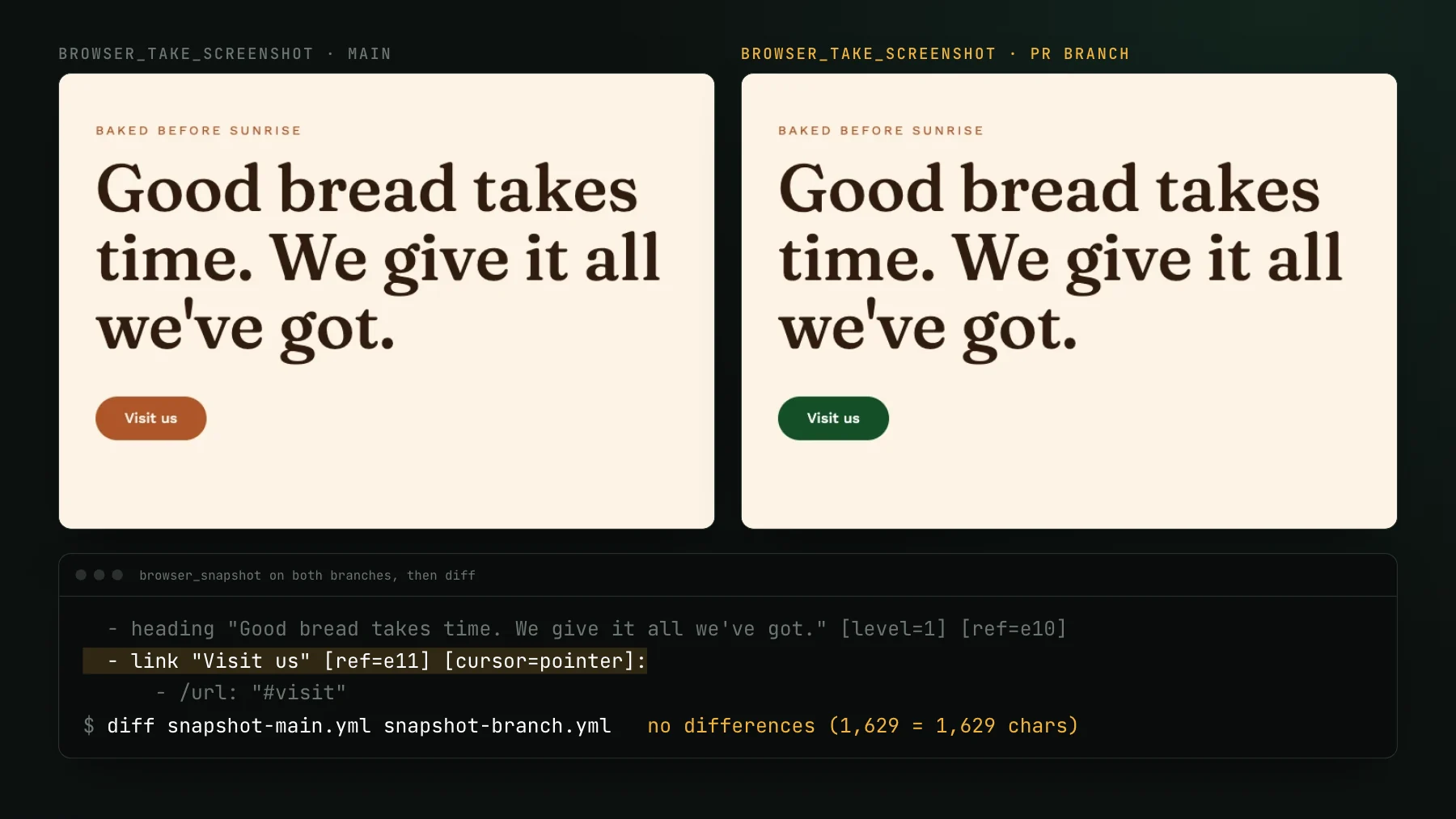
You ask your coding agent to make the bakery's Visit us button dark green. It edits the class and opens the page through Playwright MCP. What it learns next depends on which tool it calls. The accessibility snapshot, the view Playwright MCP is built around, reports a link named Visit us and says nothing about its color: in our test, the snapshot before and after the change was byte-identical. A screenshot does show the green button, but only as the page looks now. It holds no picture of the page before the edit, so the agent can confirm the button it changed and has nothing to tell it what else moved.
Playwright MCP is Microsoft's Model Context Protocol server for Playwright: it gives Claude Code, Cursor, Codex, or any MCP client a real browser to drive, and it describes each page to the model as an accessibility snapshot rather than as pixels. That makes it the best tool there is for letting an agent click through your app. It also leaves one question it cannot answer on its own, and this post measures both sides on @playwright/mcp 0.0.84, the current release on 2026-11-02.
What is Playwright MCP?
Playwright MCP is an MCP server, published as @playwright/mcp from microsoft/playwright-mcp, that launches a browser and exposes Playwright actions as tools: navigate, click, type, fill a form, take a screenshot, read the console. Its README describes the approach as structured accessibility snapshots that let the model act on a page "bypassing the need for screenshots or visually-tuned models" (checked 2026-11-02). Each element in a snapshot gets a ref such as e11, and the agent clicks that ref instead of guessing coordinates.
Three defaults are worth knowing before you add it. The browser opens headed, so a window appears unless you pass --headless. The profile is persistent, which keeps logins between sessions but means two agents cannot share it; --isolated keeps the profile in memory instead. And it needs Node.js 18 or newer. The README also says plainly that Playwright MCP is not a security boundary, so point it at pages you would let the agent open anyway.
How do you add Playwright MCP to Claude Code?
Run one command in your project. The README's version is claude mcp add playwright npx @playwright/mcp@latest. We prefer pinning the version and putting the flags after a double dash, with project scope so the server lands in the committed .mcp.json and every teammate gets the same setup:
claude mcp add --scope project playwright -- npx @playwright/mcp@0.0.84 --headless --isolatedRestart the session so the tools load. Without a pin, @latest resolves on every launch, and this package moves fast: 0.0.84 shipped on 2026-10-31, built against a Playwright 1.65 pre-release.
The 25 tools, and the 47 you opt into
We listed the tools straight from the server's tools/list response. Out of the box Playwright MCP 0.0.84 exposes 25: the actions you would expect (browser_click, browser_type, browser_fill_form, browser_select_option, browser_drag), reading tools (browser_snapshot, browser_take_screenshot, browser_console_messages, browser_network_requests), and browser_find, which searches the snapshot for text so the agent can locate one element without reading the whole tree. Everything else sits behind --caps.
Many guides still tell you to start the server with --vision for coordinate-based clicking. On 0.0.84 that flag prints a deprecation notice; the current spelling is --caps=vision, which adds six mouse tools that work in screen coordinates. Most agent work never needs them, because refs from the snapshot are more reliable than coordinates read off an image.
A second change catches out older tutorials. Since version 0.0.69 (released 2026-03-30), browser_navigate and browser_click no longer return the page snapshot inline. They write it to a file under .playwright-mcp/ and return a link, and only an explicit browser_snapshot call puts the tree into the conversation. We found the switch by running consecutive versions; the release notes for 0.0.69 do not mention it.
What does a Playwright MCP snapshot cost?
A snapshot costs whatever the page's accessibility tree weighs, and that varies by more than forty times between ordinary pages. We called browser_snapshot and browser_take_screenshot on three real pages and counted the tokens with Anthropic's token counter. The small bakery homepage came to 614 tokens of snapshot. Our own pricing page came to 4,415. The Playwright MCP repository page on GitHub came to 25,967, which is over Claude Code's 25,000-token output cap for a single tool result. A 1280 by 720 screenshot cost 1,333 tokens on all three, but it only shows the visible viewport, where the snapshot covers the whole page.
In practice this means two habits. Let the agent use browser_find when it needs one element, instead of pulling the full snapshot every turn. And keep the snapshot for pages where it is short. The cost of the tool definitions themselves is a separate question, and on Claude Code it is mostly handled for you: MCP tool search is on by default, so the definitions load only when the agent reaches for them, and adding the server raised our starting context by a few hundred tokens.
What is Playwright MCP good at?
Playwright MCP is good at anything where the agent needs to act in a real browser and read back what happened. Reproducing a bug report step by step. Logging in and reaching the screen that broke. Filling a long form to check validation messages. Reading the console after a click to see which request failed. Writing the first draft of a Playwright test from a session it just drove, since each action returns the locator code it used. In our own setup, the e2e-verify skill drives the real dev stack through Playwright MCP in a forked context, so the screenshots and snapshots it collects never crowd the main conversation.
Where it gets shaky is judging how a page looks. A CTO who owns the frontend of a small product described the pattern well: they rate the browser tool highly, and still run one frontend agent at a time, because they have to look at every result themselves. The agent can open the page. It cannot tell them whether the page is right.
Can Playwright MCP tell what changed in a pull request?
No. Playwright MCP shows the agent the page as it is now, and nothing in its 72 tools stores a previous capture or compares against one. We tested how far that goes with a real one-commit pull request on a demo bakery site we use for testing: the PR changes the Visit us button from terracotta to dark green, two lines across a route and a stylesheet. We ran the same steps on main and on the PR branch. The two screenshots differ at a glance. The two accessibility snapshots are both 1,629 characters, and diff prints nothing at all.
The result follows from what a snapshot is. An accessibility tree records roles, names, states, and links: link "Visit us" [ref=e11]. Color, spacing, font weight, and position are not part of it. So the cheap, reliable view the agent works from is blind to the most common kind of UI regression, and the screenshot that would show the change has nothing to be compared to. An agent can only call a screenshot fine or not fine by eye, with no record of what the page looked like before its edit.
Give the agent the before as well
The fix is a second tool that holds the before. UI Verify is visual regression testing for coding agents: it captures your Playwright, Storybook, Vitest, or Bun tests on every pull request, diffs each capture against the approved baseline, and serves the result to the agent through its own MCP server. For the same bakery pull request, get_diff reported 4,922 changed pixels in a 119 by 48 pixel box, and render_diff_image returned the button before and after, cropped to that box.
The two servers do different jobs and sit well together. Playwright MCP drives: reproduce the bug, reach the state, check the flow works. The visual check judges: here is what this change did to each screen, compared to main, cropped so the model looks at the difference instead of hunting for it. Over MCP the agent can also read the reviewer's verdict on each change and accept the intended ones (the tool reference lists them all), and before a PR exists it can run `uiverify check` to preview an edit against the real baseline. If your tests already use Playwright, the capture side is an import swap, covered in the Playwright quickstart.
A setup that works
- Add Playwright MCP with a pinned version and project scope, so the whole team runs the same tools.
- Pass
--isolatedwhen more than one agent might run at once; pass--headlessin CI or on a shared machine. - Let the agent find elements with
browser_findand refs, and ask for the full snapshot only on short pages. - Add a visual check that holds the baseline, and connect its MCP so the agent sees each change against
mainbefore it says the work is done.
Trying it costs nothing: the free plan covers 10,000 snapshots a month, and open-source projects get 50,000. For a longer look at the visual-testing MCP servers on the market and how they differ, read visual testing MCP servers, compared.
Give your agent the before, not just the page
UI Verify diffs every UI change against the approved baseline and hands your coding agent the cropped before and after over MCP, so it can see what its edit did.
Start for freeNo credit card required.
Triage a build from your agent
Bucket real regressions vs noise and accept baselines, over MCP.