Storybook visual regression testing: kill flaky diffs
Storybook visual regression testing flakes most on the clock. Freeze Date in .storybook/preview to kill flaky diffs before you touch charts or animations.
 Igor LuchenkovBuilding UI Verify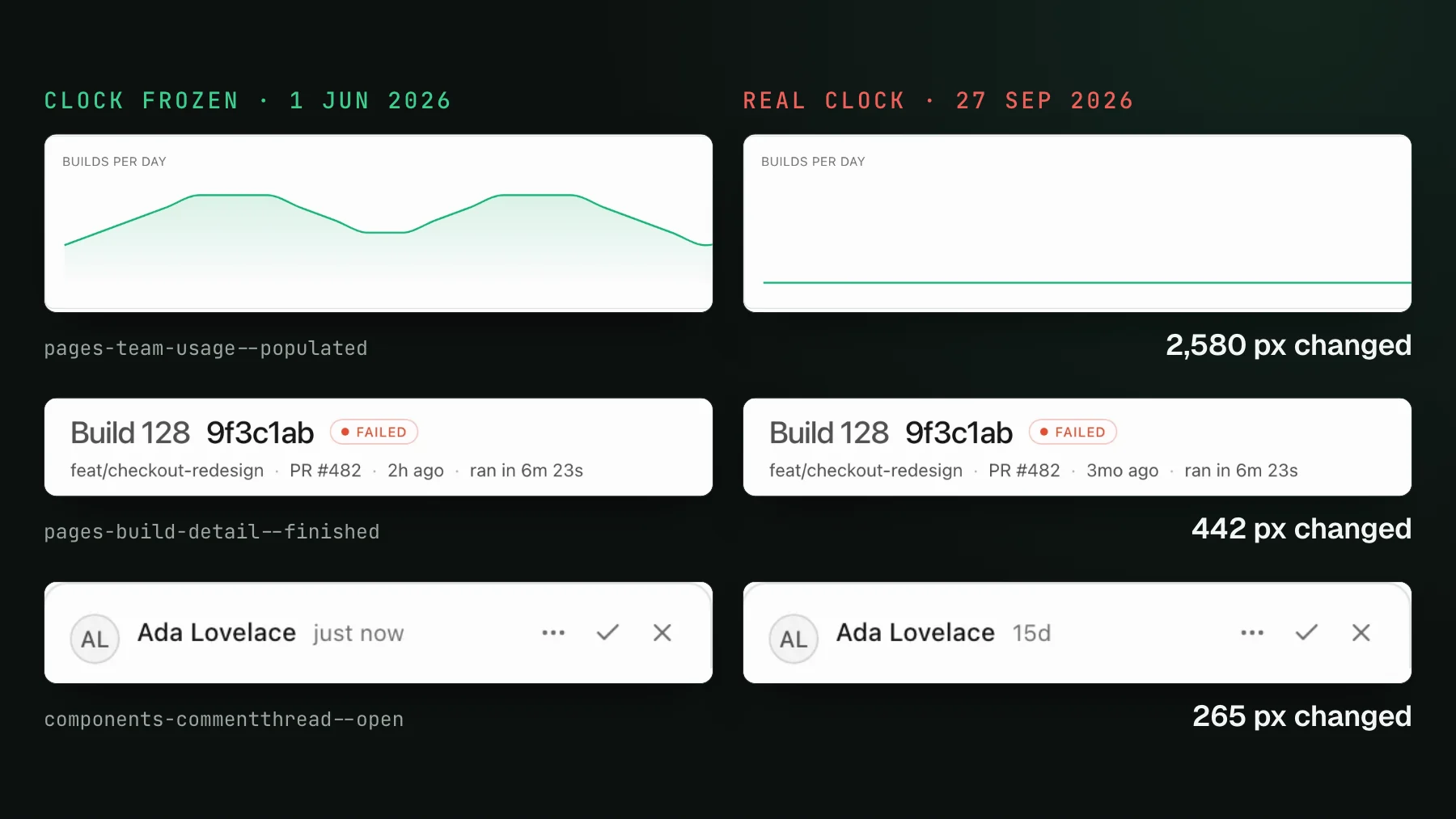
On this page
Storybook is the best place to do visual testing, because a story is already close to deterministic: you feed a component fixed props, mock its data, and render it in isolation with nothing live behind it. So when a story comes back changed on a pull request where you touched nothing near it, the culprit is almost always one thing that Storybook does not isolate for you. It is the clock. Freeze time and the majority of your flaky Storybook diffs vanish before you go anywhere near charts, animations, or fonts.
What Storybook visual regression testing is
Storybook visual regression testing renders each of your stories, screenshots it, and diffs that image against a saved baseline, so a change in the rendered pixels fails the build. Every story is a capture target already: a component in a known state, composed with fixed args. The first run records a baseline for each story; every run after that compares against it and flags what moved for a human, or a coding agent, to judge. If a refactor nudges a button, a token flip breaks contrast, or a dependency bump restyles a card, the diff catches it while your unit tests stay green. The full setup is a few minutes in the Storybook quickstart.
The promise of doing it in Storybook rather than against a live app is that the input is pinned. A story does not fetch a real API or depend on the state of a staging database, so in theory the same story renders the same pixels forever. In practice one global input escapes that isolation, and it is the reason most teams conclude that Storybook visual tests are flaky.
The clock is the number-one source of flaky Storybook diffs
Time is ambient. Unlike props or an API response, a component never has to ask for the current time through a boundary you control - it just calls Date.now() or new Date() and reads the wall clock of whatever machine is rendering. That call is invisible in the story file, so a story that looks perfectly static still depends on the exact instant it was captured. Render it at 12:00:04 and again at 12:00:11 and the pixels differ, even though the code is identical.
The tell is a diff that fires on a story you did not touch, and shows a change in exactly one spot: a timestamp, a date, a relative-time label, a chart's time axis. It is the same class of flake as in a real-page suite, which is why the clock leads the list in Fix flaky Playwright screenshot tests too. The difference is that in Storybook you can kill it in one place for the whole suite.
- Relative-time labels. A
"2 minutes ago"or"posted yesterday"string recomputes against the current instant on every render, so it drifts as the clock ticks and CI is always a few seconds behind your machine. - Absolute dates rendered from now. A
new Date()in a header, a footer copyright year, a date picker that defaults to today, an invoice dated on render. - Chart and timeline axes. A time-series axis anchored to
Date.now()slides its labels and gridlines every run. - Anything formatted with `Intl`.
Intl.RelativeTimeFormatand aDateTimeFormatoverDate.now()both bake the current moment into a string.
Freeze the clock once in .storybook/preview
Because the clock is global, the fix is global: pin Date to a fixed instant in .storybook/preview, before any story renders. Every story then reads the same frozen moment, so anything time-relative is byte-for-byte identical on every run. It is the single highest-yield line of configuration in a Storybook visual suite.
import MockDate from "mockdate";

// Every story renders as if it were this exact instant.
// Date.now(), new Date(), and anything built on them are now stable.
MockDate.set("2026-01-01T00:00:00Z");
That is the whole change for the common case. MockDate.set overrides the Date constructor and Date.now(), so a component reading either gets the frozen value without any per-story wiring. Pick a fixed date and keep it fixed: it becomes part of your baselines, so changing it later re-renders every time-dependent story at once. Prefer a plain, unremarkable instant (start of a month, midnight) so the captured strings read naturally. Our dashboard's Storybook pins midday on 1 June 2026, and when we rendered all 291 of its stories against the real clock instead, 49 of them came out different.
Two edges are worth pinning at the same time. First, timezone: a timestamp formatted in local time renders a different string depending on where the capture runs, so format in one fixed zone (UTC is the safe default) rather than the ambient one. Second, a component that advances time on its own - a live countdown, an ago label that re-renders every second on a timer - reads the clock repeatedly over its lifetime; freeze it to a resting value and let the story capture that settled frame rather than a moving one.
When one story needs a different frozen time
A single global instant is the right default, but it pins every story to the same moment, and once in a while that moment is wrong for one story. The usual case is a relative-time label rendered against mocked data. Say a story stubs an API to return an item posted at a fixed timestamp and shows it as 1 hour ago. That label is a function of the gap between the frozen now and the fixture's timestamp, so if your global now does not happen to sit an hour after the fixture, the story screenshots last year or a negative time instead of the 1 hour ago you meant to capture. You want that one story pinned to its own instant, without disturbing the rest of the suite.
The fix is a per-story override layered on the global freeze: a small decorator reads a story's own parameters.date and pins mockdate to it, falling back to the global default when a story sets none. It resets between stories, so one story's clock never leaks into the next. Set that story's clock to sit exactly where its fixture expects and the relative label renders correctly and identically every run, while every other story keeps the shared frozen now. Our blog index story is one of these: the page lists only posts whose date has arrived, and the dashboard's shared instant predates every post, so the story pins its own later date.
import MockDate from "mockdate";
import type { Decorator } from "@storybook/react";

const DEFAULT_NOW = new Date("2026-01-01T12:00:00Z");

// Freeze globally, but let any story override the instant with parameters.date.
export const withMockedDate: Decorator = (Story, ctx) => {
  MockDate.reset();
  MockDate.set(ctx.parameters.date instanceof Date ? ctx.parameters.date : DEFAULT_NOW);
  return <Story />;
};

// In a story file: pin this one to the instant its mocked data expects, so a
// fixture posted at 11:00 renders "1 hour ago" against a 12:00 clock, every run.
export const RecentActivity = {
  args: { activity: [{ label: "Deploy succeeded", at: "2026-01-01T11:00:00Z" }] },
  parameters: { date: new Date("2026-01-01T12:00:00Z") },
};Determinism levers past the clock
Freezing time handles most of it. What remains is a short, well-understood list, and Storybook already neutralizes part of it for you because you control the props:
- Animations. An infinite CSS or JS animation is caught at a different frame each run. Disable it with
animation: noneunderprefers-reduced-motion, which UI Verify emulates on every capture. A near-zeroanimation-durationoranimation-iteration-count: 1is not enough - the element stays on its own compositor layer and still flakes under render load. - Live data. Rare in a story, but a component that fires its own fetch on mount will render whatever the API returns this second. Feed it fixture data through the story's args or an MSW handler so the render is a function of your fixture and nothing else.
- Randomness. Seed or stub
Math.random, generated ids, and shuffled orders to a fixed value. - JavaScript animations no media query can reach. A charting library's animate-on-mount prop or a
<canvas>loop needs a code-level branch: render the resting frame while capturing with `isUIVerify()`.
A frontend lead I spoke with raised the obvious objection the moment he saw component screenshots: what about dynamic content, like a list whose order you do not control, a search result you cannot predict? On a live page that is a genuine problem. In Storybook it dissolves, because you are the one supplying the data - you mock every input, so there is nothing dynamic left to move between runs. Put the frozen clock next to that and a story becomes a pure function of its args. The deeper checklist, symptom by symptom, lives in Fix flaky visual tests and the Storybook determinism skill applies it to your suite for you.
.storybook/preview, it costs nothing, and it removes the largest and most confusing class of Storybook flake in one move. Everything else is a smaller mop-up on top of it.One structural choice makes the clock matter more, not less: writing one story per whole page instead of one per atom. A page-level story captures the header, the activity feed, the timestamps, and the charts in a single shot, which is exactly where time-dependent UI concentrates. The coverage is worth it, and freezing time globally is what keeps that wide capture from flaking on every render.
What still slips through: flake detection
Even a story with a frozen clock and mocked data can occasionally come back changed for a reason that is not real: a web font that swaps in a beat late, a sub-pixel reflow, an animation frame that escaped the freeze. UI Verify catches what is left by re-rendering the changed story a few more times against the same commit. If those independent renders disagree with each other - same code, different pixels - the change cannot be a code change, so it is marked flaky, kept out of your main review queue, and never promoted to a baseline on its own. It is billed as one snapshot no matter how many re-renders proved it flaked. The mechanics are in automatic flake detection.
Detection is the safety net; determinism is the fix. A story that flakes every single build is telling you about a real moving input, and the cheaper answer is to pin it at capture time rather than let the net catch it forever. For Storybook, that almost always starts with the clock. Freeze Date in .storybook/preview, mop up animations and any stray fetch, and the diffs that reach your pull request are the ones that mean something. Grab the Storybook determinism skill and let your agent wire the freeze in for you.
Deterministic Storybook diffs on every PR
UI Verify screenshots your stories on every pull request with the clock, animations, and flake handled for you, and an AI judge tells an intended change from a real regression - so a frozen clock is one line and the diffs you review are real.
Start for freeNo credit card required.
Deterministic Storybook stories
Stop story diffs that come back changed without a real change.