Storybook visual testing without Chromatic
Storybook visual testing without Chromatic: keep your stories and point UI Verify at your built storybook-static. Baselines, skip-unchanged, and an AI judge.
 Igor LuchenkovBuilding UI Verify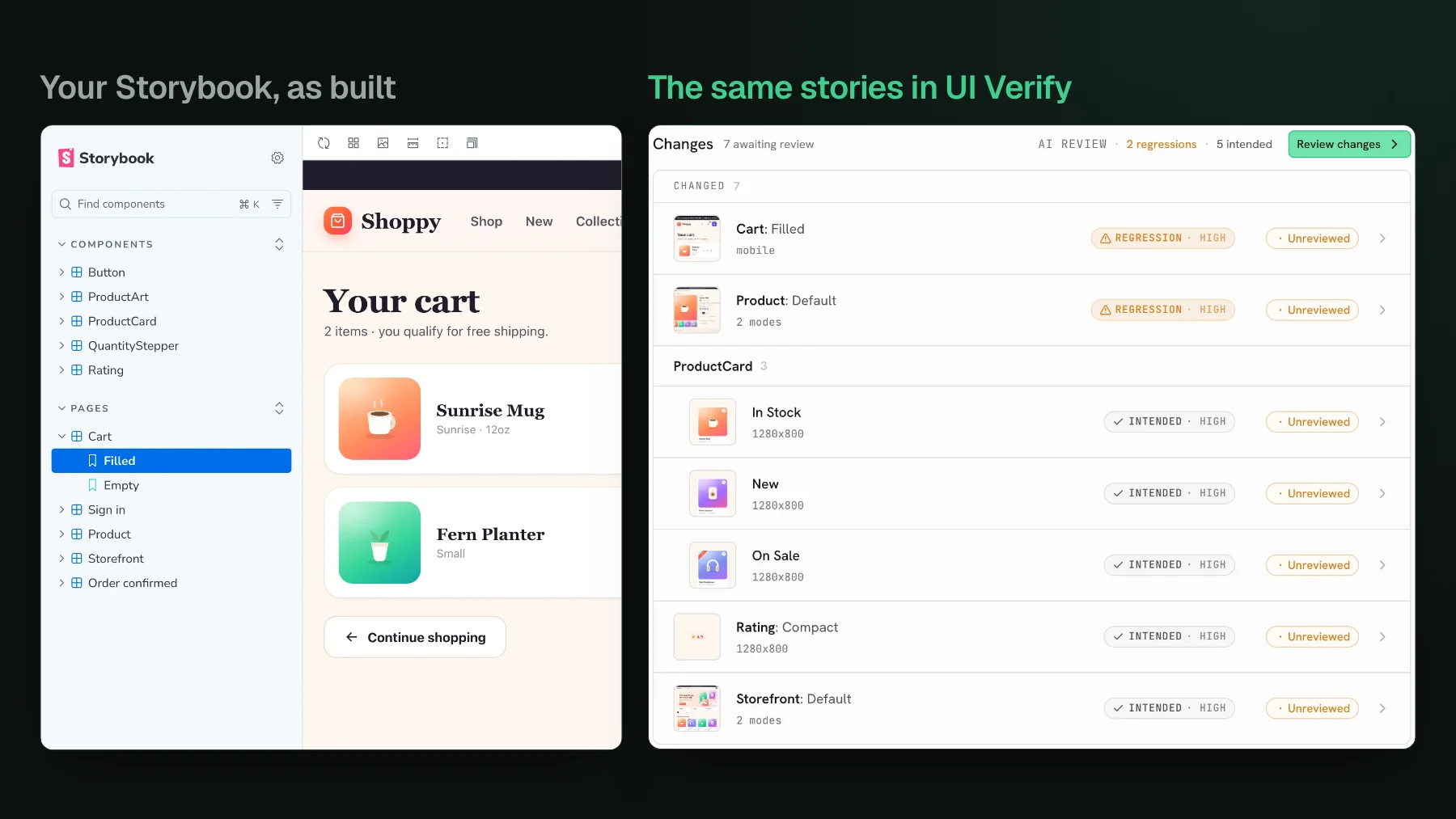
On this page
- Storybook visual testing without Chromatic, in one move
- Why teams keep Storybook but leave Chromatic
- The per-atom maintenance tax
- Inheriting Storybook's own upgrade treadmill
- How UI Verify consumes your existing Storybook
- How baselines work
- How skip-unchanged keeps a big Storybook cheap
- What actually changes when you switch off Chromatic
- When Chromatic is still the right call
- Storybook visual testing without Chromatic: FAQ
- Can you do visual testing on Storybook without Chromatic?
- Do you have to rewrite your stories to leave Chromatic?
- Is Storybook visual testing without Chromatic cheaper?
You can like Storybook and still want off Chromatic. Those are two separate decisions, and teams collapse them into one because Chromatic was built by the Storybook team and the two arrived together. Storybook is where your component states live. Chromatic is one of several tools that can screenshot those states and diff them. Wanting a different diffing tool does not mean throwing away a single story. This is the guide to keeping your Storybook and pointing something else at it.
Storybook visual testing without Chromatic, in one move
Storybook visual testing without Chromatic means keeping your stories as the capture targets and pointing a Storybook-independent tool at the built output. Your stories are the asset. The visual tool is a consumer of storybook-static, the folder build-storybook produces. Any tool that reads that folder can render each story, screenshot it, and diff it against a baseline, without a Storybook addon, a runtime hook, or a change to your story code. UI Verify works this way: you build Storybook exactly as you do now and hand it the static directory.
Why teams keep Storybook but leave Chromatic
The stories are rarely the problem. The two usual reasons for reconsidering the diffing layer are both about ongoing cost, not about Storybook itself.
The per-atom maintenance tax
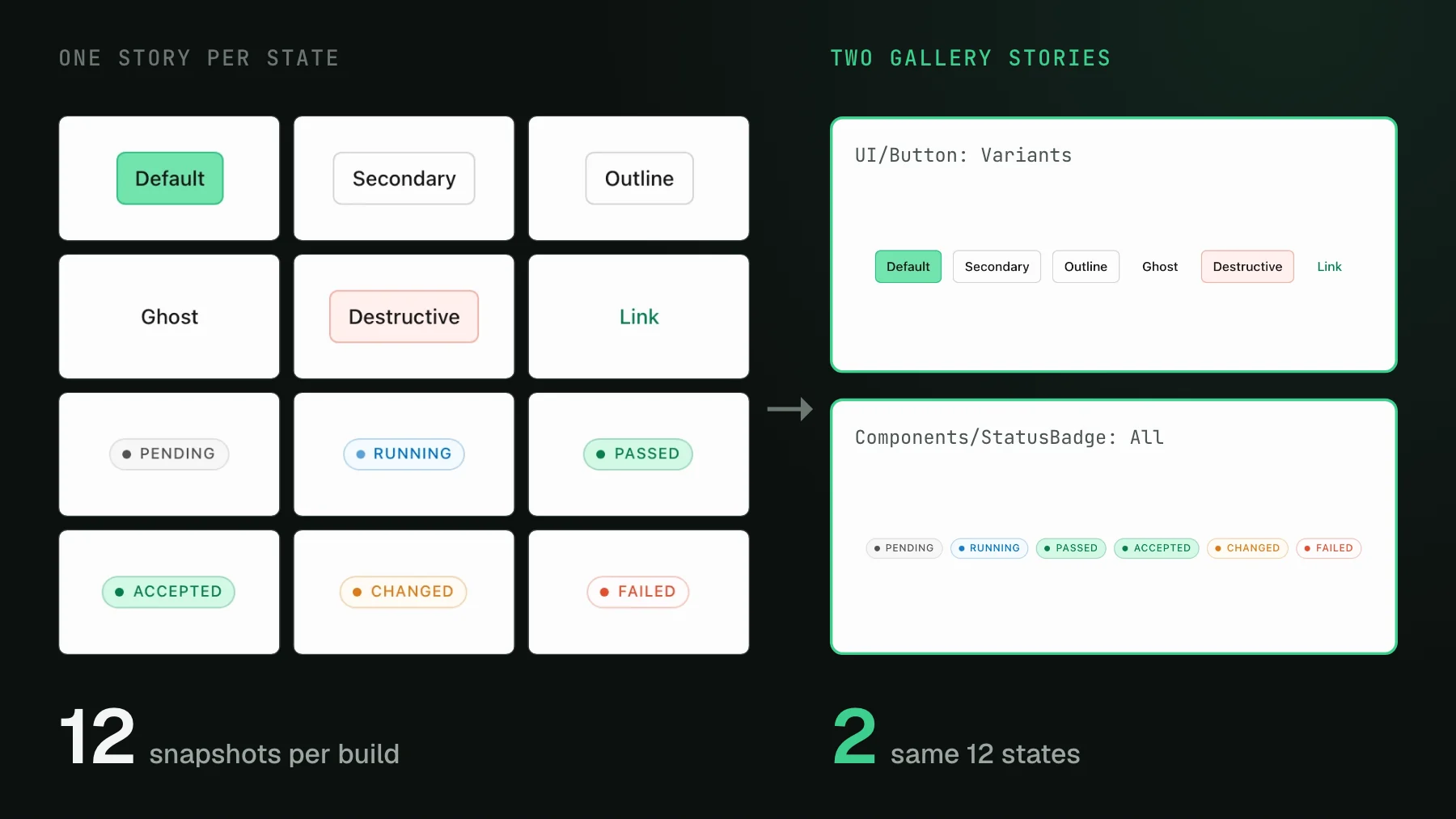
Component-driven testing bills you a story for every atom and every variant. A button has a default, a hover, a disabled, a loading, a destructive, and each one is a story you author, a snapshot you render, and a baseline you keep current as the design moves. Multiply that across a design system and the story file becomes a second surface you maintain in lockstep with the component. A design-systems engineer I talked to had built and wired all of this herself, and her read on where the effort actually goes stuck with me: standing up the components and stories is the easy part, and the real tax is keeping them real and used over time. If most of your cost is that upkeep, a per-snapshot bill that also grows with every commit compounds a problem you already feel.
The lever there is not more discipline. Dense gallery stories and data-driven states render every variant from one story instead of one per variant, cutting a component's snapshot count sharply with the same coverage. See Reduce visual test snapshots and cost, and if you would rather your agent write the stories in the first place, stop writing Storybook stories by hand.
Inheriting Storybook's own upgrade treadmill
Storybook itself is on a major-version cadence. The jump from 6 to 8 reworked the config format, the addon API, and the shift to ESM broke plenty of setups that had leaned on CommonJS. That churn is Storybook's, not any diffing tool's, but it is a reason to want your visual testing loosely coupled: if the tool hooks deep into Storybook's runtime or addon internals, every Storybook upgrade risks the visual layer too. A tool that only consumes the built storybook-static output stays on the safe side of that seam. Your stories are portable, so the diffing tool becomes a swap rather than a migration, and if you ever move a surface off Storybook entirely you have somewhere to land.
How UI Verify consumes your existing Storybook
You already have the capture targets: every story is a state worth a screenshot. Build Storybook the way you do today, then upload the static directory. UI Verify renders each story on its own pinned Linux and Chromium, so the pixels are stable across machines. On our own dashboard that is 301 captures from 291 stories, from storybook build to a verdict in under two minutes.
npm run build-storybook   # outputs ./storybook-static
UIVERIFY_API_KEY=uv_proj_your_key npx -y uiverify upload --static-dir ./storybook-staticstorybook build took 15 seconds, and the upload went from bundle to a passed verdict on 301 captures in under a minute and a half.No addon to install, no story to rewrite. If you are coming from Chromatic, your existing parameters.chromatic config carries over unread: UI Verify reads disableSnapshot, delay, and the modes and viewports you already declared, so the stories you have tuned keep behaving the same. The full walkthrough with the CI step is in the Storybook quickstart, and the Storybook visual testing skill makes your stories deterministic so they stop diffing on the clock or an animation.
parameters.chromatic.modes block from our Shoppy demo, left as it is. UI Verify reads it and captures the Storefront story once per mode.How baselines work
A baseline is the accepted screenshot a story is diffed against, held per branch. Your first upload captures every story as new and sends them to a review queue. Accept them and they become your baselines. After that, each build renders the current stories, diffs them against those baselines, and posts a check and a comment on the pull request listing what moved. Accepting a change promotes the new screenshot to the baseline for that branch. See how baselines resolve for how a branch inherits its starting point from its base.
How skip-unchanged keeps a big Storybook cheap
Most pull requests touch a few components, so re-rendering all 1,000 stories every push is waste. Add --only-changed and UI Verify renders only the stories your change can affect and carries the rest forward from their baseline, with no render and no diff for the untouched ones. It is the single biggest lever on build time and per-snapshot cost.
npx -y uiverify upload --static-dir ./storybook-static --only-changed--only-changed needs Storybook's module dependency graph, which Storybook only writes when you build with --stats-json (npm run build-storybook -- --stats-json). Without that file the flag safely renders everything, so if skipping never seems to happen, that is the first thing to check. Full detail in Skip unchanged stories.What actually changes when you switch off Chromatic
The core loop is the same one you know: render every state, diff against a baseline, gate the pull request on review. What you keep and what you gain, stated plainly:
- Your stories, untouched. Both tools take Storybook as a first-class capture path and read the built
storybook-static, so this is a CI swap, not a rewrite of your test surface. - Skip-unchanged and flake filtering. A small PR does not re-render the whole Storybook, and a change that does not reproduce on a re-render is auto-ignored, as on Chromatic.
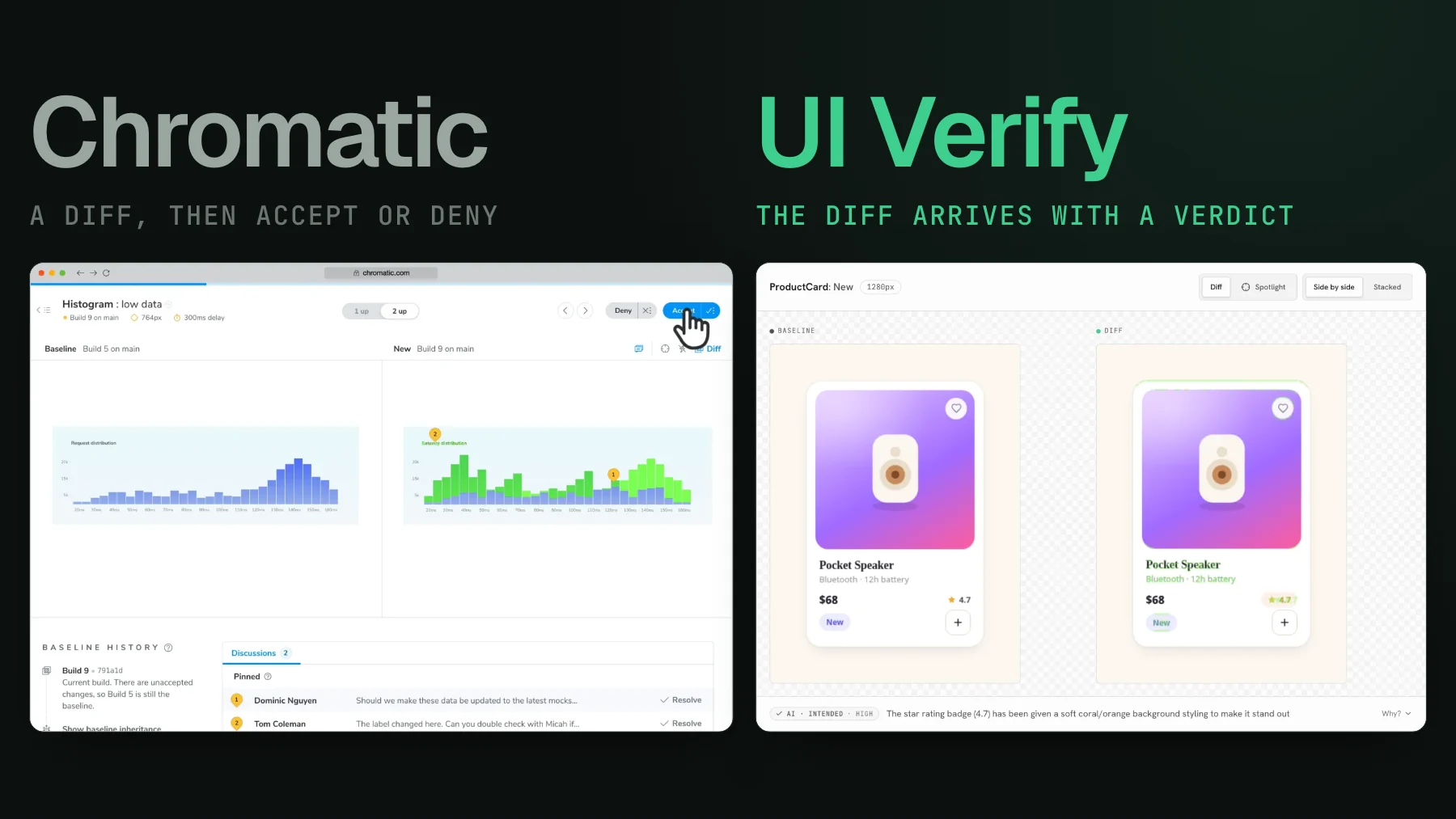
- An AI judge on top. UI Verify labels each diff a likely regression or an intended change with a reason and holds the PR on a flagged regression. Chromatic has no diff-triage AI. See the AI judge.
- Review from your coding agent over MCP. Your agent reads the exact per-story diffs and can accept the intended changes without you opening a dashboard. See triage with your agent.
- A bigger free tier. UI Verify includes 10,000 snapshots a month (50,000 for open-source projects) across Chrome, Firefox, and Safari; Chromatic's free tier is smaller and renders Chrome only.
On price, UI Verify's numbers are flat and public: 10,000 snapshots a month free, paid plans from $89 a month for 30,000, and overage at $0.004 per snapshot. The cost lever is identical on either tool, though, so the better first move is to shrink the snapshot count. If your bill is the reason you are here, the arithmetic is laid out in why your Chromatic bill exploded.
When Chromatic is still the right call
Chromatic is good software, and for some teams it stays the right tool. It runs axe accessibility checks alongside the visual snapshot on its paid tiers, it renders Microsoft Edge on top of Chrome, Firefox, and Safari, and it has a mature review workflow that a lot of teams standardize on. If your bottleneck is accessibility coverage rather than commit volume or review load, that is a fair fit. This post is narrow: wanting a different diffing tool is not a reason to give up Storybook, because your stories move with you.
Storybook visual testing without Chromatic: FAQ
Can you do visual testing on Storybook without Chromatic?
Yes. Your stories are the capture targets, and they are not specific to Chromatic. Build Storybook the way you do now and point a Storybook-independent tool at the built storybook-static folder to render each story, screenshot it, and diff it against a baseline, with no addon, runtime hook, or story rewrite. UI Verify reads that folder and your existing parameters.chromatic config unchanged.
Do you have to rewrite your stories to leave Chromatic?
No. Both tools take Storybook as a first-class capture path and read the same built storybook-static, so leaving Chromatic is a CI swap, not a rewrite of your test surface. Your parameters.chromatic settings, including disableSnapshot, delay, modes, and viewports, carry over unread.
Is Storybook visual testing without Chromatic cheaper?
It can be, but the real cost lever is snapshot count, which is identical on either tool. UI Verify includes 10,000 snapshots a month free across Chrome, Firefox, and Safari, with paid plans from $89 a month for 30,000 and overage at $0.004 per snapshot, and --only-changed renders only the stories a pull request can affect so a large Storybook stays cheap.
If you are still deciding, the head-to-head is on UI Verify vs Chromatic, and a wider story-hygiene read is one Storybook story per page. Keep your Storybook. Swap the tool that looks at it.
Keep your stories, swap the tool
UI Verify reads your built storybook-static and your existing parameters.chromatic config, so your stories stay put. You get a PR diff check, skip-unchanged builds, and an AI judge that tells an intended change from a real regression.
Start for freeNo credit card required.
Deterministic Storybook stories
Stop story diffs that come back changed without a real change.