Dynamic content in visual tests: data or regression?
Visual testing dynamic content: freeze it with fixtures, mask it in Playwright knowing what a mask hides, or let your coding agent check the source.
 Igor LuchenkovBuilding UI Verify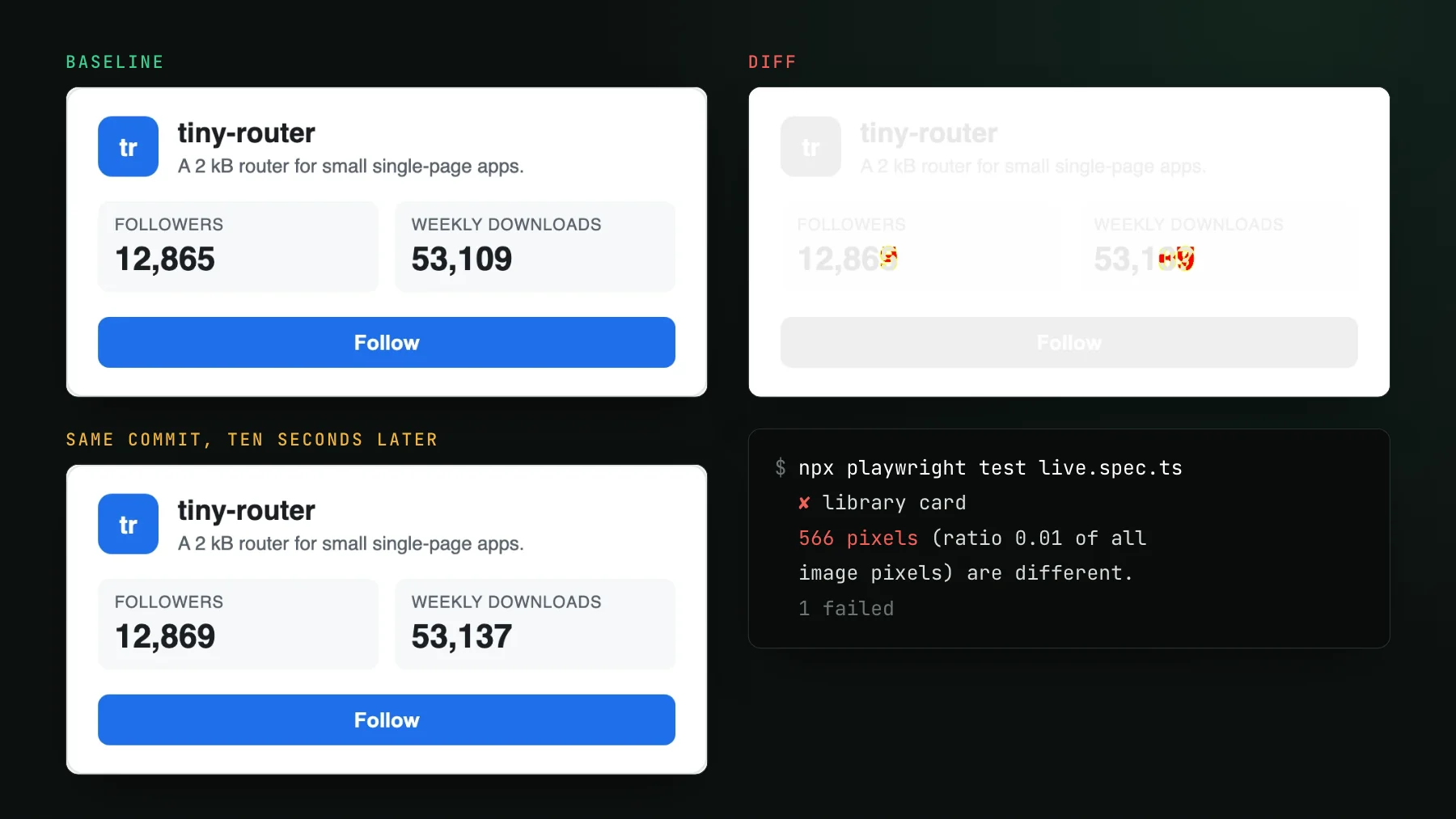
On this page
- What is dynamic content in a visual test?
- Why does content noise do more damage than flake?
- How do you freeze dynamic content with fixtures?
- How do you mask dynamic content in Playwright?
- Can a coding agent tell content from a regression?
- What does the UI Verify MCP give the agent?
- Which dynamic-content technique to use when
A changed value in a visual test is data, not a regression, when it comes from an API, a file or a database and the code that fetches and formats it did not change in the pull request. Freeze that content with fixtures where you can, mask only what you cannot feed, and let a coding agent check the source for whatever still moves.
The cover is a real Playwright run. A library card, rendered twice from the same commit ten seconds apart. Between the two captures the follower count went from 12,865 to 12,869 and weekly downloads from 53,109 to 53,137. The diff lit up the trailing digits and nothing else, toHaveScreenshot reported 566 pixels different, and the test failed. No line of code changed. Run it again in a minute and it fails again, on different digits.
Read correctly, that diff says the data moved, not the UI. The card is fine; its numbers are newer. But a pixel diff has no way to know which of the changed pixels were drawn by your code and which were drawn by your data, so every run hands you the same question: is this data, or is this a regression? This post covers the three answers that work, in the order you should reach for them, with a scratch project run for each one.
What is dynamic content in a visual test?
Dynamic content is anything on screen whose value comes from data rather than from the code under test: counts, prices, names, avatars, timestamps, feeds, search results, a list sorted by popularity. It changes when the data changes, which is on its own schedule and unrelated to your pull request. A screenshot test that renders it live diffs whenever the world moves, so the diff stops tracking your code and starts tracking your database.
Content drift is a different animal from flake. A flaky diff comes from the render itself: render one commit twice and the two pictures disagree, which is how flake detection proves it and sets it aside. A follower count that grew since yesterday's baseline is a real, reproducible difference between two days of data. Render today's page as often as you like and it agrees with itself, so a check built to spot renders that disagree has nothing to remove.
Why does content noise do more damage than flake?
Because it is reproducible and widespread, so nothing filters it out and reviewers learn to wave it through. On a page with a lot of data, one moving value rarely stays on one page. A count in a shared card template shows up on every listing, every profile and every search result that uses the card, so a single number ticking over turns hundreds of screenshots red at once. The reviewer opens the first few, sees a number that went up by four, shrugs, and accepts. By the second week the shrug is the whole review, and a suite whose failures are always data teaches the team to stop reading failures. That is the expensive part: the day a real regression lands in the same build, it arrives in a queue nobody opens.
Tool evaluations run into this fast. A team trying a visual tool on a data-heavy site expects it to tell a follower count from a broken layout, and a tool that fails the test the same way a plain differ would leaves them asking what they gained. There is no single switch for that. There are three techniques, used in order.
How do you freeze dynamic content with fixtures?
Serve the page a fixed response, so the numbers on screen are numbers you chose and committed. That is the strongest fix, because it removes the variation before the screenshot exists. In Playwright that is page.route returning a fixture file; in Storybook it is fixture args or a mock handler per story (the Storybook MSW post covers the handler side); in Vitest browser mode it is passing literal props, as the flaky Vitest visual tests guide recommends before anything else.
import stats from "./fixtures/stats.json" with { type: "json" };

test("library card, fixture data", async ({ page }) => {
  await page.route("**/api/stats", (route) => route.fulfill({ json: stats }));
  await page.goto("/");
  await expect(page.getByTestId("library-card")).toHaveScreenshot("card-fixture.png");
});
With the fixture in place the card test passed three runs in a row. Then I staged a bug in the scratch app: the card's script started reading stats.followerCount instead of stats.followers, a rename that happened on one side only, so both counts rendered NaN. The fixture test failed on 4,538 pixels and the diff pointed straight at the two numbers. Pinned data is what makes that failure readable. When the only thing that can move is your code, a moved pixel is a code change.
Fixtures have one maintenance cost worth naming: they can drift from the real API shape. Keep them small (the card needs two numbers, not the whole payload), store them next to the test, and regenerate them when the API contract changes, the same way you would update a typed client. If the real response is huge, capture a representative slice; the test checks the drawing, not the dataset. The same rule holds when UI Verify records a Playwright test: the determinism recipe says to pin data at record time, with committed fixtures or a seeded backend, so the next record reproduces the last one.
How do you mask dynamic content in Playwright?
Pass the moving elements to the mask option of toHaveScreenshot. Playwright paints a solid box (magenta #FF00FF by default, configurable with maskColor, per the `toHaveScreenshot` reference as of 2026-10-17) over each matched element in both the baseline and the new screenshot, so whatever renders inside that box no longer counts toward the diff. On the scratch card, masking the two count elements turned the always-failing test into one that passed on every run.
The cost is in the name. A mask hides everything inside its box, including a broken value. With the same staged NaN bug, the masked test kept passing: the page showed NaN in both counts and the screenshot comparison never saw it, because the two places that broke were the two places covered in magenta. The mask is not blind to everything, though. When I staged a second bug that shrank the count's box, the masked test failed on 25,984 pixels, because the mask moved with the element and the uncovered background showed. A mask catches changes to the box. It cannot catch what happens inside it.
NaN in both counts under the magenta boxes.So use masks for content you genuinely cannot feed: a third-party embed, an ad slot, a map tile, a live video. Mask the smallest element that moves, never the whole card or section around it, and prefer a fixture for anything your own code formats, because formatting is where content bugs live. A count that renders NaN, a price with the wrong currency, a name truncated by a new width rule: each sits in the region a mask covers.
Can a coding agent tell content from a regression?
Yes, when the agent has the repository open, because the answer lives in the source rather than in the pixels. The rule is simple. A changed string that appears as a literal in the source is code: someone typed it, so it is a real change and the question is only whether it was intended. A changed value that appears nowhere in the source, and traces back to a field read from an API, a file or a database, is content. A pure pixel differ cannot draw that line; an agent that wrote the pull request can draw it with a couple of searches.
In the scratch project a pull request renamed the downloads label from "Weekly downloads" to "Downloads this week". Run against live data, the diff showed 2,259 changed pixels in three places: the label and both counts. The agent's checks took three commands. The new label text sits on line 23 of app/index.html, inside the hunk the pull request changed, so that region is a real, intended edit. Neither new number exists anywhere in the repo, and the element that shows downloads is filled from stats.weeklyDownloads at runtime, so those two regions are content.
The rule has one exception, and it is where regressions hide. A value from data is content only if the code that fetches and formats it did not change in the same pull request. The NaN bug above is a value from data, but the line that read it was in the diff. So the agent checks both ends: is the new text a literal, and did the pull request touch the path that produces it? Data shown by unchanged code is content. Data shown by changed code is the change under review.
What does the UI Verify MCP give the agent?
The MCP gives the agent the two things it needs before it can search anything: what changed, and where. UI Verify exposes each build over its MCP server, so the agent that opened the pull request can list the changed stories, call get_diff for presigned baseline, candidate and diff URLs plus the change's bounding box, or call render_diff_image for the before and after cropped to the region that moved, which its vision model reads directly. The same response also carries the AI judge's verdict, a likely regression or a likely intended change with a short reason. The search through the source is the agent's own step, done with the repository it already has open.
That is a real change from our own dashboard's Storybook. A pull request rewrote one comment in the Playwright snippet on the onboarding page, the build flagged 2,325 pixels in a 543 by 55 box, and searching the repo for the new line found it as a literal in two files the pull request edited. The verdict writes itself: an intended copy edit. Had the search come back empty, the next question would have been which data source feeds that block. The triage-with-your-agent guide walks the tools one by one, and the triage visual changes skill runs the whole review as one command. Accepting stays an explicit action, by you or by an agent you authorized; the verdict and the source check inform it.
Which dynamic-content technique to use when
- Freeze first. Fixtures for everything your own code fetches and formats. They make the diff mean something and catch formatting bugs a mask would hide.
- Mask what you cannot feed. Third-party embeds, ads, maps and video. Keep each mask to the one element that moves.
- Let the agent read the source for the rest. Real-data end-to-end pages and catalog sites where full fixtures are impractical. The agent classifies each changed region as code or content and checks whether the pull request touched the path behind it.
Most suites end up with all three, weighted heavily toward the first. Freeze the data the team owns, mask the few regions nobody owns, and let the agent sort whatever still moves. Then the red build goes back to meaning one thing: something in the code changed, and it is worth a look. For the rest of the determinism checklist (clock, animation, fonts), fix flaky Playwright screenshot tests and the Playwright determinism skill cover what this post leaves out.
Keep the diffs that mean something
Capture with fixtures, review every change (with an AI verdict), and let your coding agent pull the cropped diff over MCP to check the source.
Start for freeNo credit card required.
Triage a build from your agent
Bucket real regressions vs noise and accept baselines, over MCP.