Visual regression testing locally, before you push
Visual regression testing locally: run uiverify check on the stories your edit touched and diff them against the real CI baseline before you push.
 Igor LuchenkovBuilding UI Verify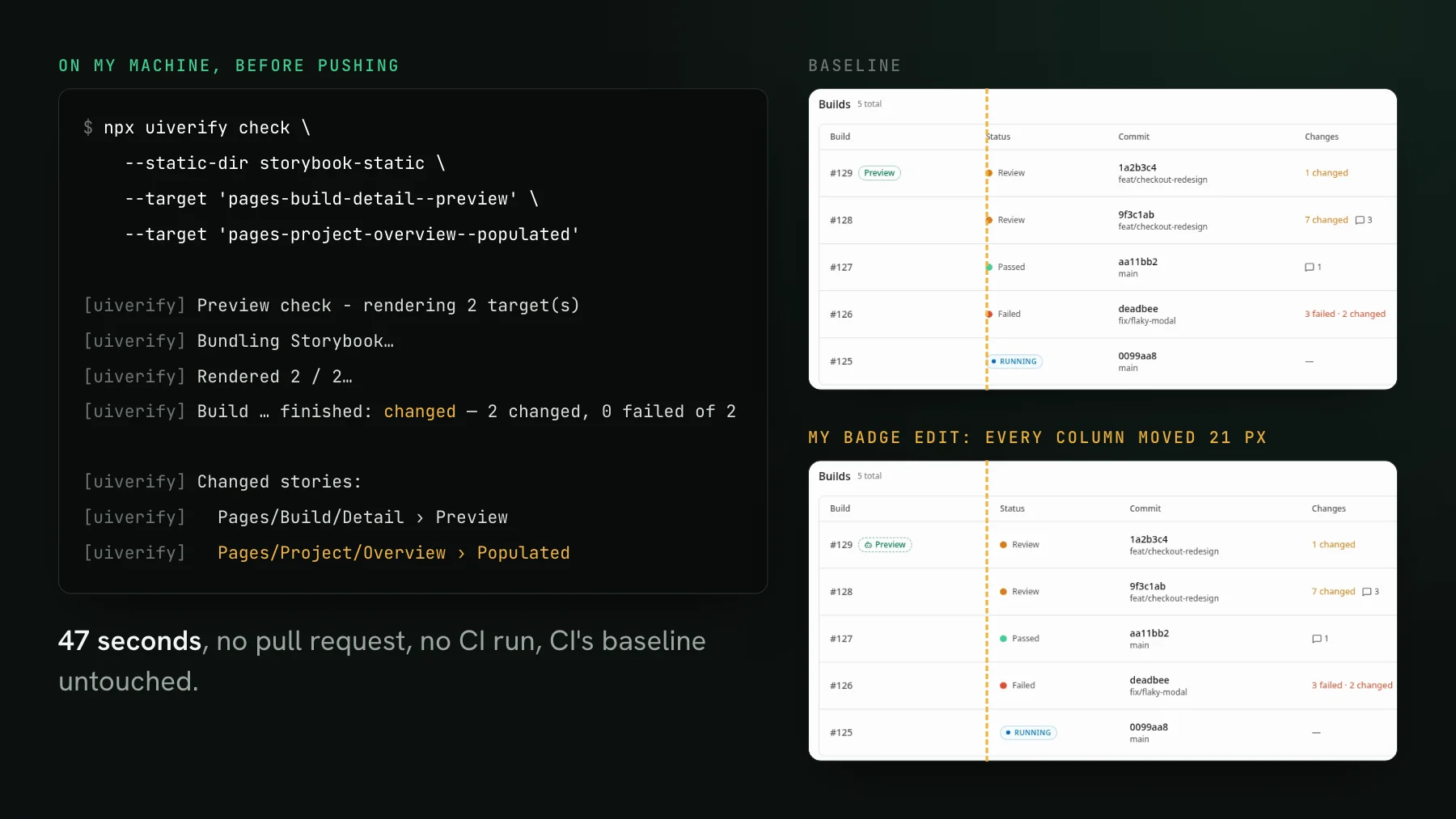
On this page
- What does visual regression testing locally mean?
- Why is a screenshot on your Mac the wrong comparison?
- What is uiverify check?
- How do you scope a local visual check to what you touched?
- Reading the result: one intended change, one side effect
- Can a coding agent run the local check itself?
- Can you try visual testing locally without installing the GitHub App?
- When is a local check enough, and when does CI decide?
To run visual regression testing locally, build what you changed and run uiverify check on the few stories your edit touched. The stories render on the same fleet as CI, against the baseline a CI build of your branch would use, and the diff comes back in under a minute, before anything is pushed.
My edit loop runs in several worktrees at once: one Claude Code agent per task, each changing some piece of UI while I move between them. The slow part is never the edit. It is finding out what the edit did to the screen. On this repo a full CI cycle takes 25 to 30 minutes, nine checks, two of them visual jobs that build everything and diff every baseline, and an agent that pushes just to learn whether a badge looks right pays that half hour per guess. So the visual check moved into the loop. While writing this post I changed one small badge in our dashboard, ran uiverify check on two stories, and had a diff back in 47 seconds. It caught a change I had not made on purpose.
What does visual regression testing locally mean?
Visual regression testing locally means checking a UI change against its accepted baseline from your own machine, in the middle of editing, before a commit reaches CI or a pull request. The useful version answers one question quickly: did my change alter the screen, and only where I meant it to? Two conditions make that harder than it sounds. The local image has to be comparable to the baseline CI uses, and the check has to be cheap enough to run after every edit.
When developers who run fleets of coding agents describe the tool they want, these tend to be the first two items on the list: run only what the change touched, and run it without a CI round trip. The rest of this post is how that works with uiverify check, shown on a real edit to our own dashboard.
Why is a screenshot on your Mac the wrong comparison?
Because the baseline it is compared against usually came from a Linux CI runner. The obvious local setup is a screenshot test that runs on your laptop, and it holds up only while the baseline came from that same laptop. macOS and Linux rasterize text differently, so a page captured on a Mac and diffed against a Linux baseline differs along the edges of the text, and the change you care about drowns in that noise. Playwright in Docker measures the gap and the container fix. uiverify check avoids the problem by not rendering on your machine at all: the CLI uploads what you built, and the stories render on the same fleet that renders CI, against the baseline a CI build of your branch would resolve.
What is uiverify check?
uiverify check starts a preview build. It uses the same rendering, the same diff and the same baseline as a CI upload, but it is walled off from CI: it posts no GitHub check, so nothing appears on a pull request, and it never moves the CI baseline. A changed result exits 0, because mid-edit a diff is something to look at, not a reason to fail the command. Only a failed render, a blocked build or an operational error exits non-zero. For a Storybook project the loop is two commands:
npm run build-storybook
npx uiverify check --static-dir storybook-static \
  --target 'pages-build-detail--preview' \
--target 'pages-project-overview--populated'Storybook has no single-story build, so the CLI uploads the whole bundle and --target decides what renders; each target is an exact story id or an anchored glob such as 'components-button--*'. On Playwright and Vitest you scope one step earlier: run only the specs you touched, point check at the archive they wrote, and --target becomes optional. A folder of PNGs from your own harness works the same way through --screenshots. Every flag is listed in the check docs.
How do you scope a local visual check to what you touched?
Name the stories where the change is visible, one per surface it appears on, and stop there. That is deliberately smaller than what CI renders. In CI, UI Verify follows the dependency graph and renders every story your changed files could affect, which is correct for the build that writes baselines and too much for a loop you run every few minutes. I counted the gap on our own Storybook from the stats file of the build I checked. The badge I edited lives in one file, imported by two components. The import graph from that file reaches 34 of our 293 stories, and from the shared Badge primitive underneath it, 141. When I ran a wider check over all 34, four of them changed.
Under-scoping costs little here because a preview build never becomes a baseline. The worst case is a story you did not ask about, and the full build on your pull request renders it anyway. In the loop I named two stories, the build page and the project overview, and two was enough to catch the problem.
Reading the result: one intended change, one side effect
The edit was cosmetic: a dashed border and a small bot icon on the Preview badge. That badge is how our dashboard marks a build that came from uiverify check, so a reader of the build list can tell an agent's mid-edit check from a CI run. The build page story showed the intended change and nothing else, 311 changed pixels around the badge. The project overview did not. It reported 6,341 changed pixels, and the diff lit up three columns of the builds table rather than the badge.
The icon made the badge wider. The table sizes its columns to their content, so the extra width in the Build column pushed Status, Commit and Changes 21 pixels to the right on all five rows. No unit or interaction test would notice, and a reviewer scrolling a pull request would likely read it as part of the restyle. In the loop it took one look. I kept the icon in the build header, where there is room for it, and gave the badge a compact prop so the table renders it without one. The second check, same two targets, took 45 seconds: the overview diff fell to 79 pixels, the dashed border alone, and the columns were back where they started.
Can a coding agent run the local check itself?
Yes, and nothing above needs me at the keyboard. The check-visual-changes skill gives a coding agent the sequence: build or capture, run uiverify check on the few targets its edit touched, then review the pixels before it decides anything. The CLI output ends with the same handoff, pointing at the triage skill and the UI Verify MCP endpoint. Over the MCP the agent pulls each changed story as a cropped before and after, the baseline beside the candidate, cut down to the region that moved.
On the first check the overview came back as four crops, three of them table columns, which tells the agent the change escaped the badge before it studies a single pixel. After the fix each story came back as one crop of the badge. Accepting a preview build writes a branch-scoped preview baseline, so a change the agent approves stops re-flagging on its next check while the CI baseline stays put. The AI judge weighs each change against what the pull request set out to do, so its verdicts arrive with the build on your pull request; mid-edit, the intent the agent checks against is its own task. Triage with your agent covers the review calls, and closing the loop over MCP follows a whole agent session.
Can you try visual testing locally without installing the GitHub App?
Yes. uiverify check needs a project API key, which starts with uv_proj_, in UIVERIFY_API_KEY, and a git checkout to read the commit and branch from. It talks only to UI Verify and posts nothing to GitHub, so the GitHub App, whose job is the check and the comment on a pull request, plays no part. The same holds for uiverify upload: uploads work with the key alone, and the App only adds the pull request surfaces.
For a team where a new GitHub integration or a new CI step waits on a long approval, that turns the first evaluation into a laptop exercise. Create a project, export the key, run one uiverify upload from your machine and accept that first build as the baseline, then run check after each edit. Nothing is installed in your organization, and your CI stays untouched until you decide it should change. Each check counts the snapshots it renders, which is one more reason to keep the target list short. The free plan includes 10,000 snapshots a month, and open-source projects get 50,000 snapshots and 500 AI reviews a month; the rest is on pricing.
When is a local check enough, and when does CI decide?
A local check is enough to keep editing; CI decides whether to merge. The preview build renders what you named against the baseline your branch resolves. The build on your pull request renders everything the change can reach, runs the AI judge against what the pull request set out to change if you turned it on, and holds the merge until each change is reviewed. The two differ in scope by design and share the renderer, so a story you checked comes out the same in CI unless main or the rest of the branch moves under it. What the local check removes is the half-hour round trip per guess. By the time the pull request opens, every changed story has already been looked at once, and CI confirms the result instead of discovering it.
Check your next UI edit before you push
Run uiverify check on the stories your edit touched and get a diff against the CI baseline while you are still editing. It needs a project key and nothing else: no GitHub App, no CI change.
Start for freeNo credit card required.
Check visual changes mid-edit
Preview a UI edit against the real baseline, no PR, no moved baseline.