Claude Code hooks: three from a real setup, measured
Claude Code hooks run your script on agent events. Three real hooks, how often they fired and misfired, exit codes, and a Stop hook running a visual check.
 Igor LuchenkovBuilding UI Verify
On this page
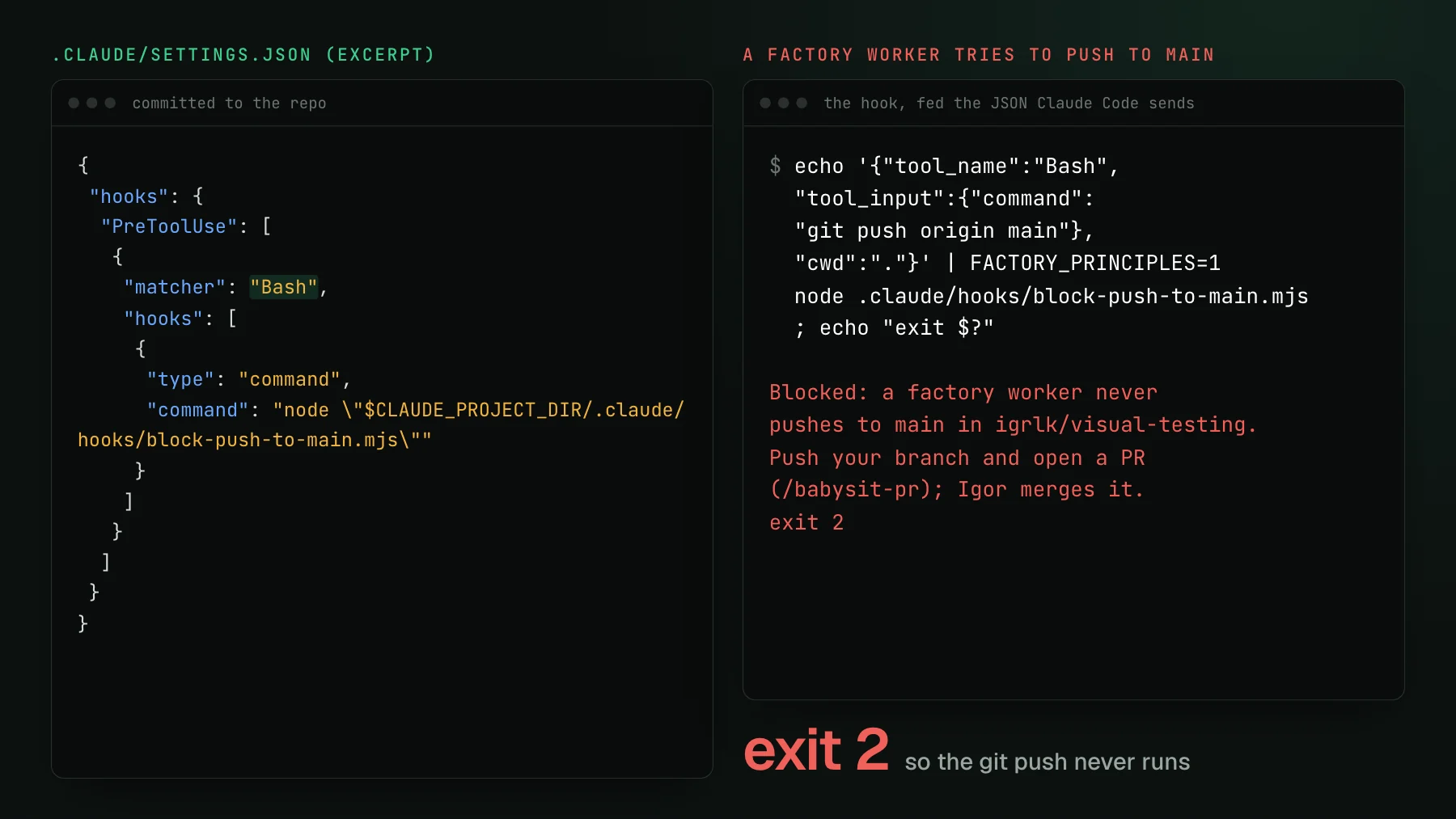
Our GitHub plan has no branch protection, and the coding agents that build UI Verify run unattended with permissions bypassed. For a while the only thing between a worker and git push origin main was a sentence in CLAUDE.md. A sentence is a request. So on 2026-10-30 I replaced it with a hook: a 91-line script that Claude Code runs before every shell command, which refuses a push to main and tells the agent to open a pull request instead.
Claude Code hooks are commands (or HTTP calls, MCP tools, prompts, or agents) that Claude Code runs at fixed points in a session: before a tool call, after one, when you submit a prompt, when the agent tries to stop. The hook receives the event as JSON on stdin and answers through its exit code and stdout. Unlike an instruction in CLAUDE.md, a hook does not depend on the model choosing to follow it. This post walks through the three hooks in our repository, with their real record, and ends with a recipe for a Stop hook that checks the UI before the agent says it is done.
What are Claude Code hooks?
A Claude Code hook is a handler registered against a hook event, with an optional matcher that narrows which tool or source triggers it. Configuration has three levels of nesting: the event (PreToolUse), a matcher group (only the Bash tool), and one or more handlers. The hooks reference listed 33 events on 2026-11-02, on Claude Code 2.1.316, and the list grows with most releases. The ones you reach for first fire once per tool call (PreToolUse, PostToolUse), once per turn (UserPromptSubmit, Stop), or once per session (SessionStart, SessionEnd).
Hooks live in settings files and merge across them: ~/.claude/settings.json for all your projects, .claude/settings.json committed with the project, .claude/settings.local.json for your machine only, plus plugins, skill frontmatter, and subagent frontmatter. Hooks from settings also run inside subagents. Ours are all in the committed project file, so every session on the repository, mine or a worker's, gets the same three.
How do Claude Code hooks block an action?
A hook blocks an action by exiting with code 2. Claude Code shows the agent whatever the script wrote to stderr as the reason, and the agent usually adjusts. Exit 0 lets the action through, and any JSON on stdout is applied as a structured decision. Every other exit code, including 1, is a non-blocking error: Claude Code notes it and carries on. The reference says it directly: if a hook is meant to enforce a policy, use exit 2. Several of the top search results for this topic still say any non-zero code halts the agent, which produces a guard that guards nothing.
Two more rules decide whether a guard holds. A PreToolUse deny blocks the tool even in bypassPermissions mode and under --dangerously-skip-permissions, because PreToolUse fires before any permission check. That is the only reason our push guard works for workers that skip every prompt. And a hook whose script path is wrong never runs, which counts as a non-blocking error, so the action goes ahead. Since 2.1.295 you can set "onFailure": "block" on a command hook to make a crash or a timeout block instead. I have seen the fail-open case in my own repo: two review skills I imported in July carried telemetry Stop hooks pointing at a script that did not exist here, and they erred on every turn without stopping anything until I deleted them.
Hook one: never push to main
The push guard is a PreToolUse hook on Bash. It parses the command, decides whether this is a factory worker (an environment variable, a factory worktree, or a factory branch name), and exits 2 if the push would update main. A human session passes untouched, because I still push docs-only changes to main by hand. To see where its limits are, I piped ten realistic commands through it.
Six blocked, including git push --force origin +fix:refs/heads/main and a push chained after pnpm lint &&. Two slipped through: bash -c "git push origin main" and a branch name held in a variable. That gap is deliberate. A guard that falsely blocked a feature-branch push would stall a worker for nothing, so the script lets anything it cannot parse through and treats itself as a backstop. It has never fired in a real session, and each run costs about 50 milliseconds. It is cheap insurance, and it only works because exit 2 survives bypassed permissions.
Hook two: notice when I push back
The second hook runs on UserPromptSubmit. When my prompt looks like a correction ("why did you", "use X instead", "that's wrong"), it prints a short reminder that Claude Code adds to the agent's context: address the pushback first, then consider whether the lesson should become a rule. On this event, plain stdout from an exit-0 hook becomes context the model sees, which is what makes the hook useful without blocking anything.
Its precision is poor, and that is fine for what it does. In a random sample of 25 prompts it fired on, about ten were real corrections; the rest were new tasks that happened to contain "instead". A hook that only adds a line of context can afford to be wrong more than half the time. One false positive did need fixing: the factory's own launch prompt contains "Never use AskUserQuestion", which matched a correction cue on every worker start, so the hook now stays quiet in factory sessions.
Hook three: no edits before the design call
The third hook is the one with real data behind it. Factory workers are supposed to ask a stronger model for a design call before they change code. With the rule written only in the skill file, I tested three Sonnet workers blind, and one of the three asked and waited. With a PreToolUse gate on Edit, Write, and Bash that refuses repository writes until the design-call file exists, all three did. Prose got the behavior one time in three; the hook got it three in three.
Then I counted what the gate blocked in real use, in my other side project, which runs the identical file. Over two days it blocked 76 tool calls across 34 worker sessions. About 16 were the code edits it exists to stop. Fourteen were workers writing the design-call file itself, and 46 were reads, scratch scripts, and issue comments. The cause was one regular expression: it looks for a shell redirect, and a > inside a quoted grep pattern, an arrow function, or a Markdown blockquote looks like one.
The workers recovered every time, since the stderr message told them what to do, but each false block costs a turn. The lesson I took: a blocking hook needs a false-positive budget, and the only way to know yours is to count blocks in the transcripts. Claude Code writes each hook result into the session's JSONL file, so the count takes one script.
A Stop hook that checks the UI before the agent stops
The hook I wanted for UI work is a Stop hook: when the agent tries to end its turn, look at which UI files it changed, preview their visual effect, and if any screenshot changed, send the agent back to review it. This is a recipe, not something wired into our repository yet. I ran it once by hand on a staged one-class edit that enlarged the pricing page headline, using `uiverify check`, which renders only the tests you name on the same machines as CI and diffs them against the real CI baseline without posting a check or moving a baseline.
{
  "hooks": {
    "Stop": [
      {
        "hooks": [
          {
            "type": "command",
            "command": "node \"$CLAUDE_PROJECT_DIR/.claude/hooks/uiverify-check-on-stop.mjs\"",
            "timeout": 300
          }
        ]
      }
    ]
  }
}
The script reads the event, exits 0 straight away if stop_hook_active is true (Claude is already continuing because of this hook), and lists changed .tsx and .css files from git diff. If there are none, it exits 0. Otherwise it runs the related Vitest tests to archive those pages, runs uiverify check on the archive, and looks for the CLI's Changed stories: section. A changed verdict exits 0 from the CLI, because a change is something to review rather than a failure, so the hook has to read the output instead of trusting the exit code. When it finds changes, it prints {"decision": "block", "reason": ...} with the list and an instruction to triage them.
The run took 78 seconds, which is why this belongs on Stop and not on PostToolUse, where it would rerun after every edit. Two guards keep it from looping: the stop_hook_active check, and Claude Code's own cap on consecutive stop-hook continuations. A check that fails to run prints a systemMessage and exits 0, so a network hiccup never traps the agent. From there the agent reads each change over the UI Verify MCP, cropped before and after, fixes what it did not intend, and accepts the rest.
What I would tell someone writing their first hook
- Use exit 2 for anything that must not happen, and write the reason to stderr as an instruction the agent can follow.
- Set
onFailure: "block"on a guard, so a typo in the script path fails closed. - Keep blocking hooks narrow and let anything ambiguous through; put the fuzzy logic in context-only hooks.
- Count your hook's blocks in the session transcripts after a week, and read a sample of them.
- Commit hooks in
.claude/settings.json, and remember the trust rule: in a-por SDK session the folder is treated as trusted, so a cloned repository's hooks run.
If you want the edit-loop check without writing the hook, the check-visual-changes skill teaches the agent the same steps, and visual regression testing locally covers running it by hand. A hook like this fits inside the free plan for most teams: 10,000 snapshots a month, or 50,000 for open-source projects.
Let the agent see its UI changes before it stops
uiverify check previews an edit against your real CI baseline, and the UI Verify MCP gives your coding agent each change before and after, so a Stop hook has something to act on.
Start for freeNo credit card required.
Check visual changes mid-edit
Preview a UI edit against the real baseline, no PR, no moved baseline.