Playwright CLI vs MCP: what actually costs tokens
Playwright CLI vs MCP for coding agents, measured on one task: both run the same engine, and how the agent reads the page moved the cost 370 times more.
 Igor LuchenkovBuilding UI Verify
On this page
"Use the CLI, the MCP burns four times the tokens." That advice traces back to a February video from the Playwright team, where the same playwright.dev task cost about 114,000 tokens through Playwright MCP and 26,800 through the new Playwright CLI. We reran the comparison on 2026-11-02 with the current releases of both, @playwright/mcp 0.0.84 and @playwright/cli 0.1.23, and got a different answer: the two tools now cost almost the same for the same work, and the thing that decides your bill is how much of the page the agent reads.
Playwright CLI (npm @playwright/cli, binary playwright-cli) is Microsoft's command-line browser for coding agents: the agent runs shell commands like playwright-cli open, click e69, and snapshot, and a background daemon keeps the browser alive between them. Playwright MCP exposes the same actions as Model Context Protocol tools. Neither is the npx playwright test runner, which shares the name and nothing else.
Why did Microsoft ship a CLI after the MCP?
Microsoft's stated reason is context. Both READMEs say CLI invocations "avoid loading large tool schemas and verbose accessibility trees into the model context" (checked 2026-11-02), and the comparison table on playwright.dev recommends the CLI for coding agents and the MCP for long-running agent loops that need persistent state. In February that argument rested on two real costs: every MCP action returned the full page snapshot inline, and every tool definition loaded into context at the start of a session.
Both costs have since moved. From @playwright/mcp 0.0.69 (released 2026-03-30), navigate and click write the snapshot to a file and return a link, the same way the CLI does; we found the switch by running consecutive versions, as the release notes do not mention it. And Claude Code now defers MCP tool definitions by default through tool search, so a server's schemas stay out of context until the agent reaches for a tool.
Do Playwright CLI and Playwright MCP run the same code?
Yes, on current versions they do. playwright-cli --help opens with "run playwright mcp commands from terminal", and both packages pin the identical playwright-core build, 1.65.0-alpha-2026-10-30. When we clicked the same link through each, the MCP returned 279 characters and the CLI printed 280: the same generated locator code, the same URL and page title, the same link to a saved snapshot. The one difference was the folder the snapshot landed in.
The measurement: one task, six ways
The task: open playwright.dev's introduction page, click Release notes in the sidebar, and report the newest version heading (Version 1.64 on the day we ran it). We ran it through both tools in two styles and counted every character each tool returned with Anthropic's token counter.
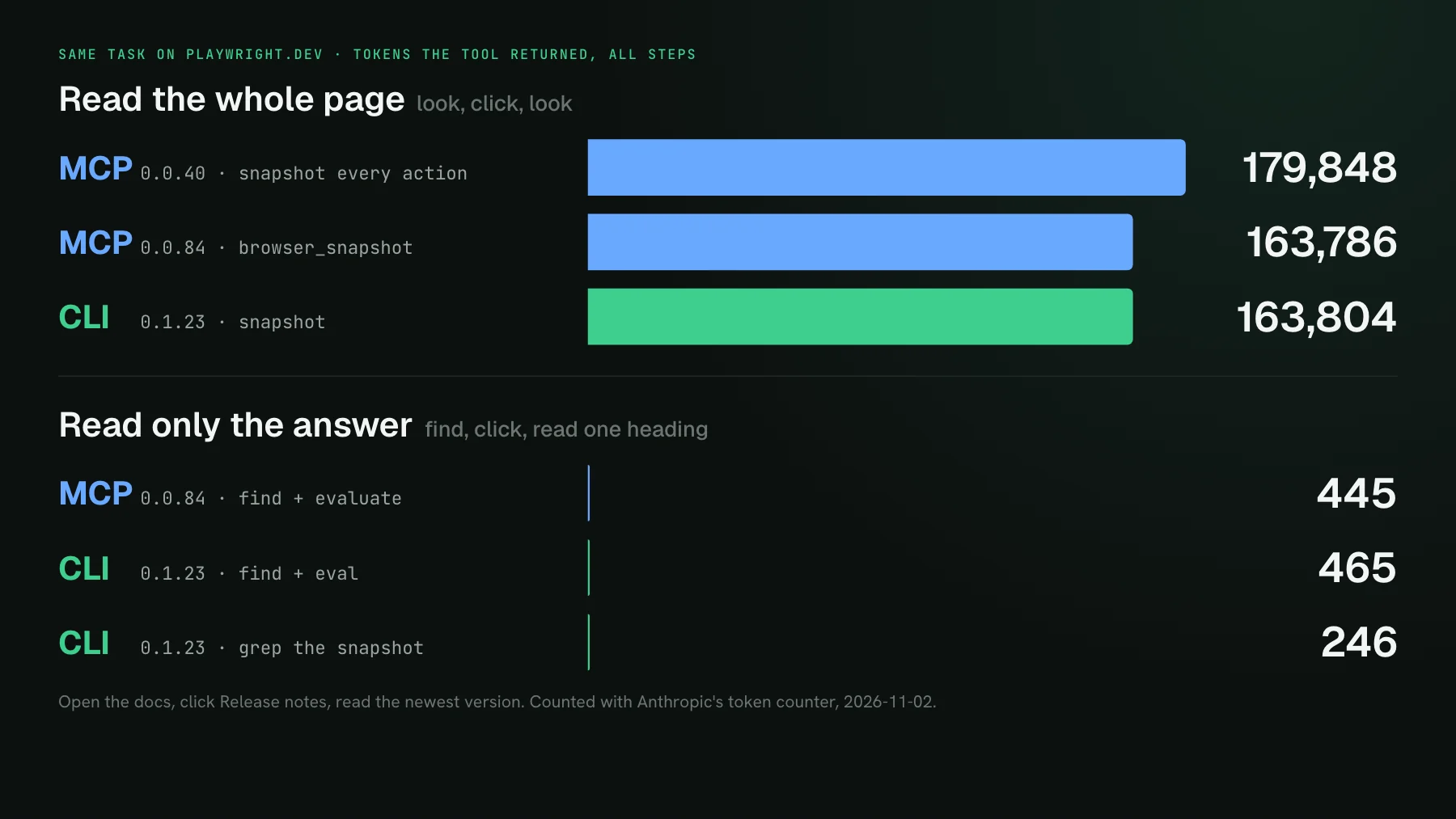
- Read the whole page each time. Ask for the full snapshot after opening and after clicking. MCP: 163,786 tokens. CLI: 163,804. The old MCP 0.0.40, which inlined a snapshot after every action, came to 179,848.
- Read only what you need. Search for the link, click it, read one heading. MCP with
browser_findand an evaluate: 445 tokens. CLI withfindandeval: 465. - Filter in the shell. Grep the snapshot file the CLI saved, click, grep the next one: 246 tokens.
So the choice of interface moved the cost by about 5%, and the reading style moved it by roughly 370 times. Most of that spread is one page: the release notes snapshot is 548,367 characters, because a docs page that lists every release has an enormous accessibility tree. On a small app the gap shrinks; adding an item on Microsoft's TodoMVC demo cost 1,955 tokens through the MCP and 1,884 through the CLI, reading the snapshot each step. The lesson holds either way: an agent that looks at the whole page by habit pays for the whole page.
What happened in real Claude Code runs?
Real agent runs came out close too. We gave Claude Code 2.1.316 the same prompt eleven times, with no user config, and measured how much context each task added. Playwright MCP with tool search on added a median of 1,724 tokens over four runs. Playwright CLI without its skill, where the agent learned the commands from --help, added a median of 1,442. Every run answered Version 1.64.
Two results stand out. The CLI's skill, which playwright-cli install --skills adds to .claude/skills/, cost about 6,000 tokens the moment the agent loaded it, so the runs with the skill came to about 6,800 each. The skill teaches the agent a lot of commands it did not need for a three-step task. And the most expensive single run used the MCP: a click missed, the agent asked for the full snapshot to recover, and that one recovery step cost more than ten ordinary runs.
Session start tells the same story. With Claude Code's default tool search, adding the Playwright MCP server raised the starting context by 294 tokens. With ENABLE_TOOL_SEARCH=false it raised it by 6,860, which is roughly what the February comparison was paying. If you run a client without deferred tool loading, that upfront cost is real and the CLI avoids it.
Where the CLI still wins
The CLI's real advantage is the shell around it. The cheapest run of all came from an agent without the skill that did what a developer would: it piped the snapshot into grep, so one line reached the model instead of 31,695 characters. With the MCP, the tool result lands in context first and gets filtered after. With a CLI, the agent can filter before it reads, chain commands with &&, save output to a file, and come back to it later.
The CLI is also headless by default and keeps sessions in memory unless you pass --persistent, which suits agents running side by side. The MCP keeps the edge where Microsoft says it does: an agent loop that runs for a long time inside one client, holding browser state across many turns, with no shell in the picture.
Which should you use?
- If your agent has a shell (Claude Code, Codex, Cursor's agent), either works. Pick the CLI if you want the agent to filter output with the tools it already knows.
- Skip the CLI's skill for short tasks. The bare CLI read
--helpand did fine; the skill pays off when the agent needs the long tail of commands, like tracing or request mocking. - With the MCP, keep tool search on and pin the version. See our Playwright MCP guide for the setup.
- With either, teach the reading habit: find the element, read the one heading, and fetch the full snapshot only when the agent is lost.
The same split, for the visual check
UI Verify, our visual regression testing tool for coding agents, splits the work the same way: a CLI for the action and an MCP for reading the result. While the agent edits, uiverify check renders only the stories it touched, on the same machines as CI, and diffs them against the real CI baseline without posting a check or moving a baseline. On our own Storybook, a scoped check of two stories printed 666 characters, about 315 tokens, ending in a verdict and counts.
When a story does change, the agent asks the UI Verify MCP for that one story's before and after, cropped to the region that moved, so the pixels it reads are the difference and nothing else. The check docs cover scoping, and the check skill gives your agent the loop. You can start on the free plan of 10,000 snapshots a month, or 50,000 a month for an open-source project.
A visual check your agent can call from the shell
uiverify check renders just the stories you touched against the real baseline, and the UI Verify MCP hands your agent the cropped before and after of anything that changed.
Start for freeNo credit card required.
Check visual changes mid-edit
Preview a UI edit against the real baseline, no PR, no moved baseline.