The best Chromatic alternatives in 2026
The best Chromatic alternatives in 2026, compared: UI Verify, Percy, Applitools, Argos, Playwright, and more, with pricing, AI review, and when to switch.
 Igor LuchenkovBuilding UI Verify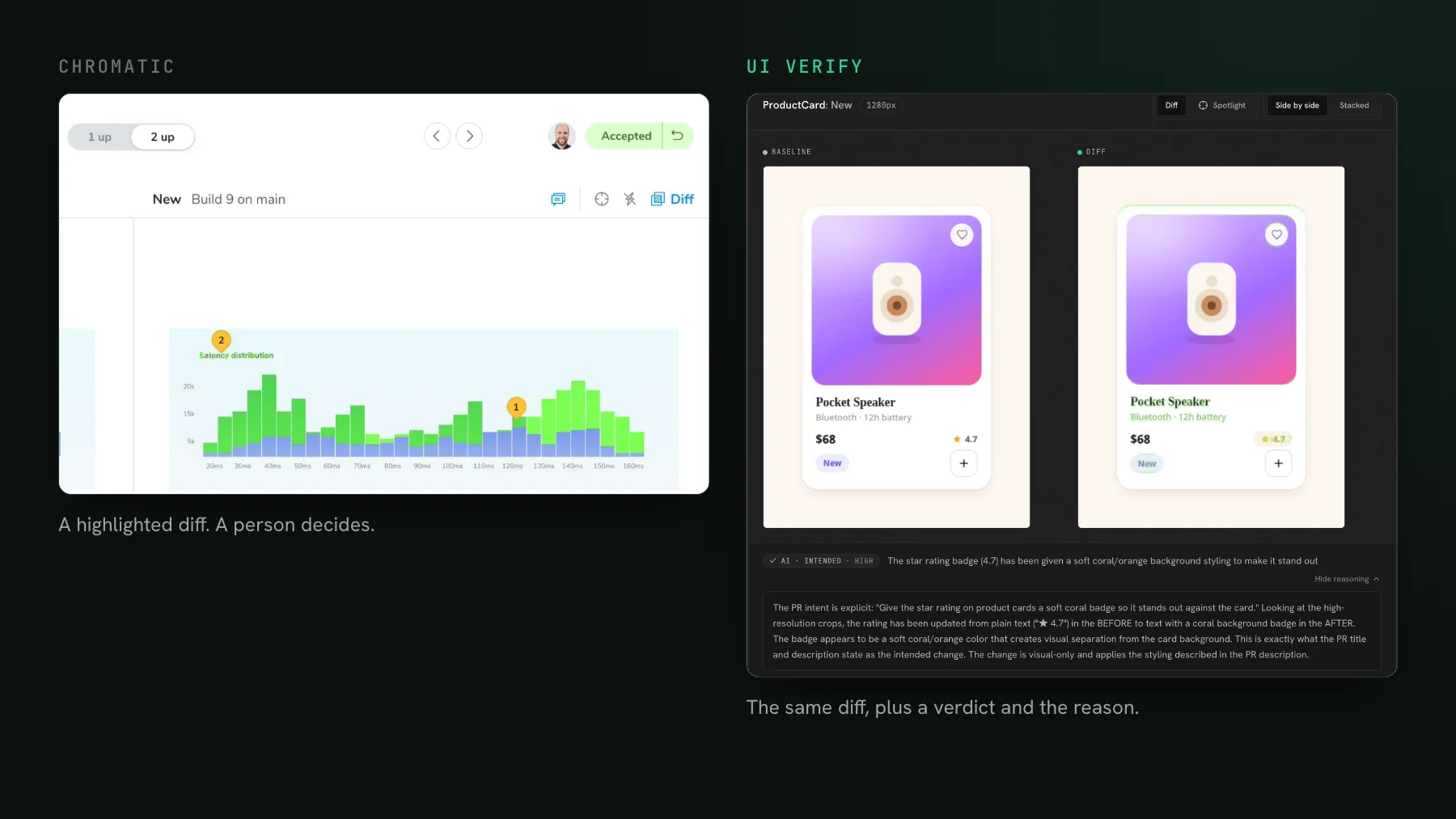
On this page
- Why teams leave Chromatic
- What to look for in a Chromatic alternative
- The best Chromatic alternatives in 2026
- 1. UI Verify: best for agent-written pull requests
- 2. Percy: best for BrowserStack and device-cloud teams
- 3. Applitools: best for enterprise cross-browser Visual AI
- 4. Argos: best for teams that capture in their own CI
- 5. Playwright screenshots: best free, local option
- 6. Lost Pixel: best open-source, self-hosted option
- Chromatic alternatives compared
- How to switch without betting your CI on it
- What is the best Chromatic alternative?
- Is there a free Chromatic alternative?
- Can I migrate off Chromatic without rewriting my tests?
- Why did my Chromatic bill jump when we started using AI coding agents?
I have used Chromatic for years and I still think it is a good product. But over the last year more and more teams have started looking for a way off it, and the reasons are consistent. This is the roundup I wish I had when I started evaluating: what the real Chromatic alternatives are in 2026, what each one is actually good at, and when you should just stay on Chromatic.
Why teams leave Chromatic
The first reason is cost, and it got much worse with coding agents. Every visual testing tool that renders in the cloud bills per snapshot, so your bill is the number of states you render times how often CI runs them. Agents push both numbers up at once. The arithmetic is short: a snapshot is one story in one browser at one viewport, rendered once per build, so twice the pull requests means twice the snapshots on the exact same tests. The bill climbs a little every week, and most teams do not decide to leave until someone pulls up the invoice and reads the monthly number out loud. Nothing about the UI got more valuable to screenshot. The machine just opened a lot more pull requests.
There is a subtle version of this too. When PR volume climbs like that, nobody spends proportionally longer reviewing the checks, so each individual run is worth less right up until the one time it catches something real. You end up paying peak prices for a check most people have quietly stopped reading.
The second reason is that after the render, the diff, and the bill, the tool still just tells you to go look. It shows you a pixel difference and hands the decision back to you. That was fine when a human opened three PRs a day. It does not scale to an agent opening thirty. By then the bottleneck has moved: capturing the change is the easy part, and the work is deciding whether the change was the point of the PR or a regression that snuck in, and catching that regression before it falls through the process. That decision is exactly the part a diff viewer leaves to you.
So the question is not just which tool is the cheapest Chromatic clone. It is which tool fits a workflow where agents write the UI, open the pull requests, and increasingly triage the results.
What to look for in a Chromatic alternative
- Cost that survives agent-scale commit volume. Per-snapshot billing means your bill tracks render count times run frequency, and both explode with agents. Weigh the free tier, the overage rate, and how well the tool skips unchanged work.
- Judgment, not just a diff. A tool that tells a real regression from an intended change, so a green check means something and your queue holds only what needs a human.
- Agent-native review. An MCP your coding agent can actually use to read the diffs and accept baselines from the terminal, not just to write tests.
- No lock-in to one framework. Capture from Storybook, Playwright, and Vitest, not Storybook alone, so the tool fits whatever you already run.
- Determinism handled for you. Flaky diffs are the fastest way to get a team to ignore the check, so the tool should neutralize the common false-diff sources rather than hand you knobs.
- An easy exit. A CI swap, not a rewrite, and ideally a way to run it alongside your current tool so you can evaluate without betting your pipeline on it.
The best Chromatic alternatives in 2026
Six tools worth evaluating, from a drop-in cloud service to a free local library to a self-hosted option. I have listed UI Verify first because it is the one I build, and then made the case for each other tool where it beats us.
1. UI Verify: best for agent-written pull requests
UI Verify does the same job as Chromatic and adds the judgment layer Chromatic leaves to you. It screenshots your UI on every pull request, an AI judge calls each change a regression or an intended change with a reason, and it holds the PR when it flags a regression so a real one cannot merge behind a green check. It reads your existing Storybook stories, Playwright pages, and Vitest components by replaying an archive of the run, so there is no separate visual SDK to author and no Storybook requirement.
- An AI judge that classifies each change and holds the PR on a regression, so review is decisions, not raw diffs. See the AI judge.
- Agent review over MCP: your coding agent reads the exact per-story diffs and verdicts and accepts the intended baselines from the terminal. See triage with your agent.
- Archive-replay of the Storybook, Playwright, and Vitest tests you already have, with no snapshot calls to sprinkle through your suite.
- Determinism handled for you at capture time, so you are not hand-tuning
delayand diff thresholds: a seededMath.random, inlined cross-origin fonts, a fetch-once image cache, a hermetic network, andprefers-reduced-motion, plus a re-render that auto-ignores flakes. See fix flaky visual tests. - Reads your existing `parameters.chromatic` config (disableSnapshot, delay, modes, viewports), so migrating is a CI swap. See UI Verify vs Chromatic.
- Chrome, Firefox, and Safari on the free tier.
To be clear, an AI review layer is no longer unique to us, and the field is adding one across the board. What UI Verify adds against Chromatic specifically is the combination: a judge that actually holds the merge, an MCP your agent triages and accepts baselines from, archive-replay so there is nothing to author, and double the free tier at half the per-snapshot rate.
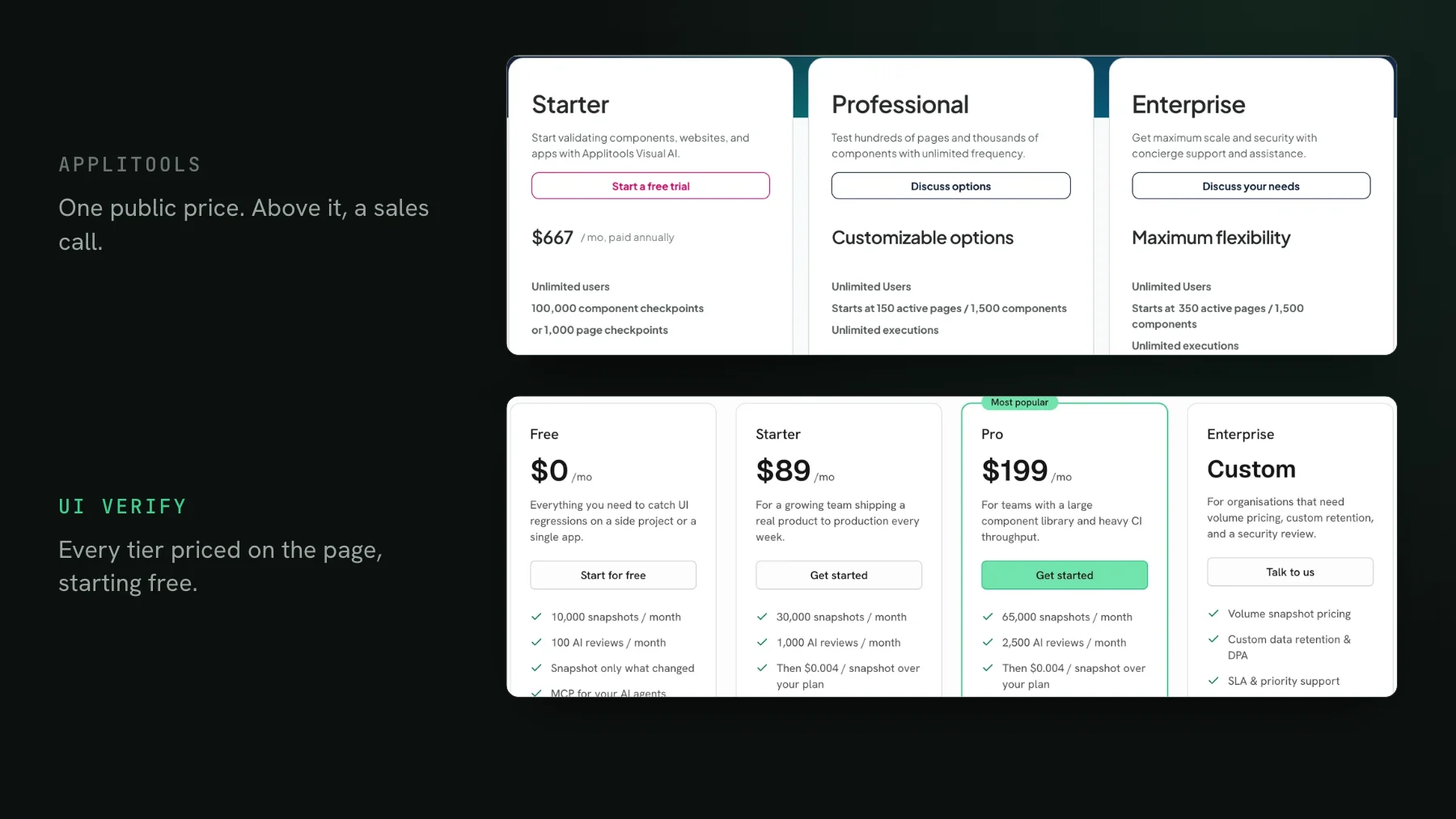
Pricing: free tier of 10,000 snapshots a month, no credit card. Paid plans start at $89 a month for 30,000 snapshots, with $0.004 per snapshot beyond your plan. Open-source projects get a larger free tier of 50,000 snapshots a month, self-declared at sign-up with no approval and no card (see free for open source). The cost lever is the same as on Chromatic, render fewer states, so economical visual tests and `--only-changed` skip-unchanged apply here too. That is the same cost tuning you might otherwise stay on Chromatic for, except on a bigger free tier and a lower per-snapshot rate.
Best for: teams whose pull requests are increasingly agent-written, and Chromatic users who want a judge that holds the merge, not just a review UI to click through.
2. Percy: best for BrowserStack and device-cloud teams
Percy is BrowserStack's visual testing product. Like Chromatic it renders in real browsers, diffs against hosted baselines, and posts a PR check, and its Visual Review Agent flags each change as likely-a-bug or likely-intended and weighs it against the pull request summary. The BrowserStack MCP can trigger a Percy build and approve it from your agent.
- Hosted baselines, a review queue, and a pull-request check.
- A Visual Review Agent that summarizes and classifies each change in plain language.
- Runs on BrowserStack's device cloud, and App Percy covers native iOS and Android visual testing.
- Wide SDK support (Storybook, Playwright, Cypress, and more), wired in with
percySnapshot()orpercyScreenshot()calls in your tests. - A BrowserStack MCP to run and approve builds from a coding agent.
Pricing: per-snapshot, like Chromatic, inside BrowserStack's billing. Check their site for the current free allowance and rate.
Best for: teams already on BrowserStack, or anyone who needs native mobile app and real-device coverage. See UI Verify vs Percy.
3. Applitools: best for enterprise cross-browser Visual AI
Applitools is the enterprise incumbent. Its Visual AI is a perceptual diff engine that decides whether two screenshots differ meaningfully, tuned per checkpoint with match levels, and its Ultrafast Grid renders across many browsers and devices. Applitools Autonomous generates and self-heals tests from plain-English steps.
- Perceptual Visual AI, tuned per checkpoint with match levels such as Strict, Layout, and Dynamic.
- The Ultrafast Grid: broad cross-browser and device coverage, including Edge and mobile.
- Autonomous test generation and self-healing from plain-English steps.
- Contrast Advisor for WCAG contrast, and a Figma plugin for comparing designs against the running app.
- An MCP server that sets up Eyes and adds checkpoints, and can also inspect a failure and accept or reject a checkpoint once you approve.
Pricing: one public entry tier billed annually, with a free trial; Professional and Enterprise are quote-based. Check their site for current numbers.
Best for: large organizations standardizing on one vendor for cross-browser Visual AI, accessibility, and design tooling. See UI Verify vs Applitools.
4. Argos: best for teams that capture in their own CI
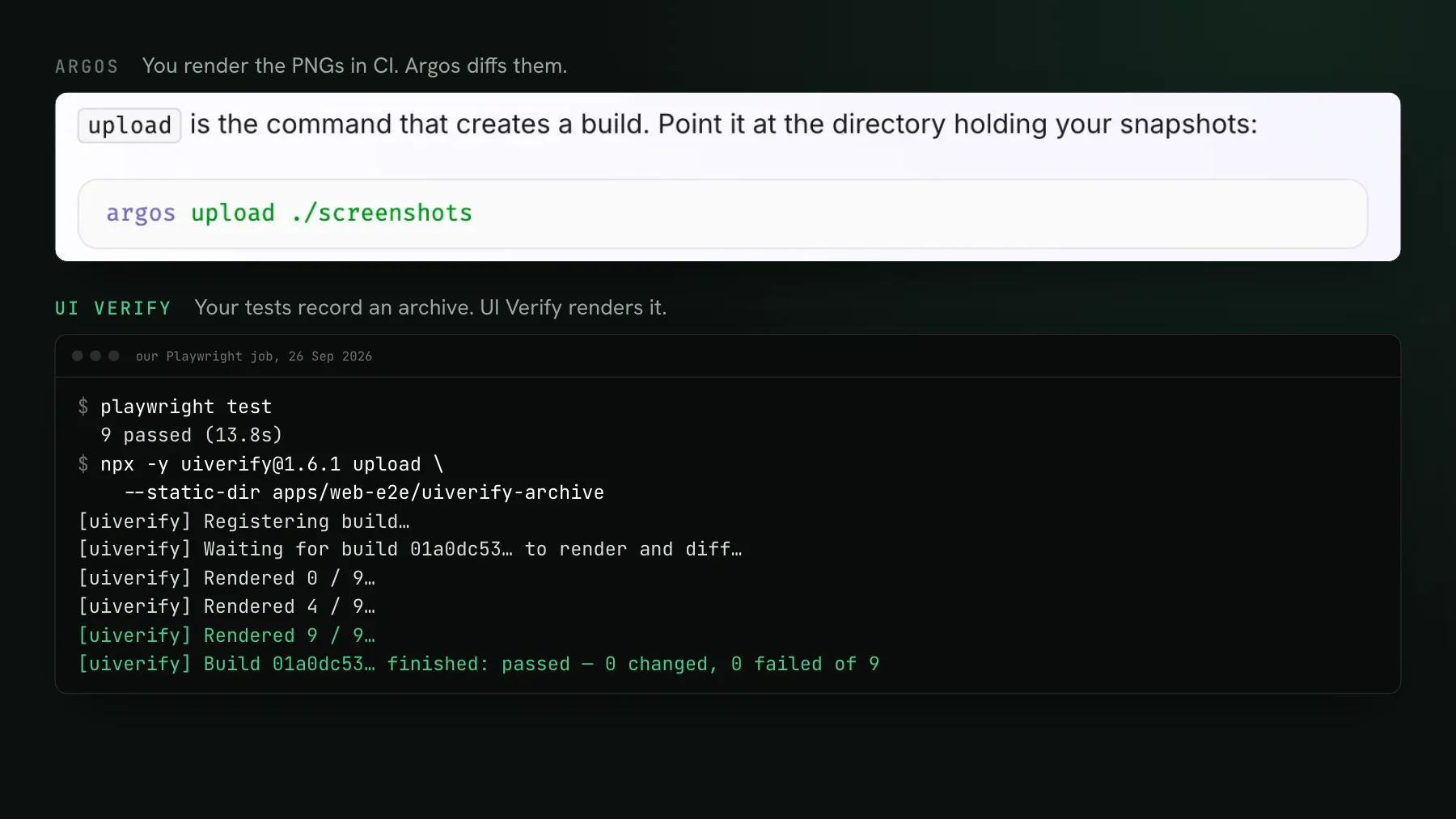
Argos takes the screenshots your CI captures and uploads and diffs them for you, rather than rendering anything itself. It hosts the baselines, gives you a review UI and a PR check, and ships an MCP server so a coding agent can read a build's results and triage them.
- Hosted baselines and a PR check over the screenshots your pipeline produces.
- SDKs for Storybook, Playwright, Puppeteer, and WebdriverIO.
- An MCP server for agent-driven review of build results.
- Open-source roots, with a free tier for small projects.
Pricing: per-screenshot on the hosted service, with a free tier. Check their site for current numbers.
Best for: teams happy to capture screenshots in their own CI who want a lightweight hosted diff and review layer on top. See UI Verify vs Argos.
5. Playwright screenshots: best free, local option
Playwright's built-in toHaveScreenshot is free, local, and already in your runner, diffing against a baseline committed next to the test with mask, threshold, and maxDiffPixelRatio, animations off by default. It is the zero-cost end of the spectrum, with the review workflow and history left for you to build.
- Free and built into Playwright, with no separate service.
- Real-browser screenshots diffed against baseline images committed to your repo.
mask,stylePath,threshold, andmaxDiffPixelRatioknobs for false diffs.- Runs entirely inside your own CI.
The trade-offs: the cross-OS baseline problem (screenshots do not rasterize identically across operating systems, so teams pin a fixed image and keep a separate baseline per OS), baseline images committed into your repo, and a change that shows up as a failed test with no history, review UI, or judgment.
Pricing: free. You pay in setup and maintenance instead of dollars.
Best for: small suites you are happy to review yourself, and teams that want the visual check to live entirely inside their own CI. See UI Verify vs Playwright.
6. Lost Pixel: best open-source, self-hosted option
Lost Pixel is an open-source visual regression tool you can self-host. It integrates with Storybook, Playwright, Cypress, and page-level captures, and diffs against baseline images. Its team joined Figma in April 2026 and is sunsetting the hosted platform, and the GitHub repository was archived on April 22, 2026, so what remains is the self-hosted core.
- Open source and self-hostable, so there is no per-snapshot cloud bill if you run it yourself.
- Storybook, Playwright, Cypress, and page-level capture.
- A hosted platform that is being wound down, so plan on running it yourself.
Pricing: the core is open source and free to self-host. The hosted platform is being sunset, so budget for running it yourself.
Best for: teams that want to own the infrastructure and avoid metered cloud billing, and are willing to trade managed convenience for control.
Chromatic alternatives compared
| Tool | AI review of changes | Agent review over MCP | Capture | Free tier | Best for |
|---|---|---|---|---|---|
| UI Verify | AI judge, regression vs intended, holds the PR | Reads diffs, accepts baselines | Archive-replay of your tests | 10,000 snapshots / mo | Agent-written pull requests |
| Percy | Visual Review Agent | Runs and approves builds | SDK calls in your tests | 5,000 screenshots / mo | BrowserStack and device cloud |
| Applitools | Visual AI, perceptual | Sets up tests, accepts checkpoints | Many SDKs | Free trial only | Enterprise cross-browser grid |
| Argos | Agent triage over MCP | Reads and approves builds | You capture in CI, upload | 5,000 screenshots / mo | Capturing in your own pipeline |
| Chromatic + TurboSnap | None for diff triage | Storybook context only | Storybook-first | 5,000, Chrome only | Accessibility and Edge |
| Playwright screenshots | None | Drives the browser | Built in, local | Free, local | Small suites you review yourself |
| Lost Pixel | Pixel diff | Not its focus | Open source, self-host | Free to self-host | Owning the infrastructure |
How to switch without betting your CI on it
The lowest-risk way to evaluate any of these is not a hard cutover. Run the new tool as a non-blocking step in CI, right alongside Chromatic, for a couple of weeks. Let both render every pull request, then compare what each one flags: where they agree, where the new tool catches something Chromatic missed, and where it over-flags noise. You get a real, side-by-side read on accuracy and cost on your own codebase before anything gates a merge.
- Add the new tool as a second, non-blocking CI job so a failure cannot block a PR.
- Run both for a week or two and collect what each one flags on the same pull requests.
- Compare accuracy (real regressions caught versus noise) and the projected bill at your volume.
- When you trust it, flip the new tool to required and drop the old one.
What is the best Chromatic alternative?
It depends on your workflow. For teams whose UI is written and reviewed by coding agents, UI Verify fits best because it judges each change and exposes review over MCP. If you already live in BrowserStack or need native mobile coverage, Percy. For enterprise cross-browser Visual AI and accessibility tooling, Applitools. If you want a free, local option, Playwright's toHaveScreenshot. And if the problem is cost, moving to a bigger free tier and a lower per-snapshot rate does more than staying and tuning Chromatic. On the pricing math alone, once you stop re-billing the unchanged stories on every commit and cut the exploding ones, moving off per-snapshot billing can take a bill down by more than half, with the agentic review on top. To see the gap at your own volume, the pricing calculator lays the monthly cost of each tool side by side.
Is there a free Chromatic alternative?
Yes, a few. Playwright's toHaveScreenshot is free and runs locally in your test runner. Lost Pixel is open source and free to self-host. And UI Verify has a free tier of 10,000 snapshots a month, roughly double Chromatic's, if you want a hosted tool without paying to start.
Can I migrate off Chromatic without rewriting my tests?
Usually yes. Moving to a tool that captures Storybook is a CI swap, not a rewrite. UI Verify specifically reads your existing parameters.chromatic config (disableSnapshot, delay, modes, and viewports), so those settings carry over, and it supports the same --only-changed skip-unchanged behavior. See UI Verify vs Chromatic.
Why did my Chromatic bill jump when we started using AI coding agents?
Because visual testing bills per snapshot, and your bill is the number of states you render times how often CI runs them. Agents push both up: more pull requests, more often, each re-rendering your stories. The fix is the same on any per-snapshot tool, render fewer states and skip the unchanged ones. Two story patterns can cut a component's snapshot count up to 10x with the same coverage, see how I cut my Chromatic bill 10x.
Leaving Chromatic? Try UI Verify
UI Verify screenshots your UI on every pull request and an AI judge tells an intended change from a real regression, then holds the PR on a regression so you review decisions, not diffs. It reads your existing Storybook config, so switching is a CI swap. Free for 10,000 snapshots a month.
Start for freeNo credit card required.
Set up visual testing
From no visual tests to a green check on every pull request.