The regressions hide in the pages nobody tests
Visual regression on legacy pages: a shared component changes, an old page nobody tests breaks, and you find out weeks later. Why team churn makes it worse, and the fix.
 Igor LuchenkovBuilding UI Verify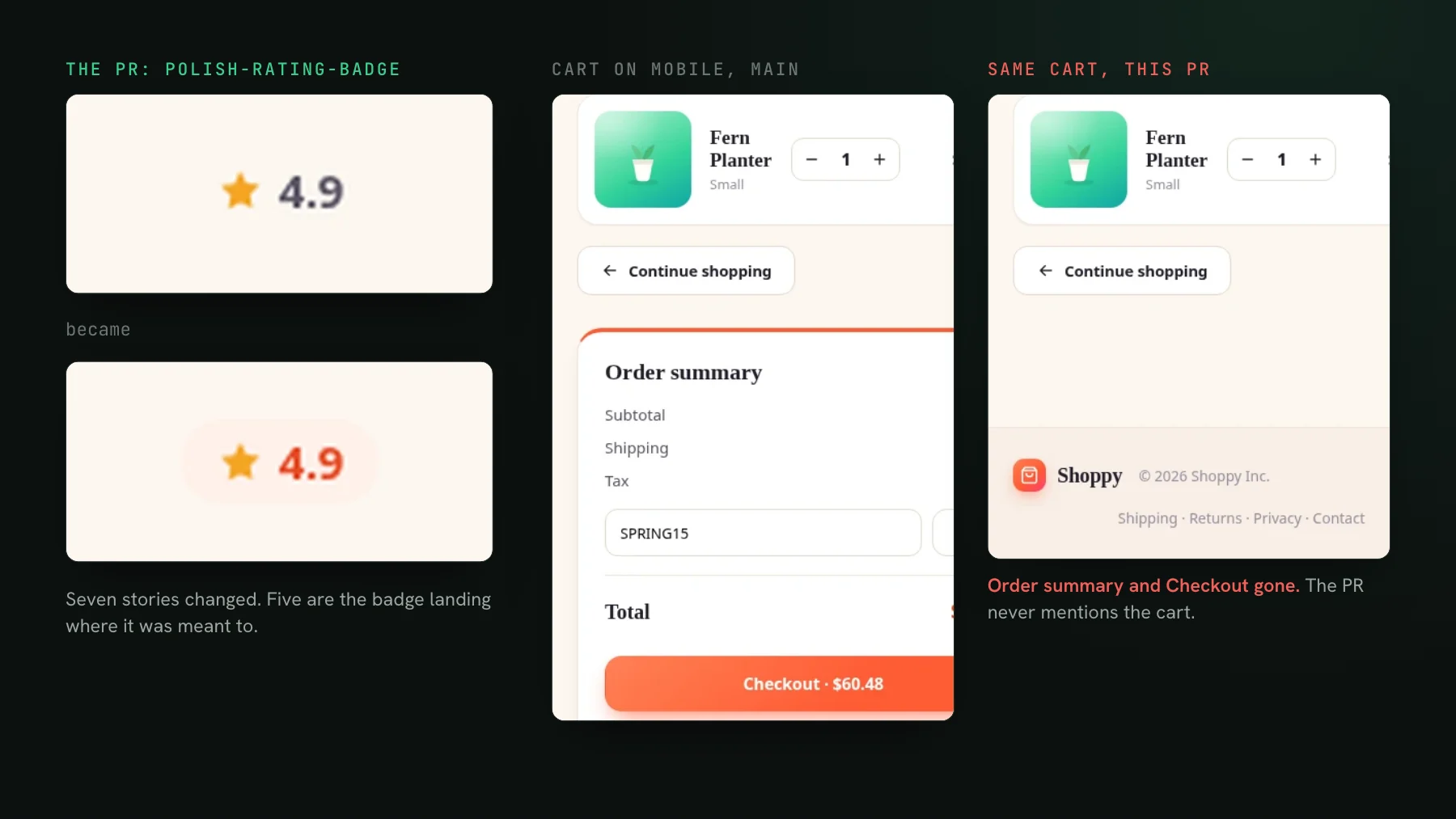
On this page
The visual regressions that reach production usually live in the pages nobody tests: an old screen, untouched for a year, that breaks when a shared component changes underneath it. Nobody edited that page, so nobody looked at it, so the break shipped. The change that caused it was three files away and looked completely safe.
"One day you just pass by and find something broken"
You know where they reach you: mainly old pages nobody has touched for a few years. Why? The team keeps changing, and the new developer does not know that this component is also used on another page, so they modify it and cause a regression on the other side. Do you cover those pages? No. Nobody runs regression tests on all pages; you always forget the ones that are not the main pages. So how do you find out? One day someone just passes by and finds something broken.
After a decade, a product is a zoo of features, some behind flags, and naturally nobody has it in their head. Ask a team on a codebase that old how often this bites and the answer is roughly once per sprint: a component reused in ten places, one of them breaking unnoticed. The workaround people build is manual: ask the agent to list where a block is used, then click through each page yourself. It works until the list is wrong, which is the day someone forgot to update the import that would have put the page on it.
Why is code review bad at catching these regressions?
The damage is not where the diff is. You review the component change, it looks correct, you merge. The page that renders that component two layouts deep is not in the diff and not in anyone's head. The blast radius of a shared-component change is the whole set of pages that use it, and almost nobody holds that set in memory. Two things compound: teams only run regression coverage on the main flows, so the deep and old pages have no automated check at all; and teams change, so the person most likely to break the old page is the person least equipped to know they did.
polish-rating-badge, set out to restyle one small badge. The PR view lists the seven stories it reached: five where the badge landed as intended, and two pages the description never mentions.I have said a version of this about myself in public: one button appears on fifty pages, I change it, I test one page, I ship, and the visual check on the PR is the thing that says "oh no, it's not fine" about half the time. I forget things. The reuse graph of a years-old app is not something a person should be expected to carry.
The fix: screenshot the shared component and everything that renders it
When you capture a shared component and every page that renders it, a change to that component surfaces every place it lands, including the old screen nobody remembers. You do not have to know the blast radius; the diff shows it to you.
That build is the mechanism working. The pull request set out to change the settings pages, and the judge agreed those were intended. It also flagged the Projects page and the New Project page, which were not in the diff and were not in the author's head, because the shared icon rail that draws their sidebar had reordered. 235 pixels on a page nobody opened. This time it was harmless. The point is that nobody had to know the rail was shared to find out; the diff listed every page it lands on.
Is covering every page affordable?
Covering the long tail sounds like paying to re-render the whole app on every pull request. It is not, because a build only re-renders what your change could have affected. With --only-changed, UI Verify reads the module dependency graph from the built Storybook and walks upward from every changed file to every story that imports it, directly or transitively, and carries the rest forward at a fifth of the cost. A path collision seeds every story it could match, so it over-renders rather than misses. The one thing that forces a full render is a change to a global decorator or style, which is correct, because those touch everything. How this stays safe is in skip unchanged; it needs Storybook built with --stats-json, and it does not apply to Playwright page captures, which have no module graph.
--only-changed selection over our own built Storybook for single-file changes. EmptyState.tsx reaches 121 stories in 22 story files, which is more than anyone would list from memory, and a file inside the global decorators re-renders everything.On top of that, the AI judge reads the PR intent, so when your shared-component change lights up twelve pages it tells the intended restyle apart from the one page that actually broke, instead of handing you twelve diffs to open.
The point is to move the burden of remembering off people and onto the check. A rotating team cannot be expected to carry the full reuse graph of a years-old app, so do not rely on it. Screenshot the shared components and the pages that use them, and the old screen that would have broken silently holds the PR instead. The setup skill gets the captures and CI in place, and do you need visual regression testing helps you decide how wide to cast the net.
Catch the break on the page you forgot about
UI Verify screenshots your shared components and the pages that render them, so a change that breaks an old screen holds the PR instead of shipping. Start free.
Start for freeNo credit card required.
Set up visual testing
From no visual tests to a green check on every pull request.