Do you need visual regression testing?
Visual regression testing pays off on legacy, sprawling, and agent-written frontends, and pays least on small, clean component systems.
 Igor LuchenkovBuilding UI Verify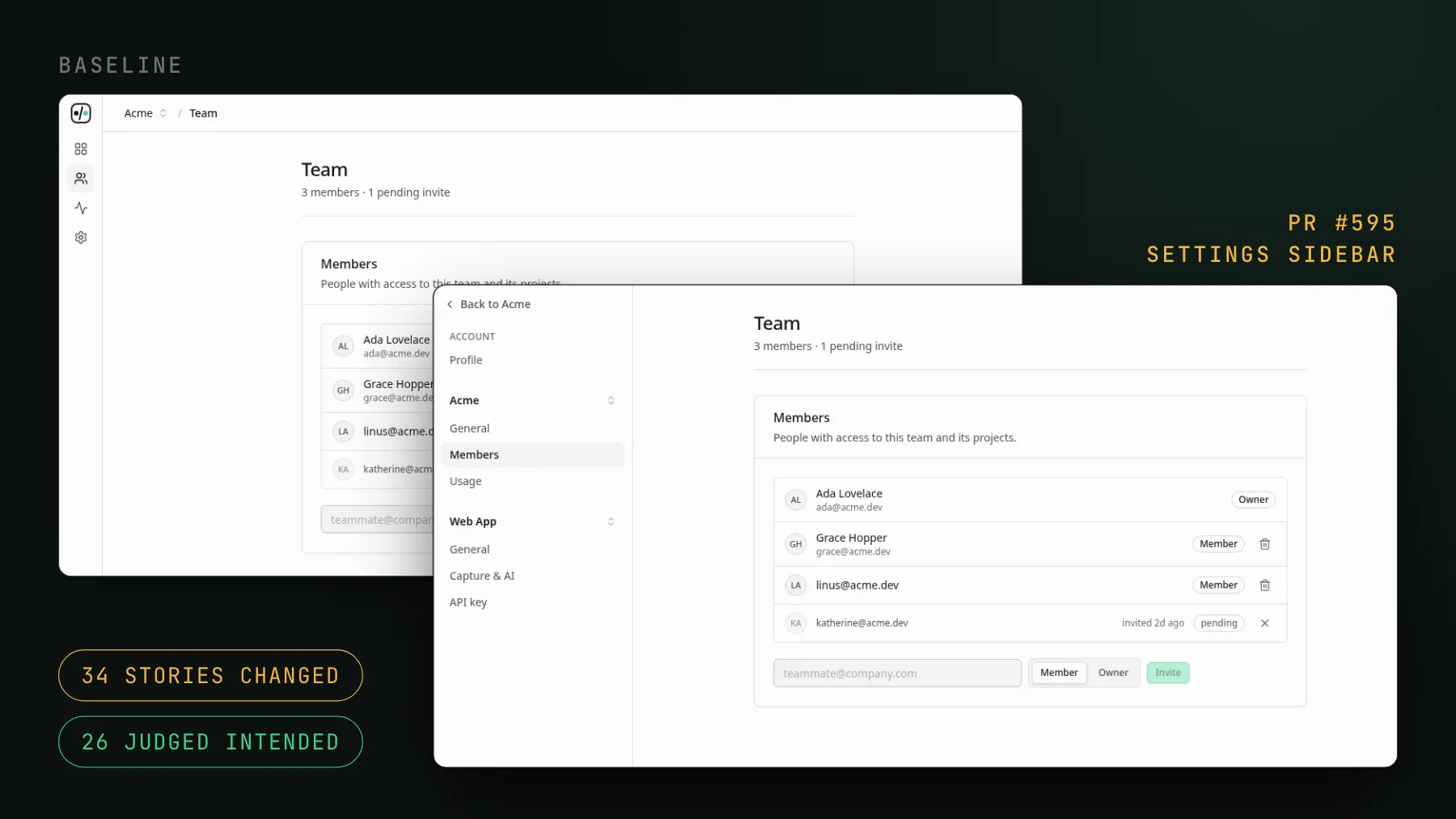
On this page
You need visual regression testing if your UI changes faster, or in more places, than your team can look at every screen a change touches: legacy and sprawling frontends, agent-written UI, many contributors, frequent restyles. On a small, clean component system with careful review, you can skip it for now. This is the guide I wish existed before I set it up: what visual regression testing protects, the codebases where it pays for itself, the ones where you can skip it for now, and the objection that actually decides adoption.
What does visual regression testing protect against?
Visual regression testing renders your UI, screenshots it, and diffs each image against a saved baseline, so an unintended change in the rendered pixels fails the build. It exists to catch one specific class of bug: the change that passes every assertion and still ships broken. A refactor nudges a button eight pixels, a token flip breaks contrast, a dependency bump restyles a card, a flex container wraps at a width nobody tested. Your unit tests stay green because nothing threw and every value is still correct. Only a screenshot shows it. If that failure mode is rare in your work, you may not need the tool. If it is a weekly occurrence, read on.
When does visual regression testing pay for itself?
The common thread below is the same: your UI changes faster, or in more places, than your team can eyeball every screen a change touches. That gap is what visual regression testing fills. When we redesigned our own settings sidebar, one pull request changed 34 stories across the account, admin, team and project pages.
- Legacy and sprawling frontends. A 15-year app nobody can hold in their head starts leaking regressions to customers the moment a shared component changes and no one remembers everything that renders it. The larger and older the surface, the more a change reaches somewhere nobody thought to check.
- Agent-written and vibe-coded UI. Coding agents write frontend code far faster than a human can review it, and the failure mode is specific: the logic looks right, the tests pass, and the layout quietly broke. Agent-built CSS in particular looks perfect on desktop and falls apart at mobile and tablet widths. A screenshot at each width is the only thing that catches it.
- Many contributors, or teams that do not talk. A vendor team and an internal team push to the same repo, merges combine, and something breaks that neither side sees. Visual checks are the shared safety net multi-contributor UI otherwise lacks.
- Frequent restyles and design-system churn. If you flip tokens, upgrade a component library, or refactor shared styles often, every one of those touches every screen downstream. That is the highest-value place to have a diff waiting.
- Customer-facing and user-generated surfaces. The pages a customer sees, and the content they do not want changing under them, are where a silent visual regression costs the most. Scope coverage there first.
When can you skip visual regression testing?
Visual regression testing pays least on the three kinds of UI below, so you can skip it there for now and spend the effort where it counts:
- A small, clean, atomic-component codebase with strong review. If your UI is a well-factored component system, every change is localized, and a human reviews each diff carefully, you already have most of the protection. The tool adds the least here.
- A surface that rarely changes. A page you touch twice a year does not need a check on every pull request. The value tracks how often the UI moves.
- Low-stakes internal screens. A login form, a settings page, an internal admin tool that only staff see. Deliberate scoping beats snapshot everything: cover the customer-facing artifacts and skip the rest.
What decides whether a team adopts visual testing?
Ownership decides it. Almost everyone agrees visual testing is worth it in principle. Adoption dies somewhere else: on who owns it. Someone has to write the stories or the tests, keep them deterministic, and triage the diffs, and on most teams no one volunteers to carry that maintenance tax forever. That, not the value question, is where visual testing gets dropped.
The agent era changes the answer to that objection. If a coding agent is already writing your components, it can write the visual tests alongside them and keep them deterministic, following a checklist you encode once. You go from authoring and maintaining tests to reviewing the diffs the tests surface. That is a different, much smaller job, and it is the one that makes visual testing land instead of getting shelved. See stop writing Storybook stories by hand for how that works in practice. In this repo, 95 of the 96 Storybook story files were added in a commit co-authored by Claude.
Decide it in one question
Does your UI change faster than your team can look at every screen each change touches? If yes, you need visual regression testing, and the size of the yes tells you how much. If your UI is small, stable, and carefully reviewed, you can wait. Everyone in between should scope it to the surfaces that change most and matter most, rather than trying to cover everything at once.
If that sounds like your codebase, the visual testing setup skill wires the capture and CI into one repo for you, and reuses the tests you already have rather than asking you to write new ones. Start there, on your busiest surface, and let a week of real diffs make the call.
Try visual regression testing on one PR
UI Verify screenshots your UI on every pull request and an AI judge tells an intended change from a real regression, so you review decisions, not diffs. Wire it into one repo and see what it catches before you commit to it.
Start for freeNo credit card required.
Set up visual testing
From no visual tests to a green check on every pull request.