React visual regression testing: a baseline you can trust
React visual regression testing with Storybook, Vitest, or Playwright: the setup habits that make every baseline show the screen you meant to test.
 Igor LuchenkovBuilding UI Verify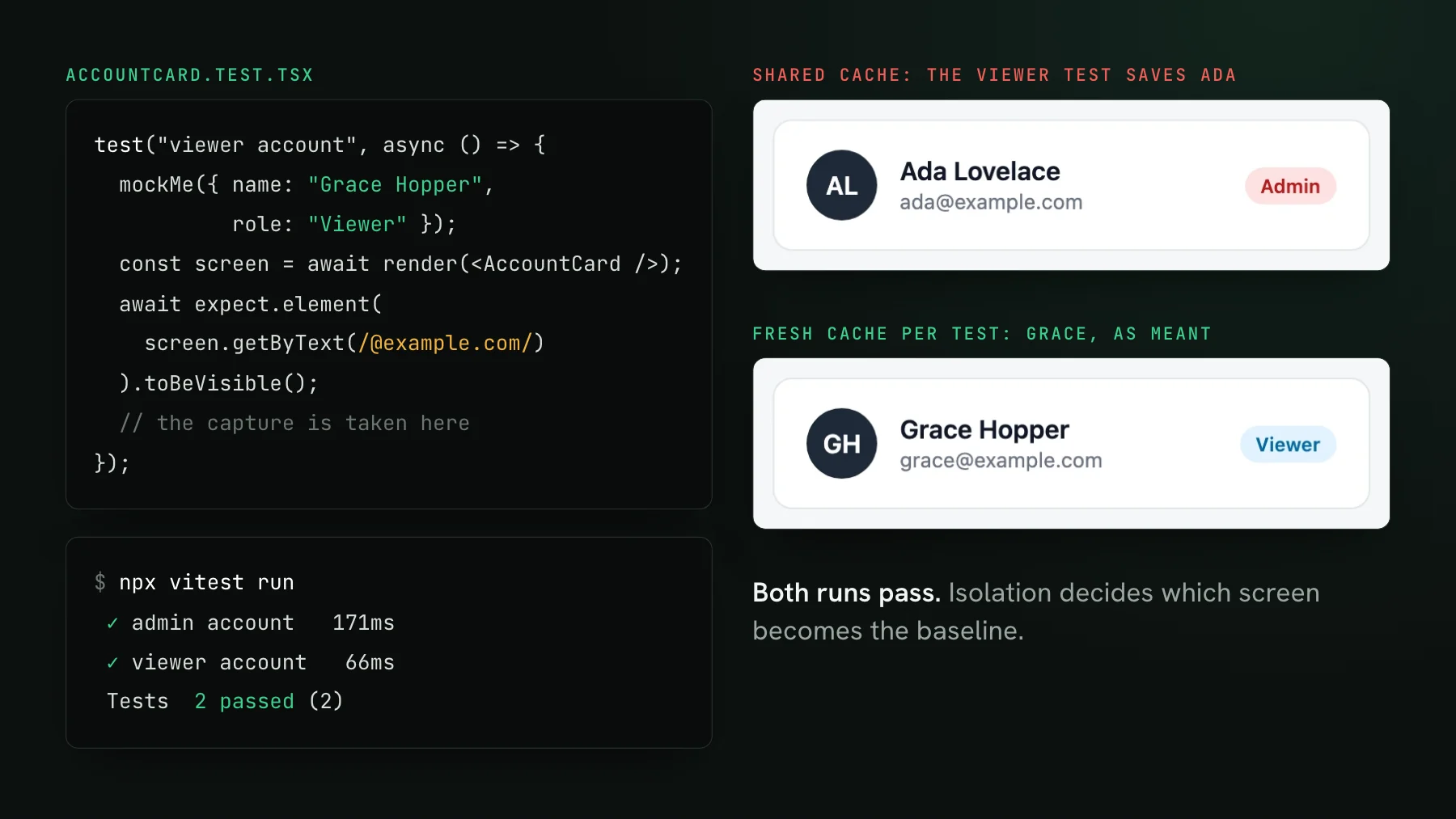
On this page
- Three ways to capture a React UI
- How do you keep one test's data out of the next screenshot?
- What UI Verify holds still, and what your setup owes it
- Mock the network, not the hook
- How do you make sure React has finished rendering before the capture?
- Load one copy of React
- What does a real React diff look like in review?
- Where to start
A visual regression test is only as good as its baseline, the accepted screenshot every later pull request is compared against. Get the first one right and each diff after it points at a real change. In a React app, getting it right comes down to a few setup habits, and this post is the checklist we follow on our own dashboard. The cover shows why the first habit matters: one test, run twice, both runs green, and only one of the two captures is the screen the test meant to render.
React visual regression testing means screenshotting your React components or pages on every pull request and diffing each screenshot against an accepted baseline, so a change in what users see shows up before the merge. The screenshot itself does not care that React produced the DOM. What React changes is everything around the screenshot: caches that outlive a test, rendering that finishes asynchronously, mocked data, and a runner that has to load exactly one copy of React. UI Verify keeps the browser side of every capture stable. The React side, what your test actually puts on screen, comes from your setup, and that is what the rest of this post covers.
Three ways to capture a React UI
- Storybook. Stories for components and whole pages, through
@storybook/react-vite, or@storybook/nextjs-vitefor a Next.js app. A page story with mocked data is a full-page visual test, and UI Verify replays the built Storybook as is. - Vitest browser mode. A component test rendered with
vitest-browser-reactin real Chromium. AdduiverifyPlugin()tovitest.config.tsand every browser-mode test archives its DOM for the visual check, with no extra snapshot calls. - Playwright. Point it at the running app, a Vite dev server or a preview deploy, for pages that only make sense behind routing, auth, or a real backend.
Our own dashboard is a Next.js app and uses all three: around 300 Storybook captures rendered from mocked API responses, a Vitest browser-mode suite that renders the marketing pages, and a Playwright suite. The wiring for each is in the quickstarts for Storybook, Vitest, and Playwright. The rest of this post is the setup that makes those captures trustworthy: four habits, each with the fix we use.
How do you keep one test's data out of the next screenshot?
Give every test and every story its own data cache. Without one, state from an earlier test leaks into the next, and the most common carrier is the data-fetching cache. By default SWR keeps one global cache for the whole app, keyed by request URL. In Vitest browser mode the tests in one file share a page, so when the viewer test rendered <AccountCard />, the cache already held the admin test's /api/me response. SWR returned it immediately and, inside its default two-second deduping window, did not even refetch. The assertion looked for any address at example.com, found Ada's, and passed. TanStack Query does the same thing when the QueryClient is created once at module level and reused.
The leak depends on test order, which is why it is worth fixing up front. Run the viewer test alone and it captures Grace. Run the whole file and it captures Ada. Add .only while you debug and the problem vanishes, then comes back in CI. A visual test inherits this from the test it wraps, and the baseline it stores is whichever version ran first on the default branch.
The fix is one wrapper. In a Vitest test it goes around render:
import { SWRConfig } from "swr";

const Fresh = ({ children }: { children: React.ReactNode }) => (
  <SWRConfig value={{ provider: () => new Map() }}>{children}</SWRConfig>
);

const screen = await render(<AccountCard />, { wrapper: Fresh });In Storybook the same fix belongs in a global decorator, so no story can forget it. This is the one our dashboard's .storybook/preview.tsx applies to every story; dedupingInterval: 0 also stops SWR from skipping a fetch because a sibling story made the same request a moment earlier:
export const withSWR: Decorator = (Story) => (
  <SWRConfig value={{ fetcher, provider: () => new Map(), dedupingInterval: 0 }}>
    <Story />
  </SWRConfig>
);
With TanStack Query, the equivalent is a new QueryClient() per story or per test, with retries off so an error state renders on the first failure instead of after a backoff.
What UI Verify holds still, and what your setup owes it
UI Verify holds the browser side of every capture still: the clock, animations, fonts, randomness and the network, so two captures of the same commit agree and a diff points at a real change. The one input it takes as given is what your test or story puts on screen, because only your code knows the viewer test was meant to show Grace. That is why the fresh cache belongs in your setup on day one. With it in place, the first baseline is the screen you meant, and every pull request after it is measured against the right picture.
Mock the network, not the hook
A React component's loading, empty, and error branches only get screenshotted if something drives the component into them. Mocking at the network layer with MSW does that without touching the component: each story swaps the response for one endpoint, and the real hook, the real fetcher, and the real branching run unchanged. A request that never resolves holds the component in its loading state; a 500 pushes it into the error state. Mocking the hook instead skips the code that decides which branch renders, which is the code most likely to regress.
Two habits keep this honest. Give every visual state its own story or test, because a state with no story is never captured and a regression in it ships unseen. And treat an unexpected error message in a baseline as a bug in the mocks, not as part of the design: a component that falls back to its error state because one endpoint had no handler will pass review if nobody reads the text.
How do you make sure React has finished rendering before the capture?
End the test on an assertion about the final state, not on the render call. In Vitest browser mode render() from vitest-browser-react is async and has to be awaited, and the archive is taken when the test ends or when it calls takeSnapshot(), so whatever is in the DOM at that moment is what gets replayed and diffed. If data arrives after an effect runs, await expect.element(screen.getByText(...)).toBeVisible() waits for it. Pick text that only the final state contains: the viewer test above asserted on any example.com address, which the wrong user satisfied too. A name or a role badge would have failed loudly.
The same rule covers React.lazy and Suspense. Until the lazy chunk resolves, the DOM holds the fallback, and a capture taken then is a picture of a spinner. Wait on an element from inside the resolved tree before the test ends, and the capture shows the component instead of its placeholder.
Load one copy of React
When we pointed Vitest browser mode at our Next.js components, the Storybook Next.js plugin we reused aliased React to Next's bundled copy while vitest-browser-react rendered with another. Hooks from one copy cannot read context from the other, so SWRConfig handed its children a null context and the pages broke in ways that looked like data bugs. One line in vitest.config.ts fixed it: resolve: { dedupe: ["react", "react-dom"] }. If a provider seems to do nothing in tests, check for two Reacts before you debug the provider.
What does a real React diff look like in review?
Often bigger than the change. Most React UIs are lists rendered with .map(), and inserting one item into the array moves every item after it. The diff engine sees each moved card as changed pixels, so a one-line data change can light up a fifth of a page. That is correct, and it is also why a raw pixel count is a poor signal on its own.
What makes a diff like that quick to review is context: which pull request caused it and what that pull request said it would do. That is the job of the AI judge, which reads the change against the pull request and labels it intended or a regression with a reason. A reflow the PR described gets accepted in one click; a reflow nobody asked for, on a page the PR never mentioned, gets a closer look.
Where to start
Start with the capture path you already have, and add the fresh-cache wrapper or decorator on day one, before the first baseline is accepted. Freeze the clock the same way: our Storybook preview pins Date in a global decorator, and freezing time in Storybook covers why that matters. If your tests are Vitest component tests, Vitest visual testing goes deeper on that runner, and the Vitest determinism skill gives your coding agent the same checklist to apply. React itself needs no special integration. The work is making sure the screen in the screenshot is the one the test meant to render.
Visual test your React app
Screenshot your React components and pages from the Storybook, Vitest, or Playwright tests you already have, and review every change on the pull request.
Start for freeNo credit card required.
Deterministic Vitest captures
Stop component-test diffs that flake without a real change.