Stop downloading Playwright screenshot artifacts
Playwright screenshot comparison is solid locally. The pain is CI: download the archive, authenticate, unzip, squint at PNGs. Put the diff in the PR instead.
 Igor LuchenkovBuilding UI Verify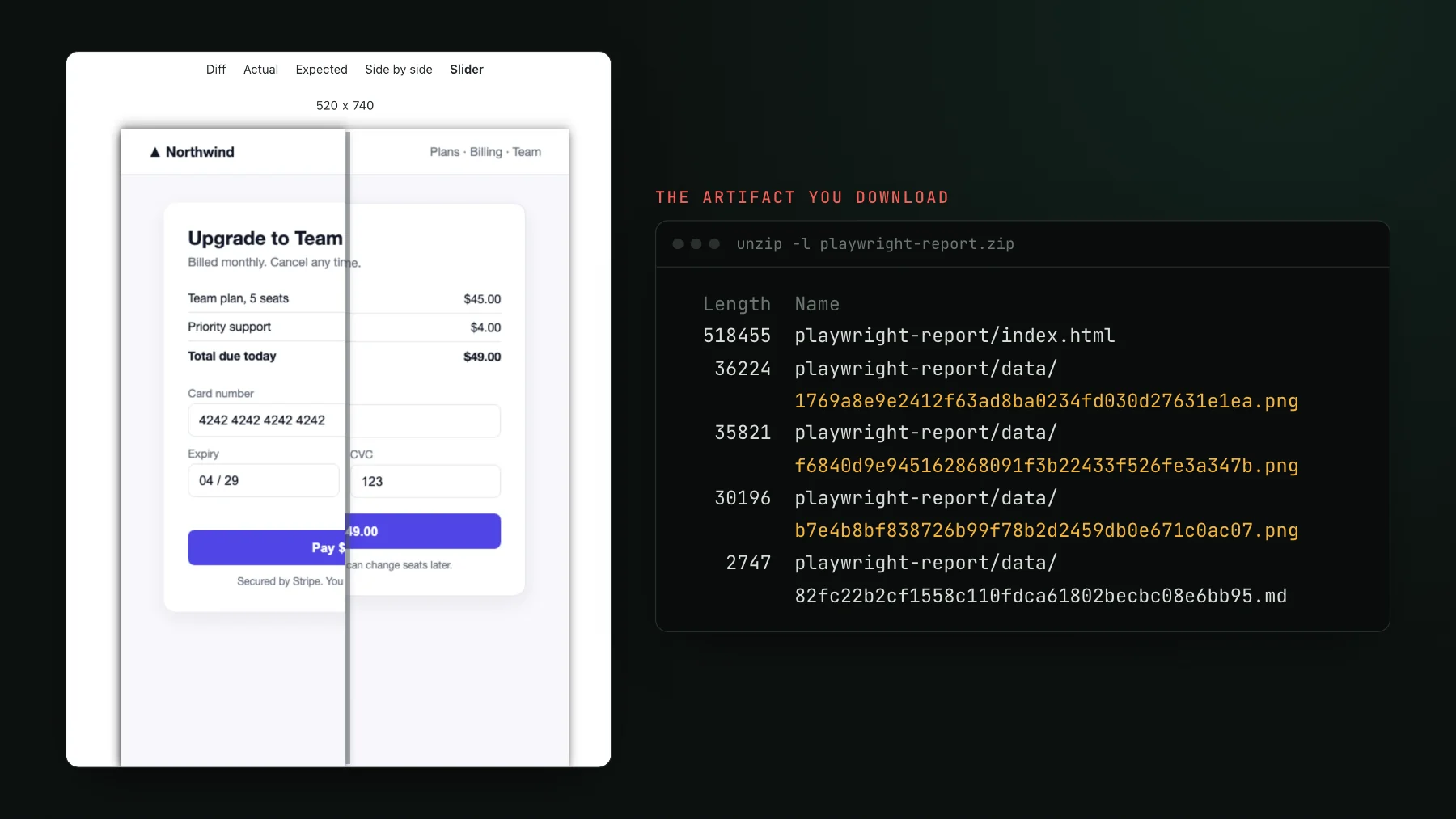
On this page
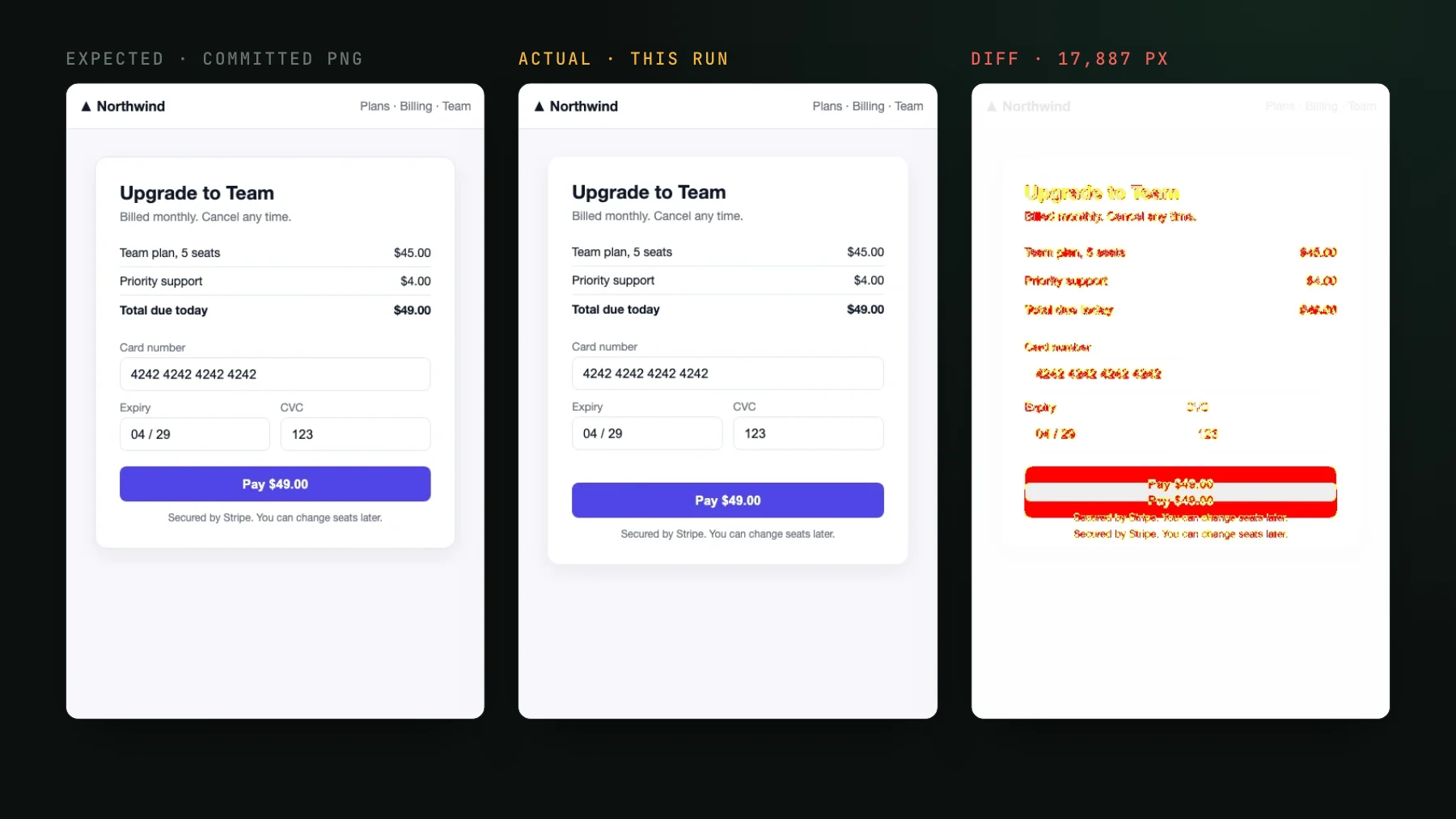
I like Playwright's built-in screenshot comparison. toHaveScreenshot renders a page, diffs it against a committed baseline, and on your own machine it is genuinely good: it disables animations by default, gives you mask, threshold, and maxDiffPixelRatio to tame false diffs, and the HTML report shows expected, actual, and diff side by side. Locally, this is a solved problem, and nothing below is a knock on the comparison itself.
The pain starts the moment it fails in CI. The comparison ran on a machine you are not sitting at, the result is a failed assertion buried in a log, and the images are zipped inside a build artifact. So to see the one thing you actually need, what changed, you go on a small expedition. We ran it on a demo checkout page for this post: one failing toHaveScreenshot, and the three images you need sit inside a 290 KB report archive, named by content hash instead of by test.
The Playwright screenshot slog, step by step
Here is the loop a red visual check actually puts you through. None of the steps are hard. That is the problem: they are all just annoying enough that you stop doing them.
- Your PR check goes red. A visual assertion failed somewhere in the suite, and the log tells you which test, not what moved.
- You open the CI run, find the right job, and scroll to the artifacts section.
- You download the artifact archive (the Playwright HTML report or the
test-resultsfolder), often after authenticating to your CI provider first. - You unzip it and dig for the failing test's directory.
- You open three PNGs by hand: the expected baseline, the actual screenshot, and the diff.
- You flip between them, squint, and decide whether this is a real regression or the intended change you shipped.
- Or you skip all of that, hit re-run, and hope it was flake.
Why the artifact model breaks at agent PR volume
The download-and-squint loop was tolerable when a person opened three PRs a day and reviewed each one by hand. That is not the world anymore. Every frontend team I talk to says the same thing: PR volume has at least doubled, PRs are either one line or fifty files with nothing in between, and review has quietly become LGTM. Backend engineers ship frontend changes with an agent now, and nobody reads every file.
An artifact archive is a per-failure tax, and a tax that scales with failures does not survive that volume. Nobody unzips forty archives a day. So the visual check that lives inside a downloadable artifact gets one of two treatments: it is muted because it is too noisy to chase, or it is rubber-stamped with a re-run. Either way the coverage you paid render time for is not actually protecting anything, because the review step is too far from where the work happens.
Put the diff where the decision happens: in the pull request
The fix is not a better comparison engine. Playwright's is fine. The fix is moving the baselines, the diff, and the verdict out of the artifact and into the pull request, where you and your agent already are. Same screenshots under test, but the change is something you look at and accept or reject inline, not a test you re-run with --update-snapshots and hope.
Concretely, this is what changes when the diff lives in the PR instead of an archive:
- The diff is right there. Expected, actual, and the highlighted diff render in the check, per changed screenshot. No archive, no authenticate, no unzip, no opening PNGs by hand.
- An AI judge takes the first pass. Each change is labeled a likely regression or an intended change, with a reason, read against your PR description. A flagged regression holds the merge; the intended ones do not waste your attention.
- Baselines are hosted and git-aware. No screenshot PNGs committed to your repo, and no per-OS baseline files to juggle because the same capture never rasterizes identically across two operating systems. Baselines live in the service, one per branch.
- Flakes are caught, not chased. A change that does not reproduce on a re-render is auto-ignored, so a flaky screenshot does not turn into a red build you re-run on faith.
- Your agent can do the triage. The exact per-story diffs and verdicts are exposed over MCP, so the same agent that wrote the PR can look at the pixels and accept the intended changes.
Let the agent do the first pass
This is the part that actually pays for itself at high PR volume. When a coding agent opens the PR, it can also review the pixels: list the changed screenshots, read the judge's verdict on each, pull the before and after into the conversation, and accept the intended ones, all over MCP without a human unzipping anything. You step in only for the changes the judge flags as regressions. That is the whole point of putting the diff somewhere an agent can read it. There is a full walkthrough in Triage visual changes from your coding agent.
Keep Playwright's comparison. Change the review loop.
To be clear about where the built-in tool wins: if you have a handful of screenshots and you are happy to review the diffs yourself, Playwright's built-in comparison is the right tool. It is free, local, built into your runner, and it gates entirely inside your own CI. You do not need a hosted service to look at three PNGs once a week. The archive slog only becomes the bottleneck when the number of changes, and the number of PRs, climbs past what one person can download and squint through. I wrote up the full side by side in UI Verify vs Playwright screenshots.
The nice part is you do not rewrite anything to move the diff into the PR. With an archive-replay capturer like @uiverify/playwright, the Playwright tests you already have record the page once and replay that frozen archive in the cloud, so the same specs become a visual check on every pull request. Point it at your project with a uv_proj_ key, and the next red check is a diff you can read, not an archive you have to download.
The comparison was never the hard part. The review loop around it was. Take the diff out of the artifact, put it in the PR, and let the judge and your agent handle the first pass, and the visual check goes back to being something you trust instead of something you re-run and hope. Grab the Playwright visual testing skill to set it up, or browse all the visual-testing skills.
See the diff in the pull request
UI Verify runs Playwright's kind of screenshot comparison, then puts the diff and an AI verdict right in your PR, so you decide instead of downloading an archive. Point it at the Playwright tests you already have.
Start for freeNo credit card required.
Deterministic Playwright captures
Stop real-page diffs that flake without a real change.