Playwright in Docker: screenshots that match in CI
Playwright in Docker: pin the official image to your @playwright/test version, update snapshots inside it, and run the same image in CI so screenshots match.
 Igor LuchenkovBuilding UI Verify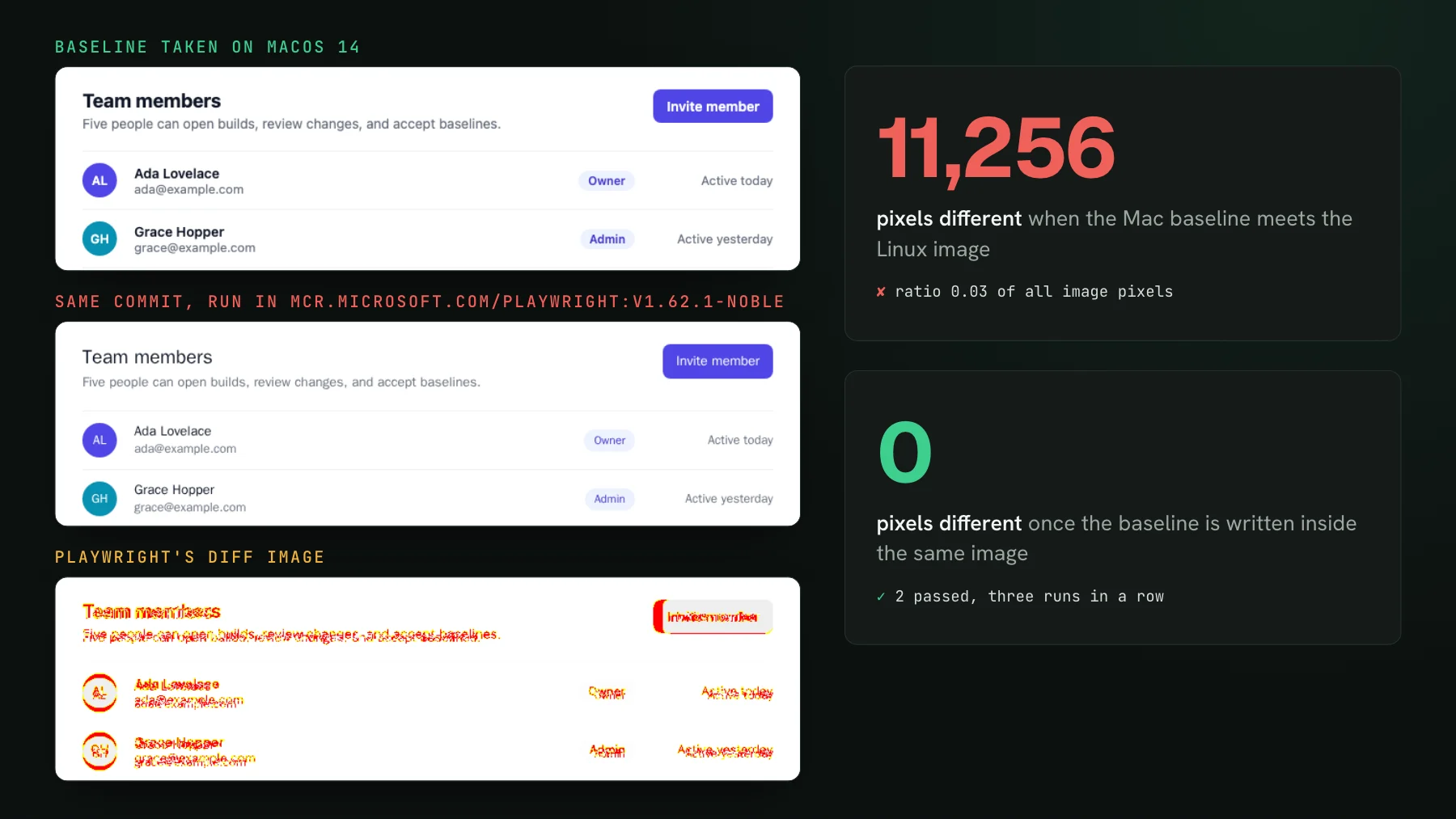
On this page
- What does running Playwright in Docker fix?
- Does bundling your fonts make Mac and Linux screenshots match?
- Pin the image tag to your @playwright/test version
- How do you update Playwright snapshots inside Docker?
- Drop the platform from the snapshot path
- Give the container its own node_modules
- Can you keep the test runner on your Mac and run only the browser in Docker?
- How do you run the Playwright Docker image in CI?
- Where UI Verify takes the machine out of the loop
- A Playwright Docker checklist
To make Playwright screenshots match in CI, run every test and every --update-snapshots inside the official Playwright Docker image, pinned to the exact version of your @playwright/test, and use that same image as the CI container. 11,256. That is how many pixels Playwright flagged when an unchanged page met its baseline on the wrong machine: the baseline taken on a Mac, the comparison run inside the official Playwright Docker image. Same commit, same @playwright/test 1.62.1, same 800 by 520 viewport, and toHaveScreenshot failed with a ratio of 0.03. For this post we built a one-screen team settings page in a scratch project, took its baseline on macOS 14, and ran it through the Linux image. Every number and figure below comes from that project.
That gap is why a lot of teams move Playwright into a container. Isolation and tidy dependencies are a bonus. The real motive is that a Mac draws text one way, the Linux CI box draws it a little differently, and the screenshots flicker between the two until nobody trusts a red run. A container is the cheapest way to make every machine that renders a baseline the same machine. Here is how to set it up so it holds, from the image tag to the CI job, with the traps we hit along the way.
What does running Playwright in Docker fix?
Running Playwright in Docker means executing your tests inside mcr.microsoft.com/playwright, Microsoft's Ubuntu image that ships the browsers Playwright drives plus their system dependencies, fonts included. Every screenshot is then drawn by one OS, one set of font files, and one browser build, whether the command started on a laptop or on a CI runner. The fix is narrow on purpose: Docker removes the machine as a variable and nothing else. A live clock, an unmocked API, or a running animation still moves the picture inside the container, and those inputs are covered in fixing flaky Playwright screenshot tests.
Most of the 11,256 pixels came from the font stack. The page asks for system-ui, so on macOS Chromium renders San Francisco, bold where the CSS says 600 or 700. Inside the image there is no system-ui face, no Segoe UI and no Roboto, so the stack falls through to sans-serif, and Chromium picked WenQuanYi Zen Hei, a Chinese font the image installs next to Liberation, FreeFont and Noto Color Emoji. It has no bold face. Every heading and button label rendered at regular weight, and the card grew 5 px taller.
Does bundling your fonts make Mac and Linux screenshots match?
It closes about half the gap, not all of it. The second test on the same page loads Inter from a .woff2 file served by the app, so both machines draw identical glyph outlines. The diff still came back at 5,322 pixels. macOS and Linux rasterize the same outline with different hinting and antialiasing, and text widths can land a pixel or two apart: the Invite member button measured 125 px wide on the Mac and 127 px in the image. Bundle your fonts anyway, because it removes the dramatic failures like the missing bold. Then draw every baseline in one place.
Pin the image tag to your @playwright/test version
The image does not contain the Playwright package. It contains browsers, built for one Playwright release, under /ms-playwright. Your project brings @playwright/test from its own node_modules, and that version decides which browser build it looks for. Pin both to the same exact version: no caret on the package, and the matching tag on the image, v1.62.1-noble for 1.62.1. The suffix is the Ubuntu base. noble is 24.04, and Playwright also publishes jammy (22.04) and resolute (26.04) tags, all three listed in Playwright's Docker guide when we checked on 2026-10-17. Pick one and treat a change of base like a version bump, since a different Ubuntu brings different system packages, so regenerate the baselines in the same commit.
A mismatch fails fast, which is the good outcome. Upgrade the package to 1.63.0, forget the tag in the script, and every test dies before a screenshot is taken, with an error that names the tag it wanted:
The tag ends up in exactly two places, the wrapper script below and the CI container line. Bump both in the same pull request as the package, and a forgotten one fails like this on its first run rather than drifting.
How do you update Playwright snapshots inside Docker?
Run --update-snapshots inside the container, never on the host. A baseline written on a Mac is a Mac baseline, whatever folder it lands in. A small wrapper keeps the command identical for everyone on the team and for any agent working in the repo:
#!/bin/sh
# Run Playwright in the same image CI uses. Keep the tag equal to @playwright/test in package.json.
exec docker run --rm --init --ipc=host \
  -v "$PWD":/work -v /work/node_modules -w /work \
  mcr.microsoft.com/playwright:v1.62.1-noble \
  sh -c "npm ci && npx playwright test $*"
./scripts/pw-docker.sh runs the suite, and ./scripts/pw-docker.sh --update-snapshots rewrites the screenshots that no longer match; add =all to rewrite every one. The --ipc=host and --init flags come from Playwright's Docker guide: Chromium can run out of shared memory without the first, and the second keeps zombie processes from piling up. In the scratch project the full round trip, npm ci included, took under five seconds. After the baselines were rewritten in the image, three runs in a row passed, and a fourth with =all wrote files identical to the committed ones, byte for byte.
Drop the platform from the snapshot path
By default Playwright names a baseline after the platform that ran the test: team-chromium-darwin.png on a Mac, team-chromium-linux.png in the image. The suffix lets teams that render on several systems keep one file per system. Once every render happens in one image, it mostly invites a stray second baseline, so remove {platform} from the template:
export default defineConfig({
  testDir: "./tests",
  // One file per screenshot: the image is the only place baselines are drawn.
  snapshotPathTemplate: "{testDir}/__screenshots__/{testFilePath}/{arg}{ext}",
});
A run on the host now fails with a pixel diff against the Linux file, and nothing new lands in the snapshot folder for someone to commit by accident. In our run that host failure was the same 11,256 pixels in reverse, which is a useful reminder of what the wrapper is for.
Give the container its own node_modules
Mounting the repository carries your Mac's node_modules into the container. Pure JavaScript packages like @playwright/test survive the trip; anything with a native binary does not. With Vite 8 as the webServer, the run never reached a browser, because its bundler looked for a Linux arm64 binding and found only the darwin one.
npm ci gives the container a Linux install, and the folder on the Mac stays as it was.That is what the -v /work/node_modules line in the wrapper does: an anonymous volume hides the host folder inside the container, and npm ci fills it with Linux builds on every run.
Can you keep the test runner on your Mac and run only the browser in Docker?
Yes, Playwright can also split the work. run-server starts only the browser inside the image, and your tests connect to it over a WebSocket, so the test runner, your editor integration, and your dev server stay native while the pixels come from Linux. Start the server with the same version as your package, then point connectOptions at it, or set PW_TEST_CONNECT_WS_ENDPOINT in the environment. exposeNetwork set to <loopback> lets the containerized browser reach localhost on your machine, so webServer and baseURL work unchanged:
export default defineConfig({
  use: {
    baseURL: "http://localhost:4173",
    connectOptions: { wsEndpoint: "ws://127.0.0.1:3999/", exposeNetwork: "<loopback>" },
  },
});
One trap. The platform suffix comes from process.platform of the runner, not of the browser, so Linux pixels get saved under a -darwin name. The file is correct and the label lies, and the next person to open the folder reads it as a Mac baseline. Dropping {platform} from the template, as above, removes the confusion.
How do you run the Playwright Docker image in CI?
The CI job uses the image as its container, with the tag from the wrapper. Playwright's own CI guide runs it as --user 1001 (still the case on 2026-10-17), and this job follows it:
name: Playwright
on: [push, pull_request]

jobs:
  test:
    runs-on: ubuntu-latest
    container:
      image: mcr.microsoft.com/playwright:v1.62.1-noble
      options: --user 1001
    steps:
      - uses: actions/checkout@v7
      - run: npm ci
      - run: npx playwright test
      - uses: actions/upload-artifact@v7
        if: failure()
        with:
          name: playwright-results
          path: test-results/
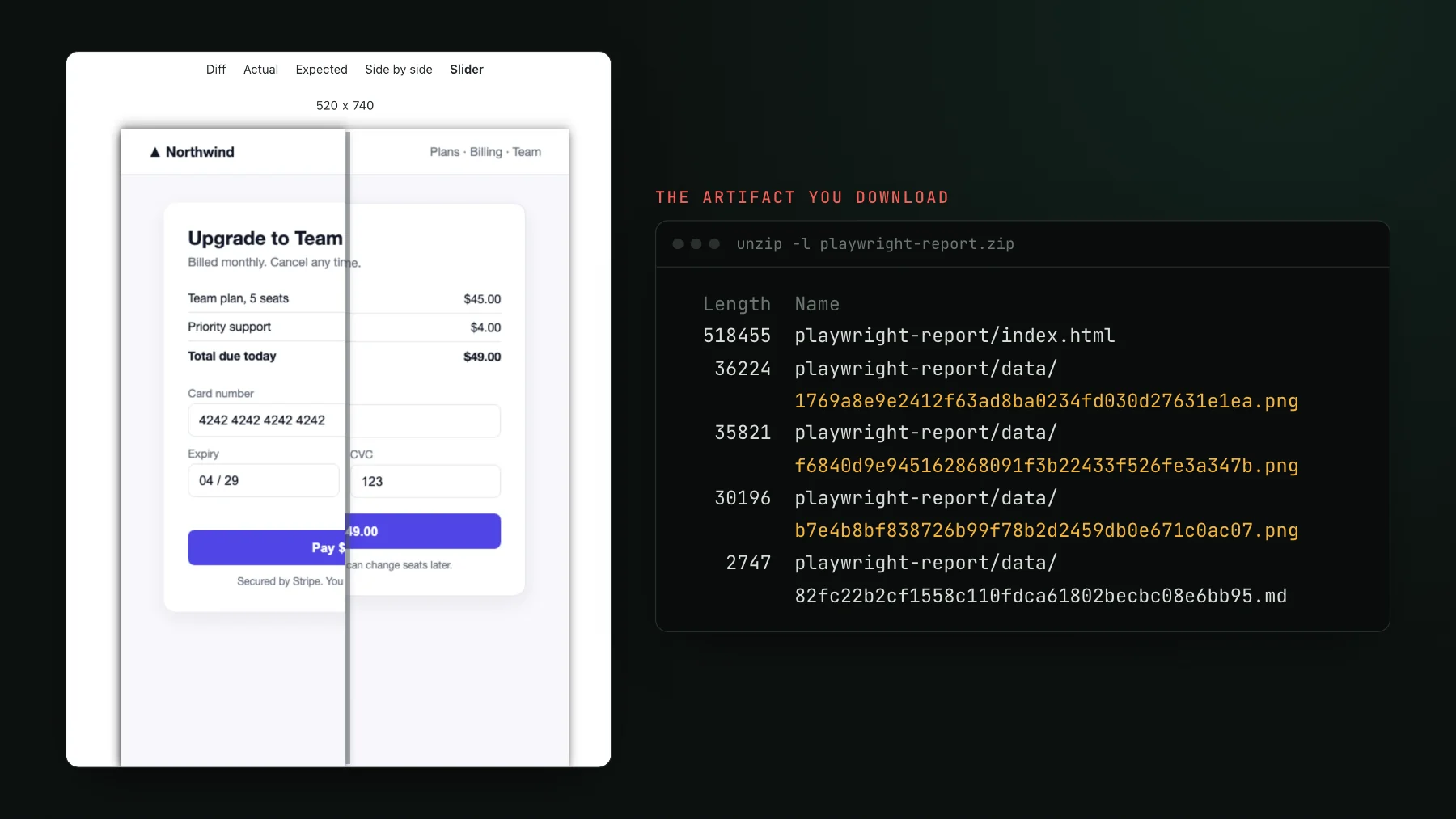
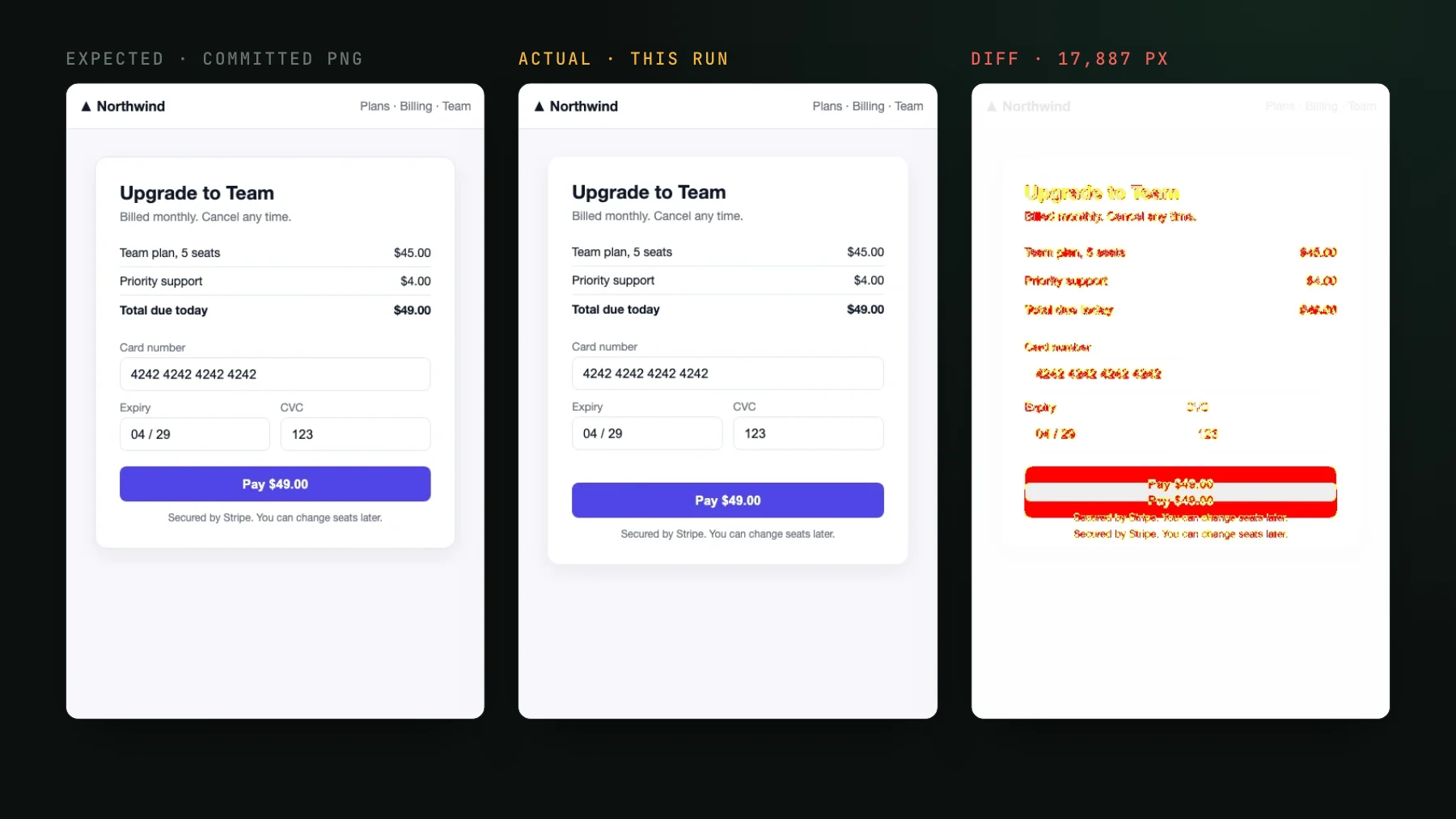
Two steps a typical Playwright workflow carries are gone on purpose. There is no npx playwright install, because the browsers are already in the image, and no setup-node, because the Node that ships in the image is the one your wrapper used locally. On failure, the expected, actual and diff PNGs land in the uploaded artifact.
One more difference to check once. On Apple Silicon, Docker pulls the arm64 variant of the image, while GitHub's ubuntu-latest runners pull amd64. For this page the two agreed: the amd64 image, run under emulation on the Mac, wrote screenshots identical byte for byte to the arm64 ones. Emulation is not a real x86 runner, so treat the first CI run after the switch as the real test, and if it disagrees, generate the baselines from CI instead of the laptop.
Where UI Verify takes the machine out of the loop
Everything above makes one Linux image the place where baselines get drawn and keeps it in step with your package.json. UI Verify reaches the same result from the other side: it does not take the screenshot on your laptop or your runner at all. With @uiverify/playwright, a test records an archive of what the page rendered, its DOM and the resources it loaded, and UI Verify draws the screenshot on its own pinned Linux, Chromium, and fonts. The reasoning is in why UI Verify renders in the cloud.
That changes what the image is for. Keep your functional suite in Docker if you like it there, but the visual check no longer needs an image tag, baseline PNGs in the repository, or a rule about where --update-snapshots may run. A change shows up on the pull request, where you accept it, and the AI judge labels each one as intended or a regression. Before you push, `uiverify check` renders a preview build on the same fleet, so the answer on your laptop matches the one CI will give. The Playwright quickstart covers the one-import setup.
A Playwright Docker checklist
- Pin
@playwright/testto an exact version and the image to the matchingvX.Y.Z-nobletag, and bump both in one commit. - Run the suite and every
--update-snapshotsthrough one wrapper script, never on the host. - Mount the repository, but give the container its own
node_moduleswith an anonymous volume andnpm ci. - Remove
{platform}fromsnapshotPathTemplateso each screenshot has a single baseline. - Pass
--init --ipc=hosttodocker run, as Playwright's Docker guide recommends for Chromium. - Use the same tag as the
containerimage in CI and drop the browser install step. - Bundle your web fonts anyway: it cut this page's Mac-to-Linux diff from 11,256 pixels to 5,322 before Docker entered the picture.
Playwright screenshots without the image to pin
UI Verify draws every Playwright capture on its own pinned Linux, Chromium, and fonts, so a run on your Mac and a run in CI meet the same baseline. Swap one import to start.
Start for freeNo credit card required.
Deterministic Playwright captures
Stop real-page diffs that flake without a real change.