Dark factory for coding agents: lessons from running one
A dark factory runs coding agents unattended: GitHub issues in, reviewed PRs out. How mine works on a Mac with Claude Code, and nine lessons from running it.
 Igor LuchenkovBuilding UI Verify
On this page
- How does a dark factory work?
- Lesson 1: you decide the big things before the build
- Lesson 2: agents decide the small things and list them
- Lesson 3: triage decides what not to build
- Lesson 4: a cheaper model builds, a stronger one judges
- Lesson 5: repeated findings mean the design is wrong
- Lesson 6: context size is the bill
- Lesson 7: agents fail quietly, so watch for silence
- Lesson 8: look at what needs you, not at activity
- Lesson 9: each project gets its own slots and budget
- What should you know before you run a dark factory?
A dark factory for coding agents is a setup where agents take work from a backlog and ship it with no human at the keyboard: issues go in, reviewed pull requests come out, and you step in only to answer a real question or to merge. You run one with a small control loop that hands each issue to an agent session, plus written rules that let those agents decide on their own. I run mine on my Mac with Claude Code and published it as open source at uiverify/factory. Here is how it works and nine lessons that hold for anyone building one.
It is the step after the software factory, which covers the five pillars that make one agent's work trustworthy and running the loop by hand, one ticket at a time. A dark factory runs that loop on many issues at once while you're doing something else.
How does a dark factory work?
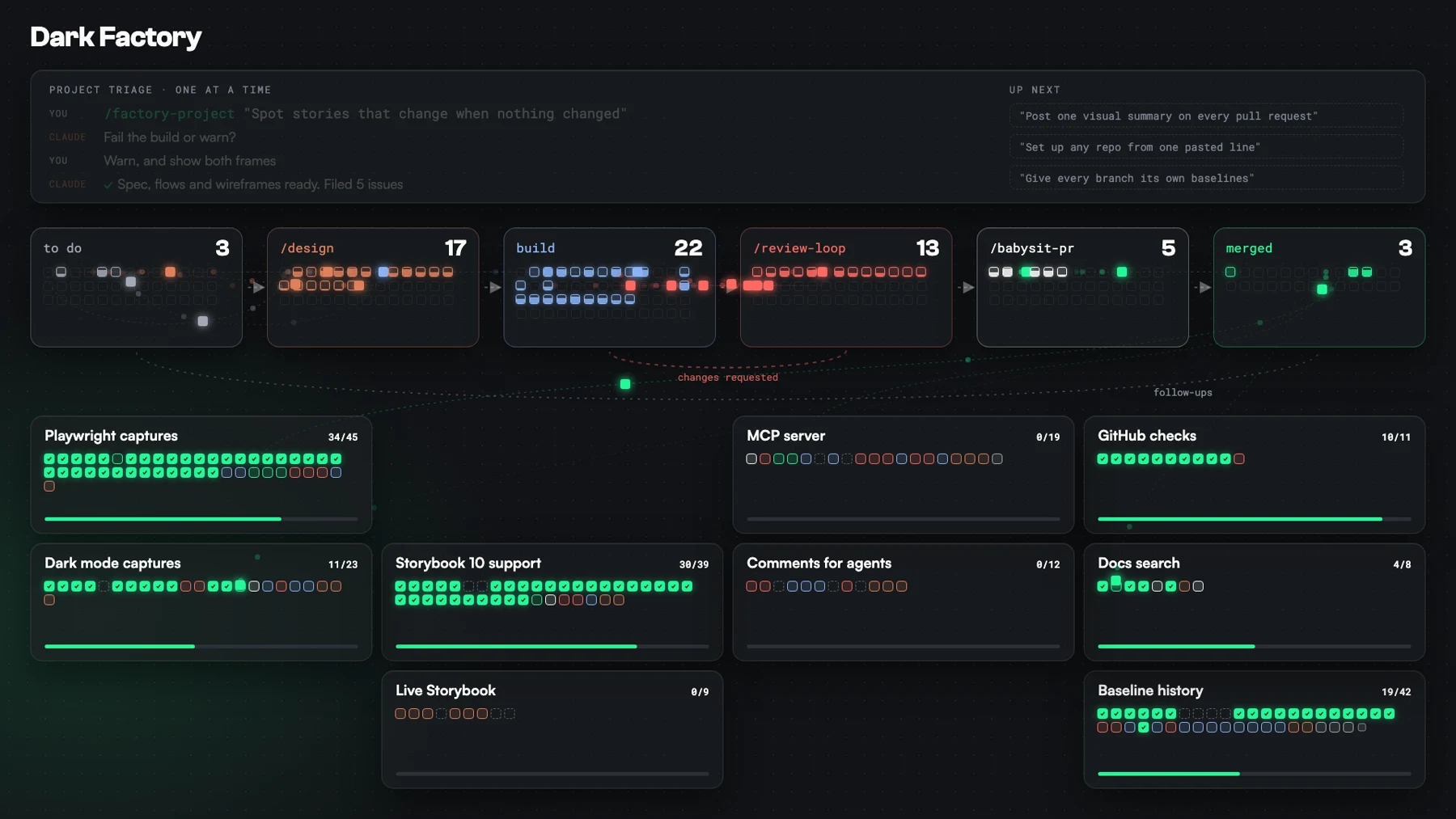
A dark factory like mine has three parts. A plain Node script runs every 10 minutes: it reads GitHub issues, pull requests and the running Claude Code sessions, decides what moves next, and starts or wakes a session to do it. Its own logic is plain rules: anything that needs judgment, from triage to the work itself, goes to a Claude session it starts. Where each issue stands is recorded on the issue itself: labels plus one state comment. Workers are background Claude Code sessions, each in its own git worktree. A small dashboard and a read-only monitor watch the rest.
- Triage. A short headless run reads a new issue and decides: ready, split it, needs a product decision, needs a human, or later.
- Build. Ready issues are grouped into packages, one worker each. The worker designs the change when it needs one, with critics attacking the plan, builds, has the diff reviewed (by Claude, plus Codex when it's installed) until it's clean, drives the real app when the change has a surface tests can't cover, and runs the checks. In my setup, when the change touches UI, UI Verify shows the agent every UI change it made, before and after, so it fixes what it broke before anyone looks.
- Ship. By default the worker opens a PR and is woken again when a check fails or a review comment lands, and you merge the green PR. My own repos are set to land reviewed commits straight on a staging branch instead, which I release by hand.
Lesson 1: you decide the big things before the build
An agent can only work unattended if the decisions that matter were made before it started: what the product should do, what the user sees, how it fits the rest of the system. That is where my time goes now: one sitting per feature that produces a spec (every flow, every state of every screen, the exact labels, the errors, what's out of scope), the architecture, and the issues in build order.
Part of that sitting is rough wireframes in plain HTML: grayscale boxes, real copy, one frame per screen and state. I switched this step from Figma to HTML because the agent writes it in the same sitting, I correct it in a sentence, and every worker reads the same file.
Lesson 2: agents decide the small things and list them
Once the product decisions are made before the build, what's left for the agent is small enough to decide on its own. That matters: with one agent beside you, a question costs seconds; with eight running while you're away, every question stops a worker until you come back. So anything a later commit can undo, the agent decides: names, which helper to reuse, the test strategy, copy inside the UX you already agreed. It lists each choice in the PR under Decisions taken, with the reason, and the alternative when there was one. Overruling one afterwards is a single comment in a review you were doing anyway, and nobody waited for you.
An agent stops only for what it must not decide: something irreversible, a conflict with a recorded decision, a wrong premise, a product fork users would notice, or a step only you can do. Then it asks once, on the issue, with options and a recommendation, and that question blocks only the issue it's about. The rest of the agent's work keeps moving.
Lesson 3: triage decides what not to build
Agents are generous with follow-ups. Every review finds an edge case, every worker notices something nearby, and each becomes an issue. A factory that builds everything it files spends its days on its own suggestions, and each small follow-up pays the full price of a piece: its own triage, design and review. In one stretch, eleven review follow-ups queued as eleven pieces of about two hours each.
So every issue passes triage before a worker sees it: is it in scope, is it worth doing now, does it overlap work in flight. Related small issues go to one worker together. A follow-up gets built when it blocks what you're shipping or real usage shows the problem; everything else stays open as "later", with one line on what would bring it back.
Lesson 4: a cheaper model builds, a stronger one judges
Running several strong-model sessions at once eats a subscription fast, so builders move to a cheaper model. The trap is letting that builder also decide how much scrutiny its own work needs: a model grading its own plan tends to agree with itself. Split by role instead. In my factory, workers on my two main repos build on Sonnet by default (I switch a project to Opus when the work is risky), while the design critique and the code review always run on Opus. On UI Verify's own repo a separate Opus agent also makes the call on whether a change needs a design, and any Sonnet worker asks an Opus agent before a product or architecture call. Where Codex is installed, the code review pairs Claude with it, because a different model misses different things. Nobody grades their own work, and in a factory that's cheap to enforce: the reviewer is one more session.
Lesson 5: repeated findings mean the design is wrong
When review rounds keep finding new holes in the same area, the structure is wrong. Fixing each finding as it comes, or telling reviewers to raise only blockers from now on, freezes a bad structure in place. Change the structure instead (often one source of truth instead of state kept in two places), and keep the reviewers' instructions the same every round.
And cap the rounds. I first let design loops run to 10 and cut them to 5 the next day, because the long loops cost more than they caught. At the cap, minor findings get listed in the PR and the work gets built; a real hole still open means the agent stops and asks.
Lesson 6: context size is the bill
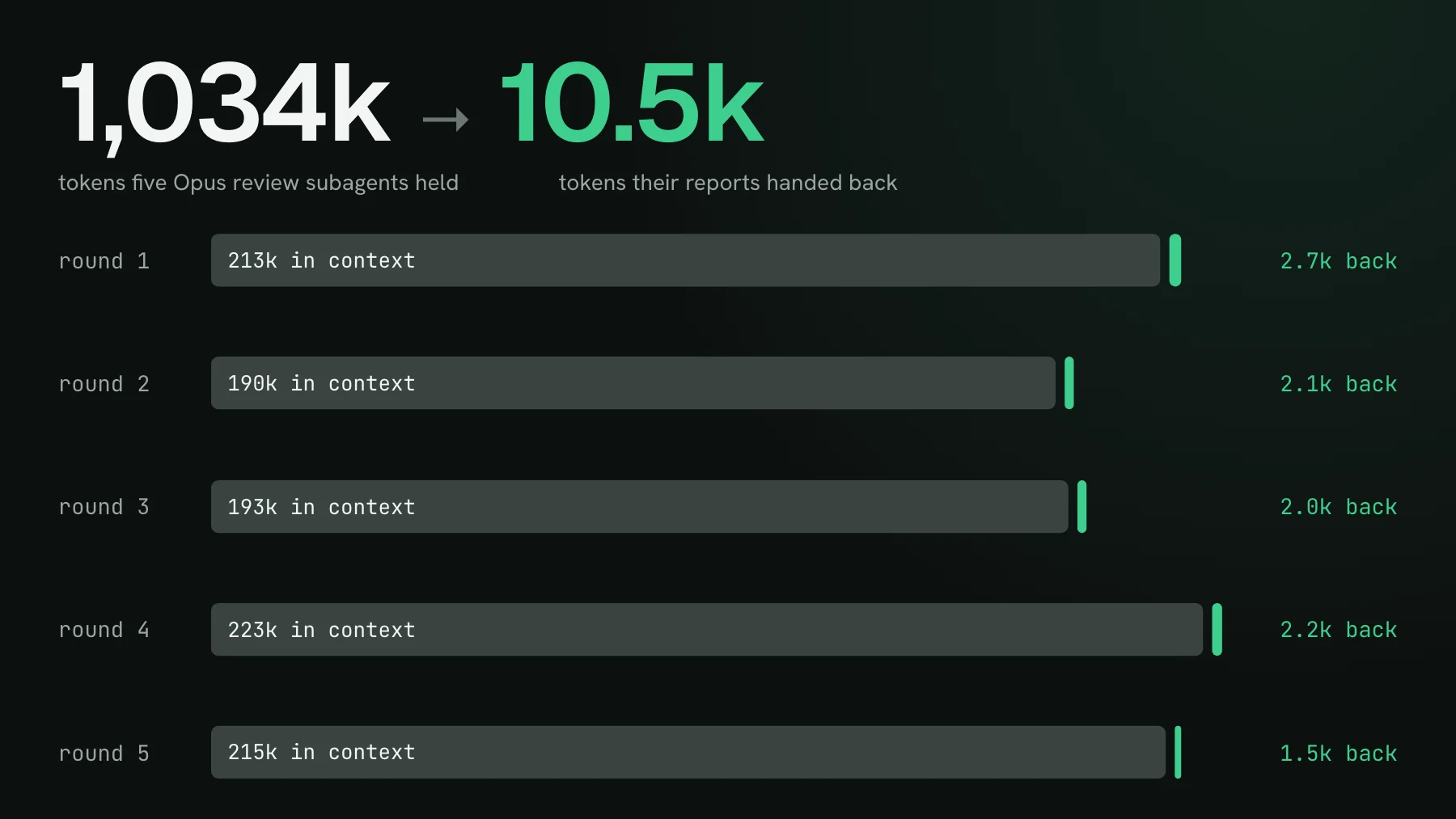
Every turn of an agent session re-reads the whole conversation, so the size of the context is most of what a factory costs. Waking a big session with nothing for it to act on is pure cost: wake an agent for a failing check, a conflict or a new comment, and keep any timer as a slow safety net. Everything a session loads up front, such as tool and skill listings it will never use, is paid again on every turn, so give each agent only what its project needs.
Long sessions should write a handoff and continue fresh. But a fresh start isn't free: the new session re-reads its files and rebuilds context before it does anything. Hand off too early and the work gets more expensive, not less:
I moved the mid-run handoff to 500k tokens and kept the fresh start for a session that wakes up big after waiting. Measure where your own line is.
Lesson 7: agents fail quietly, so watch for silence
Agents rarely crash loudly. They die, wedge, or wait on something that never reports back, and from outside a stuck session looks just like a busy one: a request can freeze mid-turn and the session shows "busy" forever. So judge progress by output, not status. If a session has written nothing for an hour, stop it and resume it. When you hit the usage limit, pause all agent work until it resets instead of letting every new session fail.
Then add a slow, read-only check on top, separate from the loop: mine runs every 30 minutes and looks for a PR green for hours that nobody announced, a "busy" worker that already finished, an issue marked in progress that nobody works on.
Lesson 8: look at what needs you, not at activity
A feed of what eight agents are doing is fun to watch and useless to act on. The first thing on my dashboard is what needs me: PRs ready to merge, questions waiting for an answer, product forks. Your attention is the one part of the factory that doesn't scale, so the screen you open should be the short list only you can clear.
Lesson 9: each project gets its own slots and budget
Put several projects through one factory and the biggest backlog takes everything. I raised worker slots to 8 for one project's backlog, and when I turned the second project back on two days later, the first was holding all 8. Give each project its own cap on agents in flight and PRs waiting for review, and track spend per issue so an expensive one stands out while it's running, not at the end of the week.
What should you know before you run a dark factory?
You should know it isn't plug and play. The factory is my working setup, published as is, and it encodes how I work. Expect a couple of days to make it yours: your ticketing system (it reads GitHub issues; I started on Linear), where code lives and how it ships, your cost and usage limits, which model builds and which judges, and your repo's rules. The fastest way to write those rules: look at the questions your agents asked you last month. Every question you answered the same way twice is a rule.
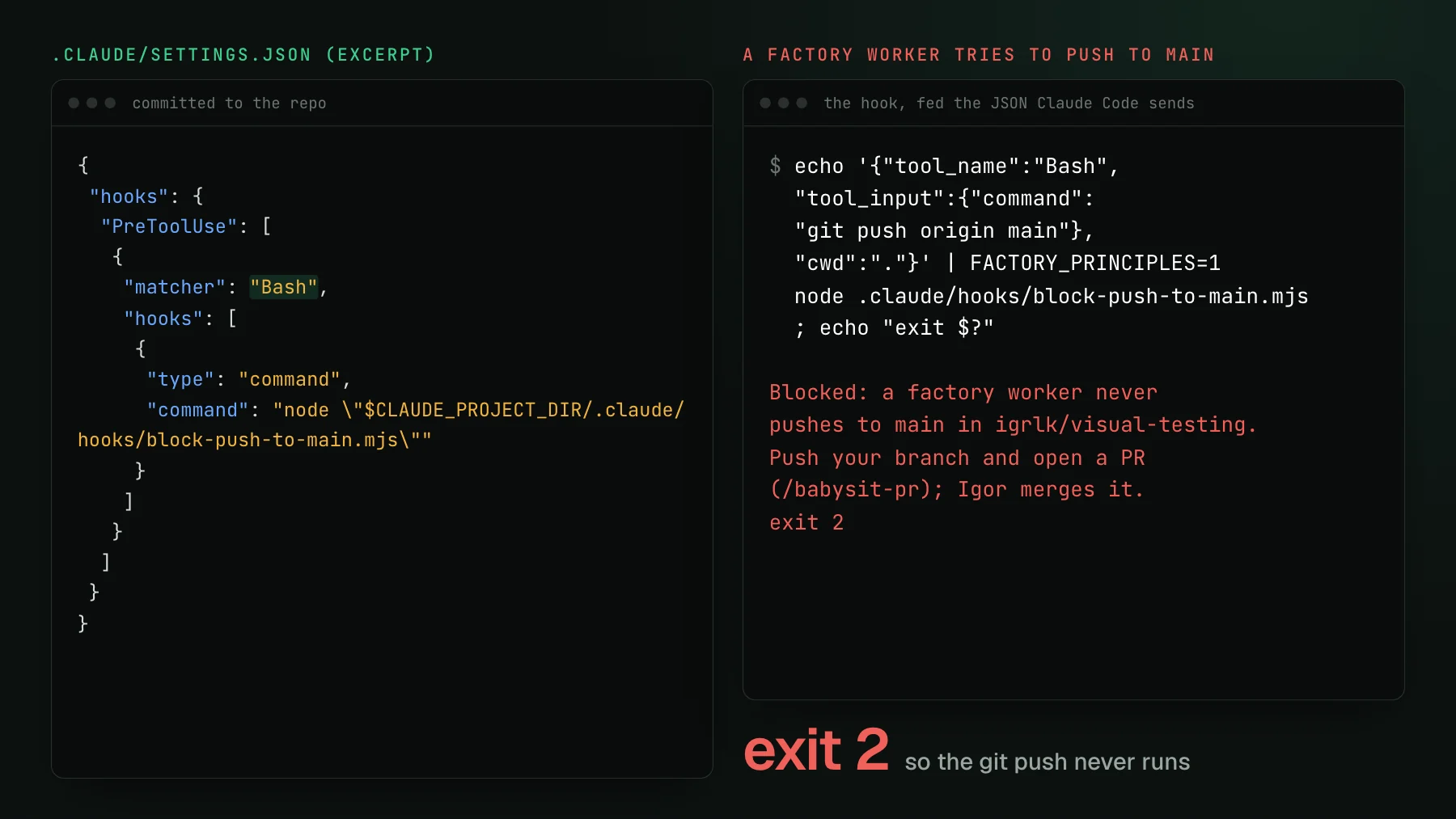
Two things hold whatever you change. Workers run with no permission prompts, so anything that must never happen belongs in a hook that blocks it, not a sentence in CLAUDE.md (three hooks, measured). And the factory is only as good as the repo it runs on: written conventions, lint and tests that catch mistakes, and a way to see UI changes. The factory runs the loop; your repo supplies the judgment.
Start small: one project, one or two issues at a time, every change through a PR you merge. The code and the skills are at github.com/uiverify/factory, MIT licensed, and the factory skill is the loop each worker runs, if you want to try it by hand first.
Let every worker see the UI it changed
UI Verify is visual testing for coding agents: each agent in your factory sees every UI change it makes, before and after, so visual bugs never reach production. Free for 10,000 snapshots a month (50,000 for open-source projects).
Start for freeNo credit card required.
Factory
Say what you want. Get a merge-ready PR.