Agentic coding workflow: how to build a software factory
How to build an agentic coding workflow that ships itself: the five pillars of a software factory - docs, guardrails, tests, and second-model review.
 Igor LuchenkovBuilding UI Verify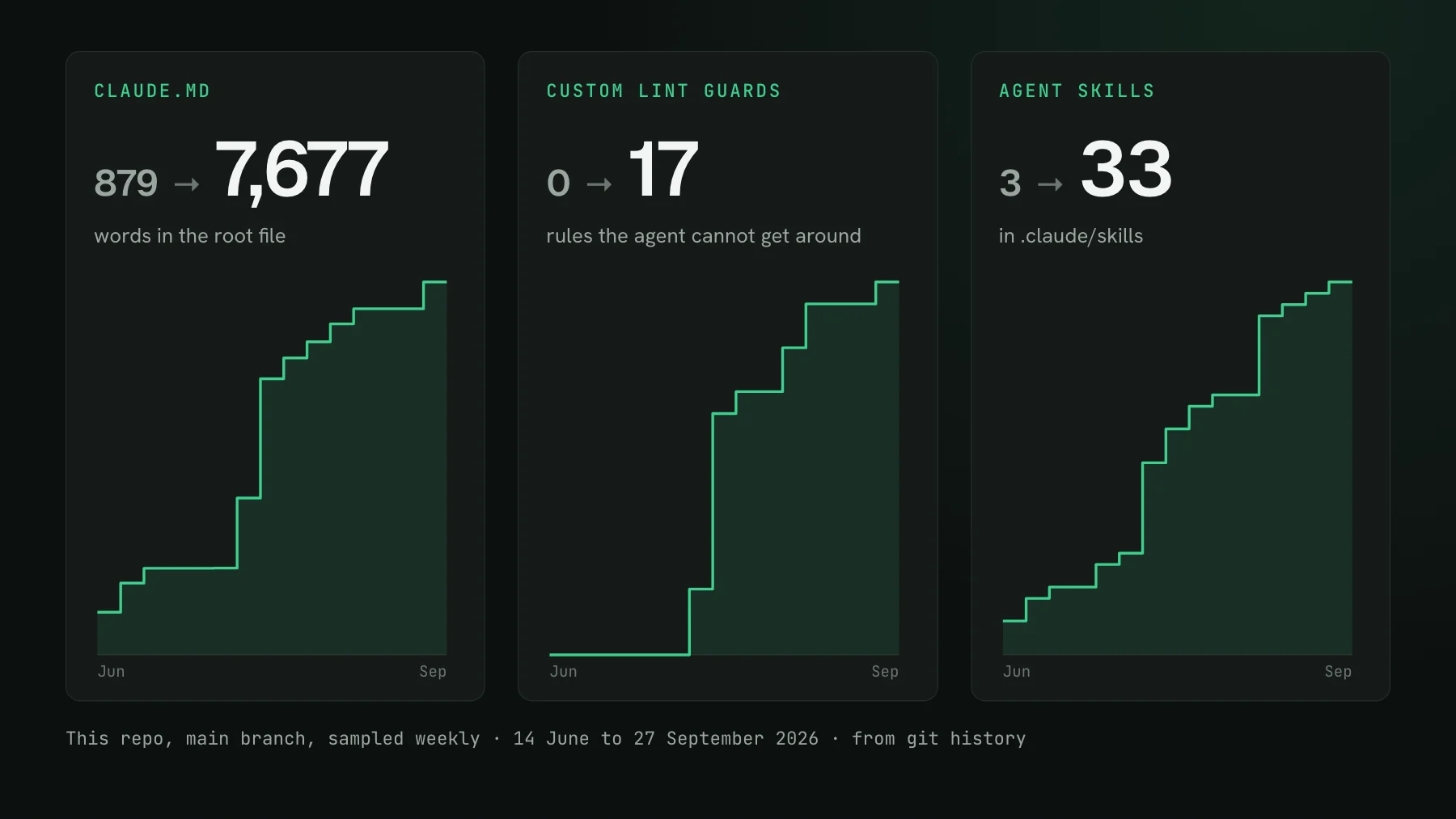
On this page
- Pillar 1: CLAUDE.md, and the habit of extending it
- Pillar 2: architecture docs
- Pillar 3: guardrails - linters that stop the agent
- Pillar 4: tests, the most important pillar
- How do you know the UI still looks right after the agent changed it?
- Pillar 5: a second model reviews the PR
- The skills that run the factory
- Bootstrap your CLAUDE.md in one prompt
- Start where you are
The goal of an agentic coding workflow is easy to state: stop typing furiously, hand off the requirement, and let agents ship the work. Most teams are nowhere near that, and the models are not what holds them back: they are stuck at one particular level of using agents, with no clear path up. Here is the ladder, and the setup that climbs it.
| Level | What it looks like | Who's the bottleneck |
|---|---|---|
| 1. Advisor | You ask Claude or ChatGPT, it hands back a snippet, you paste it in | You write everything |
| 2. Pair programming | It does part of the task, you refactor the rest by hand | Shared |
| 3. Big PRs | It writes a 40-file PR that works, you leave 20 review comments, then 20 more on the next one | You, the reviewer - most teams are here |
| 4. Autonomous | The 40-file PR comes back with one or two things you would do differently, or none | Almost nobody |
| 5. Software factory | You hand off the requirement, never read the code, it ships user value | No one |
Level three is where most teams sit, and it is a trap. Models got good enough to write a large PR that runs, so the app works - but the code ignored your conventions, used a file it should not have, skipped the test, and you are back to twenty comments a PR. Grinding on the model does not fix it. Two things do: documentation and guardrails. That is the entire move from level three to level four, and the five pillars below are how you build it.
Pillar 1: CLAUDE.md, and the habit of extending it
Everyone already has a CLAUDE.md - it is the first file the agent creates. The secret is not having one, it is constantly maintaining it. When a 40-file PR comes back with twenty issues, do not hand the list back and say fix these; it will just happen again on the next PR. Instead turn each recurring issue into a rule: you built your own component instead of using the design tokens, you edited a file that should never be touched here, you skipped the test this component needed. Write the rule once and that mistake stops coming back. The root CLAUDE.md in this repo went from 879 words in June to 7,677 by late September, across 45 commits.
This habit is the engine of the whole factory, and it repeats in every pillar below: every time a human corrects the agent, ask whether the correction should become a standing rule so nobody has to give it again.
Pillar 2: architecture docs
A CLAUDE.md cannot be ten thousand lines, and in a monorepo you do not want the frontend rules loaded while the agent is touching the database. So keep the top-level file thin and route from it: if you are changing the frontend, read frontend.md; if you are changing how we talk to the database, read database.md. Document the user journeys too - a user-journeys.md that says 'a user uploads a file: this page, this service, then S3, then Postgres' lets the agent read three files to understand the system instead of grepping through forty.
Pillar 3: guardrails - linters that stop the agent
CLAUDE.md and architecture docs are prose, and prose is advisory - the agent can read your convention and still ignore it. Linters are not advisory. A custom lint rule stops the agent from doing the thing at all: no barrel file in this folder, use this state hook and not that one, never put these two components together. Same habit as pillar one - every time you see a mistake that can be described mechanically, formalize it as a lint rule and it never passes review again. And do not write the rule by hand; ask the agent to write it, it is quick. This repo has 17 of them now, each tied to the CLAUDE.md rule it enforces.
Pillar 4: tests, the most important pillar
Your architecture can be clean and your code beautifully written, but if the app does not work, none of it matters - nobody gets value from a broken app. Tests are how the agent proves the app still works without you opening six work trees and clicking through each by hand. A good stack runs fastest to slowest:
| Layer | What it covers | Notes |
|---|---|---|
| Backend integration | A service writes to the DB, reads it back, asserts the result | Hundreds to thousands, fast, great coverage |
| Interaction (Storybook or Vitest) | Render a page in isolation with data mocked, click a button, the modal opens, fill the form, the API fires on submit | Easy for the agent to write; make CLAUDE.md always ask for them |
| Visual | Does the page still look right after the agent changed CSS or a shared component | The agent-era pillar with no off-the-shelf answer, covered next |
| End-to-end | The deployed app, click to click | Keep few - slow, needs a deploy, prone to flakiness |
Make the tests non-optional with a guardrail: a lint rule that a foo.page.tsx must have a foo.test.tsx next to it means a page with no test cannot pass the PR gates. You never have to remember to ask for the test again.
How do you know the UI still looks right after the agent changed it?
Ten agents raise ten pull requests and every one touches the UI. All your interaction tests pass. But if a PR changed a shared component or a design token, did the interface still render crisp, or did something shift eight pixels and overlap? Interaction tests click straight through a broken layout without noticing - they assert behavior, not appearance. That gap is what visual testing fills, and it was the pillar with no good answer once agents entered the picture, which is why I built UI Verify.
So on every pull request UI Verify screenshots all your Storybook stories, Playwright pages, and Vitest components, compares each against the baseline on main, and posts a check and a comment right on the PR - the same place your agent already looks when something goes red. The comment says how many stories changed and, before anyone opens a thing, how many are likely regressions versus intended.
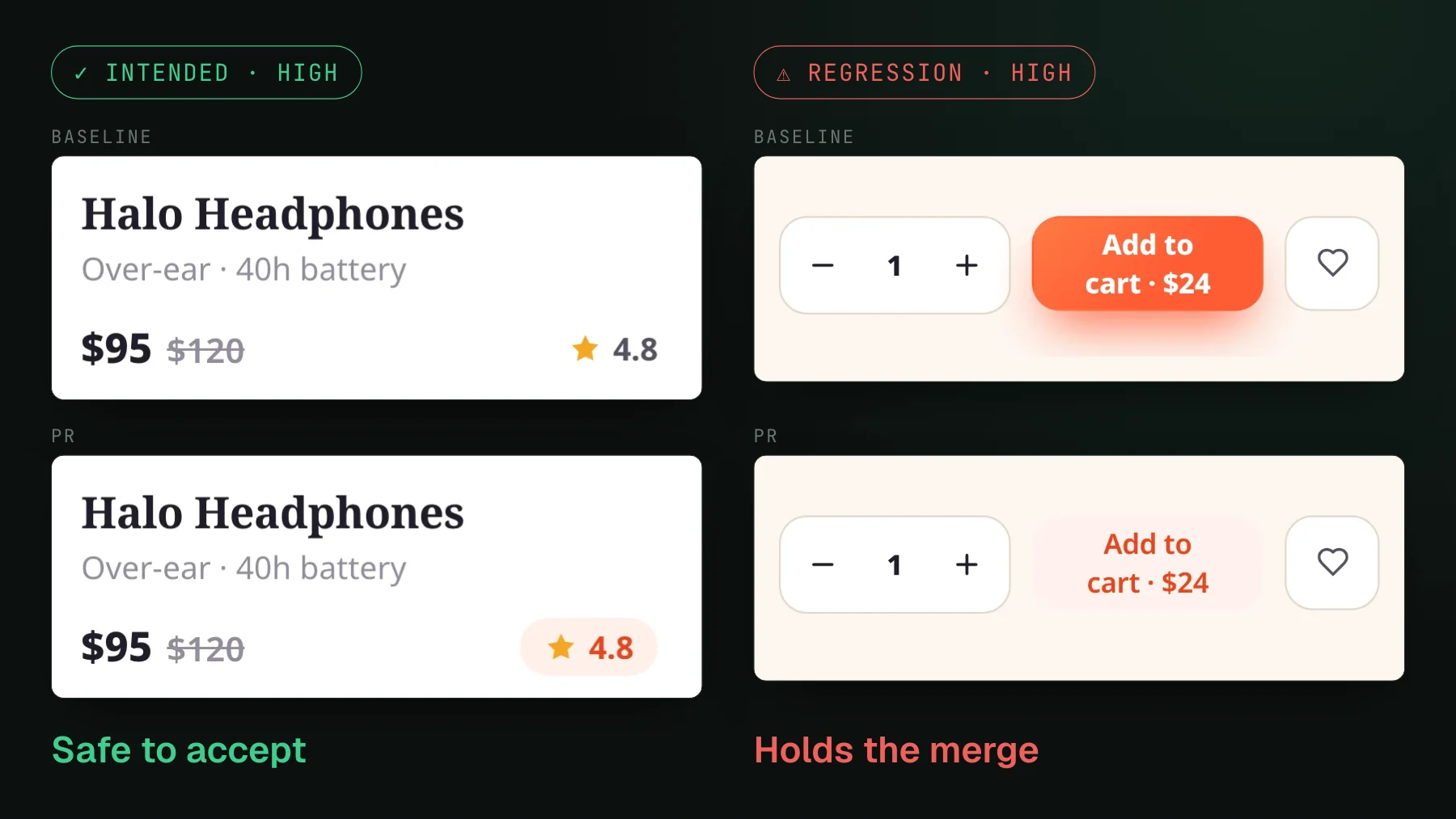
Follow the link and you see exactly what moved. An AI judge has labeled each change against the PR's stated intent - intended, or a regression, with a reason - so the list is already triaged before you look at a single pixel.
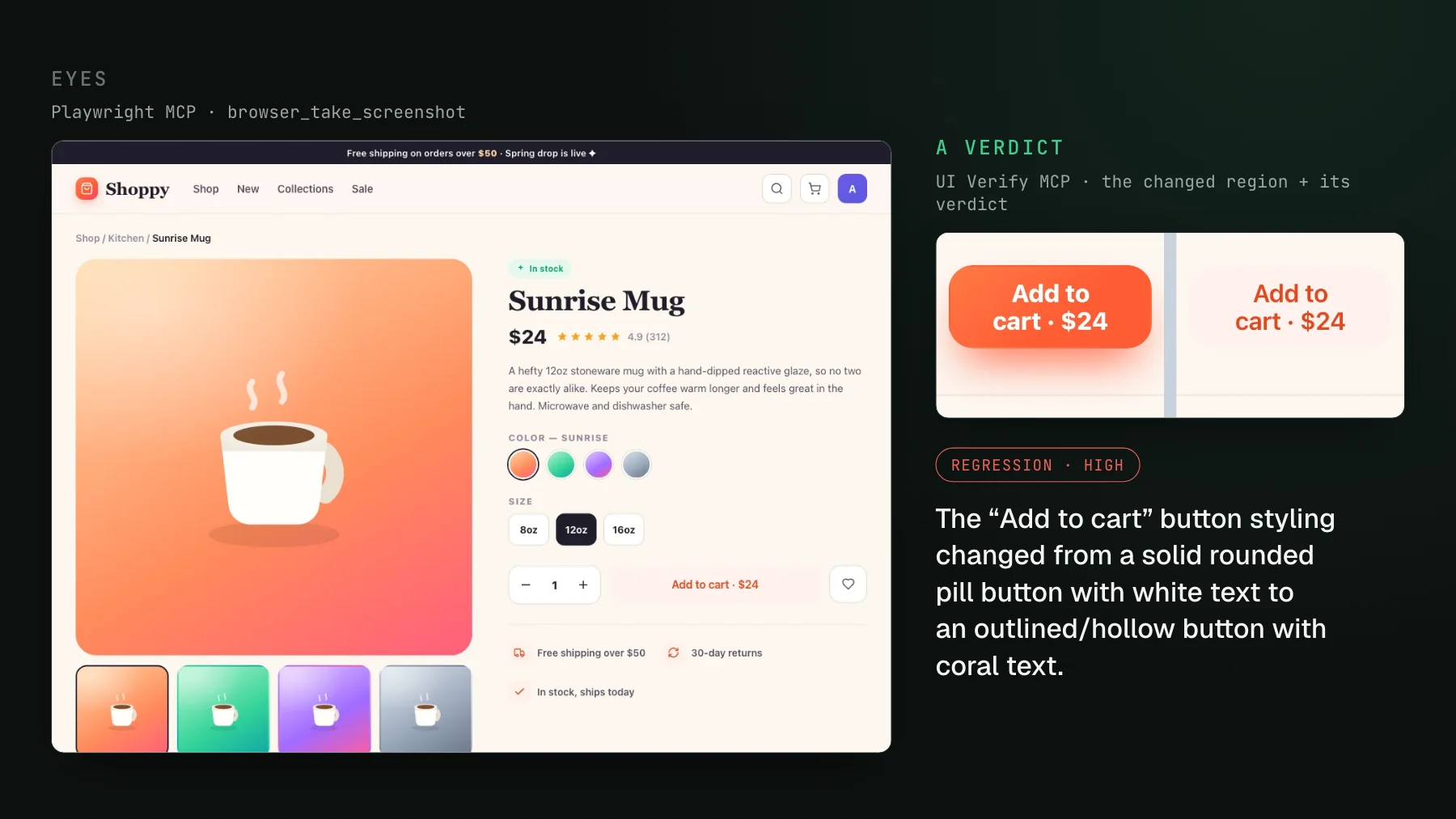
Here is a real one of our builds. A pull request whose whole intent was to polish a product-card rating badge: the build rendered 29 stories, flagged 9 as changed, and the judge sorted them into 5 intended restyles and 2 regressions. The one it cared about was an Add-to-cart button that had flipped from a filled coral button into a faint outline nobody would click - on a page the rating-badge PR had no business touching. The judge called it a high-confidence regression in plain words: unrelated to the stated intent of restyling the rating badge. That sentence is what the agent acts on, not a pixel count. For the diff to be trustworthy the render has to be deterministic - same commit, same pixels, with the clock and animations and live data frozen - or the check flakes and people learn to click past it; deterministic captures covers how. The AI judge and visual testing for coding agents go deeper.
And here is the part that makes it an agent workflow and not a dashboard you babysit: the same agent that opened the PR pulls those diffs into its own context and fixes the ones it did not mean. It sees the check failed, calls get_diff over MCP, gets back the two things that changed, reasons that the Button restyle was intended and the faint Add-to-cart outline was not, restores the fill, re-runs the check, and reports back green - all before you open anything.
Pillar 5: a second model reviews the PR
The last pillar is the advanced one: a different model, running on GitHub on every pull request, reviewing the code the first model wrote. Its job is to find what the author could not see - deeper issues, and any place a CLAUDE.md or architecture rule was violated. If it is clean, it approves and the PR can merge. A model reviewing its own work shares its own blind spots; a different one disagrees where it counts.
The skills that run the factory
The five pillars are what the agent reads and runs. These are the commands I run every day that string them together, and each one links to the skill itself, so you can read or install it. None is exotic; each closes a loop so the agent, not you, does the checking.
Review loop runs Claude and Codex in parallel, collects the findings, fixes them, and does it again and again until it converges - either no issues, or only nitpicks the two models disagree on. E2E verify runs your app on unique ports - ten agents, ten copies of the app, each on its own port - then drives that copy with Playwright over MCP to confirm the whole stack works before the agent says it is ready; building a new page with a new endpoint, you know the agent actually exercised it end to end. Babysit PR opens the pull request, then checks it every ten minutes for failed jobs or reviewer comments, fixes what it finds, pushes, and waits again, until the checks are green and the review is clean.
Two of them are meta. Add rule is a standing instruction in CLAUDE.md: when a human pushes back on the agent, consider turning that into a rule - someone says on review 'never use this file for that', so you add it and it never has to be said again. That is pillar one, automated. Evaluate is higher level still: it takes a whole agent session and checks whether it violated the rules it was given - asked to review and e2e-verify and it skipped the e2e - then updates that skill or adds a rule so the miss does not repeat.
Factory is the umbrella over all of it. The docs come in through CLAUDE.md by default; it implements, runs the two-model review, verifies in the browser if needed, then babysits the PR. You hand it a ticket and it produces something working and ready to merge. That is level five, and it is built out of the four skills above.
Bootstrap your CLAUDE.md in one prompt
Reading about the factory is the easy part. The actual work is auditing your own repo for the conventions it already has and writing them down where the agent will read them. So hand that to the agent. Paste this into your coding agent - it reads the pillars above, scans this repository, and drafts the CLAUDE.md, the architecture docs, and the lint rules to match, then tells you what is still missing before it writes a line:
Set up an agentic coding workflow for this repository, following the five
pillars in https://uiverify.ai/blog/agentic-coding-workflow: CLAUDE.md,
architecture docs, guardrails, tests, and a second-model review.

1. Scan the codebase and infer the conventions we follow but have never
   written down: the design-token or component system, folders and files
   that should never be imported from, the state and data-fetching patterns
   we standardize on, how the frontend talks to the backend, and our main
   user journeys.
2. Draft or extend CLAUDE.md so you read those conventions on every run.
   Keep the top file thin and route long sections to their own docs
   (frontend, backend, database, user-journeys).
3. For every convention that can be checked mechanically, propose a lint rule
   that fails when it is broken - starting with "a page component must have a
   colocated test".
4. List the tests this repo has and the ones it is missing: backend
   integration, interaction (Storybook or Vitest), and visual regression.
5. Tell me what is still missing for you to check your own work without me: a
   second-model review on each PR, a browser run, and a visual diff on every PR.

Show me the proposed CLAUDE.md, docs, and lint rules before writing anything.
That is pillars one through three, bootstrapped from your actual code in a single pass, instead of a blank CLAUDE.md you fill in by hand. Run it, review what it proposes, keep what fits. The visual pillar is the one it cannot stand up on its own, which is where UI Verify comes in.
Start where you are
Wherever you are on the ladder - level two, level three, wherever - there is a next pillar worth adding, and the compounding is real. What worked for our team was giving one or two people a couple of days, up to a week, purely on agentic infrastructure: another skill, a few more CLAUDE.md rules, the reviewer bot. It is not glamorous work and it pays back fast. Invest in the factory and the throughput follows.
The one pillar with no off-the-shelf answer for agents was the visual one, which is the gap UI Verify closes: a cloud render on every PR, an AI judge whose verdict travels with the diff, and an MCP your agent triages through. The triage visual changes skill is the ready-made version of that step, and triage from your coding agent walks it tool by tool. It is also what finally lets UI changes join the auto-merge lane. The rest of the factory you can start building today with the agent you already have.
Give your agent eyes on the UI
UI Verify screenshots your UI on every pull request and an AI judge tells an intended change from a real regression, then exposes both over MCP so the agent that wrote the PR triages its own diffs. The visual pillar your factory is missing. Free for 10,000 snapshots a month (50,000 for open-source projects).
Start for freeNo credit card required.
Triage a build from your agent
Bucket real regressions vs noise and accept baselines, over MCP.