Chromatic TurboSnap: what it skips and what it can't
Chromatic TurboSnap skips stories a change cannot reach. Why a token file or a barrel still re-renders most of the suite, measured on a real preview-stats.json.
 Igor LuchenkovBuilding UI Verify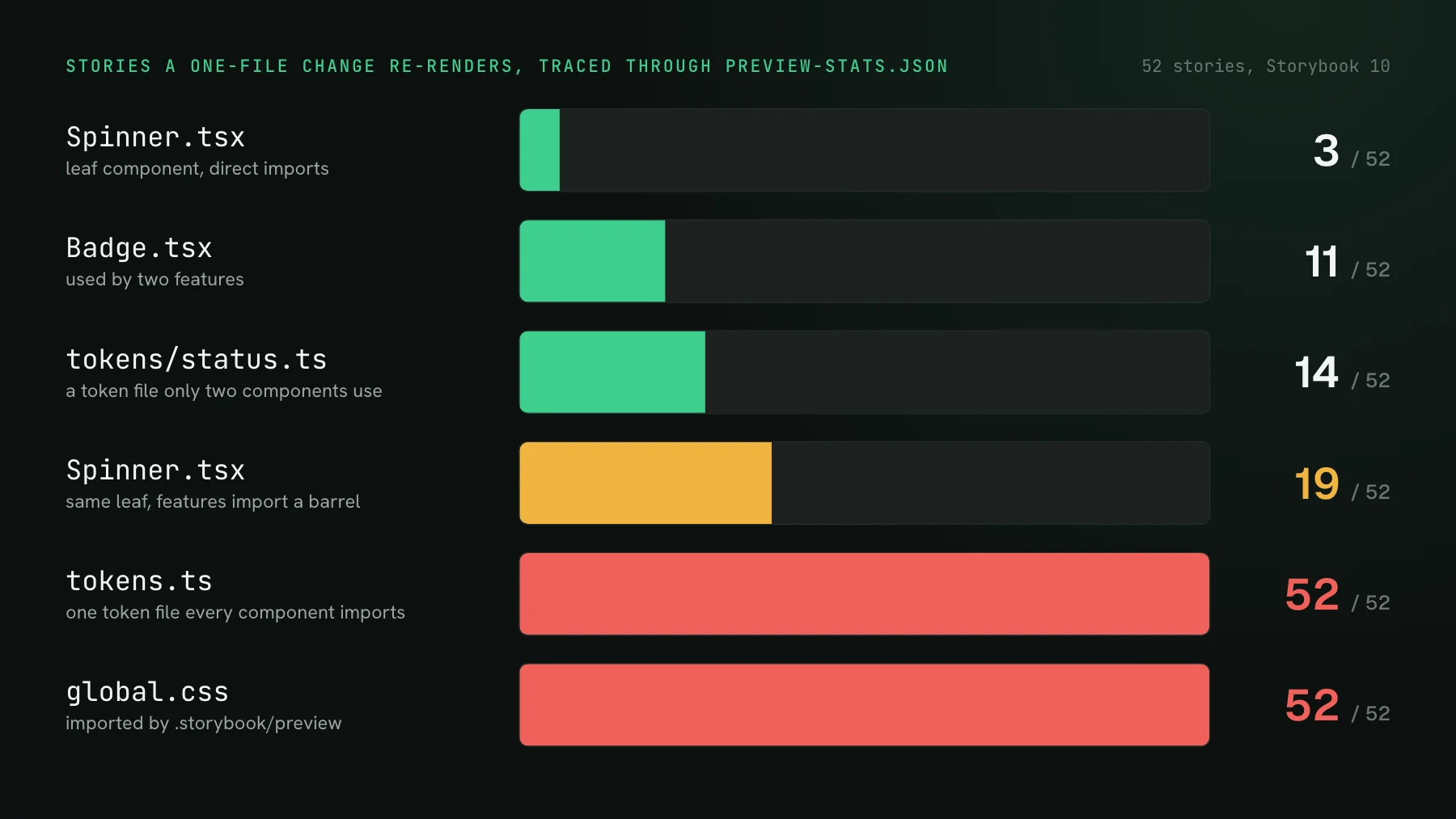
On this page
- "We turned on TurboSnap. Why did it render everything?"
- What is Chromatic TurboSnap?
- Which changes force a TurboSnap full rebuild?
- Measuring the blast radius on a real preview-stats.json
- Why does a design-token file re-render the whole suite?
- How do barrel files break TurboSnap?
- How to structure code so skipping actually works
- How does UI Verify's --only-changed decide what to skip?
- Where the TurboSnap bill actually comes from
"We turned on TurboSnap. Why did it render everything?"
Because the change touched a file that sits near the top of your dependency graph, and from there every story is downstream. TurboSnap did not fail. It read the graph and the graph said everything could have moved. I ran into this at my day job: a change to a package the web app depends on re-ran every story, because anything in the app could have shifted visually. TurboSnap was on, and it kept only a small slice of the affected area from rendering. The builds it could not trim were the ones that touched shared code, and those were the expensive ones.
This post is about that gap: what TurboSnap actually looks at, which changes force a full rebuild by rule, which ones force it through the graph, and how to lay out a codebase so the skip has room to work. The numbers come from a small Storybook I built for this post and traced file by file.
What is Chromatic TurboSnap?
TurboSnap is Chromatic's skip-unchanged mode. You enable it with --only-changed on the Chromatic CLI (or onlyChanged: true in the GitHub Action). For each build it collects the git changes since the ancestor build, maps them through the bundler's dependency graph to the story files they reach, and captures only those stories. Every other story is copied from its baseline. The graph is the preview-stats.json Storybook writes when you build with --stats-json, from Webpack or Vite.
A few details from Chromatic's docs, captured October 2026, matter for what follows. TurboSnap unlocks after ten successful CI builds. Its prerequisites list Storybook 6.5+ or Vitest 4+. The unit it tracks is the story file, so editing one story in Button.stories.tsx retests every story in that file. If preview-stats.json is missing from a prebuilt Storybook, Chromatic warns that TurboSnap bailed and runs a full build rather than failing. On billing, a copied snapshot counts as a fraction of a captured one, and a build where nothing in any story's graph changed is bypassed and bills nothing.
Which changes force a TurboSnap full rebuild?
Chromatic lists them. A change to dependency versions in package.json with no valid lockfile, any change to the Storybook configuration, any file imported by preview.js, the static folder, files you declared with --externals, a --force-rebuild re-run, infrastructure upgrades, a newly enabled browser, and switching on accessibility tests for the first time. Each of those re-captures every story, by design, because any of them can change how any story renders.
The list is the easy half. You can see a lockfile in a diff. The harder half is a change that is not on any list and still reaches most of the suite through ordinary imports, and that one only shows up if you look at the graph.
Measuring the blast radius on a real preview-stats.json
To get numbers rather than intuitions, I built a small Storybook 10 project on Vite in a scratch folder: twelve components, four features that compose them, two pages, 52 stories in 18 story files. Every component reads a shared tokens.ts, and .storybook/preview.ts imports one global stylesheet. I built it with --stats-json three times, changing only how the code imports itself, and traced single-file changes through each graph.
The stats file is a flat list of modules, and each module carries reasons: the modules that import it. Walking those edges upward from a changed file until you hit story files is the core of any graph-based skip, and it fits in a few lines:
import { readFileSync } from "node:fs";
const [dir, ...changed] = process.argv.slice(2);
const { modules } = JSON.parse(readFileSync(`${dir}/preview-stats.json`, "utf8"));
const { entries } = JSON.parse(readFileSync(`${dir}/index.json`, "utf8"));
const stories = Object.values(entries).filter((e) => e.type === "story");
const importers = new Map(modules.map((m) => [m.name, (m.reasons ?? []).map((r) => r.moduleName)]));

for (const file of changed) {
  const seen = new Set([file]);
  const queue = [file];
  while (queue.length) for (const parent of importers.get(queue.shift()) ?? []) {
    if (!seen.has(parent)) { seen.add(parent); queue.push(parent); }
  }
  const global = [...seen].some((m) => m.includes(".storybook/preview"));
  const hit = global ? stories : stories.filter((s) => seen.has(s.importPath));
  const files = new Set(hit.map((s) => s.importPath)).size;
  console.log(`${file.padEnd(34)} -> ${String(hit.length).padStart(2)} of ${stories.length} stories (${files} story files)${global ? "  [imported by preview: full rebuild]" : ""}`);
}With components imported by path, the skip does what you hope. A change to Spinner.tsx, which nothing else uses, reaches its own 3 stories. Badge.tsx reaches 11, because two features and one page render a badge. The money formatter reaches 16. Then tokens.ts reaches 52 of 52, and so does the global stylesheet, the first through the graph and the second through the preview rule.
Why does a design-token file re-render the whole suite?
Because every component imports it, so every story depends on it, and a module graph records which file imports which, not which value inside it each importer reads. Changing one status color in a shared token file looks, to the graph, identical to changing the entire palette. That is not a TurboSnap shortcoming. Any skip built on a dependency graph reads the same edges and reaches the same answer, and re-rendering everything is the correct response when the edges say everything could have moved.
What you can change is the shape of the edges. In the third build I moved the status colors into their own tokens/status.ts, imported only by the two components that use them. A status-color tweak then reaches 14 stories instead of 52. The core token file still reaches everything, and it should: spacing and type scales are real global inputs. The goal is not to make global files cheap. It is to stop non-global changes from living in a global file.
The second habit is to land token changes on purpose. A pull request that edits the token file will render the full suite on any graph-based tool, so give it its own pull request with a description that says so, review it as the design change it is, and keep it out of the feature work that would otherwise inherit a full rebuild. A design system migration is the extreme version of this, and the same habit scales up: one deliberate pull request per global change, reviewed as the restyle it is.
How do barrel files break TurboSnap?
They put one module between every consumer and every component. When features write import { Button, Card } from "./components", each of them imports components/index.ts, and the index imports every component. A change to any component now reaches every file that imports the barrel, whether or not it renders that component. Chromatic's troubleshooting page warns about this and says TurboSnap relies on Webpack tree-shaking (production mode, ES module syntax) to see through a barrel.
My scratch project builds with Vite, and its stats file recorded the barrel edges as plain imports. Chromatic's trace utility followed them: one changed file, seven affected story files, against one with direct imports. In the barrel build no component costs fewer than 19 stories, because they all share one doorway, and Button.tsx, which two other components render, costs 25. If your Storybook builds on Vite, assume the barrel widens the blast radius and check it with a trace rather than relying on tree-shaking.
How to structure code so skipping actually works
- Build with `--stats-json` and fail CI if `preview-stats.json` is missing. Without the file, every tool falls back to rendering the full suite, and the fallback is easy to miss in a green build.
- Keep `.storybook/preview` thin. Everything it imports, directly or through a barrel, is global. Import a stable theme object, not a theme folder's index, and move providers that only some stories need into story-level decorators.
- Import components by path inside the app. Keep the barrel for the package's public entry if you publish one, but do not route your own features and pages through it.
- Split token files by concern. Core spacing and type can stay global. Status colors, chart palettes, and one-off brand values belong in files only their consumers import.
- Keep lockfile churn out of UI pull requests. With a valid lockfile, TurboSnap traces a bumped package to the stories that import it; without one, or with a lockfile out of sync with
package.json, it re-tests everything. Either way an unrelated upgrade widens a feature branch's build, so batch upgrades into their own pull requests. - Trace before you push.
npx chromatic trace ./src/path/to/File.tsxreads a localpreview-stats.jsonand prints which story files a change reaches; I ran it without a project token. The script above gives the story count for any stats file. - On GitHub Actions, check the trigger. Chromatic's docs recommend running TurboSnap on
push, because apull_requestrun builds an ephemeral merge commit, and they document a checkout setup if you need the pull request event.
How does UI Verify's --only-changed decide what to skip?
UI Verify's --only-changed decides from the module graph as well. It reads the preview-stats.json a Storybook writes when built with --stats-json, selects every story that imports a changed file directly or transitively, and carries the rest forward from their baselines with no render and no diff, at a fifth of the cost of a rendered snapshot. On Vitest browser-mode tests, @uiverify/vitest 1.1+ writes the Vite module graph into the archive itself, so a changed file traces to the tests that import it with nothing to configure.
That makes the restructuring above worth doing whichever tool runs your builds. The token split that took a status-color tweak from 52 stories to 14 saves those renders here too, and importing components by path keeps a leaf edit down to its own handful of stories. If the skip never seems to happen, the first thing to check is the stats file: the troubleshooting page covers it, and Skip unchanged stories has the setup for Storybook and Vitest. For the feature-by-feature comparison of the two tools, see UI Verify vs Chromatic.
Where the TurboSnap bill actually comes from
Chromatic bills per snapshot, and a skipped story costs a fraction of a captured one, so a month of leaf-component pull requests is cheap with TurboSnap on. The builds that dominate the invoice are the wide ones: the token tweak, the edit to something preview imports, the dependency upgrade, the shared package everything depends on. Chromatic's best-practices page says a well-configured project should skip a full rebuild on roughly 80 to 90% of builds, and that seeing half or more of builds rebuild everything points at configuration or at shared code that changes too often. Its usage report has a bail-reason column that tells you which.
That column is worth an afternoon. Sort last month's builds by bail reason, trace the files behind the biggest bucket, and restructure the two or three that keep pulling the whole suite in. It is the same work on any per-snapshot tool, and it compounds with the other lever, rendering fewer states per component, covered in how I cut my Chromatic bill 10x. If the bill climbed without any new stories, why your Chromatic bill exploded has the commit-volume side of the math, and Chromatic pricing explained covers the plans.
Skip the stories your change cannot reach
UI Verify's --only-changed traces your Storybook or Vitest module graph and carries every unaffected story forward from its baseline, so a small PR stays a small build.
Start for freeNo credit card required.
Write economical visual tests
Full visual coverage in the fewest billable snapshots.