The best Lost Pixel alternatives in 2026
Lost Pixel is joining Figma and sunsetting its platform. The best alternatives to migrate to in 2026, compared: Argos, Chromatic, UI Verify, Percy, and Playwright.
 Igor LuchenkovBuilding UI Verify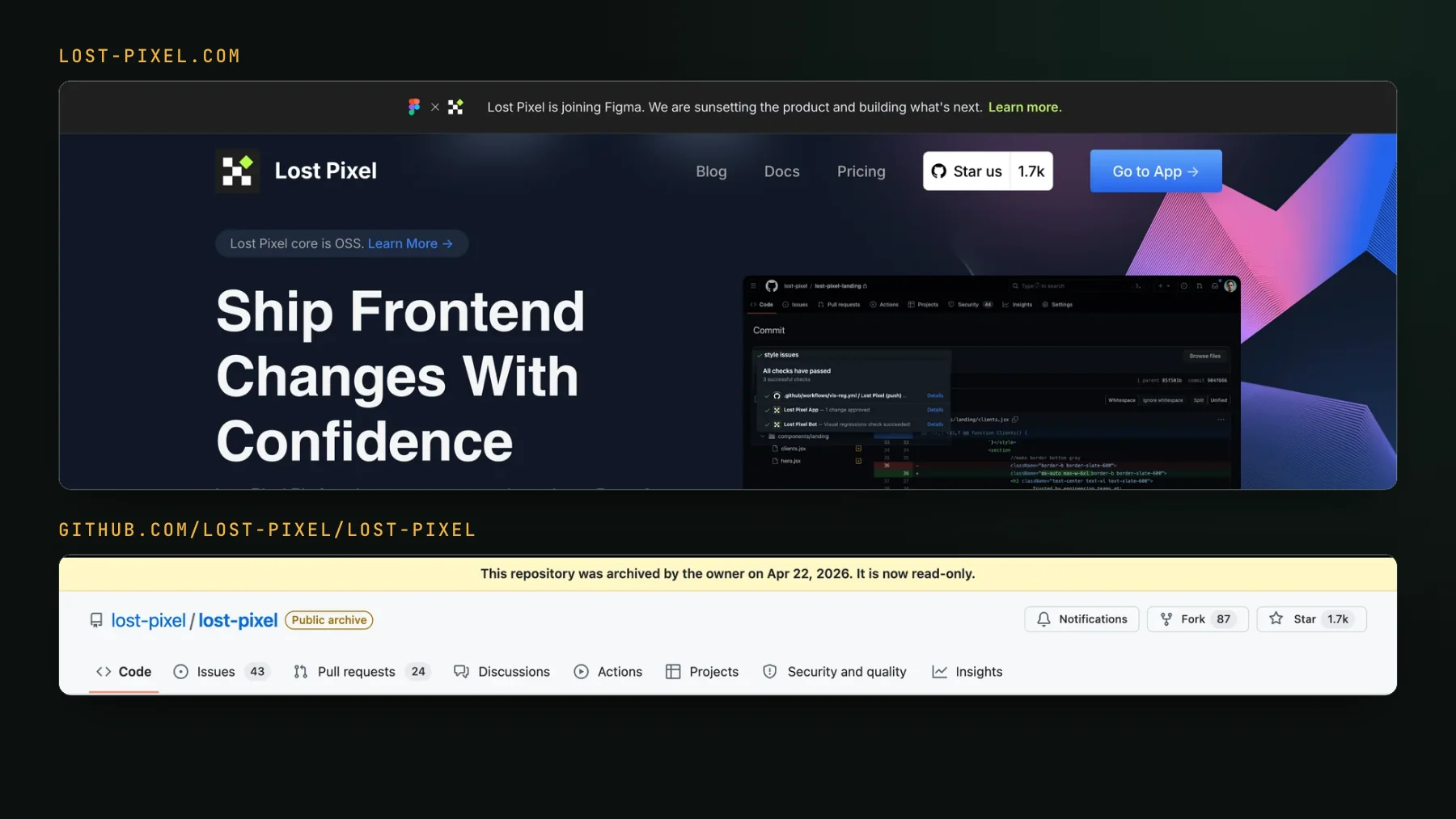
On this page
- What is happening to Lost Pixel?
- What are your two paths off Lost Pixel?
- How should you choose a Lost Pixel alternative?
- Pick Argos if you liked Lost Pixel's open-source, capture-in-CI model
- Pick Chromatic if you need accessibility checks and Microsoft Edge
- Pick UI Verify if coding agents write your pull requests
- Pick Percy if you need BrowserStack and real devices
- Pick Playwright screenshots if you want to stay free and local
- Lost Pixel alternatives compared
- When can you stay on open-source Lost Pixel?
- What is the best Lost Pixel alternative?
The best Lost Pixel alternatives in 2026 are Argos if you liked its open-source, capture-in-CI model, Chromatic if you need accessibility checks and Microsoft Edge, UI Verify if coding agents write your pull requests, Percy if you need BrowserStack's real devices, and Playwright's built-in screenshots if you want to stay free and local. Lost Pixel was one of the better open-source visual regression tools: an OSS core you could self-host, a hosted platform on top, and a clean fit with Storybook and CI. In April 2026 its team joined Figma and started sunsetting the product, so if you were on the hosted platform you now need somewhere to go. Below is what each alternative changes for you, plus the one case where you do not need to move at all.
What is happening to Lost Pixel?
Lost Pixel is joining Figma and sunsetting its hosted product: its own site leads with the banner "Lost Pixel is joining Figma. We are sunsetting the product and building what's next." There is no published shutdown date (still none when we checked on 2026-10-17), and the open-source core (lost-pixel on npm) is still on GitHub, archived read-only since April 22, 2026, and still runs. So the practical situation is split: the managed platform, with its hosted baselines and review UI, is winding down, while the self-hosted OSS mode keeps working for as long as you maintain it. If you relied on the hosted side, that is the part you are migrating.
What are your two paths off Lost Pixel?
- Stay on the open-source core, self-hosted. Keep running
lost-pixelin your CI with baselines in your repo or an S3 bucket. Free and unchanged, but you own the maintenance of an archived project and you get no managed review UI, no hosted history, and no vendor fixing bugs. - Move to a maintained tool. Trade the self-hosting for a hosted platform that is actively developed, with a review workflow, hosted baselines, and support. The rest of this page is that shortlist.
How should you choose a Lost Pixel alternative?
Start from what you valued in Lost Pixel and what you want to stop doing. Five things separate the tools below:
- Who captures the screenshots: your CI renders and uploads them, as with Lost Pixel's OSS core, or the tool renders them for you.
- Which tests it reads: Storybook only, or your Playwright and Vitest suites too, and whether you author new snapshot calls to get there.
- How a change is reviewed: a failed test, a hosted review UI with history, or a verdict on each change that your coding agent can act on over MCP.
- Browser and device coverage: Microsoft Edge, an accessibility check in the same run, real mobile devices, or native apps.
- What it costs to run: free and self-maintained, or a per-snapshot bill with the hosting and maintenance included.
Each tool below is listed under the situation it fits, with its case for when it is the better pick. I build UI Verify, so read its section knowing that.
Pick Argos if you liked Lost Pixel's open-source, capture-in-CI model
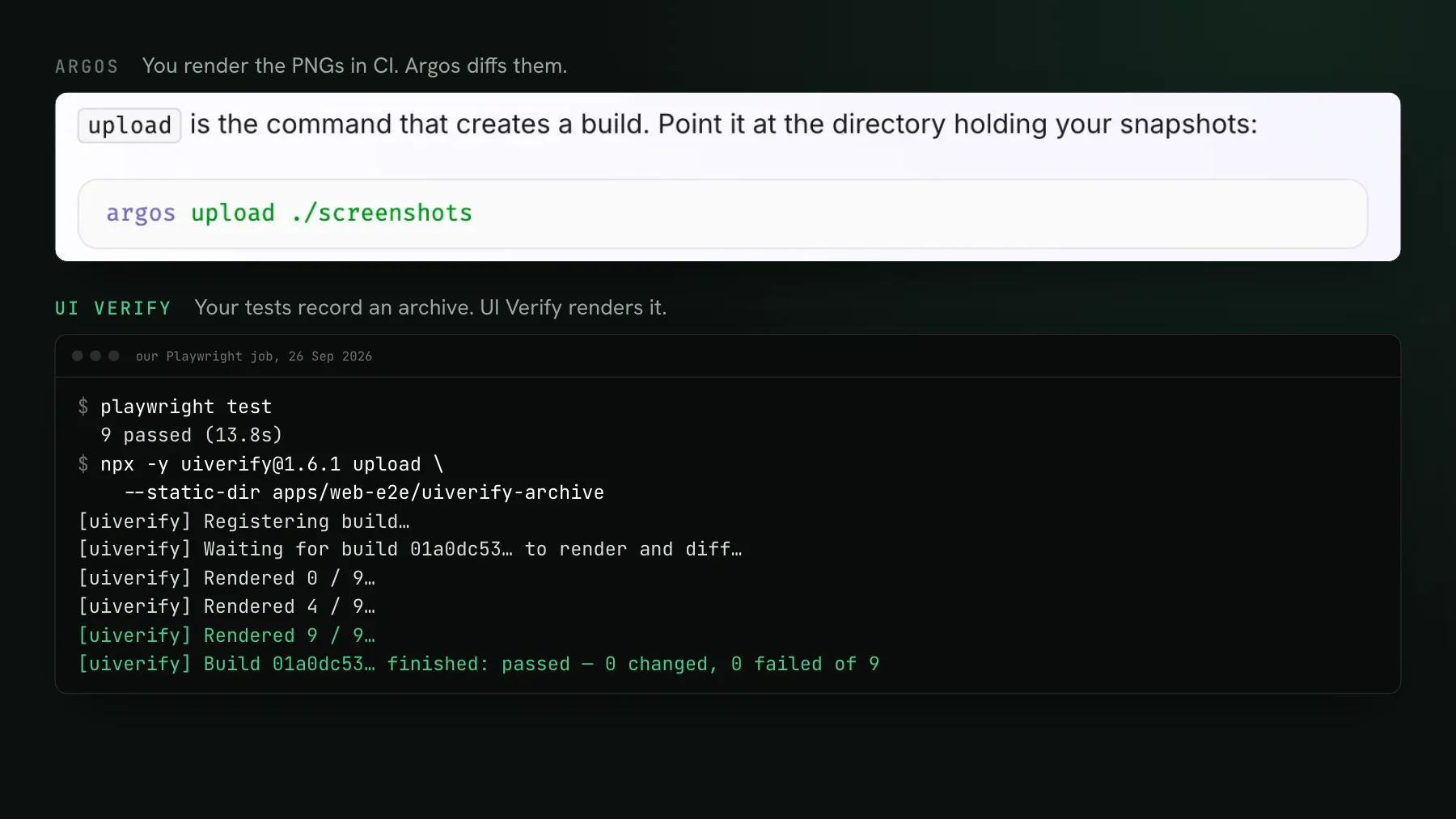
Argos is the closest in spirit to Lost Pixel. It is open source (the whole platform is MIT-licensed, per its docs, checked 2026-10-17), it diffs the screenshots your CI captures and uploads rather than rendering them for you, and it keeps baselines and a review UI hosted. If what you valued in Lost Pixel was capturing inside your own pipeline with an OSS foundation, Argos will feel the most familiar.
- Hosted baselines and a PR check over screenshots your pipeline produces.
- SDKs for Storybook, Playwright, Cypress, Vitest, Puppeteer, and WebdriverIO (each published under @argos-ci on npm, checked 2026-10-17).
- Fully open source, with a free tier for small projects.
Best for: teams happy to keep capturing in their own CI who want an open-source hosted diff layer. See the best Argos alternatives.
Pick Chromatic if you need accessibility checks and Microsoft Edge
Lost Pixel was frequently paired with Storybook, and Chromatic is the Storybook team's own visual testing service, so a Storybook-heavy migration lands there most naturally. UI Verify captures Storybook first-class, skips unchanged stories the same way, publishes its own permalinked Storybook, and has its own collaborative review, so what actually sets Chromatic apart is axe accessibility in the same run and Microsoft Edge on the paid tiers (chromatic.com/pricing, checked 2026-10-17). Designers review, comment on the exact pixels, and approve or reject in UI Verify too, so sign-off is not the dividing line.
Best for: teams that need axe accessibility and Microsoft Edge in the same run. See how the pricing works in Chromatic pricing explained.
Pick UI Verify if coding agents write your pull requests
Coming from Lost Pixel, the thing you feel first is that there is nothing to author and nothing to self-host. UI Verify replays an archive of the Storybook, Playwright, and Vitest tests you already run, so the same suite becomes your visual suite with no new code. On every pull request it screenshots your UI, an AI judge labels each change a regression or an intended change with a reason, and the check holds the PR until each change is reviewed, so a real regression cannot merge behind a green check.
- Nothing to self-host or maintain: a managed platform, in place of an archived OSS project you keep running yourself.
- A check that holds the PR until each change is reviewed, plus an AI judge that can classify each change, so review is decisions, not raw diffs. See the AI judge.
- Agent review over MCP: your coding agent reads the exact per-story diffs and verdicts and accepts the intended baselines from the terminal. See triage with your agent.
- Flake handled for you, not self-hosted: on the Lost Pixel OSS core you owned determinism and baselines yourself, so what you gain is the maintenance you stop doing, a seeded
Math.random, inlined fonts, a fetch-once image cache, a hermetic network, andprefers-reduced-motionneutralized at capture time, plus a re-render that auto-ignores flakes. See fix flaky visual tests. - Chrome, Firefox, and Safari for Storybook stories on the free tier, at desktop and mobile widths.
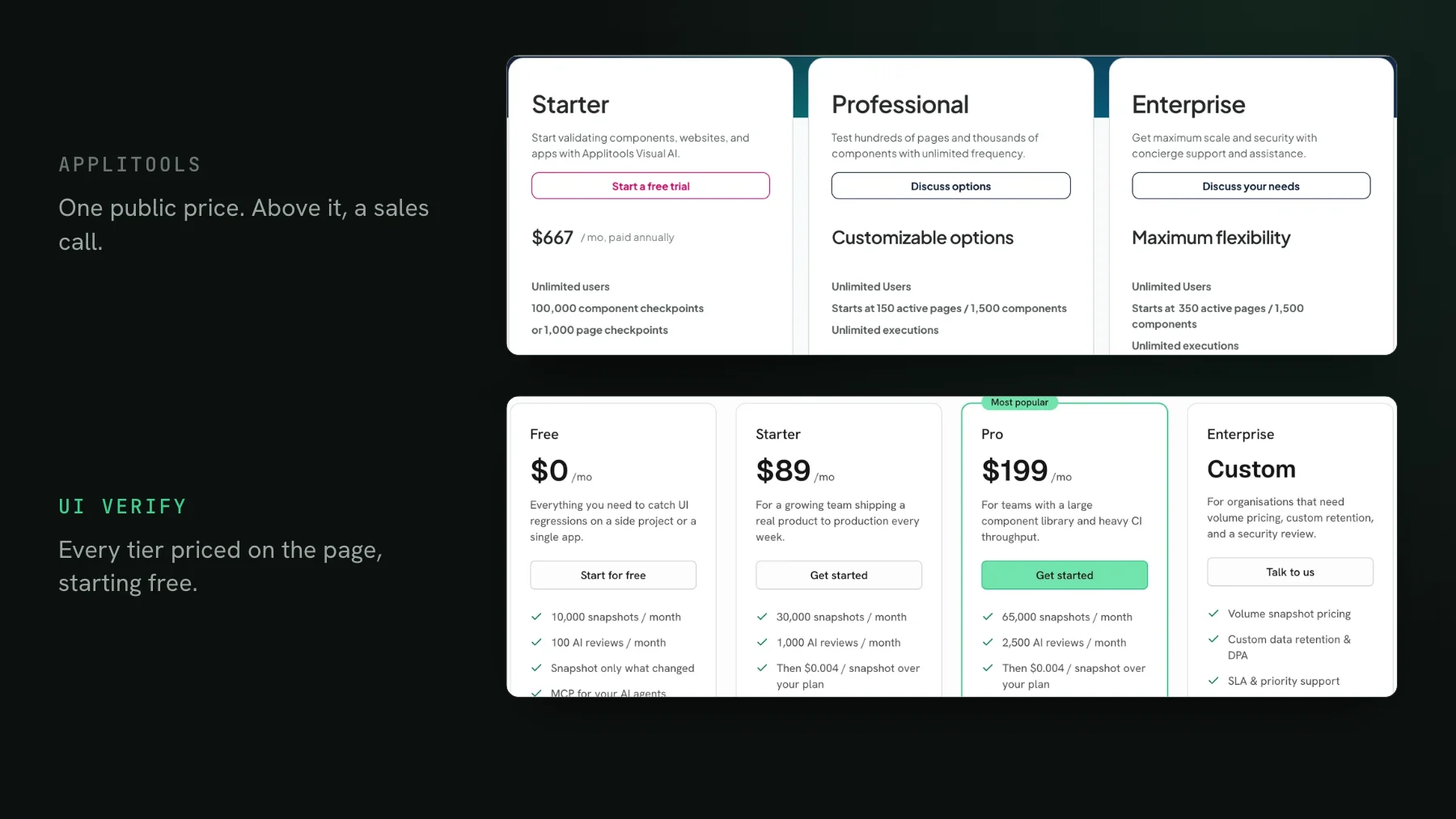
Pricing: a free tier of 10,000 snapshots a month (50,000 for open-source projects) with no credit card, then plans from $89 a month for 30,000 snapshots and $0.004 per snapshot beyond that. Open-source projects get a larger free tier of 50,000 snapshots a month, self-declared at sign-up with no approval and no card (see free for open source). Not free the way the OSS core was, but with nothing to self-host or maintain in exchange. See how that compares at your volume in the pricing calculator.
Best for: teams whose UI is increasingly written and reviewed by coding agents, and anyone who wants to stop maintaining their own visual testing infrastructure.
Pick Percy if you need BrowserStack and real devices
Percy is BrowserStack's visual testing product. It wires in through percySnapshot() calls you add to your tests, and its advantage is the wider BrowserStack ecosystem: cloud rendering, a real-device cloud, and App Percy for native iOS and Android. If your migration also needs cross-device or native-app coverage, that is a genuine edge.
Best for: teams already on BrowserStack, or anyone who needs real-device and native-app visual testing. See the best Percy alternatives.
Pick Playwright screenshots if you want to stay free and local
If you self-hosted Lost Pixel to avoid a per-snapshot bill, Playwright's built-in toHaveScreenshot is the simplest way to stay free and local. It captures a page or element and compares it to a baseline PNG committed beside the test, with mask, threshold, and maxDiffPixelRatio to keep noise down. What you give up is what the hosted tools sell: baselines still live in your repo, they differ across operating systems, and a change lands as a red test with no history, review UI, or verdict.
Best for: small suites you are happy to review yourself, entirely inside your own CI.
Lost Pixel alternatives compared
| Tool | AI review of changes | Capture | Free tier | Best for |
|---|---|---|---|---|
| UI Verify | Check holds the PR for review; AI judge on each change | Archive-replay of your tests | 10,000 snapshots / mo (50,000 open source) | Agent-written pull requests |
| Argos | Agent triage over MCP | You capture in CI, upload | 5,000 screenshots / mo | Open source, capture in your pipeline |
| Chromatic | None for diff triage | Storybook-first | 5,000, Chrome only | Accessibility and Edge |
| Percy | Visual Review Agent | SDK calls in your tests | 5,000 screenshots / mo | BrowserStack and real devices |
| Playwright screenshots | None | Built in, local | Free, local | Small suites you review yourself |
When can you stay on open-source Lost Pixel?
You can stay while you are happy to maintain an archived dependency, so you do not have to move immediately. The OSS core still runs, so if you self-host it, keep baselines in your repo, and are comfortable maintaining an archived dependency, it will keep passing and failing PRs as it does today. The reasons to migrate are forward-looking: no more upstream fixes or features, no managed review UI, and the risk that a future Node, browser, or CI change breaks a project nobody is maintaining. That drift has started: the last npm release, 3.22.0 from November 2024 (still the latest on 2026-10-17), pins playwright-core 1.47.2, so every install still renders in Chromium 129. If your suite is small and stable, that risk is low for a while. If it is central to how you ship, move before it bites.
What is the best Lost Pixel alternative?
It depends on what you valued in Lost Pixel. If it was the open-source, capture-in-CI model, Argos is the closest. If it was Storybook, Chromatic. If you need real devices, Percy. If you want to stay free and local, Playwright. And if you would rather stop maintaining visual testing infrastructure altogether and let an AI judge do the triage, UI Verify replays your existing tests, judges each change, and exposes review over MCP.
Migrating off Lost Pixel? Try UI Verify
UI Verify screenshots your UI on every pull request and an AI judge tells an intended change from a real regression, and the check holds the PR until each change is reviewed, so you review decisions, not diffs. It replays your existing tests instead of asking you to author snapshot calls. Free for 10,000 snapshots a month, and 50,000 for open-source projects.
Start for freeNo credit card required.
Set up visual testing
From no visual tests to a green check on every pull request.