A BackstopJS alternative for the agent era
BackstopJS is a solid open-source visual regression tool, and teams now point Claude at its report. Where that hits a ceiling, and when BackstopJS is still the right call.
 Igor LuchenkovBuilding UI Verify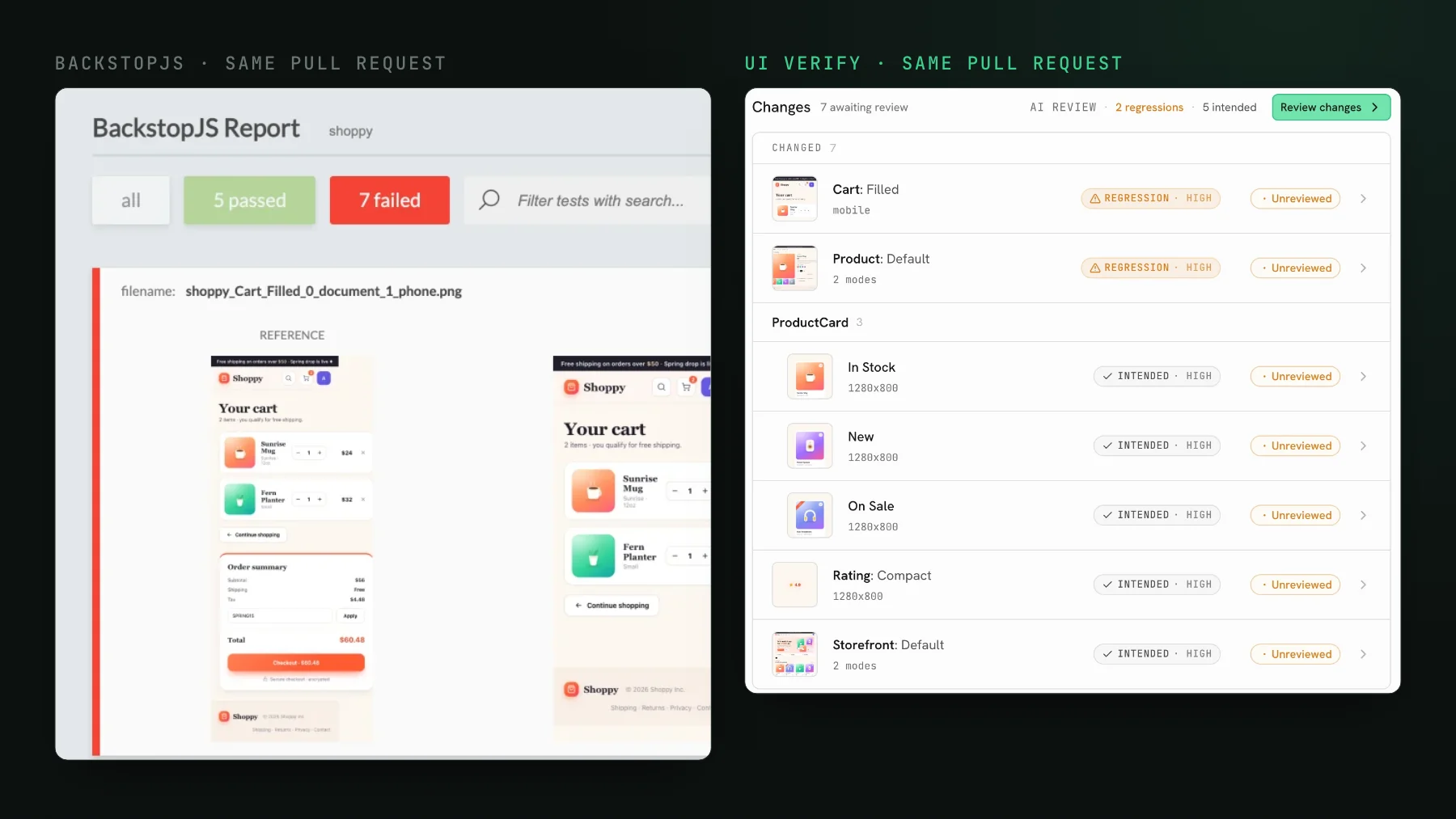
On this page
The right BackstopJS alternative depends on what you need once the screenshots are diffed. If one or two people maintain a small, stable suite and everything has to stay free and local, stay on BackstopJS. If you already run Playwright tests, its built-in toHaveScreenshot assertion does the same local, committed-reference job without a separate config file (Playwright's snapshot docs, checked 2026-10-17). If coding agents open your pull requests and you want each diff read, judged against the PR's intent, and the PR held until each change is reviewed, that is the job UI Verify was built for. I am building UI Verify, so read this with that in mind, and I ran BackstopJS against our own site before writing it.
BackstopJS is a config-driven, open-source visual regression tool: you list scenarios in a JSON file, it captures each one in a headless browser, diffs it against a committed reference image, and writes an HTML report with a reference, test, and diff view you can scrub between. It is free, it runs locally or in your own CI, and it has been dependable for years. Its GitHub repository is MIT-licensed and not archived, and the newest release on npm is 6.3.25, published in September 2024 (both checked 2026-10-17).
How fast is a first BackstopJS run?
About fifteen seconds for three scenarios against uiverify.ai, on one desktop viewport and the default Puppeteer engine: the reference run took nine seconds, the test run five, and the report opened in a browser tab.
That is a lot of value for a JSON file. It also ships real knobs for stable shots: delay and ready selectors for timing, hideSelectors and removeSelectors to drop noisy elements, a misMatchThreshold to tune sensitivity, and an official Docker image so renders match across machines, all documented in the BackstopJS README as of 2026-10-17. For a small, stable suite that one or two people maintain, it is a clean setup with very little to explain.
What changes when an agent reads the BackstopJS report?
The agent becomes the first reader of the diff, and the human reads its summary. A team pulls it in, points it at the branch versus the integration branch, and has Claude read the output: the agent reads the diff and reports what changed and what looks broken. Another team runs it by hand for the before-and-after of a component-library migration and has not yet tried letting the agent see the comparison. Both are days into it, both are happy with it, and both are already asking the same next question.
So the category no longer needs a pitch. People want the screenshots diffed, and they will wire an agent to the diff themselves. The contest is what happens after the diff exists: who reads it, who decides whether the change was intended, and who holds the pull request when it was not.
Where does BackstopJS hit a ceiling?
BackstopJS hits its ceiling at triage, and everything below follows from it being a developer-only local CLI. That is not a flaw; it is what a free, local, config-driven tool is. The friction shows up once pull-request volume climbs, because the part it leaves to you, reading and triaging the diff, is the part that does not scale with agent-written PRs.
- No hosted review surface. The report is a local artifact. The media company's lead named this as his main ask: product owners and designers are not used to developer tools, and he wanted them to be able to open the review. The agency lead could not show me his report at all, because it only exists on the machine that ran the command.
- No verdict. Claude can tell you that a small percentage of pixels differ. On our public demo PR, BackstopJS's largest mismatch, 19.92%, is the change the PR asked for, and the phone cart that lost its checkout scores 15.15%. It cannot tell you whether that difference was the restyle you asked for or the badge that fell off, unless something feeds it the pull request's intent alongside the crop.
- PR integration is yours to build. The check, the gate, the comment on the PR: all DIY.
- Determinism is manual. The knobs are there, and you configure and maintain them per scenario, rather than getting held animations, seeded randomness, and inlined fonts by default.
- Baselines live in your repo and grow with the suite, and someone owns re-referencing them after every intended change.
What does an agent-native tool do differently?
Instead of generating a report for a human to open, UI Verify sends per-story diffs (and a verdict on each) to your coding agent over MCP, cropped to the region that moved rather than a whole-page bitmap. That crop matters more than it sounds. If you hand an agent a full page and ask whether it looks broken, it will usually say no, even when a badge is half off the screen. The AI judge labels each change intended or regression by reading the PR description, and the PR is held until each change is reviewed. The agent that wrote the change accepts the intended baselines from the terminal; see triage with your agent.
I built it this way because of my own workflow: I usually have at least three agents changing UI in parallel, and what I want is to be confident none of them broke anything without opening each page myself. Existing tools gave the agent no way in. Capture is Storybook-independent, so it replays the Storybook, Playwright, or Vitest tests you already run, and it also captures real pages. Determinism is handled at render time, then the flakes that remain are auto-ignored; the mechanics are in deterministic captures.
When should you stay on BackstopJS?
- Your suite is small and stable and the diff count per PR is low. The report is fine at that volume.
- Everything must be free and fully local, with no external service in the loop. BackstopJS is the right tool, full stop.
- The job is episodic: a component-library migration where you eyeball one batch of diffs and move on. This is exactly what the agency lead uses it for, and I would too.
When is it time to move off BackstopJS?
- Parallel agents open PRs faster than a human reads diffs.
- A shared component changes and the blast radius spans dozens of stories or pages.
- You want the diff read and triaged by the agent, and the PR held only when it is a real regression.
- Someone outside engineering needs to open the review.
The free tier is 10,000 snapshots a month, 50,000 for open source, so trying it next to BackstopJS is not a purchase decision. If you are weighing whether to keep building on a local tool, build vs buy for visual testing walks through the arithmetic, and the setup skill wires the first captures.
Let your agent read the diff, not just generate it
UI Verify replays your existing tests, judges each change intended versus regression, and hands the results to your coding agent over MCP. Start on the free tier and see where the ceiling moves.
Start for freeNo credit card required.
Set up visual testing
From no visual tests to a green check on every pull request.