Agent visual testing: give it the cropped diff
Agent visual testing hands your coding agent the cropped diff of what moved plus an AI judge's verdict over MCP, not a full-page screenshot it rubber-stamps.
 Igor LuchenkovBuilding UI Verify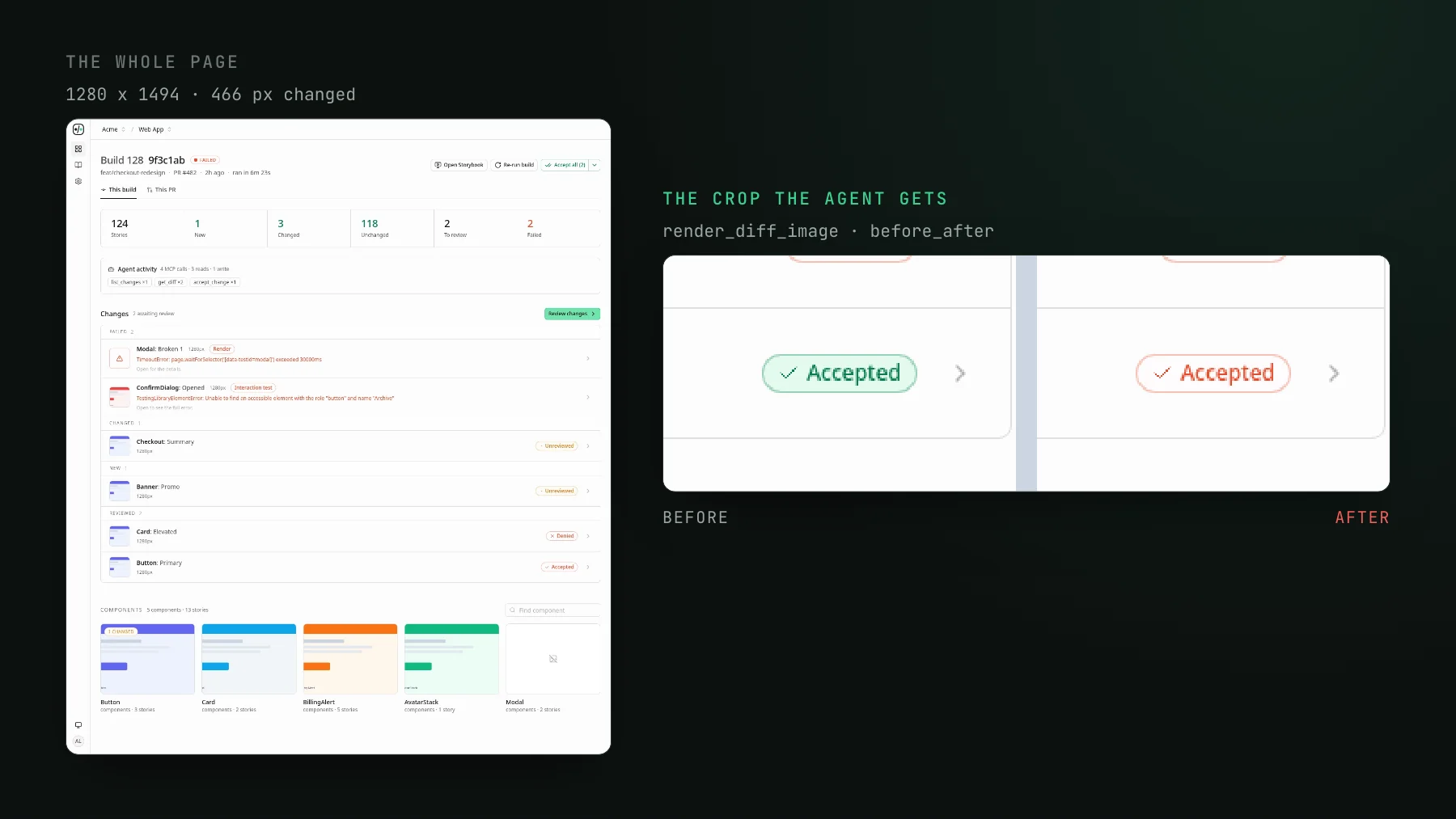
On this page
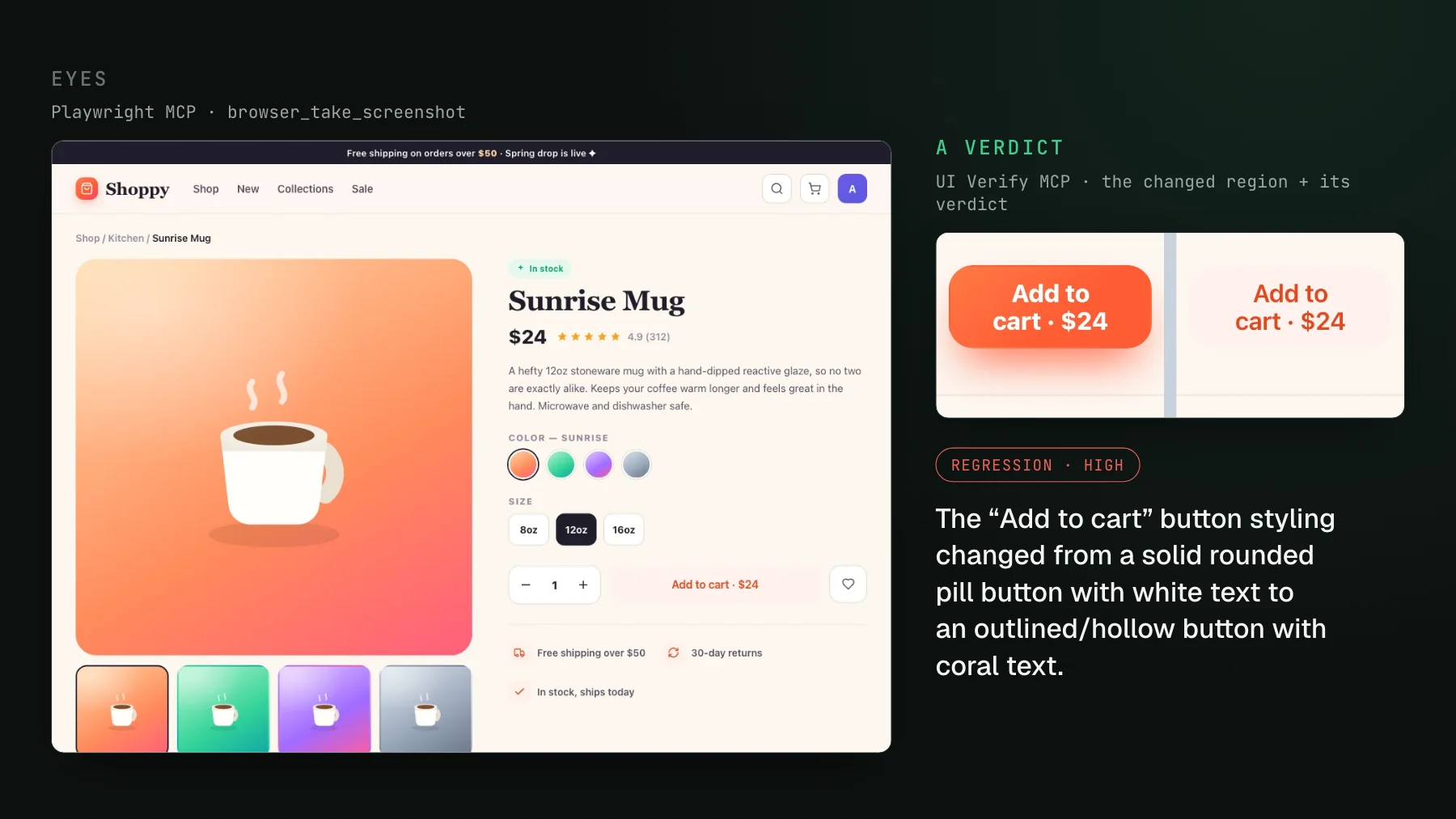
Hand a coding agent a full-page screenshot of your app and ask whether the change looks right, and it will tell you it looks great. Hand it a tight crop of the one region that actually moved - two buttons that came back a shade off, sitting side by side against their baseline - and it catches them. Same model, same change, opposite outcome. The only variable is what you put in front of it. That is the part of agent visual testing that decides whether it works, and it reduces to a single design choice: how granular the diff is.
Agent visual testing, defined
Agent visual testing is visual regression testing shaped for a coding agent as the reviewer, instead of a human clicking through a dashboard. Your UI is screenshotted on every pull request, each screenshot is diffed against its committed baseline, an AI judge labels each change a regression or an intended change, and the agent that opened the pull request pulls those diffs and verdicts into its own context over the Model Context Protocol - so it reviews the pixels it changed the same way it reads a failing test. The mechanics of that loop are covered in Close the loop: let your agent triage visual diffs over MCP. This post is about the thing that loop lives or dies on: the unit of review, meaning what exactly the agent gets to look at for each change.
The unit of review is the crop, not the page
A real page is hundreds, often thousands of pixels tall, and most of it is unchanged on any given pull request. When a one-line CSS edit shifts a button's padding by two pixels, that button is a rounding error in a full-frame screenshot. A vision model does not scan a 1440-pixel-tall image row by row looking for it. The MCP client downsamples the frame to fit the model's input, and a two-pixel shift or a slightly-off color survives that downsampling as noise the model has every reason to discard. Ask it "did anything change here?" over the whole page and the honest answer it can give is "nothing obvious" - which reads back to you as approval. That is the same failure mode as an agent with no picture at all, just with a screenshot attached to make it look diligent.
Narrow the frame to the region that changed and the model's entire attention budget lands on the pixels in question. Now the two-pixel shift is not a rounding error, it is most of the image. The judge's verdict is the tie-breaker, but the crop is what makes the question answerable in the first place. This is the difference between an agent that reviews and an agent that rubber-stamps, and it is invisible in the demo: both setups return a screenshot, both agents say something confident, and only the cropped one is actually looking at the change.
| What the agent receives | Full-page screenshot | Cropped diff |
|---|---|---|
| What is in frame | The whole page, mostly unchanged | Only the region that moved, plus a little padding |
| What the model attends to | Everything, so effectively nothing | The pixels actually under question |
| A two-pixel or off-color change | Lost in downsampling | Most of the image |
| The verdict you get back | "Looks great" | Regression, or intended, with a reason |
What the cropped diff actually contains
In UI Verify the crop is one MCP call. render_diff_image with which: "before_after" returns the baseline and the candidate side by side, cropped to the changed region with a little padding, as inline pixels the agent's vision model reads directly. Three things fall out of that shape:
- Before and after, together. The agent sees what the region looked like and what it looks like now in one image, so it is judging a delta, not guessing at an absolute.
- One crop per changed region, not one tall image. When a story moved in several far-apart places - a header and a footer, say - the response comes back as one crop per region stacked top to bottom, instead of a single image tall enough to span the untouched gap between them. Each real change gets its own focused frame.
- Padding, not the page. Enough context to see the region in place, not so much that the change dissolves into it again.
render_diff_image returns it with which: "before_after": one padded crop per changed region, stacked. The badge that went red is now half the image instead of a speck on a tall page.The verdict rides alongside the crop
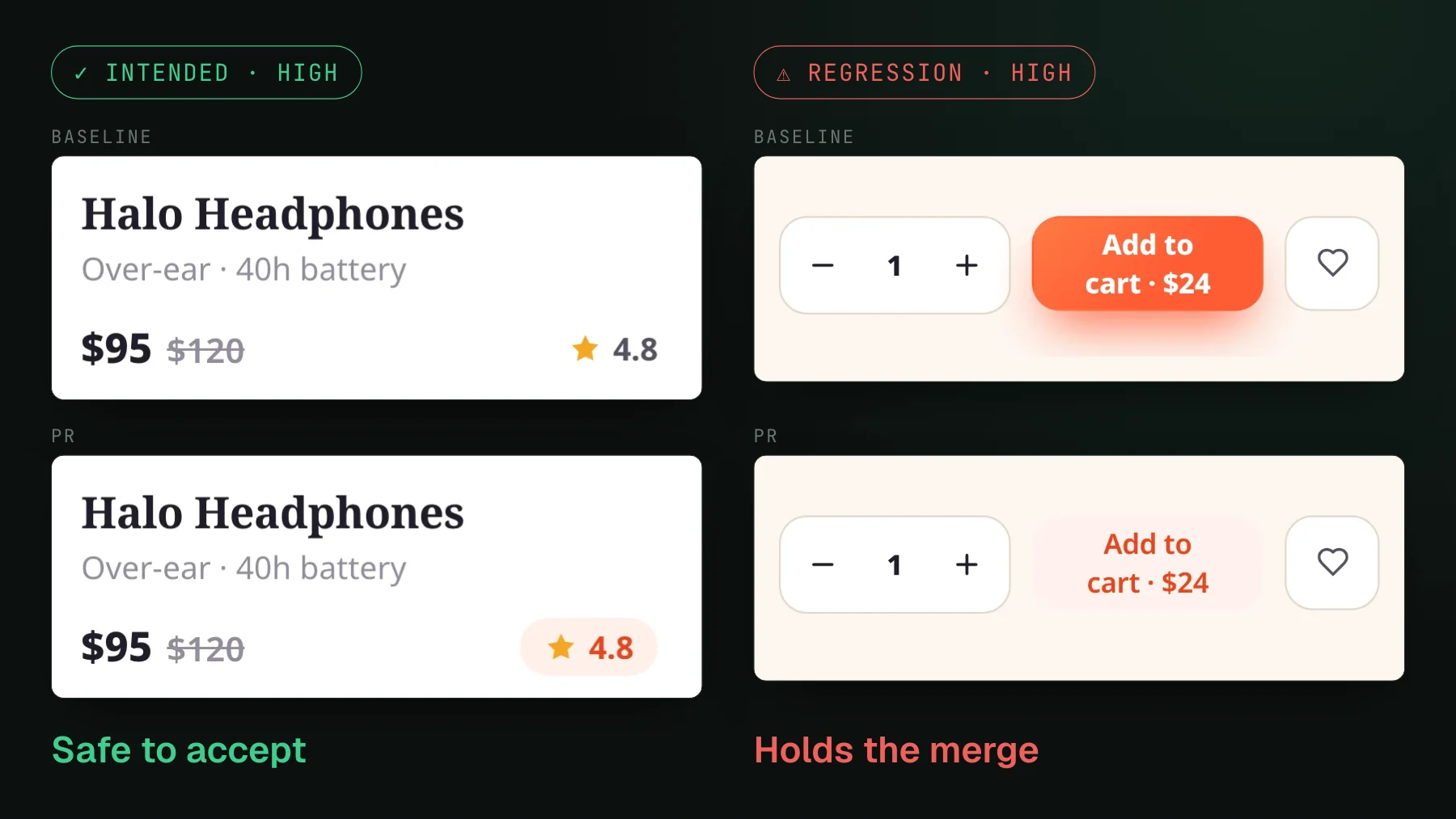
Granularity gets the agent looking at the right pixels; it does not, on its own, tell the agent whether the change was the point of the pull request. That is the judge's job, and it travels with the diff. get_diff returns the AI judge's verdict for each changed story - likely regression or likely intended change, with a short reason - alongside presigned URLs for the baseline, candidate, and diff images. So the agent reasons over two signals at once: its own look at the cropped pixels, and a verdict from a model that compared baseline, candidate, and diff and already sorted the queue. A change the judge calls intended and the agent's own context confirms was the goal of the PR gets accepted as a new baseline; a change neither can account for gets flagged, not waved through.
get_diff on a story from our public demo build, trimmed. The judge reviews crops too: its reasoning cites the before and after of region 1 before calling the coral rating badge intended.Delivered over MCP, where the agent already works
The crop only matters if the agent can reach it without a human in the middle. UI Verify exposes each build over MCP, so the agent that wrote the pull request lists the changed stories, pulls the cropped before/after for each, reads the judge's verdict, fixes the real regressions, and accepts the intended ones - all in the terminal, the same place it wrote the code. render_diff_image needs a native MCP client that renders image content, such as Claude Code or Cursor, because it returns inline pixels rather than a link. The full tool-by-tool walkthrough is in Triage visual changes from your coding agent.
This came up sharply on a call with a frontend developer at an agency, a small team just starting to lean on agents. She kept pressing me on one question, and it was the right one: how does the agent actually decide a change is a regression? When we got to comparing whole pages, the practical wall surfaced on its own - a full page has too many elements on it for the agent to reason about reliably. The moment you narrow it to the component that changed, the question stops being fuzzy. The agent has the before, the after, and a verdict, all pointed at one small thing, and a small thing is something a model can actually judge.
Why granularity is the ceiling on agent review
Everything else in an agent's loop already closes itself. Tests fail with a stack trace, types fail with a location, lint fails with a rule name, and the agent reads each signal and fixes it. Visual review was the one surface where the signal - an image - was one the agent could technically receive but not reliably reason about, because the image was the whole page. Fix the granularity and that last loop closes too: the agent gets a signal as sharp as a failing test, scoped to exactly what changed, with a verdict attached. That is why the crop is not an implementation detail. It is the thing that turns "an agent can see the screenshot" into "an agent can review the change."
To see it working, Triage visual changes from your coding agent walks the flow tool by tool, the AI judge explains how the verdict that rides with the crop is produced, and the triage visual changes skill packages the whole review into one command your agent runs. For the end-to-end loop the crop plugs into, read Close the loop: let your agent triage visual diffs over MCP.
Give your agent the crop, not the page
UI Verify screenshots your UI on every pull request, crops each diff to the region that moved, and hands your coding agent the crop plus an AI verdict over MCP - so it reviews decisions, not full-page screenshots it would rubber-stamp.
Start for freeNo credit card required.
Triage a build from your agent
Bucket real regressions vs noise and accept baselines, over MCP.