Storybook MSW: mock the API without lying
Storybook MSW setup for msw-storybook-addon 3: per-story handlers, a story for every API state, and mocks built from real responses so they cannot hide bugs.
 Igor LuchenkovBuilding UI Verify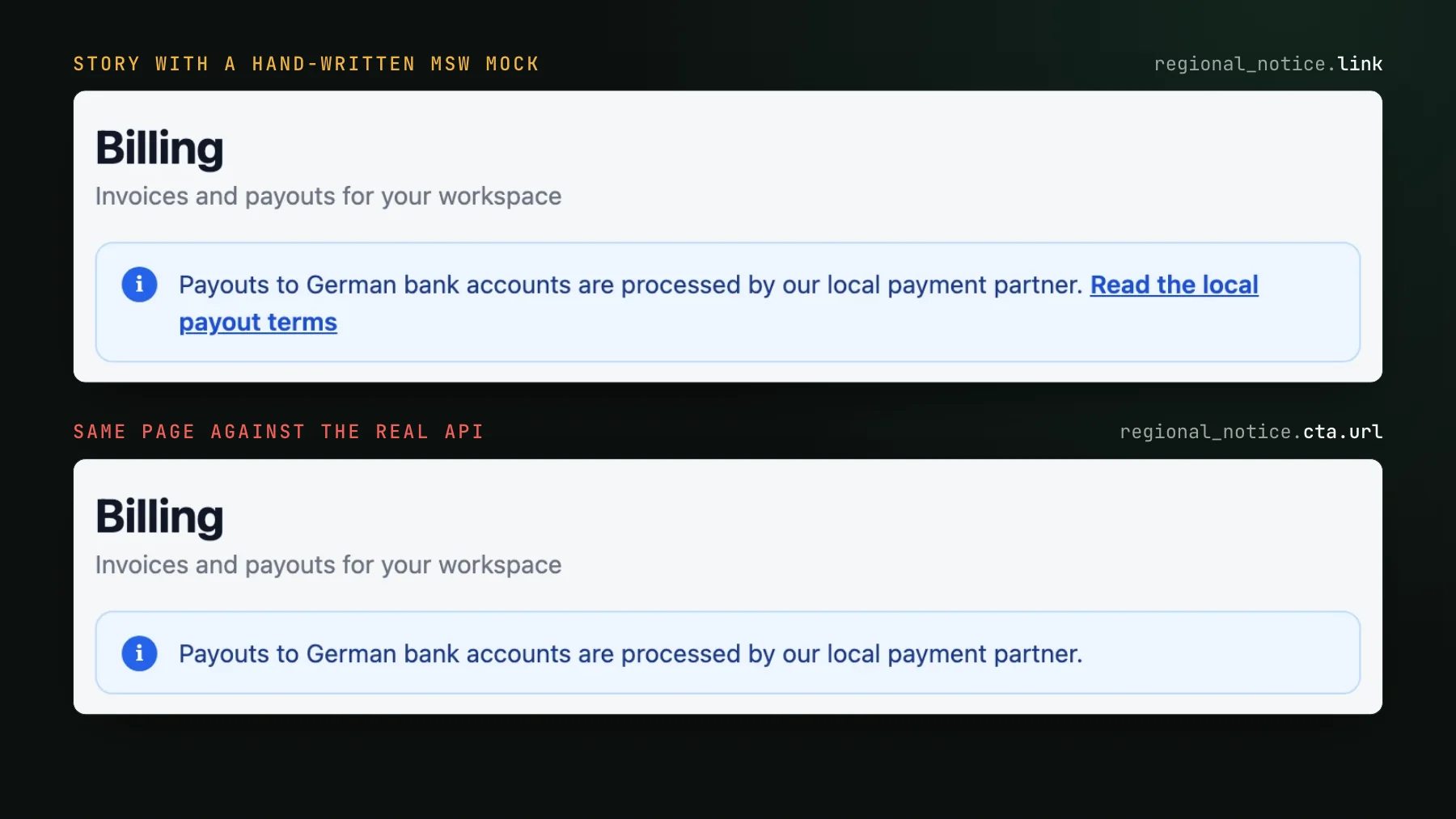
On this page
- What is MSW in Storybook?
- How do you set up MSW in Storybook?
- Ship the worker file with the static build
- How do you give every API state its own story?
- Why does a mocked story pass a bug production won't?
- How do you build MSW mocks from the real data path?
- Record fixtures from real responses
- Type fixtures and handlers with the API's own types
- Check each hard-to-reach state against the real thing once
- How do you visual test MSW stories on every pull request?
To use MSW in Storybook, install msw and msw-storybook-addon, ship the worker script with your Storybook, and give each API state its own story with its own request handlers. To keep those mocks truthful, build every response from what the real API sends rather than from what the component expects, so a story cannot render data production never would.
A frontend engineer I know builds most of their UI through coding agents, and their product has screens that are awkward to reach for real. One is a notice shown only to accounts served by another region's backend, switched on by config, for a kind of test user nobody had set up. Wiring up that environment by hand would have cost a day. So they had the agent mock it instead: the same app, running on mocks, showing the regional alert with a link to the details. The screenshot looked right, link and all.
In production the link was missing. The backend had been sending it the whole time. The defect lived in the frontend, in the code that carried the config response to the component, and that code lost the link on the way. The mock could not notice, because the agent had shaped the mocked response around what the component wanted to receive, so the link reached the banner whether or not the real data flow could deliver it. Their verdict afterwards was that the agent had mocked lazily. A mock built by tracing the data along its real path would have rendered the bug. Once they named the problem, the agent fixed it in one pass.
So this guide has two halves. The first is how to run MSW in Storybook today, on the current addon API, with one story per API state. The second is how to build those mocks so a story cannot show something your real API would never produce. I rebuilt the trap in a small Storybook for this post, and the cover is the result: one billing page, a hand-written mock above, the real backend below.
What is MSW in Storybook?
MSW in Storybook means answering a story's network requests from handlers you write, using Mock Service Worker. A service worker sits between the page and the network, intercepts each fetch, and replies with whatever the matching handler returns. Your component's real data code runs untouched: the hook, the fetcher, the mapping from response to props. Only the response is fake. The msw-storybook-addon package starts that worker inside Storybook and resets the handlers between stories, so every story describes its own little network.
That property is why MSW is the usual choice for page-level stories, the ones that render a whole screen with its own data fetching. Nothing in the page knows it is being mocked, so the story exercises the same code the browser runs in production. Keep that sentence in mind for the second half of the post, because it is only true when the response looks like the real one.
How do you set up MSW in Storybook?
Install msw and msw-storybook-addon, copy the worker script into a folder Storybook serves, register the addon, and add its loader to the preview. Version 3 of the addon reshaped its API: initialize() is gone, mswLoader moved to a /csf3 entry point and became a function you call, and per-story handlers moved from parameters.msw to a beforeEach hook. Most tutorials still show the old shape; the addon's v3 migration guide, checked 2026-10-17, lists each change. Everything below was run in October 2026 on Storybook 10.6, msw 3.0 and msw-storybook-addon 3.0, which needs Storybook 9 or newer.
npm i -D msw msw-storybook-addon
npx msw init ./public --save
msw init writes mockServiceWorker.js into public/, and --save records that folder under msw.workerDirectory in package.json. Then two config files:
import type { StorybookConfig } from "@storybook/react-vite";

const config: StorybookConfig = {
  framework: "@storybook/react-vite",
  stories: ["../src/**/*.stories.tsx"],
  addons: ["msw-storybook-addon"],
  staticDirs: ["../public"],
};

export default config;import type { Preview } from "@storybook/react-vite";
import { mswLoader } from "msw-storybook-addon/csf3";
const preview: Preview = {
loaders: [mswLoader()],
};
export default preview;The addon now creates and starts the worker itself, quietly, and ignores Storybook's own asset requests. If you need custom worker.start() options, pass mswLoader a function that builds the worker with setupWorker() from msw/browser, starts it, and returns it. On CSF Next (story factories) there is no loader at all: addons: [addonMsw()] inside definePreview does the same job, and the addon's README now recommends that route and marks the CSF 3 loader API deprecated. Upgrading an existing setup from version 2? Run npx msw-storybook-addon migrate, a codemod that rewrites the preview and moves parameters.msw handlers into beforeEach. Any story it cannot convert keeps working on the old parameter, which version 3 still reads on CSF 3 but marks as deprecated.
Ship the worker file with the static build
MSW stories that work under storybook dev can still break once deployed, and the cause is nearly always one file. By default msw registers the worker from /mockServiceWorker.js on the page's origin, so the script has to land at the root of storybook-static. With the Vite builder, a public/ folder at the project root is copied into storybook-static on its own. Put the worker anywhere else and only staticDirs gets it there. To see the failure, I moved the worker to a static/ folder, dropped staticDirs, and built: the build passed, the worker never shipped, and the story failed as soon as it loaded. If you host the build under a subpath, give the worker its real path through serviceWorker.url in a custom setup function.
mockServiceWorker.js was left out. The build itself reported success; the error appears only when a story loads. One ls storybook-static/mockServiceWorker.js in CI catches it before anyone opens the page.How do you give every API state its own story?
Write one story per state, each overriding a single MSW handler. A component that fetches data has at least four faces: the data, the empty list, the wait, and the failure. Put the default handlers on the file's meta and override only what changes. In version 3, msw.use() in a story's beforeEach takes priority over the handlers set on meta, and everything is reset before the next story renders:
import type { Meta, StoryObj } from "@storybook/react-vite";
import { delay, http, HttpResponse } from "msw";
import { BillingPage } from "./BillingPage";
import config from "./mocks/fixtures/config.de";
import invoices from "./mocks/fixtures/invoices";

const meta = {
  title: "Billing/BillingPage",
  component: BillingPage,
  beforeEach({ msw }) {
    msw.use(
      http.get("/api/config", () => HttpResponse.json(config)),
      http.get("/api/invoices", () => HttpResponse.json(invoices)),
    );
  },
} satisfies Meta<typeof BillingPage>;

export default meta;
type Story = StoryObj<typeof meta>;

export const Data: Story = {};

export const Empty: Story = {
  beforeEach({ msw }) {
    msw.use(http.get("/api/invoices", () => HttpResponse.json({ ...invoices, items: [] })));
  },
};

export const Loading: Story = {
  beforeEach({ msw }) {
    msw.use(http.get("/api/invoices", () => delay("infinite")));
  },
};

export const ServerError: Story = {
  beforeEach({ msw }) {
    msw.use(http.get("/api/invoices", () => HttpResponse.json({ error: "internal" }, { status: 500 })));
  },
};
delay("infinite") is the cleanest way to hold a loading state: the request never settles, so the skeleton stays on screen for as long as anyone looks, instead of flashing past on a fast machine. For the error state, return the status your API really sends on failure, and its real error body too if the component reads it. That habit is the subject of the next section.
A story per state does add snapshots. For a small presentational component, passing the data in as props and laying every state out in one story is cheaper, a pattern covered in reduce visual test snapshots. MSW shines one level up, on the page or container that does its own fetching, where props cannot reach the data.
Why does a mocked story pass a bug production won't?
Because the mock was written from the consumer's point of view. MSW runs your real data code, but a handler's response is whatever you typed into it, and the easiest response to type is the one the component expects. That turns the mock into an echo: the code's assumption about the API goes out, the same assumption comes back, and the story agrees with itself. A mismatch between the code and the real API, the one bug a network mock is best placed to catch, becomes the one bug it cannot see.
My demo reproduces the regional-notice story with a deliberate bug. The billing page shows a payout notice from /api/config. The frontend's mapper reads regional_notice.link, but the real API sends the link as regional_notice.cta.url. The hand-written handler was shaped from the mapper, so the story rendered the link. Pointed at the real backend, the page rendered the notice without it, as on the cover. Both versions look finished. Only one of them is what users would see.
How do you build MSW mocks from the real data path?
Make the real API, not the component, the author of every mock. Three habits do most of the work, and none of them needs more than an afternoon to set up.
Record fixtures from real responses
Start every fixture from a response the backend produced, a dev server, staging, or a saved network log, and keep it as data rather than retyping it. A short script makes re-recording a one-liner:
// node scripts/record-fixture.mjs <url> <TypeName> <out.ts>
import { writeFile } from "node:fs/promises";

const [url, type, out] = process.argv.slice(2);
const body = await (await fetch(url)).json();
await writeFile(
  out,
  `import type { ${type} } from "../../../api/types";\n\n` +
    `export default ${JSON.stringify(body, null, 2)} satisfies ${type};\n`,
);
Variants for the other states start from the recorded file and change one thing: { ...invoices, items: [] } for the empty list. A hand-built object that only resembles the response is where the drift creeps back in. Strip anything personal before you commit a recording, and re-record when the API changes instead of patching the fixture by hand.
Type fixtures and handlers with the API's own types
satisfies ConfigResponse on the fixture and http.get<never, never, ConfigResponse>(...) on the handler turn shape drift into a compile error. The type has to come from the API side: a schema the backend owns, types generated from its OpenAPI document, or a shared contract package. A type the frontend wrote to describe what it hopes to receive repeats the original mistake with extra steps. In the demo, typing the hand-written handler with the real response type failed tsc on the link field before a single story rendered.
Check each hard-to-reach state against the real thing once
For any state you can only reach through a mock, compare the story with the real screen at least once, the first time it is built and again when the data path changes. MSW makes that cheap: a temporary story can let one request through to a dev or staging backend with passthrough(), while the rest stay mocked.
import { http, passthrough } from "msw";

export const NoticeRealApi: Story = {
  beforeEach({ msw }) {
    msw.use(http.get("/api/config", () => passthrough()));
  },
  // a one-off comparison, not a baseline
  parameters: { uiVerify: { disableSnapshot: true } },
};
Keep that story out of visual testing. Whatever it renders depends on which backend is reachable at that moment, so as a snapshot it is a flaky test by construction. I left it in for one build to show why: in the captured build the passthrough had nothing to reach, the request failed, and the notice vanished from the page.
cta.url. The hand-written mock no longer matched the code and threw, which was reported as a failed render instead of a diff. The passthrough story rendered without its banner.The failed story in that build is worth a second look. Once the mapper read the real field, the old hand-written mock had no cta to give it, and the story crashed. That is the best outcome a stale mock can have: it fails loudly the moment the code moves to the real shape. The worse outcome is the original one, a mock that keeps rendering a happy screen for a contract nobody honors.
How do you visual test MSW stories on every pull request?
Screenshot the built Storybook, worker included, once the stories tell the truth. UI Verify captures the Storybook you build, so the MSW worker comes along as long as it sits in storybook-static, which the setup above guarantees. Build with --stats-json and upload the folder, as in the Storybook quickstart:
npm run build-storybook -- --stats-json
npx -y uiverify upload --static-dir ./storybook-static
Every story becomes a capture, the loading skeleton held by delay("infinite") included, and once you accept the first build on your default branch as the baseline, every pull request is compared against it. Mocked data already removes the biggest source of run-to-run noise; for the rest, such as relative dates and animations, fix flaky visual tests has the checklist, and freezing the clock in Storybook covers the most common one. When a re-recorded fixture moves a screenshot, your coding agent can pull the before and after over MCP and tell you whether the change came from the data or the code.
The loop the opening story needed is short. Record the response, type it with the API's contract, give each state a story, check the hard ones against the real screen once, and let the visual test watch them from then on. The Storybook determinism skill hands your agent the same checklist, so the next time it mocks a state nobody can reach by hand, it traces the data instead of guessing at it.
Screenshot every state your mocks render
Upload your built Storybook, MSW worker included, and UI Verify captures each story on every pull request, so a change to a loading, empty or error state shows up before the merge.
Start for freeNo credit card required.
Deterministic Storybook stories
Stop story diffs that come back changed without a real change.