Visual regression testing strategy: where to start
Visual regression testing strategy: rank components by screens reached, visual branches and who sees them, then cover the top 20. A real run on documenso.
 Igor LuchenkovBuilding UI Verify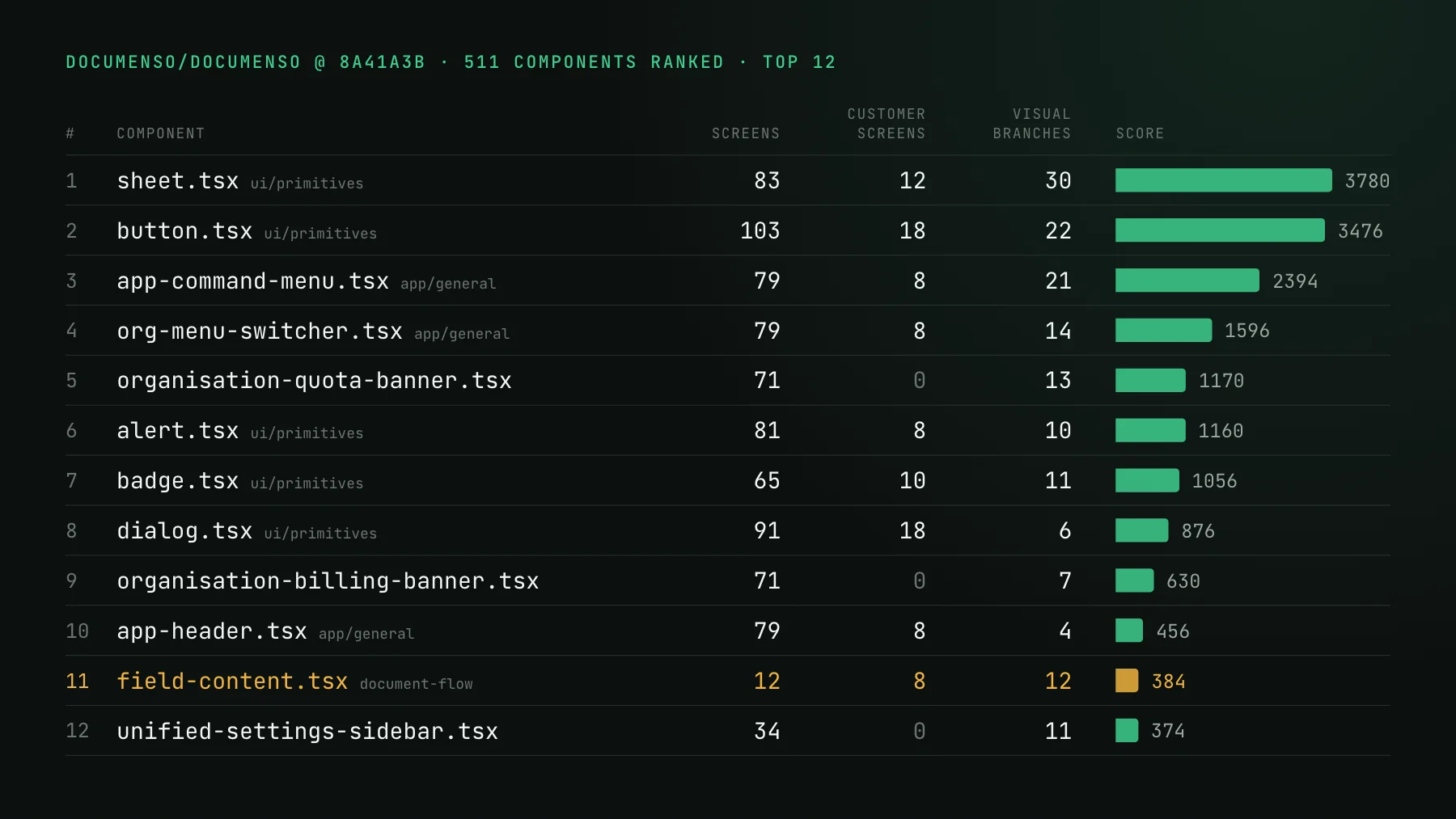
On this page
- What is a visual regression testing strategy?
- Three numbers rank a component
- Ranking a real codebase: documenso at 8a41a3b
- What counts as a visual branch?
- Why does the algorithm propose and an agent pick?
- How do you turn the ranked list into stories?
- How many components should the first pass cover?
- Where to start, in five steps
Start a visual regression testing strategy with the components most likely to break something people notice. Score each one by the screens that render it, the number of ways it can paint, and who looks at those screens, then put screenshots on the top twenty first.
Teams that start visual testing by covering the button usually stop by the third week. The first story is easy, so they open the primitives folder and go down it alphabetically: accordion, alert, avatar, badge, button. Every story passes, none of them catches anything, and by the time the suite would reach the screens where regressions actually land, the initiative has run out of goodwill. The coverage was not wrong. The order was.
This post is a method for choosing that order on purpose, with a script I ran on a real open-source codebase to show what it picks and why.
What is a visual regression testing strategy?
A visual regression testing strategy is the decision of which UI states get a screenshot baseline first, and in what order the rest follow. Every state you capture costs a story or a test to write, a snapshot on every build, and a diff someone has to read when it moves. So the strategy is a ranking: put the components where a change is most likely to break something people notice at the top, cover the first twenty, and let the rest wait until the first twenty are paying for themselves.
Three numbers rank a component
- Blast radius: how many screens render it. Count importers transitively, from each route down through layouts and composites, and report screens, not files. In documenso, a banner imported once, by the authenticated layout, reaches 71 screens, while the form primitive imported 119 times reaches 68.
- Visual branches: how many ways it can paint. Every conditional className, every variant option, every
{cond && <X />}and every earlyreturnof a different tree is a state a screenshot can lose. This is cyclomatic complexity aimed at pixels instead of paths through a function. - Audience: who looks at those screens. A signing page a customer's client sees, a document or slide deck a user built, an embed inside someone else's product: people do not want those changing under them. Settings, admin and login pages still matter, they just matter less per screen.
Multiply them. A screen seen by people outside your team counts 3, a core app screen counts 2, a settings, admin or sign-in screen counts 1. Add up the weights of every screen a component reaches, multiply by its visual branches, and sort. The weights are a judgment call; the point of writing them down is that the judgment is made once, in the open, instead of by whoever writes the next story.
Ranking a real codebase: documenso at 8a41a3b
To see what the method actually picks, I cloned documenso, the open-source document signing app (React Router, Tailwind, a shared @documenso/ui package), and wrote a 245-line Node script against the TypeScript compiler API. It parses every file, resolves relative imports and the ~/ and @documenso/* aliases, treats every route that renders a page as a screen, adds the layouts each route renders inside, and walks the import graph from every screen down. Then it counts visual branches in each component file and computes the score.
The audience split is the first thing the run tells you, and it is lopsided: 66 of the 105 screens are settings, admin or authentication pages. Count screens without weighting them and that long tail decides your ranking. The 20 pages a signer or an embedding customer actually sees would be outvoted three to one by pages only staff and admins open.
Blast radius alone fails in a second way. Here is the same run sorted by screens reached and nothing else:
A provider reaches every screen because everything sits inside it, which says nothing about whether it can look wrong. Across the whole app, 214 of the 511 components that some screen renders have no visual branch. They render one way or not at all, so any page capture that contains them already covers them. Direct import counts mislead too: button.tsx has 281 direct importers and reaches 103 screens, barely more than the quota banner's 71 from its single importer.
field-content.tsx, the component that draws every field on the document a signer sees, goes from 65th to 11th.The final top of the list is on the cover: the sheet and button primitives, the command menu and organisation switcher in the app header, two organisation banners, and at 11th the first piece of the product a customer's customer looks at, field-content.tsx. It reaches only 12 screens, but 8 of them are signing pages and embeds, and it has 12 visual branches.
What counts as a visual branch?
A visual branch is any place where the same component, given different input, paints a different result. The script counts four shapes of it: a condition inside a className (a ternary, an &&, or a key in a cn() / clsx() object), an option in a cva() variant map, a conditional JSX child, and an early return of different markup. It is a proxy, not a proof, but it is a good one, because each branch is a state a story either shows or does not.
field-content.tsx, with their real line numbers. They collapse into eight states a single story can render side by side, from the empty checkbox placeholder to a typed signature in the signature font.Read the list and the test writes itself. Five early returns are five field types that render their own markup. The direction ternary decides whether checkbox options stack or wrap. The object passed to cn() decides alignment and whether the text switches to the signature font. A refactor that touches any of those reaches every signing page at once, and none of it is visible on the screens a developer opens while working.
Why does the algorithm propose and an agent pick?
Because a score can rank five hundred files in two seconds and still not know what it is looking at. It cannot tell a variant option that changes the layout from one that maps to an empty string, or a conditional class from a key hardcoded to true. It cannot see that two components share one shell and need one story between them. Asking an agent to read a whole codebase and decide what to test gives it no place to start; giving it a ranked shortlist does.
So the second half of the method is a handoff. Take the top hundred, give them to a coding agent with the source, and ask it to pick twenty, saying in one line per pick what it verified in the file. I did that with the documenso list:
Only two of the score's top ten survived: the command menu, where the agent found real loading, error and no-results states, and the organisation switcher, with its empty-teams state and role-gated rows. The sheet, button, dialog and card primitives went out for reasons it checked in the source: size keys that map to empty strings, a none variant with no styles, bare Radix re-exports, always-true keys in a cn() object. In their place came the signing page itself, the signature pad, the field container every field type renders inside, and the sign-in form, ranked 63rd despite sitting in the weight-1 group, because it is the one login page any visitor sees, with SSO buttons, a captcha and a two-factor dialog on it. Weight 1 is a discount, not a zero.
I would argue with one call. A single empty variant does not cancel the button's six real ones, so I would keep it as one gallery story. That is the review step working as intended: the score proposes, the agent selects and says why, and you read twenty one-line reasons instead of five hundred files.
How do you turn the ranked list into stories?
Write one dense story per pick that renders every branch at once, driven from data rather than duplicated, so twenty components does not mean a hundred stories. That is the economical stories pattern of mapping through a fixture array in a single grid. For field-content.tsx that is one story, eight cells:
// drawnSignature and typedSignature are fixture Signature rows: one with signatureImageAsBase64, one with typedSignature.
const option = (id: number, value: string, checked = false) => ({ id, value, checked });

const fields = [
  { type: FieldType.CHECKBOX, fieldMeta: { type: 'checkbox', values: [] } },
  { type: FieldType.CHECKBOX, customText: 'A', fieldMeta: { type: 'checkbox', direction: 'horizontal', values: [option(1, 'A'), option(2, 'B')] } },
  { type: FieldType.RADIO, customText: 'Yes', fieldMeta: { type: 'radio', values: [option(1, 'Yes'), option(2, 'No')] } },
  { type: FieldType.DROPDOWN, fieldMeta: { type: 'dropdown', values: [{ value: 'One' }] } },
  { type: FieldType.SIGNATURE, inserted: true, signature: drawnSignature },
  { type: FieldType.SIGNATURE, inserted: true, signature: typedSignature },
  { type: FieldType.TEXT, inserted: true, customText: 'Acme Ltd', fieldMeta: { type: 'text', textAlign: 'right' } },
  { type: FieldType.EMAIL },
];

export const AllFieldStates = () => (
  <div style={{ display: 'grid', gridTemplateColumns: 'repeat(4, 200px)', gap: 16 }}>
    {fields.map((field, i) => (
      <div key={i} style={{ height: 64, border: '1px dashed #cbd5e1' }}>
        <FieldContent field={field} />
      </div>
    ))}
  </div>
);
The same shape works as a Vitest browser-mode test if you do not run Storybook. For the screens themselves, one story per page with its states mocked covers the composition the component stories cannot; one Storybook story per page is that pattern written out. The economical visual tests skill does the consolidation for you when a component's story count starts to explode.
The import graph the ranking walks is also what keeps the suite cheap once it exists. By default, UI Verify walks your pull request's changed files through the module dependency graph and renders only the stories that import one of them, directly or transitively; everything else is carried forward from its baseline at a fifth of the cost. The ranking reads that graph from the screens down to find what deserves a story. Skip unchanged reads it from the changed file up to decide which stories a pull request can have moved.
How many components should the first pass cover?
Twenty is a starting batch, not a law, and the right size depends on how much shared UI changes at once. The pain visual tests remove grows with two things multiplied together: how far a shared component's changes travel, and how many changes are in flight against it in the same week. If you run one frontend agent at a time and look at every change before starting the next, you are the visual check, and five well-chosen stories on your customer-facing screens may be all you need for now. If several people or several agents touch the same primitives in parallel, nobody can hold the reuse graph in their head, and twenty is the floor.
Whichever size you pick, re-run the ranking every month or so. A component that grows from three branches to fifteen climbs the list without anyone deciding it should, and the fastest way to notice is a script that does not care who wrote it. Git history is a fair fourth input if you have it: files that change often, or that keep showing up in bug-fix commits, deserve a bump.
Where to start, in five steps
- List your screens (routes, or pages in your router) and tag each by who sees it: people outside the team, the core app, or settings, admin and sign-in.
- For every component, count the screens that render it through the import graph and the visual branches in its file. A script like the one above, or your coding agent, can do this in minutes.
- Score each one as weighted screens times branches, sort, and keep the top hundred.
- Hand the hundred to an agent with the source and have it pick twenty, merge the duplicates, and drop the ones whose branches do not change any pixels.
- Write one dense story or test per pick, upload it, and review the first baselines.
If you are still deciding whether your codebase needs any of this, do you need visual regression testing answers that first. If the answer is yes, the setup skill wires capture and CI into your repo and writes the first stories; give it your ranked twenty and it starts where the risk is instead of at the top of the primitives folder.
Put your top 20 under a screenshot
Rank your components, write the first stories or tests, and let UI Verify diff them on every pull request, re-rendering only what each change can reach.
Start for freeNo credit card required.
Set up visual testing
From no visual tests to a green check on every pull request.