Empty, loading, error: the states that break
Visual testing edge states: reload, resize, empty, loading, and error states are where UI silently breaks, because humans skip them and assertions miss them.
 Igor LuchenkovAuthor
The UI bugs that reach users live in the states nobody looks at while building: the empty list, the error toast, the widget that loaded all but one of its panels, the window resized to an awkward width. You build the happy path, you look at the happy path, and the states you never open are the ones that ship broken. This is not carelessness. It is a systematic blind spot, and it has a systematic fix.
Nobody thinks about it, and nobody ever realises
Ask anyone who runs a very large Playwright suite and you get the same diagnosis: everything is designed for the happy path, so page reload, resize, in-between resolutions, and mobile rot silently, and you would never guess a user on a phone has everything broken. The homegrown answers are cannons aimed at sparrows: an agent skill that checks dozens of resolutions, a script that draws boxes around every text node to detect overflow. And the real problem is not fixing a visual bug once it is found, which is fast. It is catching it before it falls through the process.
Think about a widget dashboard. The state that bites is the one where most of the panels loaded and one got stuck: that is already a different UI. Users without a subscription get an ad block injected into the same page. A failed third-party widget has to collapse rather than leave a hole. The way those states get reproduced today is by blocking requests in Chrome DevTools, by hand, per developer. On a mobile-heavy product, checking a change on mobile costs as much time as checking it on desktop, and the bug still gets past: someone tries it on their phone and cannot see the button.
Why do these states stay untested?
Because seeing them means leaving the path you are working on. To check the error state you have to make a request fail. To check the empty state you have to wipe the data. To check the reload case you have to reload at the wrong instant, which almost never happens naturally. A person reviewing a change looks at the state in front of them, which is the state they were building, which is the state that already works. The broken ones are one deliberate step away, and that step rarely gets taken.
Agents make it worse. An agent generates the happy-path markup, renders it once, reports that it looks great, and never drives the component into its empty or error branch. The confident report covers the one state it looked at and says nothing about the four it did not. I have watched five agents in parallel all report "done, it works", with interaction tests passing, while the form they touched had a button half off the screen.
How do you test empty, loading, and error states?
Give each state its own story, fed the fixture that produces it, so the screenshot exists whether or not a human ever clicks into it. A story that passes an empty array renders the empty state. A story with a rejected fetch renders the error state. A story at a narrow viewport renders the overflow. Because the state is pinned by data, it captures the same way every run, and a regression in the error toast shows up as a diff even though nobody navigated to it.
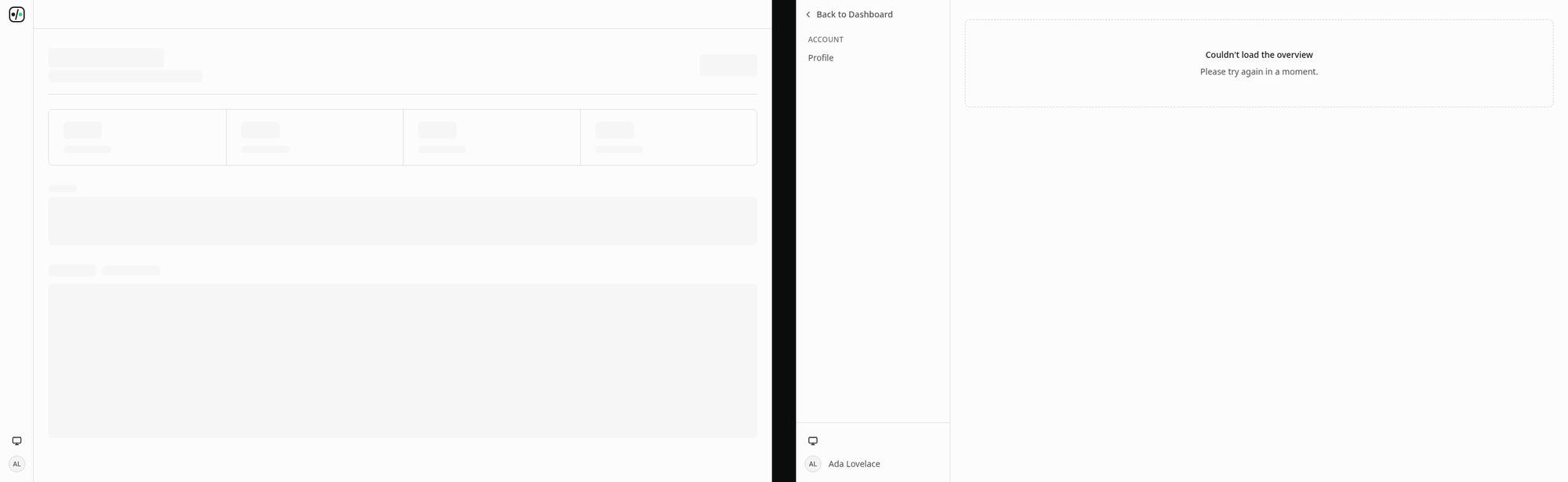
That is how UI Verify's own dashboard is covered. Across its story files there are seventeen loading states, five empty states, and a load-error story for every data-heavy page. None of them needed a backend to fail on cue. And the lesson of why we bother comes from our own early mistake: the first version of the product auto-accepted a project's first build, and a loading spinner got baked into a baseline nobody had looked at. The states you do not render on purpose are the states that get enshrined by accident.
The list worth naming
- The empty state, before any data exists, which often ships as a blank white box.
- The loading and skeleton state, visible for a moment and rarely screenshotted.
- The error state, when a request fails, which you have to force to even see.
- The partial state: every widget loaded except one.
- A reload mid-flight, where a half-hydrated page renders in a way the happy path never shows.
- An awkward viewport, a narrow phone or a resized window, where a fixed layout overflows.
- Long or overflowing content: the user name three times longer than the mockup's.
- The other theme. Someone on my team once changed a text colour that was fine in light mode and invisible in dark mode. The screenshot caught it; nothing else would have.
You do not need a story for every combination; you need one for each state where a break would reach a user. The Storybook quickstart and the Storybook visual testing skill cover driving states as stories, and economical stories covers doing it without capturing every permutation. The habit is small: whenever you add a state to a component, add the story that renders it, the way you would add a test for a new branch. Then the states nobody looks at are the states the check looks at for you. And when I have a component in five states, I do not want to run the app and click through them. I want the diff to tell me which one broke.
Screenshot the states nobody opens
Give each empty, loading, and error state its own story, and UI Verify captures the screens humans skip on every build. Free for the first 10,000 snapshots a month.
Start for freeNo credit card required.
Deterministic Storybook stories
Stop story diffs that come back changed without a real change.