Playwright vs Selenium: waits, speed and setup, measured
Playwright vs Selenium compared with real runs: how each waits, 100-run flake rates, command and suite speed, setup with Selenium Manager, and visual checks.
 Igor LuchenkovBuilding UI Verify
On this page
You inherit a Selenium suite. It fails a few times a week, nobody trusts it, and someone on the team says the answer is to rewrite it in Playwright, because Playwright waits automatically. Before you spend the quarter on that, it helps to know which of the suite's problems the move would actually fix. We measured the parts that usually decide it: how each tool waits, how fast each runs, and what setup costs today.
Selenium and Playwright both automate real browsers for end-to-end tests. Selenium sends each command over the W3C WebDriver protocol to a driver per browser (chromedriver, geckodriver, and so on), with official bindings for Java, Python, C#, Ruby, and JavaScript. Playwright drives its own builds of Chromium, Firefox, and WebKit over a persistent connection, with bindings for JavaScript and TypeScript, Python, Java, and .NET, and its own test runner for Node. Everything below ran on 2026-11-02 with selenium-webdriver 4.52.0 and Mocha 12, and Playwright 1.64.1, in JavaScript, on an Apple M1 Max shared with other jobs.
Does Playwright's auto-wait make tests less flaky than Selenium?
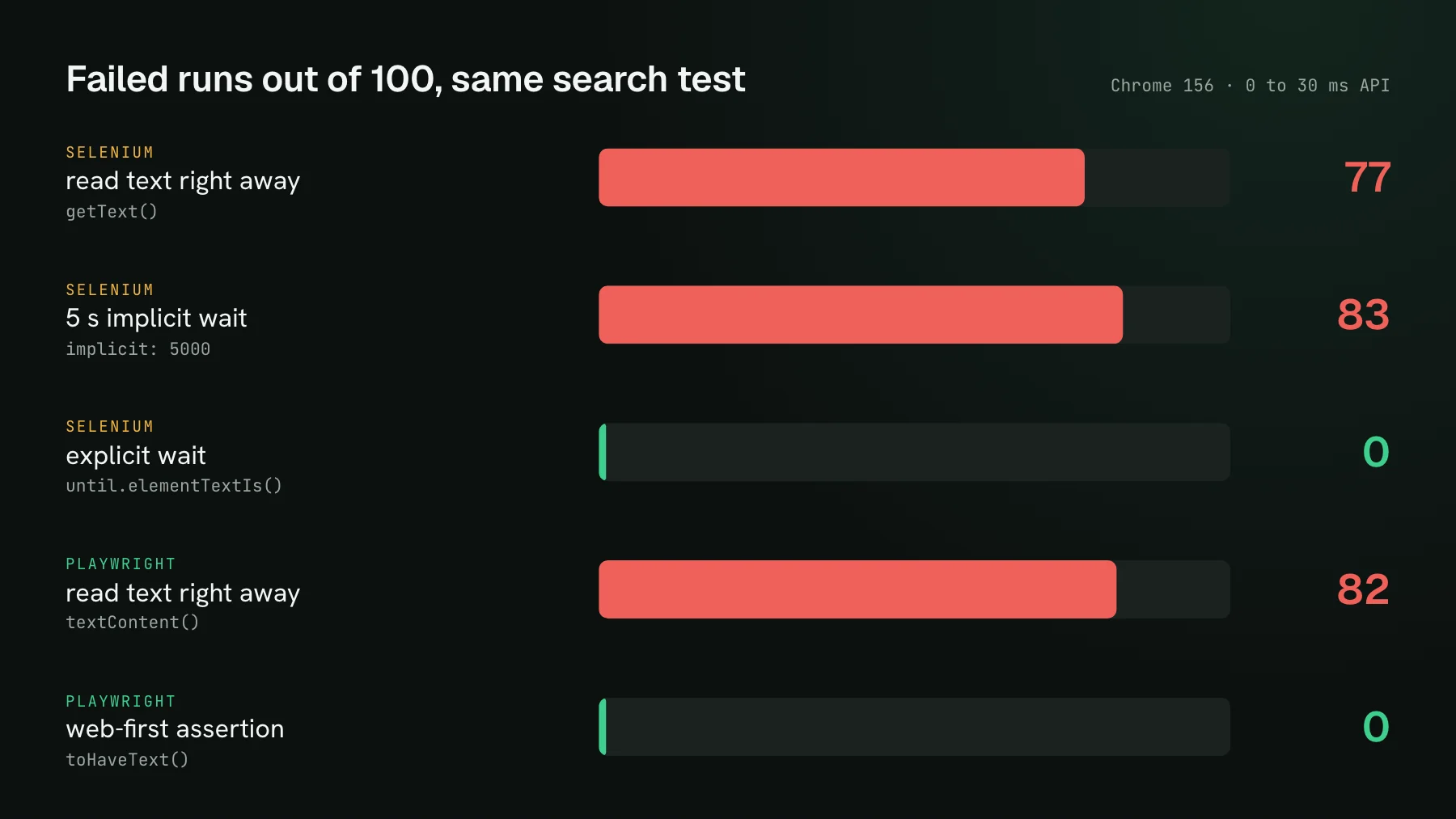
Only when you use the waiting form. We built a staged race on purpose: click Search, the status line changes to "Searching...", and after a random 0 to 30 milliseconds it reads "3 results". Then we checked that status 100 times each, in different ways. Reading the text once, right after the click, failed 77 times in Selenium and 82 in Playwright. The race is the same in both tools; the protocol does not rescue a check that reads too early.
Selenium's explicit wait, driver.wait(until.elementTextIs(status, '3 results'), 5000), failed 0 times. Playwright's web-first assertion, await expect(status).toHaveText('3 results'), also failed 0 times. The real difference is which form is the default. In Playwright, expect(locator) retries until its timeout, so the safe version is the one you write without thinking. In Selenium you have to reach for an explicit wait every time, and the obvious code, find the element and read its text, is the flaky one. Playwright's docs warn about the exception: expect(await locator.textContent()).toBe(...) reads once and fails exactly like Selenium.
Why doesn't Selenium's implicit wait fix it?
An implicit wait makes Selenium retry finding an element until it exists. It does not wait for the element to be in the right state. With a 5-second implicit wait, the status check still failed 83 times in 100, because the status line was already on the page; it just had the old text. The same implicit wait fixed a different check completely: waiting for the results list, which is inserted only after the response, went from 86 failures with no wait to 0 with it.
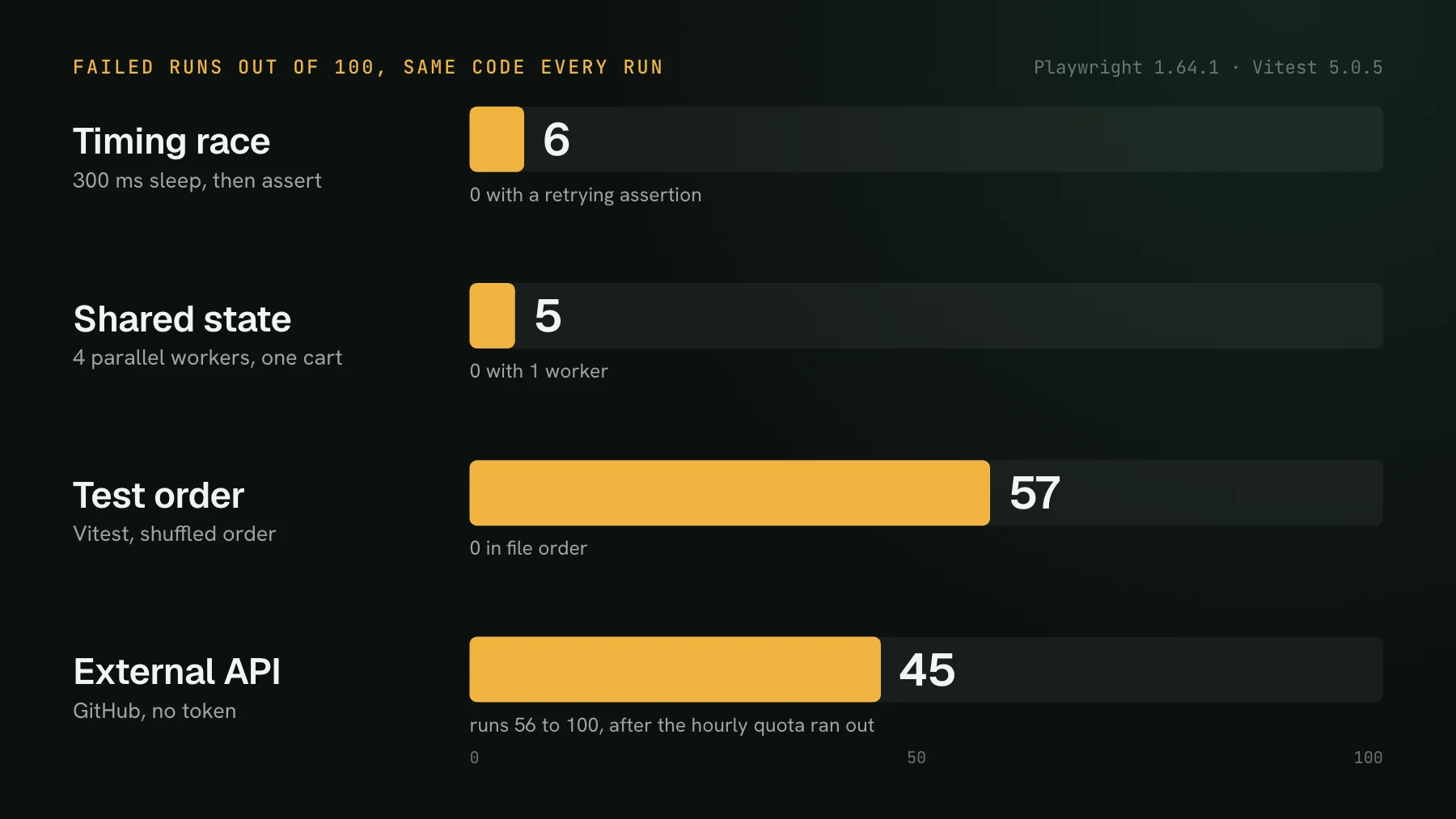
Selenium's documentation says the same in words, and adds a warning worth repeating: do not mix implicit and explicit waits, because the timeouts can stack unpredictably. So the answer to the inherited suite is usually not a rewrite. Replacing one-shot reads with explicit waits on the condition you care about removes most of this kind of flakiness in Selenium too. Our flaky tests guide covers the other causes, from shared state to time zones.
Is Playwright faster than Selenium?
Per command, yes. Per suite, it depends on the suite. We timed one command 500 times against the same Chrome 156. Finding an element took about 4 milliseconds through Selenium and chromedriver, and about 1.5 milliseconds through Playwright. Every Selenium command is an HTTP request to the driver, which then talks to the browser, while Playwright sends a message over a connection that is already open.
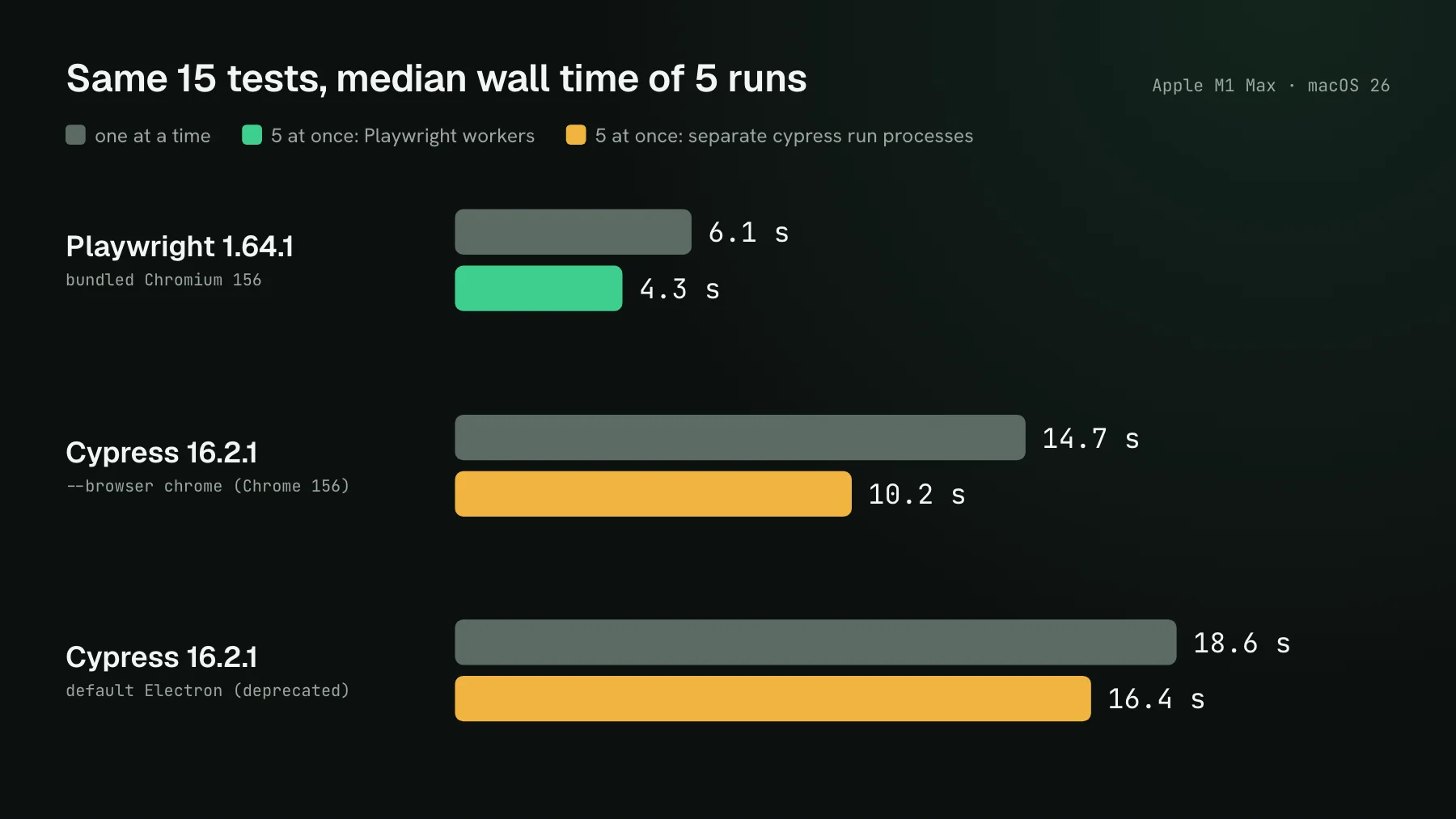
At the suite level the result went the other way. We ran the same 15 tests in both tools against the same Chromium build, median of five runs. One at a time, Selenium took 7.1 seconds and Playwright 6.1. With five in parallel, Selenium with Mocha's parallel mode took 2.5 seconds and Playwright with five workers 4.3. Our tests mostly wait on 150-millisecond API calls, so a few milliseconds per command barely registers. And Selenium shared one browser session per file, while Playwright gave every test a fresh, isolated context, which costs time and buys isolation.
So be careful with the line that Playwright is faster than Selenium. Its commands are, and on suites dominated by many small interactions that shows. On suites dominated by waiting for the app, the session model and how you parallelize matter more than the protocol.
How hard is Selenium setup in 2026?
Much easier than most comparisons say. Many top results still tell you to download chromedriver and put it on your path by hand. Since Selenium 4.6, Selenium Manager ships with every release and does it for you, and since 4.11 it can download browsers too. On our machine it found the installed Chrome 156 and fetched the matching chromedriver in 1.2 seconds with no setup code. It is still labeled beta, and it sends anonymous usage statistics by default, which SE_AVOID_STATS=true turns off.
Selenium installs light because it drives the browsers you already have: selenium-webdriver and Mocha came to 43 npm packages and 38 MB. Playwright is 3 packages plus its own browser builds, about 580 MB for Chromium. Two protocol details are often misstated. WebDriver Level 1 is a W3C Recommendation; the current Level 2 and WebDriver BiDi, the event-streaming protocol Selenium now uses for network and console access, are still Working Drafts. And Selenium removed its Chrome DevTools Protocol support for Firefox in 4.29, in favor of BiDi.
When is Selenium the better choice?
- Your team writes Ruby or C#-first tests, or needs a binding Playwright does not offer.
- You need real branded browsers, including Safari through safaridriver, rather than Playwright's patched builds; Playwright runs WebKit, which is close to Safari but not the same.
- You test native mobile apps, where Selenium's protocol is the basis of Appium.
- You run a large Selenium Grid already, with years of tests on it that work.
Playwright is the better choice for a new web project in JavaScript or Python: retrying assertions by default, browser contexts for isolation, a trace viewer for debugging, and screenshot comparison built in with toHaveScreenshot(). Selenium can save a screenshot with takeScreenshot(), but it has no way to compare one; you write the file and bring the comparison.
Visual checks for either tool
A functional test asserts on text and structure, so a page can pass every Selenium or Playwright check and still look broken. UI Verify, our visual regression testing tool for coding agents, adds the visual layer to both. With Playwright, an import swap captures every page your tests open and renders it in one pinned browser. With Selenium, there is no plugin to install: write screenshots into a folder, and upload the folder as a custom screenshots project, where each file path becomes a stable id with its own baseline.
With uploaded screenshots, determinism is on your side: pin the browser, the window size, and the data, since UI Verify compares the files as given. One detail from our run: a 1280 by 720 window in headless Chrome produced 1280 by 577 screenshots, because the window size includes the browser's own frame. The custom screenshots quickstart and the Playwright quickstart cover both paths. There is a free plan of 10,000 snapshots a month, and open-source projects get five times that, 50,000.
Put screenshots from either tool under review
UI Verify diffs every capture against an approved baseline and shows each change on the pull request: Playwright with one import, Selenium screenshots as an upload.
Start for freeNo credit card required.
Deterministic Playwright captures
Stop real-page diffs that flake without a real change.