Introducing UI Verify: visual testing for coding agents
UI Verify is visual testing for coding agents: your agent sees every screen its change touched, before and after, and fixes what it broke before you look.
 Igor LuchenkovBuilding UI Verify
On this page
UI Verify is visual testing for coding agents. Your coding agent sees every UI change it makes, on every screen the change touched, so visual bugs never reach production. It works with the tests you already have in Playwright, Storybook, Vitest or Bun, and with the agents you already use, such as Claude Code, Cursor and Codex. Today I'm launching it publicly.
Why do coding agents ship visual bugs?
Building software today means shipping faster than ever. With coding agents, a product team ships more every week, and everything a user sees still has to work, every time it loads. Agents are good at UI now. The problem is volume: one change to a shared component touches dozens of screens, in light and dark, on desktop and on mobile.
Your agent checks the page it worked on. It opens a browser, looks at the desktop layout, and reports back that it's done and looks great. What it didn't open is the same page on a phone, or the other screens built from the same component. Nobody on the team has time to click through all of them for every change, and with several agents working in parallel, nobody even tries.
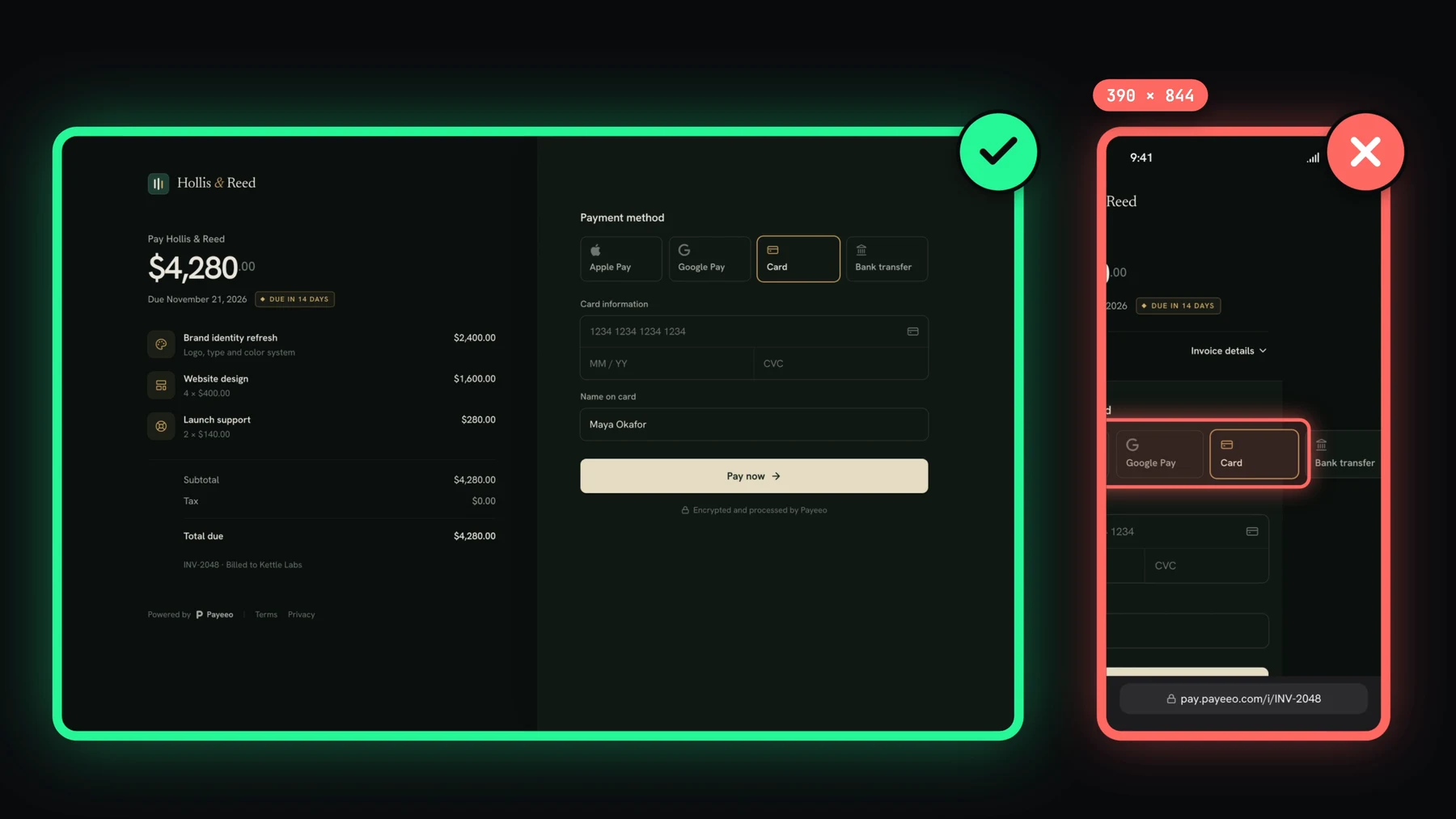
So the break ships, and customers find it first: a payment option pushed off the edge of a phone screen, a row of buttons that lost their styling after a CSS refactor, a dark theme nobody opened before merging.
What does UI Verify do?
UI Verify makes every screen a change touched visible, to the agent first and to you second. In four lines:
- Your agent sees every screen its change touched, before and after.
- It spots what it broke and fixes it before you look.
- You get screenshots of every change on the pull request, without running the app.
- You leave a comment on a screen, and your agent picks it up.
The rest of this post walks through each of those. The pictures are frames from the launch video: the app in it, an invoice payment page called Payeeo, is a demo built for the video, and the break in it is staged.
How does the agent see every screen it touched?
UI Verify renders each of your stories, pages or test screenshots in the cloud, in every mode you ask for (light and dark, desktop and phone widths), and compares each one with the version on your main branch. In the video, the agent adds Apple Pay and Google Pay to the payment form. That one change produces one build: 12 screens rendered, 8 of them changed, each changed screen listed with its mode.
The agent reads that build itself, through the UI Verify MCP server or the uiverify CLI, so nothing waits for a person to open a dashboard. For each changed screen it gets the before and the after, with the region that moved marked.
How does the agent fix what it broke?
Seeing the break is most of the work. With the before and after in front of it, the agent knows what moved and on which screen. It fixes its own change and checks again with uiverify check, a preview build that renders just the screens it is working on against the same baseline. In the video it wraps the payment methods onto two rows, and the next check comes back with all four options on the phone.
All of this happens before the agent tells you it is done. By the time you open the pull request, the break it introduced is already gone, and the screens that still show a change are the ones it meant to change.
What do you see on the pull request?
Every pull request gets screenshots of every visual change, so you can review a UI change without checking out the branch and running the app. You accept the changes you meant, and they become the baseline the next change is compared with. The visual changeset groups everything the pull request changed in one place, however many times the agent pushed.
How do you ask the agent for a change on a screen?
Sometimes a change is correct and you still want it different. Instead of describing the screen in a chat message, anyone on the team leaves a comment on the screen itself, pinned to the part it is about. The agent reads the open comments on its branch when it picks the work back up, makes the change, and resolves the thread. Collaborative review covers how comments work for people and agents.
Who uses UI Verify already?
Teams at JetBrains, Cura, Metica and others already use it. Adam Towers, CTO at Cura, put it this way:
A Tailwind refactor broke a bunch of our buttons. Now UI Verify catches those bugs before we ship, and otherwise stays out of the way. Awesome stuff.
I use it the same way. I run tens of agents every day myself, and I don't open the app to check their work anymore. Before UI Verify I built storybook-addon-test-codegen, a Storybook addon with over four million downloads.
How do I set up UI Verify?
Paste one line into your coding agent, opened in your repo. It signs you in through the browser, finds how your UI is already rendered (Playwright, Storybook, Vitest or Bun), and runs your first build:
Set up UI Verify in this repo: fetch https://uiverify.ai/install.md with curl and follow it.It's free to start: 10,000 snapshots a month on the free plan, and 50,000 snapshots a month for open-source projects. The setup guide has the details for each framework.
Run more agents. Break nothing.
Paste the one setup line into your coding agent and it sees every screen its next UI change touches.
Start for freeNo credit card required.
Set up visual testing
From no visual tests to a green check on every pull request.