Visual regression testing ROI depends on your rollback
Visual regression testing ROI tracks how fast you can reverse a release: minutes on the web, a store review on mobile, months in regulated apps.
 Igor LuchenkovBuilding UI Verify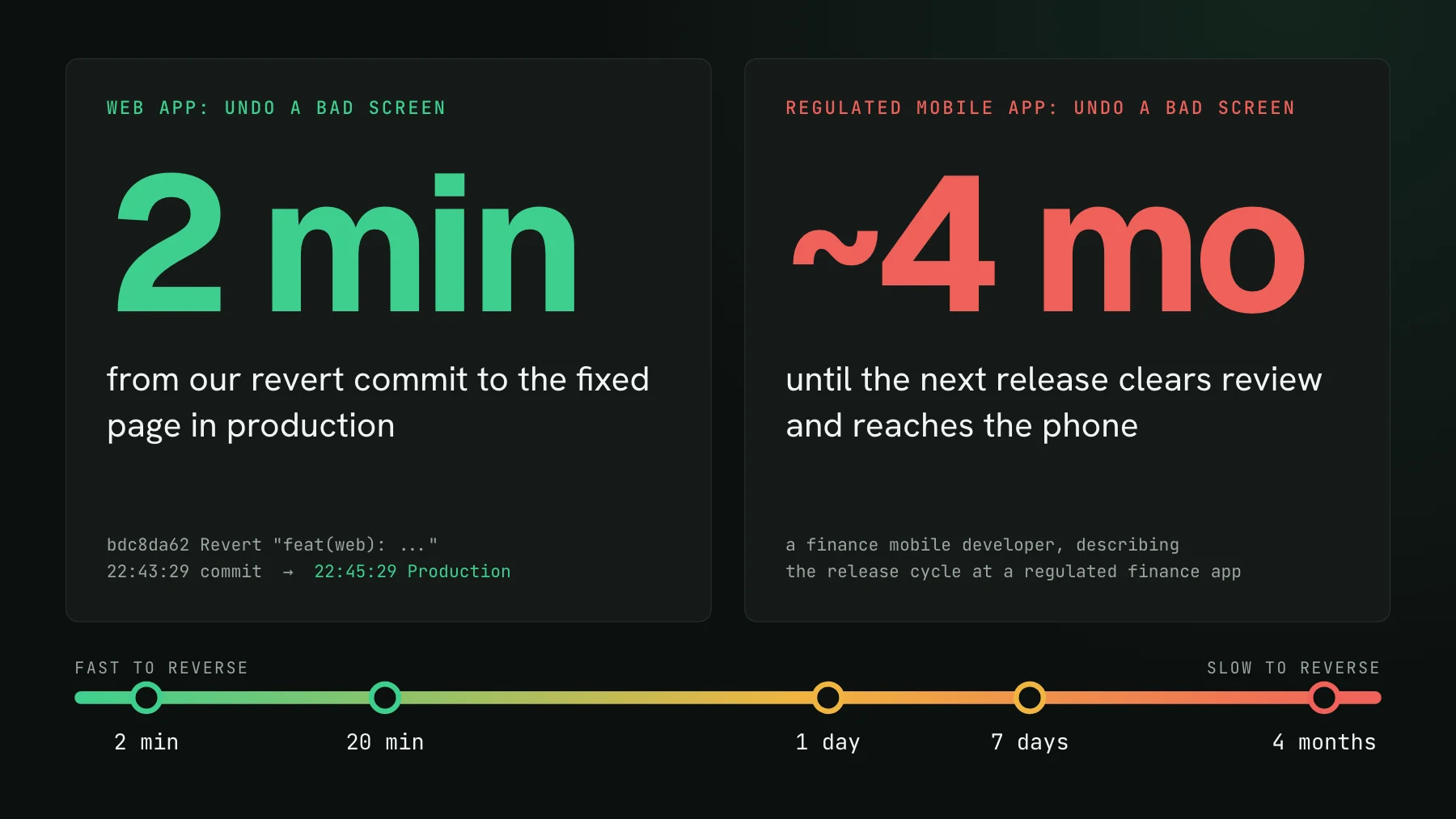
On this page
- What does visual regression testing ROI depend on?
- The reversibility spectrum, with real numbers
- What fast rollback does and does not buy a web app
- Why does a store review make one missed visual bug expensive?
- The cost of a miss, as arithmetic
- A decision framework for visual testing investment
- Is visual testing worth it if you can roll back in minutes?
- Where UI Verify fits at each end of the spectrum
Two minutes. That is how long our own marketing site took to go from a revert commit to the fixed page in production, and the median across our last 100 production deploys is a little over three. Now the other end. A React Native developer who used to work on a mobile app in regulated finance described releases that took about four months to clear review, which meant a bug that shipped stayed on users' phones until the next one. Same class of mistake, a release path tens of thousands of times slower to undo.
That gap is the variable most ROI arguments for visual regression testing skip. They count screens, contributors, and pull requests. Those matter, but they set how often a visual bug slips. What a slip costs once it reaches users is set by something else: how quickly you can take it back.
What does visual regression testing ROI depend on?
Visual regression testing ROI depends on two things: how many visual bugs the check stops before release, and how much each one would have cost after release. The second number is roughly the people who see the broken screen multiplied by how long it stays broken. Team size and change rate move the first number. Release reversibility moves the second, and on a slow release path it dominates the whole sum.
Reversibility is the time from a bad screen being noticed to a fixed screen in front of every user. On the web that is a deploy. On a phone it is a build, a store review, and every user tapping update. In a regulated business it can be a release train that leaves on a schedule set by compliance, not by engineering.
The reversibility spectrum, with real numbers
Read the chart from left to right and the cost of the same bug climbs by orders of magnitude:
- Web, push to deploy, about 3 minutes. Our site deploys on every merge to main. Across the last 100 production deploys, the median gap between a commit and Vercel reporting it live was 3 minutes 14 seconds.
- Web, hotfix end to end, about 20 minutes. A small team building an internal web tool had a change that fixed the mobile layout and broke the desktop one. Someone noticed, a fix went out, and the whole episode took around twenty minutes. Their users only work in the tool on certain days, so there was a built-in window to fix things before anyone relied on them.
- iOS, about a day. Apple says 90% of App Store submissions are reviewed in under 24 hours. That is review alone, before anyone installs the update.
- Android, up to a week. Google warns that some developer accounts get a more thorough review that can take up to seven days, or longer in exceptional cases.
- Regulated finance mobile, about four months. The developer's words, paraphrased: you send the app to review, it takes months, and a bug you shipped waits for the next release.
What fast rollback does and does not buy a web app
A web app's safety net is speed. We hit this ourselves with a change to the site that added tagged short links. It went to production one minute after merge, we decided it was a mistake, and the revert was live two minutes after the revert commit. The change was public for 39 minutes in total. It was a routing feature, not a visual bug, but a broken button would have taken the same road out.
Teams on this end of the spectrum describe their visual bugs as rare and cheap. Rare is often true. Cheap only holds for screens few customers see. Some fix forward because pushing a patch takes minutes, and roll back only when they cannot tell what went wrong. Some keep every large change behind a feature flag, so turning a broken screen off is a toggle, not a release. Some have colleagues who use the product every day and spot a slip within hours. All of that shortens a miss. None of it makes one free: a broken checkout or sign-up page on a busy web app is in front of thousands of people for every minute it stays live, and nobody can revert it before someone notices.
One catch keeps this from being a free pass. A rollback only starts once someone notices, and a visual bug throws no error and pages nobody. The deploy takes three minutes; the noticing can take a week if the broken state lives on a page your team rarely opens. Fast reversal shortens the second half of a miss, not the first.
The second catch is that a rollback is not always on the table. A release rarely carries only the broken screen. It also ships the feature customers were waiting for, a fix for someone else's bug, a database migration that cannot run backwards, or an API change other services already depend on. Reverting the bad screen means taking all of that back too, so in practice teams fix forward under pressure, and the broken screen stays live for as long as it takes to write, review, and ship the fix. On a busy page, every one of those minutes is multiplied by everyone who loads it.
Why does a store review make one missed visual bug expensive?
A store review makes a missed visual bug expensive because every fix becomes a new release that waits in someone else's queue, and then waits again for users to install it. The review numbers come straight from the stores' own documentation:
A day sounds fine until you add what sits around it. You still build, test, and submit the fix. Apple offers an expedited review for a critical bug fix, and most teams would rather save that request for a crash than a clipped price label. After approval, the old binary stays on every phone that has not updated, so the broken screen keeps rendering for a long tail of users even once the fix is live. Desktop apps that ship through an installer or an app store carry a version of the same tail.
Regulation stretches it further. When a release has to pass internal compliance checks on top of the store, the train leaves on a schedule, and the gap between trains becomes the minimum lifetime of any bug that boards one. That is where the four months comes from, and where a missed visual bug stops being a support ticket and starts being an incident.
The cost of a miss, as arithmetic
Put the spectrum into a rough formula: exposure equals the people who see a broken screen per day times the days it stays broken. Take one screen seen by 10,000 people a day and hold everything else equal. The only thing that changes below is the release path:
| Release path | Time to reverse | User-days of exposure |
|---|---|---|
| Web hotfix | about 20 minutes | about 140 |
| iOS review only | about 1 day | about 10,000 |
| Android extended review | up to 7 days | up to 70,000 |
| Regulated mobile release | about 4 months | about 1,200,000 |
The web row is the smallest, and it still means real customers looking at a broken screen, even with the notice-to-fix time set to the best case. The bottom row is four orders of magnitude larger for the identical mistake. If a visual check stops one such bug a year, it has paid for itself many times over on that path, On a fast web app the payoff concentrates on the busy pages instead: a rarely visited settings screen may take a long time to repay its setup, while the checkout can repay it the first time it catches something.
A decision framework for visual testing investment
Answer four questions about the surface you are deciding on, not the company as a whole. A single product can sit at both ends: a marketing site that deploys in minutes and a mobile app that waits on review.
- How long from a bad screen spotted to a fixed screen on every user's device? Minutes, days, or months. This sets the multiplier on every miss.
- Can you switch the change off without a release? A feature flag, server-driven UI, or an over-the-air update moves a slow path back toward the fast end for the changes it covers.
- Who sees the screen first? Your own team using the product every day catches slips cheaply. Customers, reviewers, or auditors seeing it first is the expensive version.
- What does one wrong screen cost? A support message, a churned trial, a rejected store submission, a compliance finding. The answer sets the stakes the multiplier is applied to.
Then match the investment to the answers. Minutes to reverse, flags on big changes, and daily internal users: start with the customer-facing flows, busiest pages first, and let the long tail of quiet screens wait. Days to reverse, or customers as the first viewers: make the visual check a required status check on the screens people pay through. Weeks or months to reverse, or a regulated release: capture every screen in every state you ship, block the release on an unreviewed change, and review each diff before it boards the train.
Is visual testing worth it if you can roll back in minutes?
Visual testing is still worth it on a fast-rollback app when the broken screen would be seen by many customers before anyone on the team notices it. Rollback speed caps the damage only after detection, and visual bugs are the ones that do not announce themselves. If your busiest pages are also the ones your team opens every day, you can scope coverage narrowly. If the risky states are an empty cart, an error banner, or a phone-width layout nobody checks by hand, the check is doing the noticing for you. Our post on whether you need visual regression testing at all covers the other axis, codebase size and change rate, and the two answers combine.
Where UI Verify fits at each end of the spectrum
At the fast end, UI Verify screenshots your web UI on every pull request from the Storybook, Playwright, or Vitest tests you already have, and --only-changed renders just what a change can affect, so a cheap-to-reverse app pays for a light check. At the slow end, a native or React Native app has no browser for us to render, so the custom screenshots path takes the PNGs your XCUITest, Espresso, or Maestro run already writes and diffs them against baselines on every pull request. Either way, requiring the check is what turns a diff into a gate, and the AI judge labels each change intended or a regression so the review stays quick.
Start with the surface where a miss costs the most, which is usually the one furthest right on the chart above. If that is a web app, the setup skill wires the capture and CI in one pass. Plans and limits are on the pricing page.
Put the check where a miss is expensive
UI Verify screenshots your web UI from Storybook, Playwright, or Vitest, or diffs the PNGs your native test harness already produces, and blocks the merge until every change is reviewed.
Start for freeNo credit card required.
Set up visual testing
From no visual tests to a green check on every pull request.