Manual visual QA cost: the hours and the escapes
Manual visual QA cost in real numbers: hours a week spent clicking through screens, bugs caught late on staging, and what an automated visual check costs.
 Igor LuchenkovBuilding UI Verify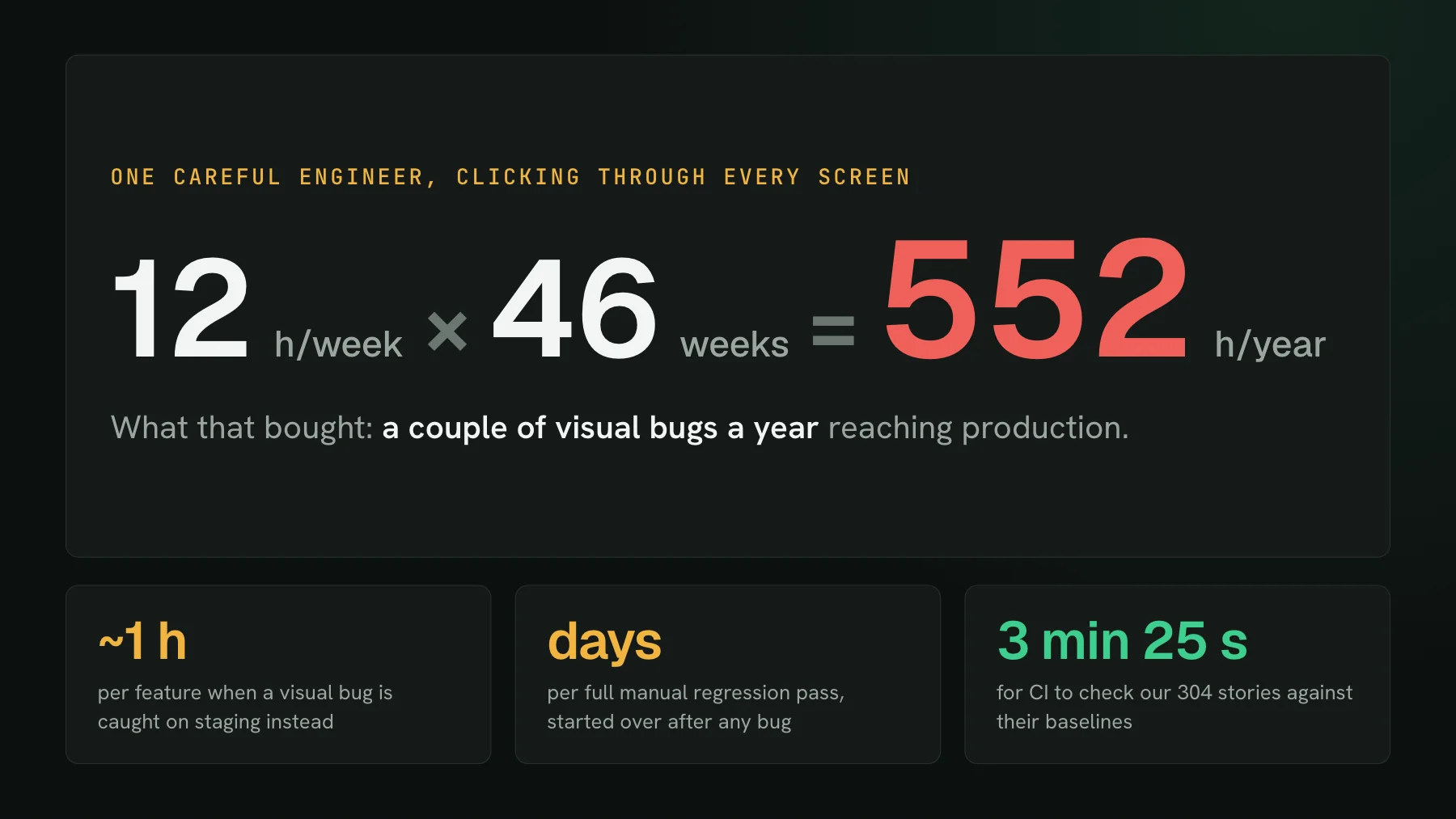
On this page
- What does manual visual QA cost a team?
- Why do a couple of escapes a year still cost so much?
- How many screens does clicking through everything mean?
- What does an automated visual check cost instead?
- What does an automated visual check not replace?
- How do you put a number on your own manual visual testing?
12 hours a week x 1 engineer x 46 working weeks = 552 hours a year. That is what manual visual QA cost one careful engineer: close to fourteen forty-hour weeks, a full quarter of one person's year, spent opening screens and looking at them before they ship, to let only a couple of visual bugs a year escape.
The inputs are rounded from a real team. An engineer at a big consumer app I spoke to spends well over ten hours every week clicking through each screen and state of their team's tools, first locally, then on staging, then in production. For that, a couple of visual bugs a year reach users. The quality bar is excellent. The price of holding it is the number above, and it never appears on an invoice because it is paid in one person's attention.
What does manual visual QA cost a team?
Manual visual QA costs three separate things, and only the first one shows up in anyone's calendar. There is the standing time of whoever looks at every screen before a release. There is the cycle cost of each bug that the look catches late, on staging instead of on a developer's machine. And there is the restart cost of a full regression pass, which one small finding can send back to the beginning.
- The standing time. The arithmetic above: hours every week, growing with the number of screens rather than with the size of the change. It lands on whoever cares most, usually a senior engineer or a founder, whose hours are the most expensive on the team.
- The late-catch cycle. On a team where QA checks each feature on a staging deploy, a visual bug found there costs somewhere between half an hour and an hour per feature: a ticket gets filed, a developer reproduces the steps, fixes it, and redeploys. That repeats for every feature in flight, so it scales with how much the team ships in parallel.
- The restart. Where the whole frontend regression pass is manual, a full pass takes days. Find one little pixel bug halfway through, fix it, and the pass starts again from the top, because the fix could have moved something already signed off.
None of these are failures of discipline. They are what discipline costs when the only instrument available is a pair of eyes and a browser tab.
Why do a couple of escapes a year still cost so much?
A couple of escapes a year is about the best result manual QA can produce, and it is bought with hours, not with process. The engineer behind the opening numbers is unusually rigorous, and what he wants is not a lower escape rate but a different timing: regressions fixed before staging rather than found on it. When his team's tools went through a large UI revamp, a set of buttons moved that nobody meant to touch, and the walk-through on staging was where it surfaced. Later, during an internal demo, three things were broken at once, one of them a control that had wandered onto a page where it did not belong.
That is the shape of the problem. The escape rate depends on one person's attention, attention does not grow with the screen count, and every new feature adds screens to the weekly pass. Holding the same bar next year means more hours than this year, from the same person.
How many screens does clicking through everything mean?
Clicking through everything means far more screens than anyone estimates, because one screen is several states. Our own dashboard makes a fair yardstick: its Storybook on main holds 304 stories, 291 of them with a stored baseline, and 163 of those are states of a dashboard page rather than a component. The build page alone has 15.
Walk those 15 by hand. Passed, finished, accepted and the comment view are reachable if the right data happens to exist that day. Running and preparing only exist for a minute while a build is in flight. Failed and flaky need a broken or unstable build to be sitting there. Loading, load error and not found need a slow network, a failing API, or a bad URL. A person clicking through the app sees maybe half of them on a good day; the rest get covered only if someone fakes the data, which is the work a story already did once.
At an optimistic 30 seconds a state, a single pass over 291 states is about two and a half hours, and that assumes every state is one click away. The states that break most often, empty, loading and error, are also the ones a manual pass skips, which is the whole subject of UI bugs in edge states.
What does an automated visual check cost instead?
An automated visual check costs machine minutes per build plus a subscription, and its human cost is only the time spent on the diffs it flags. Here is the machine side from our own CI: the same Storybook, checked against its baselines on a commit to main.
That run covers every state in the Storybook, on every commit instead of once a week. When nothing changed, nobody looks at anything. When something did, the reviewer opens that one diff instead of 291 screens, and the AI judge has already marked each change as a likely regression or a likely intended change. With skip unchanged on, a build renders only the stories a commit can affect and carries the others forward from their baselines.
The subscription side, at the list prices on our pricing page: Free includes 10,000 snapshots a month, and an open-source project gets 50,000 snapshots a month free, self-declared at sign-up. Starter is $89 a month for 30,000 snapshots, Pro is $199 a month for 65,000, and snapshots past a plan's bucket are $0.004 each. A carried-forward snapshot bills at a fifth of a rendered one. For scale, 30,000 snapshots is roughly a hundred full renders of our 304-story Storybook every month, before skipping stretches it further.
Priced in the same engineer's time at an assumed $75 an hour, a year of Starter is about 14 hours and a year of Pro about 32. The manual pass in the opening is 552. Chromatic meters on snapshots (chromatic.com/pricing, checked 2026-10-17) and Percy on screenshots, one per browser and width (browserstack.com/pricing, checked 2026-10-17), close enough to the same unit that you can run the identical conversion with the rates from their own pricing pages. The ratio between the hours and the plan is the finding, whichever vendor fills the second bar.
What does an automated visual check not replace?
An automated visual check replaces the looking, not the judgment. Three things stay with you.
- Coverage is what you capture. A state with no story or test is invisible to the check, the same as it is to a rushed manual pass. The difference is that the gap is a list you can read and close.
- Review still needs a decision. Flagged changes need someone, a person or an agent, to accept or reject them. The decision covers the handful that changed instead of every screen.
- Visual checks do not test correctness. A larger B2B software vendor measured its QA stage at roughly a third of every ticket's lifetime, unchanged across a year in which they added CI and automated tests. Most of that time goes to checking that data and predictions are right, not to how screens render. A visual check would barely move that number, and nobody should sell it as if it would.
How do you put a number on your own manual visual testing?
Put a number on manual visual testing by running the same back-of-envelope with your own inputs. It takes ten minutes and settles the argument in either direction.
- Hours. Ask whoever does the clicking how long it takes each week, then multiply by the number of people doing it and by your working weeks.
- Late catches. Count the visual bugs found on staging last quarter and multiply by the hour each one costs between ticket, reproduction, fix and redeploy.
- States. Count your stories, routes and the states behind each one. That is the snapshot count of a single full build, and it shows how much of the app a manual pass really covers.
- Snapshot volume. Multiply states by builds per month, discount the stories that skip unchanged would carry forward, and price the result on the pricing page. Denser stories cut it further; see economical stories.
- Compare. Put the hours, at your own rate, next to the plan price for a year.
If the hours come out small, keep clicking: a tool would be overhead, and do you need visual regression testing covers when that is the right call. If they look anything like 552, the careful engineer is not the thing to fix. The hours are, and a CI job can take them over in about three and a half minutes a build.
Trade the weekly click-through for a CI check
UI Verify screenshots every story or test on each pull request and shows you only what changed. Start on the free plan and count the hours you get back.
Start for freeNo credit card required.
Set up visual testing
From no visual tests to a green check on every pull request.