Design QA on every pull request, not at the end
Design review with visual diffs: give your designer the screenshot diff on every pull request, so spacing and color nits land before merge, not as tickets.
 Igor LuchenkovBuilding UI Verify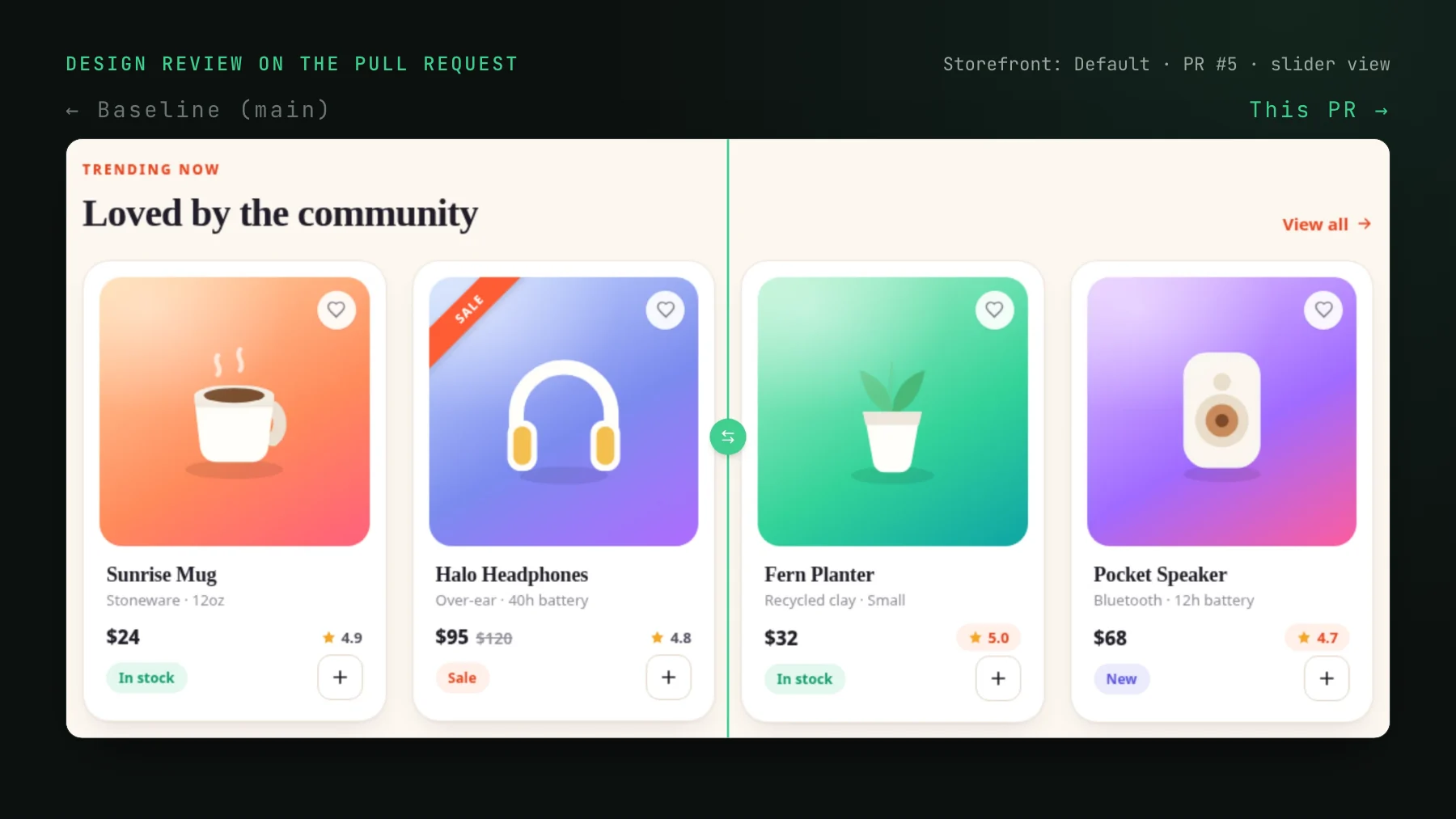
On this page
- What is design review on a pull request?
- Why design QA lands at the end of the process
- The developer runs it, the designer reads it
- How does a designer leave feedback on a visual diff?
- What can an invited designer do in UI Verify?
- What design review on the pull request does not cover
- A working agreement for design QA on pull requests
The page goes out to staging. The designer who drew it opens it beside the mockup, lays a screenshot of the design over the live page, and starts comparing, breakpoint by breakpoint. Most of it holds. Then a section title turns out to be two pixels too tall, and a ticket lands in the task tracker that says exactly that: the title here is two pixels bigger than it needs to be. Then the next ticket, about a gap. By the time the developer reads them, the page has been done for days and their head is in another feature.
That is the loop a frontend developer at a commerce company described to me, on a product held to pixel-perfect across three breakpoints. Nobody in it was careless, and both sides said the loop wore them out. The problem is where in the process the design check happens: after the merge, on a build that bundles several pull requests, as a new unit of work for someone who has already moved on.
What is design review on a pull request?
Design review on a pull request means the designer sees the visual effect of a code change before it merges, as a before and after screenshot of every story or page the change touched, and leaves feedback on that screenshot instead of on a staging site. The screenshots come from visual regression testing the developers already run in CI. The designer does not install anything, run anything, or read the code; they open the build, look at what changed, and comment or approve.
Why design QA lands at the end of the process
On most product teams the designer is the de facto visual gate. They drew the mockup, so their eye goes straight to the missing 8px or the wrong grey, and the usual phrasing is some version of "you forgot this here". Code review does not cover it. A reviewer reading a diff of a stylesheet cannot tell that a token bump shrank the padding on an icon three components away. So the first time anyone compares the rendered UI to the design is the first time the designer can see it rendered, which on most teams is a preview link or staging.
Staging is a bad place for it for three reasons. Several merges have landed by then, so a spacing change has no obvious owner. The feedback travels through a ticket or a chat message that describes pixels in words, and words are lossy. And a fix is now a fresh branch with its own review, for a change that would have been one more commit if anyone had seen it a day earlier.
The developer runs it, the designer reads it
The split that works is to hang the tooling on the developers and give the designer a seat at the result. Developers wire visual tests into CI from what they already have: Storybook stories, Playwright tests, or Vitest browser tests. Every pull request then produces a build where each changed story sits next to its baseline from main, and the pull request gets a check and a comment listing what changed. The designer gets a login and a link. Their work starts at the image.
For a designer used to sliding a mockup over a page, the review screen has the familiar tools: baseline and pull request side by side, a tinted diff, a spotlight that dims everything that did not change, and a stacked view where the two images sit on top of each other with an opacity blend or a draggable slider. The slider is the overlay they used to do by hand, with the before and after already aligned to the pixel.
How does a designer leave feedback on a visual diff?
By commenting on the screenshot itself. In UI Verify's collaborative review, any changed story's candidate image becomes a canvas: click to drop a point on one element, drag a box around an area, or comment on the whole story. The note is saved against that story's diff at that spot, so everyone who opens it sees the comment on the same pixels instead of a description of them. Comments on the baseline side annotate the before; comments on the candidate annotate the after.
Each comment starts a thread. A developer can answer, the designer can confirm, and whoever is satisfied resolves it, at which point the pin disappears from the image and the thread sinks to the bottom. When the note is pointing at something that must not merge, Comment and deny posts it and rejects the story in a single action, so the reason sits on the rejection.
The conversation does not stay in the dashboard. Every comment updates the sticky UI Verify comment on the pull request: open threads ride inline under the story they are about, and resolved ones fold into a review discussion section. The developer sees the designer's note where they already are, next to the AI verdict for the same story.
If a coding agent wrote the pull request, the designer's note reaches it too. Over MCP the agent reads the thread with list_comments, fixes what it asks for, replies, and resolves it. While a thread is open the MCP refuses to accept that story, so an agent cannot wave a design note through by accepting the baseline. A person accepting in the dashboard is not blocked, because they can see the thread.
What can an invited designer do in UI Verify?
Review, comment, and decide. A member sees the team's projects and builds, reviews flagged visual changes, and accepts or rejects baselines. A team owner adds the designer by email from the project setup page or team settings; designers rarely commit to the repo, so the email path is the one that matters, and the invite turns into a membership the moment they sign in with that address. Inviting people stays an owner action. The details are in invite your team.
Two smaller things help a designer who reviews regularly. Each build re-hosts the Storybook it captured, so a member can open it from the build page and click through hover states and controls that a screenshot does not show; see hosted Storybook. And on a public project, anonymous visitors see the diffs and the AI verdict but not the comments, so design notes stay inside the team.
What design review on the pull request does not cover
A visual diff compares a pull request to the last screenshot the team accepted, not to the mockup. So it is precise about change: a padding that moved, a color that drifted, a component that broke on a page nobody opened. It says nothing on its own about whether a brand-new screen matches the design, because a new story has no baseline yet. That first accept is the moment to have the designer look hardest, since whatever they approve becomes the reference every later pull request is measured against.
For new UI that has to match a frame closely, a story can declare the Figma export as its baseline, and every upload is diffed against the design until a render is accepted; design baselines cover the setup, and the post on implementing a Figma design with a coding agent walks through a real run. Why that is a separate loop from regression review is the subject of visual regression will not match your Figma.
A working agreement for design QA on pull requests
- Developers wire visual tests into CI for the stories and pages that matter, and keep them deterministic so the designer only ever sees real changes.
- An owner invites the designer by email. They do not need repo access or a local setup.
- Pull requests that change UI wait for the designer on the stories in their area: a resolved thread or an accept, not a thumbs-up in chat.
- Feedback goes on the pixels as a comment, never as a ticket filed after the merge. Comment and deny for anything that must not ship.
- New screens get the designer's attention at the first accept, because that render becomes the baseline.
The designer's eye is the same in both workflows. What changes is that a two-pixel note costs one commit on a branch that is still open, instead of a ticket, a fresh branch, and a second review a week later. If your team reviews visual changes with a coding agent as well, triage with your agent shows how the agent and the designer share one review.
Give your designer the diff
UI Verify screenshots your UI on every pull request. Invite your designer by email and they comment on the exact pixels that moved, before the merge, while the branch is still open.
Start for freeNo credit card required.
Triage a build from your agent
Bucket real regressions vs noise and accept baselines, over MCP.