Playwright update snapshots without the PNG churn
Playwright update snapshots: what --update-snapshots changed, all, and missing do, why a Mac update breaks Linux CI, and how to review the PNGs it rewrites.
 Igor LuchenkovBuilding UI Verify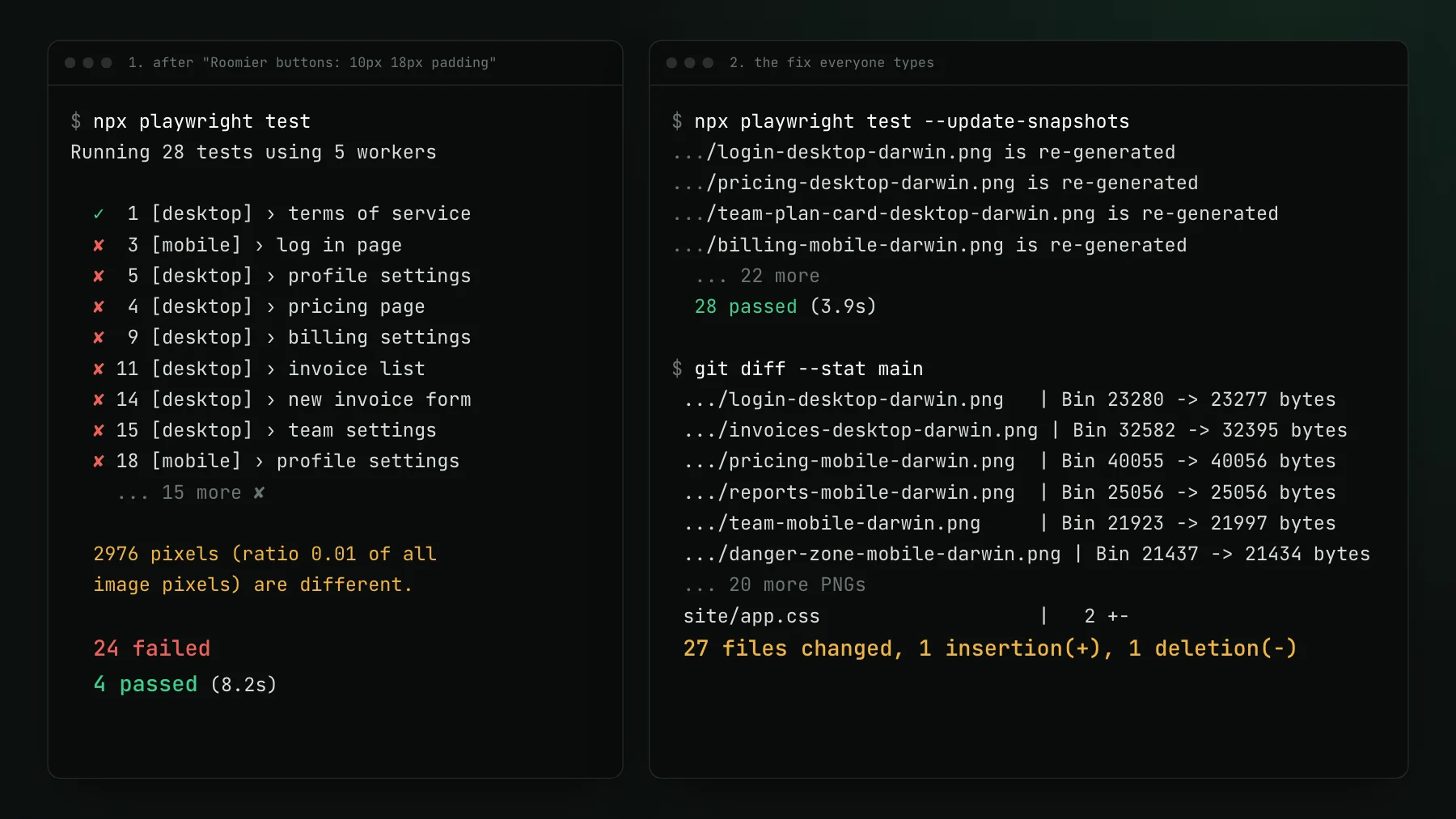
On this page
- What does Playwright update snapshots do?
- Should you use --update-snapshots=changed or all?
- How do you update one test, one project, or only the failures?
- Why does Playwright add -darwin or -linux to snapshot names?
- How do you regenerate Playwright snapshots in CI?
- How do you review PNG changes in a pull request?
- Accept the intended change instead of regenerating it
- Where to start
To update Playwright snapshots, run npx playwright test --update-snapshots (or -u) on the same operating system, container image and Playwright version CI uses. It rewrites every baseline PNG whose screenshot comparison failed, and you commit the new images with the change that caused them. The rest of this post is why each part of that sentence matters.
You changed the button padding on purpose. One line in app.css, .btn from 8px 14px to 10px 18px, because the buttons felt cramped. You push, and CI comes back red: 24 of 28 Playwright tests failed, every one of them a toHaveScreenshot that noticed bigger buttons. Nothing is broken. Each failure is the change you meant to make, and now you have to tell Playwright so.
That is what --update-snapshots is for, and it is a single flag. The trouble is everything around the flag: which mode it runs in, which machine runs it, and what a reviewer sees afterwards. To show each of those with real output, I rebuilt this scenario in a scratch project for this post: a small invoicing app with 14 pages and 28 Playwright tests split across a desktop and a mobile project, 30 screenshots in all, on Playwright 1.63.
Before updating anything, open one failure. For every mismatch Playwright writes three files into test-results/: the committed expected image, what this run rendered, and a diff. Here is the billing settings page from the red run. The buttons grew, and so did everything below them, since the second card slid down to make room.
What does Playwright update snapshots do?
npx playwright test --update-snapshots (short form -u) runs your suite and, wherever a screenshot assertion would fail, writes the new screenshot over the committed baseline PNG instead of failing. The test passes and the changed PNGs sit in your working tree, ready to commit. In our run it turned 24 failed tests into 28 passed and rewrote 26 files.
Why 26 PNGs for 24 failures? The pricing test takes two screenshots, the whole page and the Team plan card. In a normal run the first mismatch throws, so the card is never compared and the red count hides it. Update mode throws nothing, so both get rewritten. When you want to know what an update will touch, count PNGs in git status, not red tests.
The flag also takes a mode. On 1.63, npx playwright test --help lists four:
missingis the default when you pass no flag. It writes a baseline only where none exists, and still fails that test so a brand-new PNG cannot slip in unnoticed.changedis what a bare--update-snapshotsmeans. It rewrites a baseline only when the comparison actually failed, and fills in any missing ones.allrewrites every baseline whose bytes differ from the new screenshot, even when the difference sat inside your tolerance and the test would have passed.nonenever writes a file, which suits a CI run that should report differences without authoring baselines of its own.
Playwright 1.64, released after these runs, adds a fifth mode named default. It takes over the write-but-fail behavior as the no-flag default, and missing now writes the new baseline and lets the test pass (Playwright's CLI reference, checked 2026-10-17). The other three modes behave as above.
Should you use --update-snapshots=changed or all?
Use changed for an intended change, and save all for a deliberate full refresh in the environment CI checks against. With zero tolerance the two modes write the same files. They split as soon as the config sets a tolerance such as maxDiffPixels, which most suites do to absorb antialiasing noise.
Here is the same padding change with maxDiffPixels: 1000 in the config. Three screenshots now fit under that budget and pass: the desktop reports page at 842 pixels and both danger-zone pages at 885. Plain -u rewrote 23 PNGs and left those three alone. --update-snapshots=all rewrote all 26.
changed skipped three screenshots that drifted by less than the budget. The committed danger-zone baseline still shows the old button; the page no longer does.Each mode has a cost. After changed, three committed baselines show buttons the app no longer renders, and those pages start their next change with most of their pixel budget already spent on that drift. After all, the baselines match the UI, but all also rewrites any screenshot whose bytes moved for reasons you did not cause, like a font hinting difference on the machine you ran it from. A full refresh run on the wrong machine is a reliable way to fill a pull request with PNGs nobody meant to change.
How do you update one test, one project, or only the failures?
Combine the update flag with a filter Playwright already has: a file path, a title match with -g, a project, or the previous run's failures. You rarely need to rewrite the whole suite.
# one file, one test title, one project
npx playwright test tests/billing.spec.ts -g "pricing page" --project=mobile -u

# only the tests that failed in the previous run
npx playwright test --last-failed -u
The scoped command rewrote two files, pricing-mobile-darwin.png and team-plan-card-mobile-darwin.png, and touched nothing on desktop. --last-failed re-ran our 24 failures and rewrote the same 26 PNGs as a full update. One catch: it remembers only the most recent run. When we ran the scoped update first and --last-failed -u second, Playwright answered No tests found, because the last run had been one passing test.
Why does Playwright add -darwin or -linux to snapshot names?
Playwright keeps a separate baseline per operating system, because the same page rasterizes differently on each (Playwright's visual comparisons guide, checked 2026-10-17). The default path template is {snapshotDir}/{testFileDir}/{testFileName}-snapshots/{arg}{-projectName}{-snapshotSuffix}{ext}, and the suffix defaults to the platform, so billing.png in the desktop project is saved as billing-desktop-darwin.png on a Mac and looked up as billing-desktop-linux.png on a Linux runner.
That is how an update on a Mac breaks CI. Commit the Mac's -darwin files, run the suite in the Linux image CI uses, and Playwright finds no Linux baselines at all: all 28 tests failed with A snapshot doesn't exist, including the two pages nobody touched. The tempting fix is to drop the platform from the template so both machines share one file. We tried that as well. The Mac-made baselines failed every test on Linux, by 3,412 to 14,172 pixels each, which is more than the padding change produced on any page.
So generate baselines where they are checked. If CI runs on Linux, update on Linux, in the same container image and on the same Playwright version as your lockfile. Getting your laptop to render like CI is its own topic, walked through in Playwright in Docker.
How do you regenerate Playwright snapshots in CI?
When the environment that matters is a CI runner, let CI write the PNGs. This workflow runs on demand against the branch you pick, inside the official Playwright image, updates what changed, and commits the Linux baselines back to the branch:
name: Update Playwright snapshots
on:
  workflow_dispatch:

permissions:
  contents: write

jobs:
  update:
    runs-on: ubuntu-latest
    container: mcr.microsoft.com/playwright:v1.63.0-noble
    steps:
      - uses: actions/checkout@v7
      - run: npm ci
      - run: npx playwright test --update-snapshots=changed
      - name: Commit the Linux baselines
        run: |
          git config --global --add safe.directory "$GITHUB_WORKSPACE"
          git config user.name "github-actions[bot]"
          git config user.email "41898282+github-actions[bot]@users.noreply.github.com"
          git add '*-linux.png'
          git diff --cached --quiet || git commit -m "Update Linux snapshots"
          git push
Three details matter. Pin the image tag to the @playwright/test version in your lockfile, or the browser build shifts underneath your baselines. Mark the workspace as a safe directory, because the container runs as a different user than the one that owns the checkout. And a push made with the default GITHUB_TOKEN does not start a fresh CI run the usual way (GitHub skips it, or holds a pull request run for approval), so re-run your checks once the bot commit lands. We ran the commit step in the same image locally and it staged only -linux.png files. Keep in mind what the job does: it commits whatever the run rendered, a regression included, so it is only as safe as the review that follows it.
How do you review PNG changes in a pull request?
Mostly by opening them one at a time. Git treats a PNG as binary, so git diff says only that the file changed, and git diff --stat reports byte counts. Our update listed reports-mobile-darwin.png as Bin 25056 -> 25056 bytes: a real visual change with an identical file size. GitHub does better on the Files changed tab, with 2-up, swipe, and onion skin views for images, but that is still one viewer per file, and our one-line CSS change produced 26 of them.
The merge is the second cost. While our branch was open, another branch renamed the login page's SSO button and updated the same two login snapshots. Git cannot merge two images, so git merge main stopped on both. Picking a side does not resolve it: we took main's version and the login tests still failed by 1,202 pixels, because the right image has the new label and the new padding, and neither branch had ever rendered that. The only fix is to regenerate after the merge, in the right environment, and review the result again.
If your baselines live in git, three habits make the review tolerable:
- Commit the snapshot update on its own (
Update snapshots for roomier buttons), so a reviewer reads the CSS and checks the images as two separate steps. - Link the Playwright HTML report from the failing CI run in the pull request description. Expected, actual, and diff side by side beat flipping through onion skin 26 times.
- Scope the update to the tests your change should affect and name them in the description. A PNG outside that list then reads as a question, not as noise.
Accept the intended change instead of regenerating it
Everything above treats acceptance as a file-writing job: rerun the suite on the right machine, commit the PNGs, merge with care. People who move from a review tool with an accept button back to hand-run snapshot updates describe the change as painful. Faced with ten failures, they want to mark three as real, wave seven through, and be done in one action. On a codebase being restyled one widget at a time, rerunning the update stops being an event and becomes a weekly chore. The diff was rarely the slow part; saying yes to it was.
UI Verify moves that yes into the pull request. You keep your Playwright tests and swap one import to @uiverify/playwright, which archives the final state of each test, so the toHaveScreenshot lines and their committed PNGs can go. The CLI uploads the archive, and UI Verify renders every capture in one fixed environment and diffs it against a baseline kept per branch, outside your repository (Playwright setup). A check and a comment land on the pull request. Open the review from there, accept, and the same check turns green on the same commit with no CI re-run (required checks). When the pull request merges, the accepted baselines carry onto your default branch. No PNG to regenerate, no platform suffix, nothing for two branches to conflict over.
The accept can also come from your coding agent. Over the UI Verify MCP, an agent reads the whole pull request's visual changeset with get_pr_changeset (This PR vs base), looks at each diff and the AI judge's verdict, and accepts what the pull request set out to change with review_diff or accept_build. If a teammate left an unresolved comment on a story, that accept is refused until the thread is resolved (collaborative review). Below, one of our own dashboard pull requests read back over MCP: a sidebar change on two Playwright pages, 235 pixels each, judged intended and accepted.
Where to start
If your baselines stay in git, keep the three rules from this post: update inside the image CI uses, prefer changed scoped to what you touched, and commit the PNGs on their own. If the slow part of your week is accepting changes you already meant to make, move the accept onto the pull request: the setup skill wires the Playwright capture and CI for your agent, and the triage skill runs the review and accept loop. And for why a pull request should diff against the right reference in the first place, read why your PR shows a change you did not make.
Accept the change, skip the PNG commit
UI Verify keeps your Playwright baselines out of the repo, renders them in one fixed environment, and lets you or your coding agent accept an intended change on the pull request.
Start for freeNo credit card required.
Triage a build from your agent
Bucket real regressions vs noise and accept baselines, over MCP.