Invert the testing pyramid with component visual tests
Component visual testing screenshots each component in isolation, diffing it against a baseline. It survives agent PR volume where a top-heavy e2e suite breaks.
 Igor LuchenkovBuilding UI Verify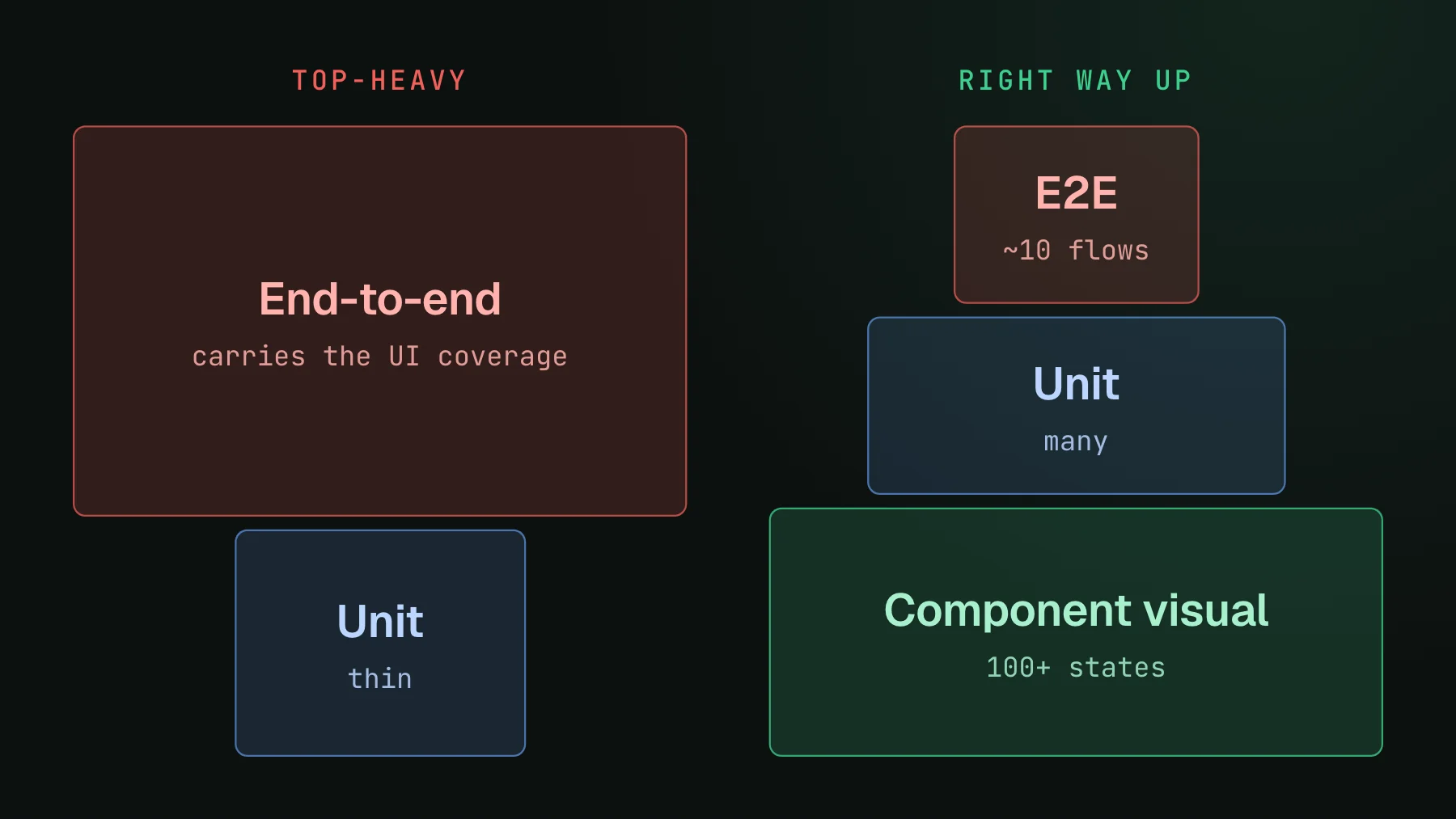
On this page
Component visual testing screenshots each component in isolation, in a known state, and diffs that screenshot against a stored baseline so a real regression shows up as a highlighted change on the pull request. It is the same idea as any visual regression check, aimed one level below the page: instead of driving a full user flow, you render one component with fixed props and compare the pixels. That altitude is what makes it the layer that holds up when a coding agent is opening pull requests all day.
The classic testing pyramid puts a few end-to-end tests on top of a wide base of unit tests, with integration in between. Most frontend teams I talk to have quietly inverted it: a thin base of unit tests and a top-heavy pile of end-to-end tests, because e2e is the thing that actually catches a broken UI. That shape was already fragile. At agent PR volume it collapses. This post is about putting the pyramid back the right way up, with component visual tests as the wide, boring bottom.
Why a top-heavy e2e suite breaks first
End-to-end tests carry weight. Each one logs in, seeds data, navigates several pages, and asserts a flow works, so a single test depends on the entire app rendering, the network behaving, and the layout of every screen it walks through. That is a lot of surface for one assertion to stand on, and it fails for reasons that have nothing to do with what you changed.
The failure mode is coupling. A staff engineer on a frontend team described the exact one to me: they had a banner at the top of every page and wrote e2e tests against it, then moved the banner from the top to a side pane, and over a hundred tests broke for that single visual change. Rewriting a hundred tests to relocate one element taxes every future ship, so their team did the rational thing and abandoned the suite. After that, regressions started reaching customers before the team caught them.
There is a second, quieter cost: flakiness. A big e2e suite that fails intermittently trains the whole team to distrust it. You see a red check, assume it is the usual flake, hit re-run, and merge. The one time it was a real regression, you merged that too. A suite everybody reruns on faith is not coverage, it is a slot machine, and it gets worse as the number of pull requests climbs.
Component visual tests isolate the diff to the PR
A component visual test has the opposite shape. It renders one component with fixed props, screenshots it, and diffs that against the baseline. Nothing about it depends on logging in, seeding a database, or the rest of the app rendering. So when your pull request touches that component, exactly the tests for that component change, and when it does not, they carry forward untouched.
Move the banner now and you get one changed screenshot: the banner. Every page that used to embed it is a separate render against a separate baseline, and those baselines did not move, so they do not diff. The blast radius of a change matches the actual change. That is the property a top-heavy e2e suite can never have, because an e2e test is coupled to everything it walks through by construction.
- One diff per real change, not a hundred red tests for one moved element.
- No shared state to seed - the component renders from fixed props, so there is no login, no database, no flow to keep alive.
- A rename or reflow shows up where it happened, so you review the component that changed instead of hunting through failed flows for the cause.
- Coverage scales with components, not with flows - adding a component adds its own isolated check, it does not multiply the fragility of the whole suite.
Component tests are the agent-friendly layer
Agents changed the volume. When a person opened a few pull requests a day, a top-heavy e2e suite was merely annoying to maintain; when an agent is opening them all day, that fragility turns into the thing gating every merge. The layer that keeps up is the one that stays deterministic and cheap to run on each of those pull requests, and that is the component layer, not the e2e layer.
Determinism is the reason. A component visual test renders the same component with the same hardcoded props every time, so the screenshot is stable and a diff means a real change rather than a rendering coincidence. An e2e test creates real entities against a live backend, so its data, timing, and screen state vary run to run - the flakiness is baked into the setup. When you want an agent to run a check, read the result, and act on it without a human babysitting, the deterministic layer is the only one it can trust.
There is also the last-mile problem: an agent can pull a failing unit test out of the console, but it cannot see a screenshot. So a visual layer only becomes part of the agent loop when the diffs and a verdict are handed to the agent in a form it can read. With UI Verify, each build's per-component diffs and the AI judge verdict are exposed over MCP, so the same agent that wrote the pull request can look at the pixels, accept the intended changes, and leave you only the flagged regressions. That closes the loop the e2e suite left open.
What the inverted pyramid looks like in practice
Inverting the pyramid does not mean deleting your end-to-end tests. It means being honest about what each layer is for and sizing them accordingly.
| Layer | How many | What it proves |
|---|---|---|
| Component visual | 100+ | Every component looks right in every state |
| End-to-end | ~10 | The core flows still work end to end |
| Unit | Many | The logic is correct |
Keep roughly ten end-to-end tests for the flows that genuinely need a full walkthrough: log in, create the core entity, complete the one purchase path. Simplest possible, no screenshots, just proof the app is not on fire. Then push the hundreds of appearance checks down to component visual tests, where each one isolates its own diff. The e2e layer answers "does the critical flow work"; the component layer answers "does anything look wrong", and it answers it without carrying the weight of a full flow. This repo sits close to that shape: 16 end-to-end tests, about 2,600 unit and integration tests, and 310 component-level visual captures.
You may already have the capture targets. If you use Storybook, every story is a component in a known state, which is exactly what a component visual test needs. If you write component tests in Vitest browser mode instead, those are capture targets too: each test mounts a real component in a real browser, and that render is the thing to screenshot, no Storybook required. Either way you can keep interaction coverage at this layer - a Storybook play function, or the interactions your Vitest test drives, run first and the snapshot captures the settled result, so a menu-open or a filled-form state is screenshotted after the interaction runs. That covers a real slice of what you used to reach for e2e to check, without the seed data or the live backend.
takeSnapshot() hands the settled render to UI Verify. No Storybook involved.Where to start
Do not rip out your e2e suite in one commit. Pick the components that break most often - the shared ones, the ones a moved element ripples through - and put a component visual test on each so the next reflow shows up as one reviewable diff instead of a wall of red flows. The Storybook quickstart turns your existing stories into a diff check on every pull request, the Vitest quickstart does the same for browser-mode component tests, and what visual testing is covers the concept end to end. When you want the whole thing wired up, the setup skill lets your agent do it.
For the wider argument about why this layer matters in the agent era, see visual testing in the agent era, and for keeping the component layer itself cheap to run, one Storybook story per page covers how to structure stories so you are not paying for a hundred near-duplicate snapshots.
Build the wide bottom of the pyramid
UI Verify screenshots each component in isolation on every pull request, and an AI judge tells an intended change from a regression. Point it at the stories you already have and get a hundred component visual tests that isolate the diff to the PR.
Start for freeNo credit card required.
Set up visual testing
From no visual tests to a green check on every pull request.