Cypress visual regression testing: plugins and pitfalls
Cypress visual regression testing with cypress-image-snapshot: why baselines break between Mac and CI, why thresholds hide real changes, and your options.
 Igor LuchenkovBuilding UI Verify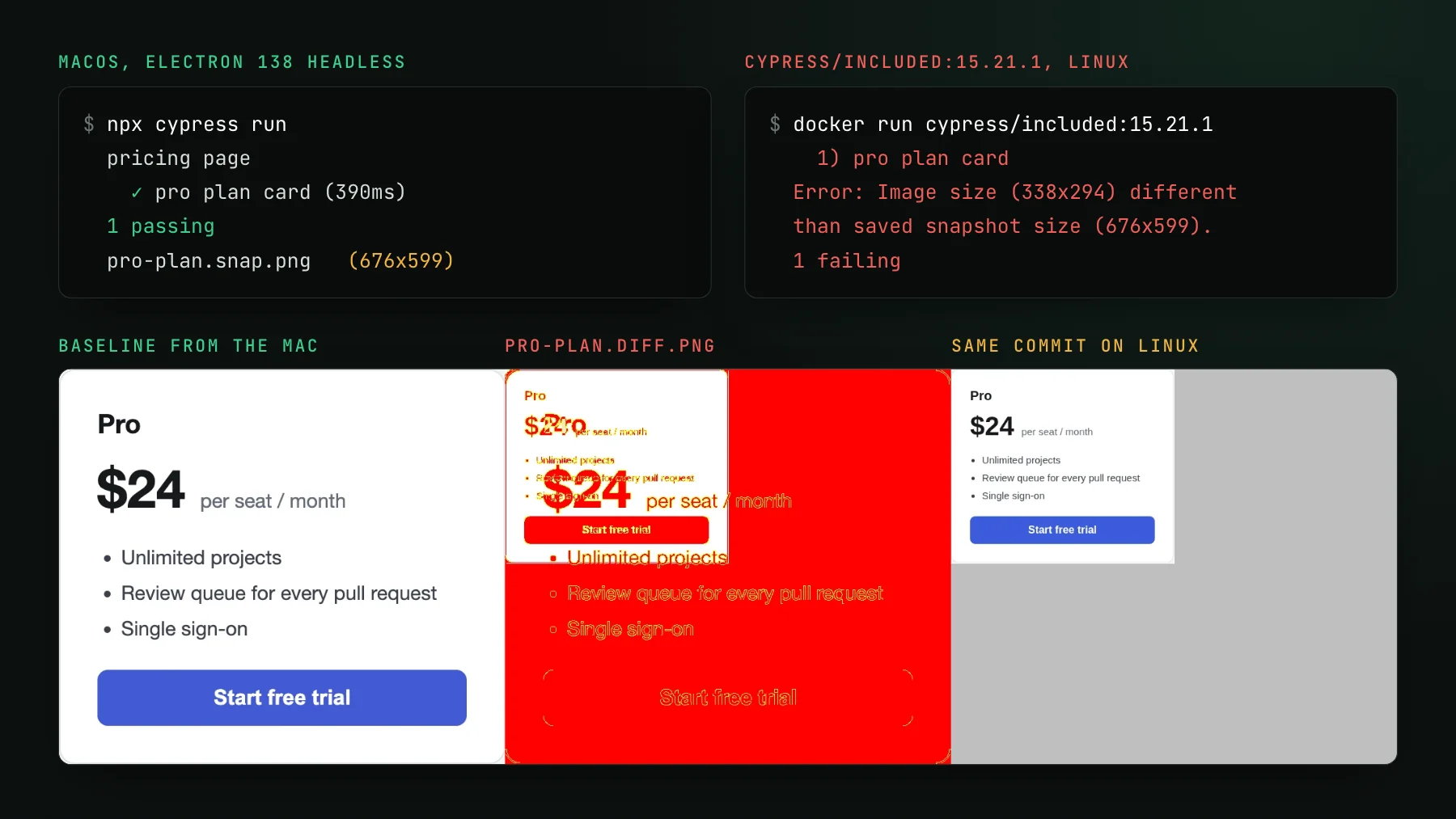
On this page
- How do Cypress teams do visual regression testing today?
- Why does a Cypress snapshot pass locally and fail in CI?
- Does raising failureThreshold fix flaky Cypress snapshots?
- What baseline PNGs in the repository cost you
- Does UI Verify work with Cypress?
- Upload the screenshots Cypress already takes
- Or capture the same pages with Playwright
- Which Cypress visual testing setup to choose
One Cypress spec, one commit, two machines. On a Mac, npx cypress run passes and saves pro-plan.snap.png at 676 by 599 pixels. In the official cypress/included:15.21.1 Docker image, the same spec fails with Image size (338x294) different than saved snapshot size (676x599), and the diff the plugin writes is almost entirely red. No line of code changed between the two runs. The cover of this post is that run, from a scratch project with one static pricing card and @simonsmith/cypress-image-snapshot.
Cypress visual regression testing means screenshotting pages or elements during a Cypress run and comparing each screenshot against an approved baseline image, so a change in what users see fails the build before it merges. Cypress itself takes screenshots with cy.screenshot() but ships no comparison, so the comparison comes from a plugin or a hosted service. Most teams start with a plugin, and most of the pain lives in the gap between the machine that recorded the baseline and the machine that checks it.
How do Cypress teams do visual regression testing today?
Most Cypress teams add an image-snapshot plugin that diffs inside the test runner. The common one today is @simonsmith/cypress-image-snapshot, a maintained fork of the original cypress-image-snapshot, which wraps the diffing from jest-image-snapshot. Setup is two lines: register the plugin in setupNodeEvents in cypress.config.js, and register the command in the support file. A test then calls cy.matchImageSnapshot() on the page or on one element.
describe("pricing page", () => {
  it("pro plan card", () => {
    cy.visit("app/index.html");
    cy.get("[data-test=pro-plan]").matchImageSnapshot("pro-plan");
  });
});
The first run writes cypress/snapshots/pricing.cy.js/pro-plan.snap.png. That PNG is the baseline, and it gets committed to the repository next to the specs. Every later run screenshots the card again, compares it pixel by pixel, and on a mismatch fails the test and writes a three-panel image to __diff_output__: baseline on the left, the differing pixels in red in the middle, this run on the right. To accept a change on purpose, you rerun with --expose updateSnapshots=true and commit the new PNG.
That diff is the plugin doing its job. Note what the error says, though: a size mismatch, with no percentage and no hint of which element moved. When an element changes height, every pixel below it shifts, and the report stops being about the change and starts being about geometry. On a full-page snapshot the same small padding edit would shift the footer and everything else below the button out of alignment.
Why does a Cypress snapshot pass locally and fail in CI?
A Cypress snapshot passes locally and fails in CI because the two machines render the same page differently, and a pixel diff cannot tell rendering from change. The cover run shows two separate causes at once. The Mac screenshots at a device pixel ratio of 2, so the baseline file is twice the card's CSS size. The Linux container screenshots at a ratio of 1. And even at the same scale the text is not the same: the system font stack resolves to a different typeface on Linux, which sets the type wider and lands the card at 294 CSS pixels tall instead of 299.5.
The standard fix is to record and compare baselines in one environment only. In practice that means running the visual specs inside the same Docker image locally and in CI, usually cypress/included pinned to an exact tag, and never updating snapshots from a laptop. The plugin's own repository runs its snapshot tests in Docker for this reason, and its contributing notes say its interactive-mode test runs ignore snapshot failures because developer machines and CI render differently. One plugin flag helps enforce the habit: with --expose requireSnapshots=true in CI, a run whose baseline is missing fails instead of writing a fresh one nobody reviewed.
The container fixes the machine, not the page. Inside one pinned image, the scratch spec passed twice in a row against its own Linux baseline, because a static card has nothing that moves. A real app has a clock, animations, fonts loaded over the network, and data that changes between runs, and each of those has to be frozen in the test before a pixel comparison means anything. The Playwright version of that checklist is in fixing flaky Playwright screenshot tests, and the causes are the same whichever runner takes the picture.
The container also costs something. A frontend team lead at a large media group described their Cypress CI as red most often for reasons that were not test failures at all: the runner failing to start, or the image failing to come up in Docker. Every extra moving part in the visual job is one more way to fail for no visual reason.
Does raising failureThreshold fix flaky Cypress snapshots?
Raising failureThreshold stops the flaky failures by also letting real changes through, because the threshold counts pixels, not meaning. The plugin passes jest-image-snapshot options straight through, and the usual first tuning is a percentage threshold set once in the support file. To see what that buys, the scratch project changed the plan price from $24 to $29 and ran inside the Linux image twice: once with the default options, once with a 1% threshold.
A wrong price is one of the most expensive bugs a pricing page can ship, and it is 191 pixels. A font fallback on the same card touched far more. Any threshold loose enough to absorb rendering noise is loose enough to absorb that edit, which is why tuning numbers never quite converges: every value is either flaky or blind somewhere. The blackout option, which paints chosen elements black before the screenshot, has the same trade in a different shape, since a hidden element can no longer regress visibly.
What baseline PNGs in the repository cost you
Baseline PNGs in the repository make the setup self-contained, which is the appeal, and they turn review into a file chore, which is the cost. A pull request that changes a shared button updates every snapshot that contains it, and the review shows a list of binary files. Two branches that both touch the header conflict on the same PNG, and neither version is right after the merge. Whoever runs the update command decides what the new truth is, usually without anyone else looking at the images. For more on why a baseline needs an owner, see how visual regression baselines work.
Does UI Verify work with Cypress?
UI Verify has no Cypress plugin or Cypress capture SDK. Its capture paths are Storybook, Vitest browser mode, Playwright, and custom screenshots, so there are two ways in for a Cypress team, and both are plain about what they are.
Upload the screenshots Cypress already takes
A custom screenshots project takes a directory of finished PNGs, diffs each one against its baseline, and runs the same AI review and pull-request check as any other UI Verify project. Cypress already writes PNGs: every cy.screenshot(name) lands in cypress/screenshots, in a folder named after the spec. Each upload gets an id from its path under the directory with the extension removed, so a stable screenshot name is a stable baseline.
npx cypress run
UIVERIFY_API_KEY=uv_proj_xxx npx -y uiverify@1.7.0 upload --screenshots ./cypress/screenshotsThree things keep this path clean. Name every screenshot, because an unnamed one is called after the test title and moves when someone renames the test. Keep failure screenshots out of the upload, either with screenshotOnRunFailure: false in cypress.config.js or by uploading a subfolder your visual specs write to. And remember which side of the line determinism sits on: UI Verify renders nothing in this mode, so whatever Cypress captured is what gets compared. Pin the environment the same way you would for the plugin, one image with one pixel ratio and one set of fonts. What changes is everything after the capture: baselines are hosted instead of committed, each change is reviewed and accepted from the pull request check, and the AI judge labels each change a likely regression or a likely intended change, with a short reason.
Or capture the same pages with Playwright
For a UI that runs in a browser, the UI Verify docs recommend a rendered project over uploaded screenshots, because the rendering then happens in a pinned browser on our side and the Mac-versus-Linux problem from the cover never reaches you. For a Cypress team that means a small Playwright suite pointed at the same app, built with @uiverify/playwright, covering the pages whose looks matter, while Cypress keeps testing behavior. You do not have to port the whole suite: a visual test only needs to reach a state and stop. The Playwright quickstart has the setup, and changes that do not reproduce on a re-render are dropped as flaky rather than failing the build (flake detection).
Which Cypress visual testing setup to choose
- A handful of stable screens, one team, baselines rarely change: the image-snapshot plugin in a pinned
cypress/includedimage is enough. Keep the threshold at the default and freeze what moves instead. - Cypress already produces the screenshots you care about, and review is the bottleneck: upload them to a custom screenshots project and review on the pull request, keeping the pinned image for capture.
- Many pages, flaky diffs, or a team tired of committing PNGs: capture those pages with Playwright through UI Verify and leave Cypress to the functional tests.
Whichever you choose, the test from the cover is worth running once on your own project: record a baseline on a laptop, check it in CI, and see what fails. If the answer is everything, the problem was never the diff algorithm. It was where the pixels came from. If you have no Storybook and want the broader picture of page-level capture, visual testing without Storybook covers it, and the Playwright determinism skill hands the same checklist to your coding agent.
Review your Cypress screenshots on the pull request
Upload the PNGs your Cypress run already writes, or capture the same pages with Playwright, and review every visual change on the pull request with an AI judge.
Start for freeNo credit card required.
Deterministic Playwright captures
Stop real-page diffs that flake without a real change.