Is your visual testing tool a security risk?
Visual testing security, explained: what UI Verify uploads is the rendered output of your UI, not your source repo, your backend, or your customer data.
 Igor LuchenkovBuilding UI Verify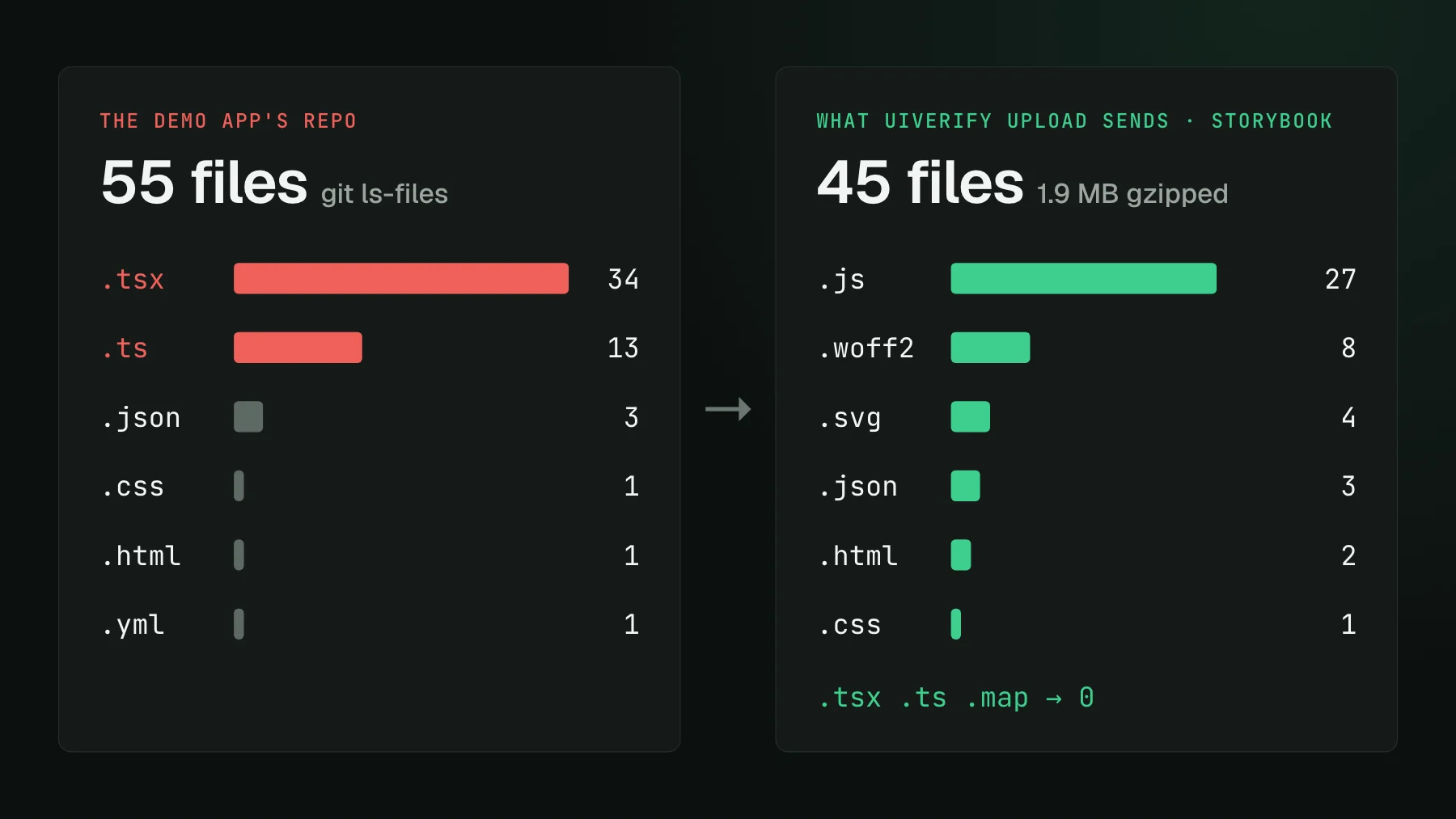
On this page
A visual testing tool is only as risky as what it uploads, and UI Verify uploads the rendered output of your UI: not your source repository, your backend, or your customer data. On the Storybook path that output is a built static bundle: compiled JS, CSS, and assets. On the Playwright and Vitest paths it is a serialized DOM snapshot plus the resources the browser already downloaded. On the screenshot path it is finished PNGs. That is the whole footprint. The rest of this post is the detail behind it, in the order security teams ask.
Do you need to self-host visual testing to keep your code safe?
Usually not, because the source code is not in what gets uploaded. Regulated buyers arrive with the objection already formed: we cannot give an external service access to our codebase, so run it in our cloud, store it in our S3, and do not touch the deployment server. That is the reflex, and it is reasonable until the data flow is on the table. Here is what the Vitest path actually sends. You add a .visual.test.ts file next to a component, it renders, the resulting DOM goes to our server, we screenshot it. The source is not in the flow. Once that is clear, the demand almost always shifts from we must host the storage ourselves to your storage is fine, we just needed to know what was in it, followed by a request for an NDA and a data-processing agreement, which is the right order of operations.
The objection was never about where the bytes sit. It was about what the bytes are. So here is what they are.
What does each capture path upload?
- Storybook. The CLI tars your
storybook-staticdirectory and uploads it. That is the same compiled output a CDN would serve to a browser. For our public demo app it is 45 files and 1.9 MB gzipped, compiled JavaScript, fonts, SVGs, HTML and the story index, out of a repository with 55 tracked files, 47 of them TypeScript source. None of the source files are in it. The CLI does not send a story list; the server reads the bundle's ownindex.json. - Playwright and Vitest. The archive is a JSON document: the DOM of each captured page or component serialized at the moment of capture, plus the bytes of the visual resources it uses (stylesheets, fonts, images), each stored once per archive and referenced by URL. Scripts and API responses are not archived, and
<script>tags are stripped from the serialized DOM. Your test code and source files are not in it. - Screenshots. Finished PNGs and a manifest naming them. UI Verify renders nothing on this path; it manages baselines, diffs, the AI review, and the PR check.
Does the render reach my backend?
No. The render is sealed on purpose, and the seal is a determinism property as much as a security one. On the Storybook path a route handler lets same-origin requests through, serves cross-origin images from a fetch-once cache, and aborts cross-origin data calls, so an unmocked endpoint cannot hang the capture and cannot be reached. On archive replay it is stricter: the only thing the shell origin serves is a blank replay page, every resource is served from the archive, and any request the archive does not contain is aborted. Your API, your database, and your internal services are never in the path. The reasoning is in why cloud render and the mechanics in deterministic captures.
Can customer data end up in a screenshot?
Only if your UI paints it. If you screenshot a page filled with a real user's records, those records are in the pixels, because that is what the page showed. The fix is the practice you want anyway: capture with seeded fixtures. Deterministic captures need stable fake data or the diff changes every run, so seeding kills the flake and keeps customer data out of the render in one move. Our own dashboard is captured this way; the team in every screenshot is a fictional Acme.
Where are the screenshots stored, and who can read them?
Screenshots live in object storage, encrypted at rest with AES-256, and every read and write is authorized against your team, so one customer cannot reach another's images. Traffic is TLS 1.2 or higher. Retention on paid plans is configurable; after an account closes, content is deleted within thirty days. Your content is never used to train third-party models. The vendors in the path are listed on the sub-processors page, the controls on the security page, and the data handling in the privacy policy. Those are the documents a review team should read rather than take my word here.
One design decision worth knowing about because it changes the threat model: the render workers, which execute your frontend code in Chromium, hold no cloud credentials at all. We removed their cloud role rather than narrowing it. Each upload uses a one-shot presigned URL, so there is no credential inside the container for a malicious bundle to steal. And a straight answer to the question I get from every enterprise buyer: we are not SOC 2 certified yet. A Type II examination is planned; the infrastructure providers underneath hold SOC 2 and ISO 27001, and we can fill in your security questionnaire.
Can you evaluate it without installing the GitHub App?
Yes, the GitHub App is the last step, not the first. The other blocker is procurement, not data. In many companies GitHub is owned by IT and a new integration means a long approval. In others it is self-hosted GitLab and a security team that forbids anything that phones home through a relay. Uploads, baselines, diffs, and the dashboard work with a project key alone, passed inline in a CI step or from a laptop:
UIVERIFY_API_KEY=uv_proj_xxx npx -y uiverify@1.8.1 upload --static-dir ./storybook-staticThe GitHub App adds the check on the PR and the comment. Evaluating the tool does not require it, and there is no relay: the CLI talks to one API. When you are ready to wire the first captures, the setup skill walks a coding agent through it.
Hand your security team the real data flow
Only the rendered output of your UI leaves your CI, never source or backend or customer data. Seed fixtures for capture and the customer-data question answers itself.
Start for freeNo credit card required.
Set up visual testing
From no visual tests to a green check on every pull request.